
1. Introduzione
Thank you for choosing the KFD 26V Charger Adapter. This adapter is designed to provide reliable power for a range of compatible vacuum cleaners. Please read this manual thoroughly before use to ensure proper operation and to maximize the lifespan of your product.

Image 1.1: The KFD 26V Charger Adapter, featuring a compact black design with a durable power cord.
2. Informazioni sulla sicurezza
Your KFD charger adapter is manufactured with safety as a priority. It incorporates multiple protection features and meets international safety standards.
2.1. Certificazioni
This product is CE, FCC, and RoHS certified, ensuring compliance with health, safety, and environmental protection standards.
2.2. Built-in Protections
The adapter includes advanced safety features to protect both the charger and your device:
- OVP (oltre voltage Output Protection): Previene i danni da eccessivo volumetage uscita.
- OCP (Over Current Output Protection): Safeguards against overcurrent conditions.
- SCP (Short Circuit Output Protection): Protegge dai cortocircuiti.
- Protezione contro le sovratensioni: Defends against power surges.
- Controllo della temperatura: Gestisce la temperatura interna per evitare il surriscaldamento.
- Fire Retardant Materials: Constructed with materials that resist fire.
- Dissipazione del calore: Designed for efficient heat management using pure copper and aluminum sheet components.
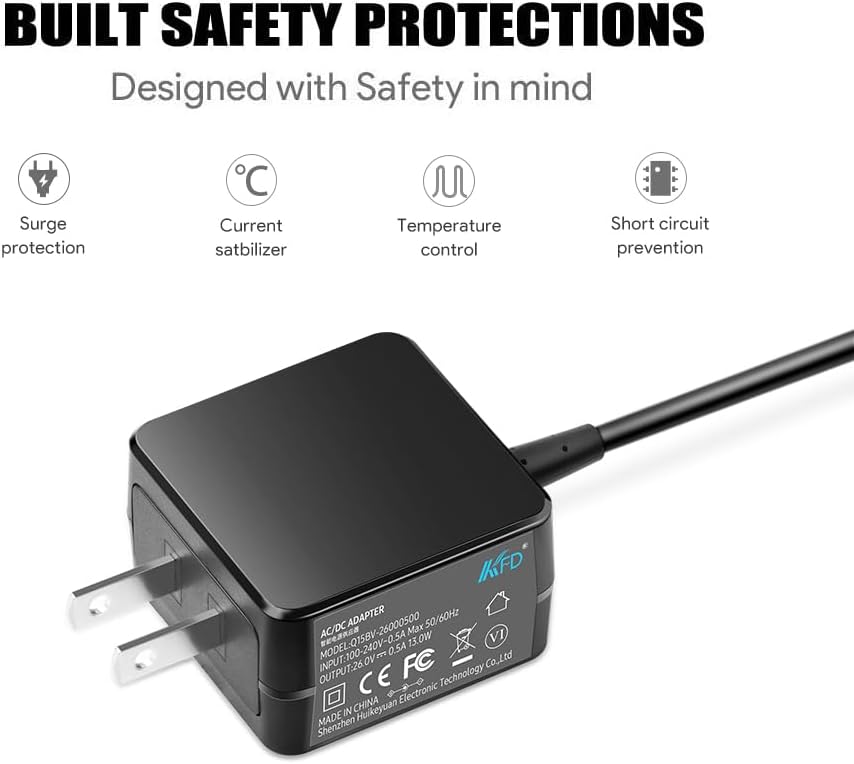
Image 2.1: Visual representation of the built-in safety protections, including surge protection, current stabilization, temperature control, and short circuit prevention.

Image 2.2: Depiction of the adapter's safety and stability features, including current surge protection, short circuit protection, over heat protection, over voltage protection, and cable durability.
2.3. Linee guida generali per la sicurezza
- Non esporre l'adattatore a liquidi, umidità o temperature estreme.
- Evitare di far cadere o di sottoporre l'adattatore a forti urti.
- Non tentare di smontare o modificare l'adattatore.
- Ensure the adapter is used with compatible devices only.
- Scollegare l'adattatore dalla presa di corrente quando non lo si utilizza o durante i temporali.
3. Impostazione
Follow these steps to set up your KFD 26V Charger Adapter:
- Disimballare l'adattatore: Carefully remove the charger adapter from its packaging. Inspect it for any visible damage.
- Collegare alla presa di corrente: Plug the AC input prongs of the adapter into a standard 100-240V wall outlet.
- Connetti al dispositivo: Insert the DC output connector of the adapter into the charging port of your compatible vacuum cleaner. Ensure a secure connection.

Image 3.1: A cordless vacuum cleaner connected to the KFD charger adapter, which is plugged into a wall outlet, illustrating the setup process.
4. Istruzioni per l'uso
Once connected, the adapter will begin charging your device. The charging process is automatic.
4.1. Processo di ricarica
- Ensure both the adapter and your vacuum cleaner are securely connected.
- The adapter will automatically detect the charging needs of your device and deliver the appropriate power.
- Refer to your vacuum cleaner's manual for specific charging indicators (e.g., LED lights) that show charging status.
- Once charging is complete, disconnect the adapter from the vacuum cleaner and then from the wall outlet.
4.2. Dispositivi compatibili
This KFD 26V Charger Adapter is compatible with a wide range of vacuum cleaners, including but not limited to:
- Kenmore: DS4015, DS4020, DS4030, DS4065, DS4090, DS4095, CSV Go XL Max Elite Cordless Stick Vacuum (P/N: 561051105 YLS0241A-T256080 YLS0241AT256080)
- Orfeld: A16
- Homeika: H016, HA016, H320 Cordless Vacuum Cleaner
- NEQUARE: S12 Series (S12 Pro, S12Pro), A18
- Roanow: MarsVac S1 Cordless Stick Vacuum
- Hompany: Aspirapolvere senza fili H18
- Vactidy: V9, V8
- OKP: X100
- GeeMo: E3
- EICOBOT: Aspirapolvere senza filo A10
- Onson: C17, D18, D18E
- Jashen: V12 Pro Vacuum
- Roborock: H6, H7 Wireless Vacuum Cleaner
- VacLife: VL702RE, VL-702RE, H20-180, VL722, H20180
- Levoit: LVAC-200, LSV-V201-WUS, LSVV201-WCA, LVAC-120, LVAC120

Image 4.1: The KFD 26V Charger Adapter shown alongside several compatible Kenmore vacuum cleaner models, highlighting its broad compatibility.
5. Manutenzione
Proper maintenance ensures the longevity and optimal performance of your charger adapter.
- Pulizia: Utilizzare un panno morbido e asciutto per pulire l'adattatore. Non utilizzare detergenti liquidi o materiali abrasivi.
- Magazzinaggio: Conservare l'adattatore in un luogo fresco e asciutto, lontano dalla luce solare diretta e da temperature estreme.
- Cura del cavo: Avoid bending the cable sharply or placing heavy objects on it. Do not pull the cable to disconnect; always grasp the plug. The cable is designed with a tough PVC jacket and long bend lifespan for durability.

Immagine 5.1: Primo piano view of the charger cable, illustrating its tough PVC jacket and flexible design for extended lifespan.
6. Risoluzione Dei Problemi
If you encounter issues with your charger adapter, refer to the following common problems and solutions:
- Dispositivo non in carica:
- Assicurarsi che l'adattatore sia collegato saldamente sia alla presa a muro sia al dispositivo.
- Verificare che la presa a muro funzioni testandola con un altro dispositivo.
- Check the charging port of your device for any obstructions or damage.
- Confirm that your device is listed as compatible with this adapter (refer to Section 4.2).
- Ricarica lenta:
- Ensure the adapter is fully seated in both the wall outlet and the device.
- Avoid using extension cords or power strips if possible, as they can sometimes reduce power delivery.
- Ensure the device is not being used heavily while charging, which can slow down the process.
- Surriscaldamento dell'adattatore:
- Unplug the adapter immediately.
- Ensure the adapter is in a well-ventilated area and not covered by anything.
- Se il surriscaldamento persiste, interrompere l'uso e contattare l'assistenza clienti.
Se il problema persiste dopo aver provato questi passaggi, contattare l'assistenza clienti per ulteriore assistenza.
7. Specifiche
Detailed technical specifications for the KFD 26V Charger Adapter (Model A-T2566):
| Caratteristica | Specificazione |
|---|---|
| Numero di modello | A-T2566 |
| Ingresso volumetage | 100-240 V CA, 50-60 Hz |
| Volume di uscitatage | 25.6V - 26V CC |
| Corrente di uscita | 0.5 Amps |
| Cosatage | 13 Watt |
| Tipo di connettore | Proprietario |
| Colore | Nero |
| Peso dell'articolo | 7 once (circa 198 grammi) |
| Dimensioni del pacco | 1.18 x 0.79 x 0.39 pollici |
| Certificazioni | CE, FCC, RoHS, UL Listed |
| Produttore | Shenzhen Huikeyuan Electronic Technology Co.,Ltd |

Image 7.1: Display of various product certifications, including UL Listed, TUV SUD, GS, CE, and UKCA, indicating adherence to high safety standards.
8. Garanzia e supporto
8.1. Informazioni sulla garanzia
KFD products come with a comprehensive warranty:
- Libero scambio: 30 giorni
- Periodo di garanzia: 36 mesi
This warranty covers manufacturing defects and ensures your product performs as expected under normal use.

Image 8.1: A graphic indicating a 3-year warranty and an illustration of customer support, emphasizing product reliability and assistance.
8.2. Assistenza clienti
For any questions, concerns, or warranty claims, please contact KFD customer support through the retailer's platform or the official KFD website. Please have your product model number (A-T2566) and purchase details ready when contacting support.