
1. Introduzione
This manual provides detailed instructions for the installation, operation, and maintenance of your Biorunn Android Car Stereo. Please read this manual thoroughly before using the product to ensure proper function and safety. This device is designed for specific Nissan Xtrail, Qashqai, and Rogue models manufactured between 2014 and 2018.
2. Informazioni sulla sicurezza
- Installazione professionale consigliata: Data la complessità degli impianti elettrici delle automobili, si consiglia vivamente l'installazione da parte di un professionista per evitare danni all'unità o al veicolo.
- Compatibilità del veicolo: Ensure this unit is compatible with your specific vehicle model and year. If unsure, consult with a professional or the manufacturer.
- Sicurezza di guida: Non utilizzare il dispositivo in modo da distrarti dalla guida. Dai sempre priorità alla sicurezza stradale.
- Alimentazione elettrica: Collegare l'unità solo a un alimentatore da 12 V CC con messa a terra negativa.
- Evitare l'umidità: Non esporre l'unità all'acqua o a umidità eccessiva.
3. Contenuto della confezione
Verifica che tutti gli articoli elencati di seguito siano inclusi nel tuo pacchetto:

Various accessories included with the car stereo, such as power cables, RCA cables, reversing camera, 4G antenna, microphone, GPS antenna, USB plugs, and a Canbus box.
- Main Head Unit (10.1 Inch Display)
- Cavo di alimentazione
- RCA
- Reversing Camera (if included in package)
- Antenna 4G
- Microfono (MIC)
- Antenna GPS
- Spine USB (x2)
- Canbus Box (if required for your vehicle model)
4. Configurazione e installazione
Before beginning installation, ensure your vehicle's ignition is off and the battery is disconnected. It is crucial to verify compatibility with your vehicle's center console. If you are unsure, please provide a picture of your car's center console to the manufacturer or a professional installer for confirmation.
4.1 Installazione finitaview
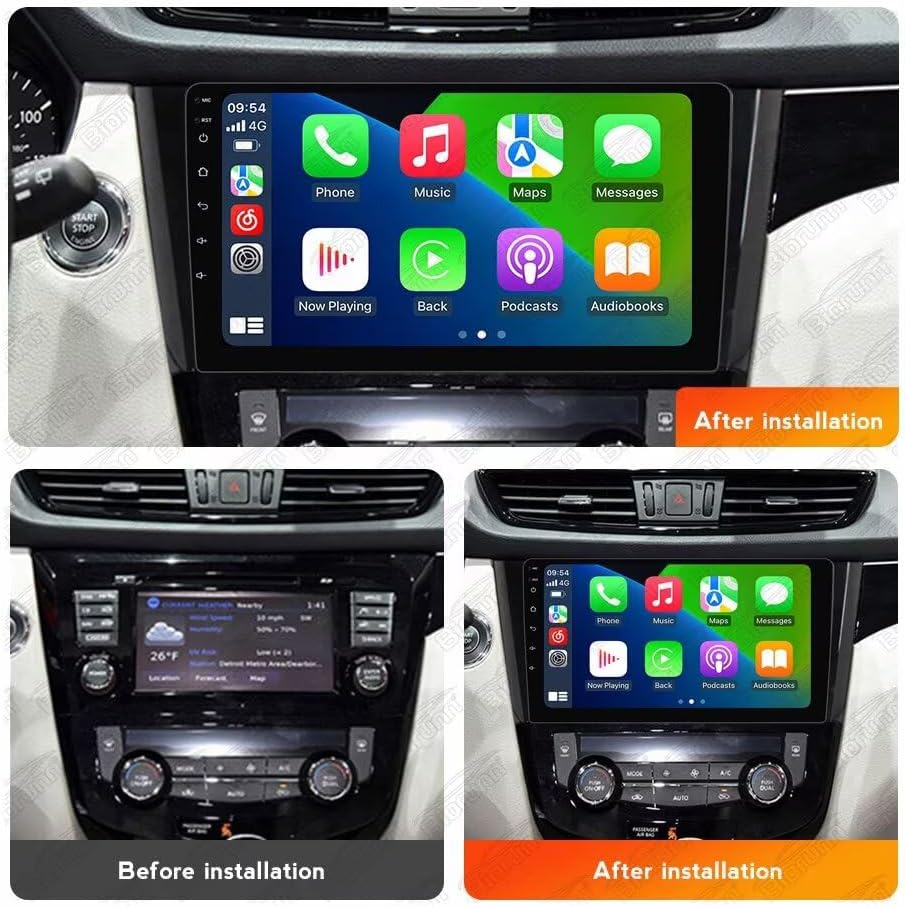
Visual comparison of the car's dashboard before and after the installation of the Biorunn Android Car Stereo, demonstrating the integrated appearance.
4.2 Collegamenti di cablaggio
- Collegamento elettrico: Connect the main power harness to the vehicle's wiring. Ensure correct connections for constant 12V, accessory 12V, and ground.
- Collegamenti degli altoparlanti: Connect the speaker wires to the corresponding vehicle speaker wires. Pay attention to positive and negative terminals.
- Antenna GPS: Montare l'antenna GPS in una posizione con una vista libera view del cielo, in genere sul cruscotto o sotto il parabrezza.
- Antenna 4G: Connect the 4G antenna for cellular data connectivity.
- Connessioni USB: Instradare i cavi USB verso una posizione accessibile, come il vano portaoggetti o la console centrale.
- Telecamera per la retromarcia: If installing a reversing camera, connect its video input to the designated RCA input on the head unit and its power to the reverse light circuit.
- Scatola Canbus: If your vehicle requires a Canbus decoder for steering wheel controls or other vehicle data, connect it as per the specific wiring diagram.
- Microfono: Collega il microfono esterno per migliorare la qualità delle chiamate.
After all connections are made, carefully reassemble the dashboard components. Reconnect the vehicle battery and test the unit's functionality.
5. Istruzioni per l'uso
5.1 Funzionamento di base
- Accensione/spegnimento: In genere, l'unità si accende con l'accensione del veicolo. Per il controllo manuale, tenere premuto il pulsante di accensione (se disponibile).
- Schermo tattile: The 10.1-inch IPS capacitive multi-touch screen allows for intuitive operation. Tap, swipe, and pinch to navigate menus and applications.
- Controllo del volume: Regola il volume utilizzando i comandi sullo schermo o i comandi al volante.
CarPlay wireless 5.2 e Android Auto
The unit supports both wireless and wired CarPlay (for iOS devices) and Android Auto (for Android devices), allowing seamless integration of your smartphone's features.

Connection steps for Wireless CarPlay (iOS) and Wireless Android Auto (Android) via Bluetooth and the 'Car Link' application. Wired connection via USB is also an option.
Passaggi di connessione:
- Connetti Bluetooth: On your smartphone, enable Bluetooth and pair it with the car stereo.
- Open Car Link: On the car stereo, open the "Car Link" application.
- Attendi la connessione: The system will attempt to connect to your phone. Follow any on-screen prompts on both devices.
- Connessione cablata (facoltativa): Alternatively, connect your smartphone directly to one of the USB ports using a compatible USB cable.
5.3 Navigazione GPS
The unit features a built-in global positioning system (GPS) for intelligent navigation. It supports various map applications and can display real-time traffic conditions for accurate positioning.
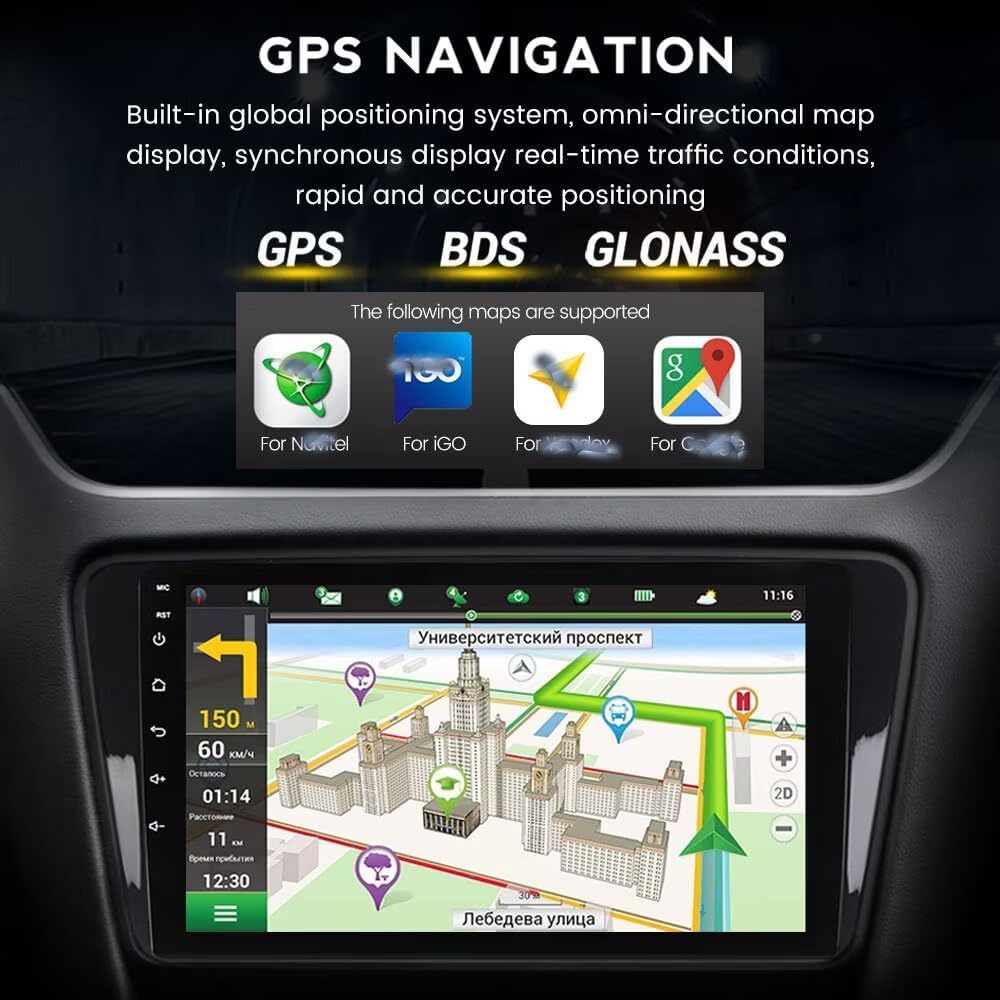
The GPS navigation interface displaying a map, route information, and supported satellite systems (GPS, BDS, GLONASS) and map applications.
5.4 FM/AM RDS Radio
The integrated radio supports FM and AM bands with RDS (Radio Data System) functionality. You can search for stations automatically or manually.

The FM/AM RDS radio interface, showing current frequency and preset station list.
Funzionamento radiofonico:
- Ricerca automatica: Utilizzare la funzione di ricerca automatica per scansionare e salvare le stazioni disponibili.
- Ricerca manuale: Sintonizzarsi manualmente su frequenze specifiche.
- Stazioni preimpostate: Save your favorite stations for quick access. The unit supports 18 preset stations.
5.5 Funzione Bluetooth
Bluetooth 5.0 enables hands-free calling, phone book download, and music streaming from your paired smartphone.

Illustration of the Bluetooth function, highlighting hands-free calling, music streaming, and contact synchronization. Emphasizes safe driving practices.
Caratteristiche Bluetooth:
- Chiamate in vivavoce: Effettua e ricevi chiamate direttamente dallo stereo.
- Scarica l'elenco telefonico: Sincronizza i contatti del tuo telefono per effettuare chiamate in modo semplice.
- Streaming musicale tramite Bluetooth: Play audio from your phone wirelessly.
- ID chiamante: Display incoming caller names.
5.6 Connettività Wi-Fi
The unit supports 5GHz Wi-Fi (802.11 b/g/n) for fast internet access, low latency, wide coverage, and stable connection.

Illustration of 5GHz Wi-Fi support, indicating the antenna connection and benefits such as fast transmission and stable connectivity.
5.7 funzioni aggiuntive
- Controllo del volante: The unit supports original steering wheel remote control for convenient operation.
- Schermo diviso: Utilize the split-screen function to run two applications simultaneously.
- Supporto 4G LTE: For models with 4G LTE capability, insert a SIM card for independent internet access.
- Processore DSP integrato: Enhances audio quality and customization.
- Riproduzione multimediale: Supports various audio (MP3, WMA, AAC, RM, FALC), video (MPEG-1/2/4, H264, H263, VC1, RV, RMVB, DivX, VP8, AVS Stream), and photo (JPG/BMP/JEPG/GIF/PNG) formats.
- Supporto ADAS DVR: Compatible with ADAS DVR anti-collision warning driving recorders (DVR not included).
- Supporto OBD II: Compatible with OBD II diagnostic tools (OBD II not included).
- Supporto TPMS: Compatible with TPMS (Tire Pressure Monitoring System) (TPMS not included).
- Supporto multilingua: Supports English, German, French, Spanish, Italian, Portuguese, Russian, Dutch, Polish, Japanese, Simplified & Traditional Chinese, Arabic, etc.
6. Manutenzione
- Pulizia dello schermo: Utilizzare un panno morbido e privo di lanugine per pulire lo schermo. Per i segni ostinati, strofinare leggermenteampPulisci il panno con acqua o un detergente per schermi. Evita prodotti chimici aggressivi.
- Pulizia generale: Pulire la parte esterna dell'unità con un panno asciutto e morbido.
- Aggiornamenti software: Controllare periodicamente la disponibilità di aggiornamenti software dal produttore per garantire prestazioni ottimali e l'accesso a nuove funzionalità.
- Ventola di raffreddamento: The unit is equipped with a powerful cooling fan to maintain stable operation in various temperatures. Ensure the fan vents are not obstructed.

Posteriore view of the car stereo, showing the powerful cooling fan designed for stable operation.
7. Risoluzione Dei Problemi
In caso di problemi, fare riferimento ai seguenti problemi comuni e alle relative soluzioni:
| Problema | Possibile causa | Soluzione |
|---|---|---|
| Nessun potere | Cablaggio errato, fusibile bruciato, problema alla batteria del veicolo. | Check power connections (12V constant, accessory, ground). Inspect vehicle fuses. Ensure battery is charged. |
| Nessun suono | Problema con il cablaggio degli altoparlanti, volume troppo basso, modalità muto attivata. | Verificare i collegamenti degli altoparlanti. Aumentare il volume. Verificare che la modalità mute sia attiva. |
| GPS non funzionante/impreciso | GPS antenna not connected, poor antenna placement, software issue. | Assicurarsi che l'antenna GPS sia collegata saldamente e abbia una visuale libera view of the sky. Restart the unit. Check map software settings. |
| Bluetooth non si connette | Bluetooth disattivato sul telefono/unità, associazione errata, interferenza. | Assicurati che il Bluetooth sia abilitato su entrambi i dispositivi. Elimina gli abbinamenti precedenti e ripeti l'abbinamento. Avvicinati all'unità. |
| CarPlay/Android Auto non si avvia | Incorrect connection steps, incompatible phone, app issues. | Follow connection steps carefully (Bluetooth then Car Link, or USB). Ensure phone OS is compatible. Update phone apps. |
| Touch screen non reattivo | Problema software, danno fisico. | Riavviare l'unità. Se il problema persiste, contattare l'assistenza. |
If the problem persists after trying these solutions, please contact Biorunn customer support.
8. Specifiche
| Caratteristica | Descrizione |
|---|---|
| Sistema operativo | Android |
| Processore | 8-Nucleo |
| Dimensioni dello schermo | 10.1 pollici |
| Memoria RAM | 4 GB |
| ROM (memoria interna) | 32 GB |
| Risoluzione | 1280 x 720, IPS Screen |
| Bluetooth | Bluetooth 5.0 |
| Processore DSP | Incorporato |
| CarPlay / Android Auto | Built-in, Wireless & Wired Support |
| Schermo diviso | Supportato |
| 4G LTE | Supportato |
| Wifi | 5 GHz (802.11 b/g/n) |
| Navigazione GPS | Built-in Global Positioning System (GPS, BDS, GLONASS) |
| Radio | FM/AM RDS, 18 preset stations |
| Controllo del volante | Supportato |
| Prese USB | USB1; USB2 |
| Formati audio | MP3, WMA, AAC, RM, FALC, ecc. |
| Formati video | MPEG-1/2/4, H264, H263, VC1, RV, RMVB, DivX, Sorenson SparK, Spark, VP8, AVS Stream |
| Formati foto | JPG/BMP/JEPG/GIF/PNG |
| Dispositivi compatibili | Smartphone, Altoparlante |
| Metodo di controllo | Tocco |
| Produttore | Shenzhen Rongnan International Electronics Co., Ltd. |
9. Garanzia
This Biorunn Car Stereo comes with a Garanzia di 1 anno dalla data di acquisto. La garanzia copre difetti di fabbricazione e malfunzionamenti in condizioni di normale utilizzo. Si prega di conservare la prova d'acquisto per eventuali reclami in garanzia. La garanzia non copre danni causati da installazione impropria, uso improprio, incidenti o modifiche non autorizzate.
10. Supporto
For technical assistance, troubleshooting beyond this manual, or warranty inquiries, please contact Biorunn customer support. Refer to the contact information provided with your purchase or visit the official Biorunn websito per le risorse di supporto.
Risorse online:
- Biorunn Official Store: Visit Biorunn Store on Amazon