
1. Introduzione
Thank you for choosing the CaDA C59002W The Dinosaur World Triceratops Building Block Set. This set allows you to construct a detailed Triceratops model that can be controlled via a remote control or a dedicated mobile application. Please read this manual carefully before assembly and operation to ensure proper use and enjoyment of your product.

Image 1.1: The fully assembled CaDA C59002W Triceratops model, showcasing its green and black design with white horns.
2. Informazioni sulla sicurezza
- Età consigliata: This product is recommended for ages 8 and up. It contains small parts that may pose a choking hazard for children under 3 years old.
- Supervisione degli adulti: Adult supervision is recommended during assembly and initial operation.
- Sicurezza della batteria: Non mischiare batterie vecchie e nuove. Non mischiare batterie alcaline, standard (zinco-carbone) o ricaricabili (nichel-cadmio). Inserire le batterie con la polarità corretta. Rimuovere le batterie se il prodotto non viene utilizzato per un periodo prolungato.
- Sicurezza ambientale: This product is made from materials free from harmful substances. Dispose of packaging materials responsibly.
3. Contenuto della confezione
Please verify that all components are present before beginning assembly. Refer to the parts list provided in the separate printed instruction booklet.
- Building blocks for Triceratops model
- Unità di controllo principale
- Telecomando 2.4GHz
- Printed instruction manual (for assembly)
- Foglio di adesivi (se applicabile)

Image 3.1: The product packaging for the CaDA C59002W set, featuring the Triceratops model and indicating dual-mode control.
4. Istruzioni di montaggio
The CaDA C59002W Triceratops model is assembled using the included building blocks. Follow the step-by-step instructions provided in the separate printed assembly manual. Ensure each piece is securely connected to prevent the model from falling apart during play.
- Fase 1: Unpack all building blocks and sort them by color or type as suggested in the assembly manual.
- Fase 2: Follow the numbered steps in the printed manual carefully. Pay close attention to the orientation of pieces.
- Fase 3: Ensure all connections are firm. If a piece feels loose, re-check the assembly step.
- Fase 4: Once the main structure is complete, integrate the main control unit and any motors or sensors as indicated in the final assembly steps.
5. Configurazione e associazione
5.1 Installazione della batteria
Batteries are not included with this set.
- Unità di controllo principale: Locate the battery compartment on the main control unit. Insert the required batteries (e.g., AA or AAA, refer to the printed manual for exact type and quantity) ensuring correct polarity (+/-). Close the compartment securely.
- Telecomando: Locate the battery compartment on the 2.4GHz remote control. Insert the required batteries (e.g., AA or AAA, refer to the printed manual for exact type and quantity) ensuring correct polarity (+/-). Close the compartment securely.
5.2 Abbinamento del telecomando
To establish a connection between the remote control and the Triceratops model:
- Ensure batteries are correctly installed in both the model's control unit and the remote control.
- Turn on the main control unit of the Triceratops model. An indicator light should illuminate.
- Turn on the remote control. The indicator light on the remote control should blink, searching for a signal.
- Once the lights on both devices become solid, pairing is successful. If pairing fails, turn both devices off and repeat the process.
5.3 Connessione all'app
The CaDA C59002W supports app-based control. Follow these steps to connect your model to the app:
- Download the official CaDA app from your device's app store (iOS App Store or Google Play Store).
- Assicurati che il Bluetooth sia abilitato sul tuo dispositivo mobile.
- Turn on the main control unit of the Triceratops model.
- Open the CaDA app and follow the on-screen instructions to search for and connect to your C59002W model.
- Once connected, the app interface will display control options.

Image 5.1: The two primary control methods: app-based control via a mobile device and a 2.4GHz remote control with a 25-meter range.
6. Istruzioni per l'uso
6.1 Funzionamento del telecomando
Use the included 2.4GHz remote control for basic movement:
- Avanti indietro: Use the designated joystick or buttons to move the Triceratops forward or backward.
- Tornitura: Use the other joystick or buttons to steer the Triceratops left or right.
- Allineare: The remote control has an approximate range of 25 meters. Ensure no major obstructions are between the remote and the model.
6.2 Funzionamento del controllo dell'app
The CaDA app offers multiple control modes:
- Controllo del joystick: Use the virtual joysticks on the app interface to control movement similar to the physical remote control.
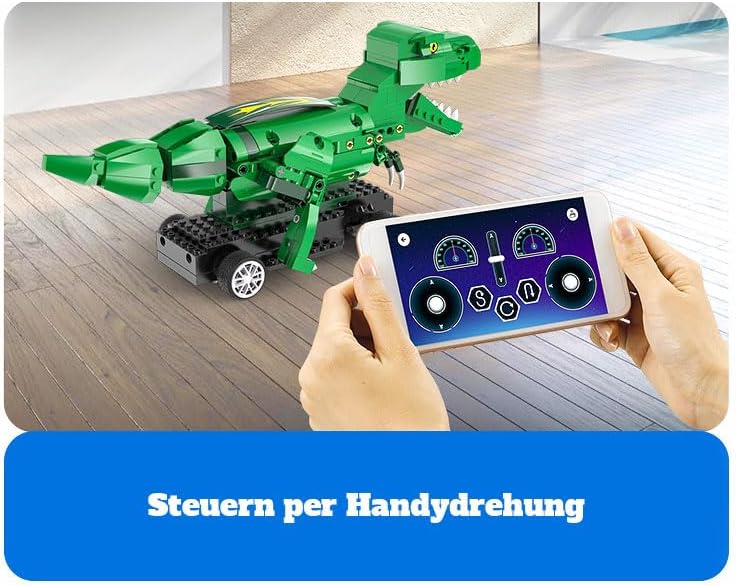
Image 6.1: The mobile app interface displaying virtual joystick controls for precise movement of the model.
- Controllo dell'inclinazione: Some app versions may allow you to control the model by tilting your mobile device.

Image 6.2: The mobile app interface demonstrating tilt-based control, where the model responds to the orientation of the phone.
- Path Programming: The app may feature a programming interface where you can draw a path or sequence commands for the Triceratops to follow.
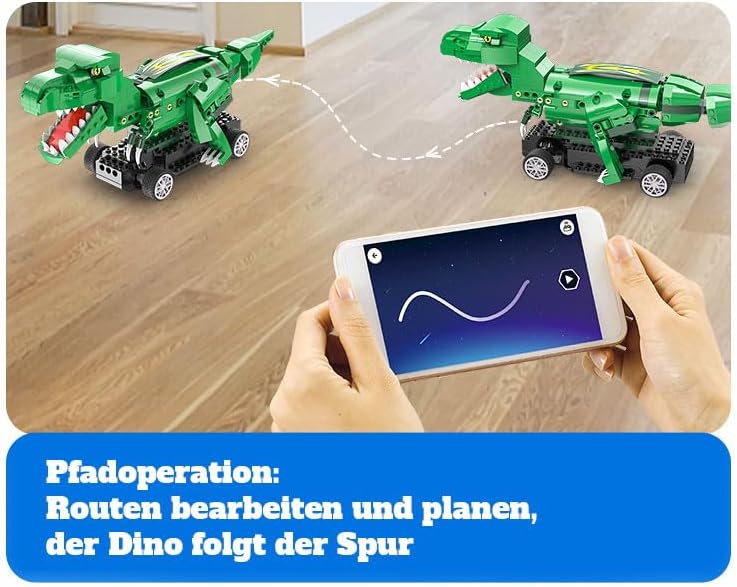
Image 6.3: The mobile app interface illustrating the path programming feature, allowing users to draw a route for the dinosaur to follow.
- Block Programming: Advanced users can utilize block-based coding within the app to create custom movements and actions for the model.

Image 6.4: The mobile app interface demonstrating block-based programming, where users can drag and drop command blocks to create sequences of actions.
7. Manutenzione
- Pulizia: Use a soft, dry cloth to gently wipe dust and dirt from the model. Do not use water or chemical cleaners, as they may damage the electronic components or plastic.
- Magazzinaggio: Store the model in a cool, dry place away from direct sunlight and extreme temperatures. If storing for an extended period, remove batteries from both the model and the remote control.
- Ispezione: Periodically check for any loose connections or damaged parts. Re-attach any loose blocks.
8. Risoluzione Dei Problemi
- Il modello non si muove:
- Ensure batteries are correctly installed and fully charged in both the model's control unit and the remote control.
- Verify that the model and remote control are properly paired (refer to Section 5.2).
- Controllare che non vi siano ostacoli fisici che impediscano il movimento.
- If using the app, ensure a stable Bluetooth connection.
- Il telecomando non risponde:
- Sostituire le batterie nel telecomando.
- Re-pair the remote control with the model.
- Ensure you are within the operating range (approx. 25 meters) and there are no significant interferences.
- Parti mancanti o danneggiate durante il montaggio:
- Controllare attentamente tutti i materiali di imballaggio per assicurarsi che non siano state trascurate piccole parti.
- If a part is genuinely missing or damaged, please contact CaDA customer support or your retailer for assistance.
- Problemi di connessione all'app:
- Assicurati che il Bluetooth sia abilitato sul tuo dispositivo.
- Restart the app and the model's control unit.
- Check if your device's operating system is compatible with the latest version of the CaDA app.
9. Specifiche
| Caratteristica | Dettaglio |
|---|---|
| Numero di modello | C59002W (also C59002W_CA) |
| Marca | CaDA |
| Dimensioni del prodotto (L x P x A) | Dimensioni: 10 x 10 x 10 cm |
| Peso del prodotto | 2 chilogrammi |
| Tema | Dinosaur (Triceratops) |
| Caratteristica speciale | Privo di sostanze nocive |
| Batterie incluse | NO |
| Tipo di controllo | 2.4GHz Remote Control, Mobile App Control |
| Gamma di controllo remoto | Circa. 25 metri |
| Età consigliata | Child (Ages 8 and Up) |
10. Garanzia e supporto
For warranty information, please refer to the documentation included with your purchase or contact your retailer. If you encounter any issues not covered in this manual or require further assistance, please contact CaDA customer support through their official websito o le informazioni di contatto fornite nella confezione del prodotto.