Introduzione
Grazie per l'acquistoasing the ANWBROAD UBDT1358 Makeup Vanity Desk. This manual provides detailed instructions for assembly, operation, maintenance, and troubleshooting to ensure safe and efficient use of your new vanity desk. Please read this manual thoroughly before assembly and use, and retain it for future reference.
Informazioni sulla sicurezza
- Leggi tutte le istruzioni: Prima di procedere, assicurarsi di aver compreso tutti i passaggi di montaggio e le avvertenze di sicurezza.
- Tenere lontani bambini e animali domestici: Small parts can be a choking hazard. Keep them away from the assembly area.
- Utilizzare strumenti adeguati: Only use the tools specified or recommended in the assembly instructions.
- Assemblare su una superficie morbida: Per evitare graffi, montare l'unità su una superficie pulita e morbida, come un tappeto.
- Secure all fasteners: Ensure all screws, bolts, and connectors are securely tightened before use.
- Evitare il sovraccarico: Do not place excessive weight on shelves or drawers to prevent damage or tipping.
- Sicurezza elettrica: When using the charging station, ensure proper electrical connections and avoid liquid spills.
- Mirror care: Handle the mirror with care to avoid breakage. Clean with a soft, dry cloth.
Contenuto della confezione
Prima di iniziare il montaggio, verificare che tutti i componenti elencati di seguito siano presenti e integri. Se alcuni componenti risultano mancanti o danneggiati, contattare l'assistenza clienti.
- Componenti della struttura della scrivania da toeletta
- Specchio con luci LED
- Drawers and Shelving Units
- Sgabello imbottito
- Charging Station Unit (with USB-A, USB-C, and power outlets)
- Ferramenta di montaggio (viti, tasselli, serrature a camma, ecc.)
- Manuale di istruzioni
Istruzioni di montaggio
Questo prodotto richiede il montaggio. Si prega di seguire attentamente i passaggi. Si consiglia di essere in due per il montaggio.
Fase 1: preparare l'area di lavoro
Liberare un'area spaziosa e disporre tutti i componenti su una superficie morbida e pulita per evitare graffi.
Fase 2: assemblare la struttura principale della scrivania
Connect the main desk panels using the provided hardware. Ensure all connections are firm.
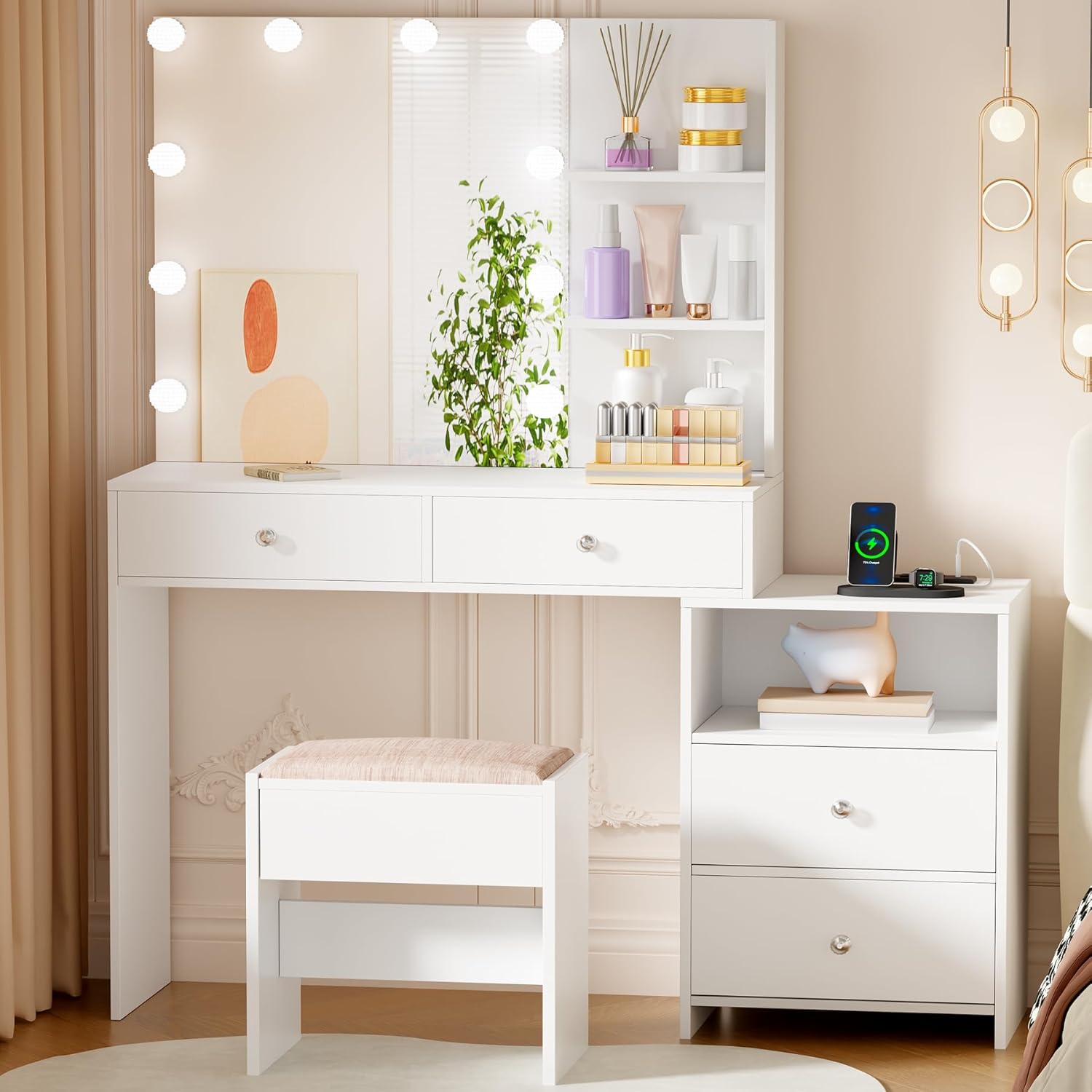
Image: The fully assembled ANWBROAD Makeup Vanity Desk, showing the main desk, mirror, side storage, and stool.
Step 3: Install Drawers and Shelves
Slide the drawers into their designated slots and secure the drawer slides. Attach any fixed shelves to the main structure.

Image: A close-up of the vanity desk's storage features, including drawers and open shelves, highlighting the ampla capacità di archiviazione.
Step 4: Attach the Mirror and LED Lights
Carefully attach the mirror unit to the back of the desk. Connect the LED lights as per the wiring instructions. Ensure the mirror is stable and secure.

Image: The vanity mirror with its 10 LED lights and integrated side storage shelves, ready for use.
Step 5: Assemble the Stool
Assemble the stool components and attach the cushioned seat. Ensure the stool is stable.

Image: A close-up showing the comfortable cushioned stool and the integrated charging station with USB ports and power outlets.
Step 6: Connect the Charging Station
Integrate the charging station into the designated area of the desk. Plug it into a suitable power outlet.

Immagine: Un dettaglio view of the charging station, showing the power outlets and USB ports for electronic devices.
Istruzioni per l'uso
Luci da specchio a LED
The vanity mirror features 10 LED lights with adjustable brightness and three color modes:
- Bianco caldo: Ideal for evening makeup.
- Bianco naturale: Suitable for daily makeup.
- Bianco freddo: Best for professional makeup application.
Per azionare le luci:
- Accensione/spegnimento: Touch the central power button on the mirror to turn the lights on or off.
- Cambia modalità colore: Briefly touch the 'M' button to cycle through the three color modes (Warm, Natural, Cool).
- Regola luminosità: Press and hold the '+' or '-' buttons to increase or decrease the brightness level.

Image: An illustration demonstrating the touch controls for the LED mirror lights, including power, mode selection, and brightness adjustment.
Stazione di ricarica
The integrated charging station includes 2 standard power outlets, 1 USB-A port, and 1 USB-C port. This allows for convenient charging of various electronic devices such as mobile phones, tablets, and laptops.
- Ensure the vanity desk is plugged into a functional wall outlet.
- Connect your devices to the appropriate USB ports or power outlets.
- Evitare di sovraccaricare la stazione di ricarica con troppi dispositivi ad alta potenza contemporaneamente.
Video: An official product video demonstrating the features of the ANWBROAD Makeup Vanity Desk, including the LED lights and charging station functionality.
Manutenzione
- Pulizia: Wipe the surfaces with a soft, dry cloth. For stubborn marks, use a slightly damp panno e sapone neutro, quindi asciugare immediatamente. Evitare prodotti chimici aggressivi o detergenti abrasivi.
- Pulizia dello specchio: Utilizzare un detergente specifico per specchi e un panno privo di lanugine. Spruzzare il detergente sul panno, non direttamente sullo specchio, per evitare che il liquido penetri nei bordi.
- Controllo hardware: Controllare periodicamente tutte le viti e gli elementi di fissaggio per assicurarsi che siano ben serrati. Serrare se necessario per mantenere la stabilità.
- Cura del cuscino dello sgabello: Spot clean the stool cushion with a mild fabric cleaner. Do not machine wash.
Risoluzione dei problemi
| Problema | Possibile causa | Soluzione |
|---|---|---|
| Le luci LED non si accendono. | Power cable not connected; loose wiring; faulty power outlet. | Ensure the power cable is securely plugged into the wall and the vanity. Check the wall outlet with another device. Verify all internal wiring connections are secure. |
| Le luci sono fioche o tremolanti. | Low power supply; loose connection; brightness setting too low. | Ensure the vanity is plugged directly into a wall outlet, not a power strip. Check all connections. Increase brightness using the '+' button. |
| La stazione di ricarica non funziona. | Vanity not powered; device cable faulty; charging station overload. | Confirm the vanity is powered. Try a different charging cable or device. Unplug other devices from the charging station. |
| I cassetti sono rigidi o non scorrono agevolmente. | Misaligned slides; debris in tracks; overloaded drawer. | Check drawer slide alignment and ensure they are properly installed. Clean tracks of any dust or debris. Reduce the weight in the drawer. |
| La vanità sembra instabile. | Elementi di fissaggio allentati; pavimento irregolare. | Retighten all assembly screws and bolts. Place shims under the legs if the floor is uneven. |
Specifiche
| Caratteristica | Dettaglio |
|---|---|
| Numero di modello | UBDT1358 |
| Marca | ANWBROAD |
| Dimensioni complessive (L x P x A) | 31.5" x 15.7" x 55.1" (80 cm x 40 cm x 140 cm) |
| Dimensioni dello sgabello (L x P x A) | 15.7" x 11.6" x 17.7" (40 cm x 29.5 cm x 45 cm) |
| Materiale | Engineered Wood, Foam & Polyester (Stool Seat) |
| Colore | Bianco |
| Luci LED | 10 Dimmable Bulbs, 3 Color Modes (Warm, Natural, Cool) |
| Stazione di ricarica | 2 Standard Power Outlets, 1 USB-A Port, 1 USB-C Port |
| Assemblaggio richiesto | SÌ |
| Peso del prodotto | Circa 87 libbre (39.5 kg) |
Garanzia e supporto
ANWBROAD products are designed for quality and durability. For specific warranty information regarding your UBDT1358 Makeup Vanity Desk, please refer to the warranty card included in your package or visit the official ANWBROAD website. If you encounter any issues or require assistance, please contact ANWBROAD customer support through the retailer where the product was purchased or via the contact information provided on the ANWBROAD websito.
Informazioni sui contatti: Please refer to your purchase documentation or the ANWBROAD official websito per i dettagli di contatto più aggiornati dell'assistenza clienti.