
Introduzione
Thank you for choosing the Karlak 7-inch Multifunctional Car MP5 Player, Model F7018. This device is designed to enhance your in-car entertainment and connectivity experience with features such as Bluetooth, FM radio, smartphone integration (CarPlay, Android Auto, MirrorLink), and multimedia playback. This manual provides essential information for proper installation, operation, and maintenance of your new car MP5 player. Please read it thoroughly before use.

Image: The Karlak 7-inch Car MP5 Player displaying its main interface and highlighting key features like reversing camera support, Bluetooth, FM radio, wiring protection, CarPlay, Android Auto, MirrorLink, USB playback, TF card support, 7 colored lights, AUX input, and steering wheel learning.
Informazioni sulla sicurezza
- Utilizzare sempre il dispositivo in modo responsabile e nel rispetto delle leggi locali sul traffico. La distrazione alla guida può causare incidenti.
- Per evitare danni al veicolo o al dispositivo, assicurarsi che l'installazione venga eseguita correttamente da un professionista qualificato.
- Non tentare di smontare o modificare l'unità. Ciò potrebbe causare danni e invalidare la garanzia.
- Tenere il dispositivo lontano da acqua, umidità e temperature estreme.
- Utilizzare solo accessori e cavi approvati.
Configurazione e installazione
Contenuto della confezione
Prima dell'installazione, verificare che tutti gli elementi siano presenti nella confezione:
- 1 x Karlak 7-inch Car MP5 Player (Host)
- 1 x Manuale utente (questo documento)
- 1 x cavo di alimentazione per auto
- 1 x telecomando (batteria non inclusa)
- 1 x set di strumenti di installazione
Istruzioni di cablaggio
Correct wiring is crucial for the safe and proper operation of your MP5 player. This unit features built-in wiring protection to prevent damage from incorrect power connections.
- Connect the power cable according to your vehicle's wiring diagram.
- Ensure the positive and negative poles are connected correctly. If connected inversely, the device's automatic power-off protection will activate, preventing damage. Reconnect correctly to power on the unit.
- Connect the speaker wires, antenna, and any auxiliary inputs/outputs as required.
- If installing an optional reversing camera, connect it to the designated input.
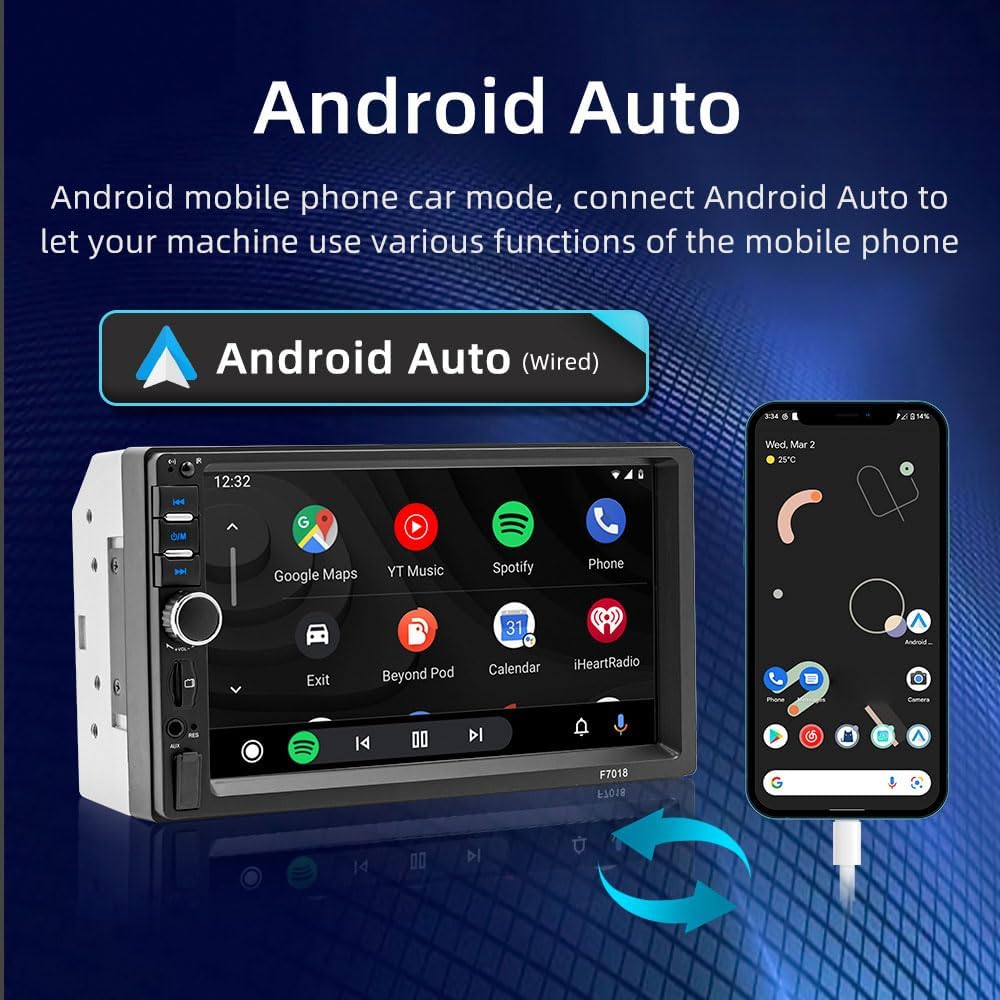
Image: A diagram illustrating the wiring protection feature. It shows that with wiring protection, incorrect power connections will not burn the circuit board or fuse, whereas without it, the machine circuit board or fuse would typically burn out.
Dimensioni di installazione
- Dimensioni di installazione: 178 x 105 mm (7.0 x 4.1 pollici)
- Dimensioni del pannello: 179 x 103 mm (7.0 x 4.1 pollici)
- Profondità dell'host: 55 mm (2.2 pollici)
Ensure your vehicle's dashboard opening is compatible with these dimensions for a proper fit.
Istruzioni per l'uso
Controlli di base
The unit features a 7-inch touch screen and physical buttons for easy operation. Common controls include power on/off, volume adjustment, mode selection, and track/station navigation.
- Pulsante di accensione: Press and hold to turn the unit on or off. Short press to mute/unmute.
- Manopola del volume: Ruotare per regolare il livello del volume.
- Pulsante Modalità (M): Cycle through available modes (Radio, Bluetooth, USB, TF Card, AUX, PhoneLink).
- Navigation Buttons (<< / >>): Skip tracks, fast forward/rewind, or change radio stations.
Radio FM
Access the FM radio mode to listen to local broadcasts, real-time traffic updates, news, and weather forecasts.
- Gamma di frequenza: Frequenza 87.5-108.0 MHz
- Scansione: Use the search function to automatically scan and save available stations.
- Stazioni preimpostate: Manually save your favorite stations for quick access.
Connettività Bluetooth 5.1
The built-in Bluetooth 5.1 module provides a stable and fast connection for hands-free calling and audio streaming.
- Abilita il Bluetooth sul tuo smartphone.
- Sul lettore MP5, vai al menu Bluetooth.
- Cercare available devices and select "Karlak F7018" (or similar name).
- Se richiesto, confermare il codice di associazione.
- Una volta effettuata la connessione, è possibile effettuare/ricevere chiamate e riprodurre musica in modalità wireless.
Smartphone Interconnection (CarPlay, Android Auto, MirrorLink)
Connect your smartphone to the MP5 player to access various phone functions directly on the unit's screen, including navigation, music, calls, and messages.
Apple CarPlay (Wired Connection)
Connect your Apple iPhone via a USB cable to enable CarPlay. This allows you to use iOS apps optimized for driving on the MP5 player's screen.

Image: The Karlak MP5 Player screen showing the Apple CarPlay interface with icons for Phone, Music, Maps, Messages, and other applications, connected to an iPhone via a wired connection.
Android Auto (Wired Connection)
Connect your Android smartphone via a USB cable to enable Android Auto. This provides access to Android apps and services tailored for in-car use.

Image: The Karlak MP5 Player screen showing the Android Auto interface with icons for Google Maps, YouTube Music, Spotify, Phone, and other applications, connected to an Android phone via a wired connection.
MirrorLink (Screen Mirroring)
MirrorLink allows you to cast your smartphone's screen onto the MP5 player. For Apple phones, connect via data cable for one-way screen touch. For Android phones, install the required mirroring software for two-way screen touch control.
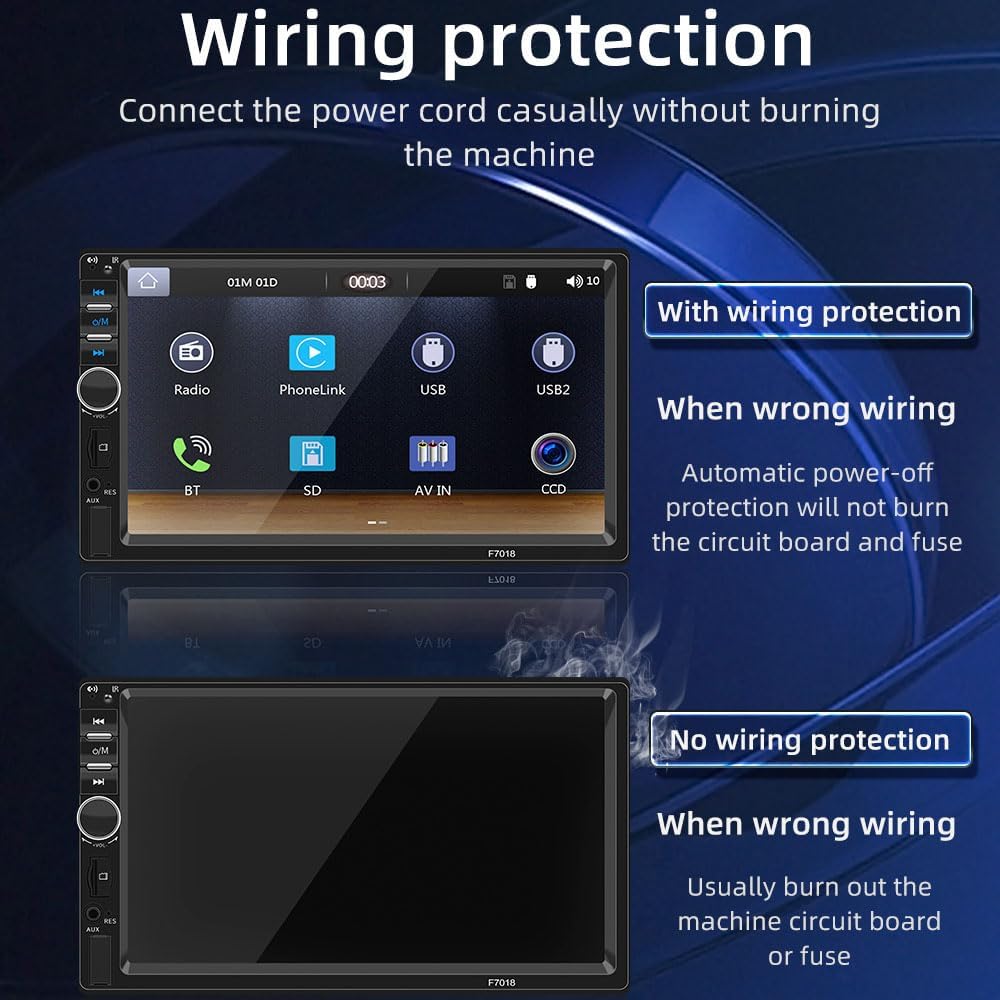
Image: The Karlak MP5 Player screen mirroring a smartphone display, showing a landscape image. Text indicates that Apple phones connect via data cable for one-way screen touch, while Android phones require mirroring software for two-way screen touch.
Riproduzione da USB e scheda TF
Play your favorite audio, video, and image files directly from a USB drive or TF (microSD) memory card.
- Insert the USB drive into the USB port or the TF card into the TF card slot.
- Select the appropriate source (USB or TF Card) from the main menu or by pressing the Mode button.
- Sfoglia e seleziona il contenuto multimediale desiderato files per la riproduzione.
Apprendimento del controllo del volante
The unit supports learning functions for your vehicle's steering wheel controls, allowing for safer operation without taking your hands off the wheel.
- Access the "Steering Wheel Control" settings menu on the MP5 player.
- Follow the on-screen instructions to assign functions (e.g., volume up, next track) to your steering wheel buttons.
- Test the assigned functions to ensure they work correctly.
Reversing Camera Support (Optional)
If an optional reversing camera is connected, the MP5 player will automatically display the rear view when the vehicle is put into reverse gear, assisting with safer parking and maneuvering.

Image: The Karlak MP5 Player screen showing a full-screen reversing image with parking guidelines, indicating the support for an optional reversing camera for safe maneuvering.
Illuminazione dei pulsanti a 7 colori
Customize the aesthetic of your MP5 player with 7 different button lighting colors. You can set it to cycle through colors or select a single preferred color.

Image: A series of images showing the Karlak MP5 Player's physical buttons illuminated in different colors (red, green, blue, yellow, cyan, purple, white), demonstrating the 7-color button lighting feature.
Manutenzione
- Pulizia dello schermo: Utilizzare un panno morbido e privo di lanugine per pulire delicatamente il touch screen. Per le macchie ostinate, pulire leggermenteampPulisci il panno con acqua o un detergente per schermi. Evita prodotti chimici aggressivi.
- Pulizia generale: Pulire l'esterno dell'unità con un panno asciutto o leggermente asciutto.amp panno. Non usare detergenti abrasivi.
- Aggiornamenti software: Controllare periodicamente le istruzioni del produttore websito per eventuali aggiornamenti software disponibili per garantire prestazioni ottimali e nuove funzionalità.
Risoluzione dei problemi
| Problema | Possibile causa | Soluzione |
|---|---|---|
| L'unità non si accende. | Incorrect wiring (positive/negative reversed). Fusibile bruciato nel veicolo o nell'unità. Collegamento elettrico allentato. |
Check wiring for correct polarity; the unit has protection against reverse connection. Verify vehicle and unit fuses. Ensure power cables are securely connected. |
| Nessun suono. | Volume troppo basso o disattivato. Speaker wires disconnected. È stata selezionata una sorgente audio errata. |
Increase volume or unmute. Check speaker connections. Ensure the correct audio source (FM, BT, USB, etc.) is selected. |
| Problemi di connessione Bluetooth. | Bluetooth not enabled on phone/unit. Dispositivo non associato. Interferenza. |
Ensure Bluetooth is active on both devices. Re-pair the devices. Move closer to the unit or away from other wireless devices. |
| Smartphone interconnection (CarPlay/Android Auto/MirrorLink) not working. | Cavo USB difettoso. Phone software not updated. Required app not installed (for Android MirrorLink). |
Use a high-quality, certified USB data cable. Ensure your smartphone's operating system and relevant apps are up to date. Install the necessary mirroring app for Android devices. |
Specifiche
| Caratteristica | Dettaglio |
|---|---|
| Modello | F7018 |
| Dimensioni dello schermo | 7 pollici |
| Risoluzione | 1024x600 |
| Versione Bluetooth | 5.1 |
| Gamma di frequenza FM | 87.5 - 108.0 MHz |
| Potenza di uscita | 60W x 4 |
| Volume di lavorotage | 12 - 14.4 V |
| Temperatura di lavoro | da -10 a 60 ℃ (da 14 a 140 ℉) |
| Dimensioni di installazione | 178 x 105 mm (7.0 x 4.1 pollici) |
| Dimensioni del pannello | 179 x 103 mm (7.0 x 4.1 pollici) |
| Profondità dell'host | 55 mm (2.2 pollici) |
| Lingue supportate | English, Chinese, Spanish, Portuguese, Russian, German, French, Dutch, Turkish, Arabic, Hebrew, Italian, Czech, Japanese, Korean |
| Riferimento produttore | SGNBRK21931 |
Garanzia e supporto
For warranty information, please refer to the documentation provided at the time of purchase or contact your retailer. Karlak is committed to providing quality products and customer satisfaction.
If you encounter any issues or have questions not covered in this manual, please contact Karlak customer support through the retailer's platform or the official brand websito per assistenza.