
1. Importanti istruzioni di sicurezza
Before operating the HomeTro Treadmill, please read and understand all safety instructions. Retain this manual for future reference.
- Consultare sempre un medico prima di iniziare qualsiasi programma di esercizi.
- Assicurarsi che il tapis roulant sia posizionato su una superficie piana e stabile, con spazio sufficiente attorno.
- Tenere i bambini e gli animali domestici lontani dal tapis roulant durante il funzionamento.
- Use the safety key/clip at all times. In an emergency, the safety key will stop the treadmill.
- Non utilizzare il tapis roulant se il cavo o la spina sono danneggiati o se non funziona correttamente.
- Indossare calzature e abbigliamento sportivo adeguati.
- Il peso massimo dell'utente per questo tapis roulant è di 120 kg (265 libbre).
2. Installazione e conservazione
The HomeTro Treadmill is designed for convenience and requires no assembly. It arrives fully assembled and ready for use.
Disimballaggio e posizionamento
- Estrarre con cautela il tapis roulant dalla confezione.
- Posizionare il tapis roulant su una superficie solida e piana. Assicurarsi che ci siano almeno 2 metri (6.5 piedi) di spazio libero dietro il tapis roulant e 0.5 metri (1.6 piedi) su ciascun lato.
- Collegare il cavo di alimentazione a una presa elettrica con messa a terra.
Piegatura e conservazione
This treadmill features a compact, foldable design with built-in wheels for easy relocation and storage.

Immagine: The treadmill can be easily folded and stored horizontally under a bed or sofa, or vertically against a wall. The image illustrates the folding mechanism and how it can be stored compactly.
- To fold, ensure the treadmill is powered off and unplugged.
- Lift the rear end of the running deck until it locks into the upright position (if applicable for running mode). For compact storage, the entire unit folds flat.
- Utilize the integrated wheels to move the folded treadmill to your desired storage location, such as under a desk, bed, or sofa.
3. Istruzioni per l'uso
The HomeTro Treadmill offers two primary modes: Walking Pad mode and Running mode, catering to various exercise intensities.
Iniziare
- Plug in the treadmill and press the power button.
- Fissare la clip della chiave di sicurezza ai vestiti e inserire la chiave nell'apposito slot sulla console. Il tapis roulant non funzionerà senza la chiave di sicurezza.
- Step onto the treadmill belt, holding onto the handrails if needed.
Operating Modes and Speed Control

Immagine: This image illustrates the treadmill's dual functionality, showing it configured for walking (lower speed, flat) and running (higher speed, with upright handles).
- Modalità Walking Pad: Ideal for light exercise or use under a standing desk. Speeds range from 1 km/h to 4 km/h.
- Modalità di esecuzione: For more intense workouts. Speeds range from 4 km/h to 14 km/h.
Speed adjustments can be made using the included remote control or the touch controls on the LED display.
Display e controlli LED

Immagine: Close-up of the treadmill's LED display, highlighting metrics like speed, time, distance, and calories. The remote control is also shown, indicating its use for adjusting settings.
The large LED display tracks essential workout metrics in real-time:
- Velocità: Velocità attuale in km/h.
- Tempo: Durata del tuo allenamento.
- Distanza: Distanza totale percorsa.
- Calorie: Calorie bruciate stimate.
The display also features touch controls for starting, stopping, and adjusting speed. The remote control provides convenient access to these functions, allowing for instant speed changes and emergency stops.
Predefined Programs and App Control
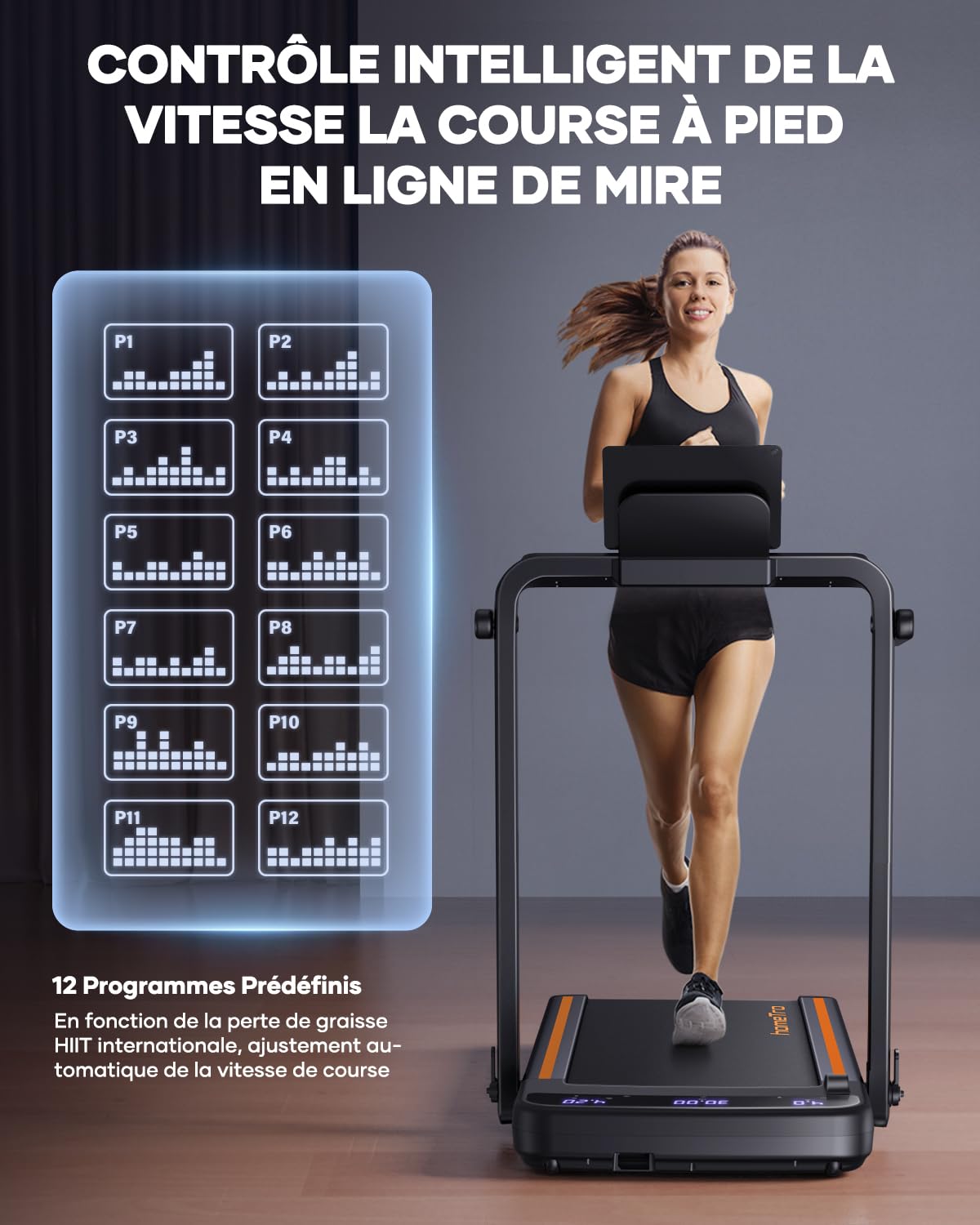
Immagine: This graphic displays 12 different predefined workout programs (P1-P12) available on the HomeTro Treadmill, offering varied intensity profiles for users.
The treadmill includes 12 predefined programs (P1-P12) designed to offer varied workout intensities and help achieve fitness goals. These programs automatically adjust speed over time.
For enhanced tracking and interaction, the treadmill supports smart app control (e.g., FITSHOW APP). This allows you to record exercise data, track progress, and potentially share results with others.
Caratteristiche aggiuntive
- Supporto del dispositivo: A built-in holder allows you to place your phone or tablet for entertainment during your workout.
- Assorbimento degli urti: The treadmill features 4-point shock absorption and a 5-layer running belt to protect joints and provide a comfortable experience.

Immagine: This image highlights the treadmill's advanced features, including 4-point shock absorption and a multi-layered running belt designed for user comfort and joint protection.
4. Manutenzione
Regular maintenance ensures the longevity and optimal performance of your HomeTro Treadmill.
Pulizia
- Dopo ogni utilizzo: Pulisci la console e le altre superfici con un panno morbido eamp panno per rimuovere sudore e polvere. Evitare detergenti abrasivi.
- Settimanale/Bisettimanale: Vacuum underneath the treadmill to prevent dust and debris from accumulating in the motor area.
Lubrificazione della cinghia
The running belt requires periodic lubrication to reduce friction and extend its lifespan. Refer to the specific instructions in your included product manual for the recommended lubrication schedule and type of lubricant.
Tensione e allineamento della cinghia
Over time, the running belt may become loose or shift to one side. If the belt feels loose or slips during use, or if it is not centered, refer to your product manual for instructions on how to adjust the belt tension and alignment using the provided L-type key (6#).
5. Risoluzione Dei Problemi
If you encounter issues with your HomeTro Treadmill, refer to the following common troubleshooting steps. For more complex problems, consult your product manual or contact customer support.
| Problema | Possibile causa | Soluzione |
|---|---|---|
| Il tapis roulant non si avvia. | Non collegato; Interruttore di alimentazione spento; Chiave di sicurezza non inserita. | Ensure power cord is securely plugged in. Turn on the power switch. Insert the safety key fully into its slot. |
| La cintura da corsa scivola o esita. | Cinghia troppo lenta; la cinghia necessita di lubrificazione. | Adjust belt tension (refer to manual). Lubricate the running belt (refer to manual). |
| Il display non funziona o mostra dati errati. | Collegamento del cavo allentato; problema con il sensore. | Check all cable connections. Power cycle the treadmill (unplug, wait 30 seconds, plug back in). |
| Rumore insolito durante il funzionamento. | Parti allentate; attrito della cinghia; problema al motore. | Inspect for any loose screws or components and tighten them. Lubricate the belt if needed. If noise persists, discontinue use and contact support. |
6. Specifiche
Detailed technical specifications for the HomeTro Treadmill.

Immagine: This graphic highlights the treadmill's powerful yet quiet 2.5 HP motor, its low noise output (≤65dB), and its robust maximum weight capacity of 120 kg (265 lbs).
| Caratteristica | Dettaglio |
|---|---|
| Marca | HomeTro |
| Numero di modello | Hometro Tapis de Course Pliable 2 en 1 |
| Potenza del motore | 2.5 CV (picco) |
| Gamma di velocità | 1 - 14 km/h (Walking: 1-4 km/h, Running: 4-14 km/h) |
| Peso massimo dell'utente | 120 chilogrammi (265 libbre) |
| Dimensioni del prodotto (P x L x A) | 143D x 75W x 15H centimetri |
| Peso dell'articolo | 27 chilogrammi |
| Tipo di visualizzazione | LED (16 pollici) |
| Materiale del telaio | Acciaio legato |
| Caratteristiche speciali | Cardio training, Compact Design, Foldable, Touch Screen, Wheeled, With wheels, 4-point Shock Absorption, 5-layer Running Belt |
| Assemblaggio richiesto | NO |
| Fonte di alimentazione | Elettrico con cavo |
| Metriche misurate | Distanza, velocità, tempo, calorie |
| Cosa c'è nella scatola | 1 x folding walking mat, 1 x remote control, 1 x product manual, 1 x L-type key (6#), 1 x power cable, 1 x security lock, 1 x mobile phone holder |
7. Garanzia e supporto
For information regarding the product warranty, please refer to the warranty card included with your purchase or the dedicated section within the comprehensive product manual.
If you require technical assistance, have questions about operation, or need to report a defect, please contact HomeTro customer support. Contact details can typically be found in your product manual or on the official HomeTro websito.