
1. Introduzione
This manual provides detailed instructions for the setup, operation, and maintenance of your summina 4-Channel Digital Audio Mixer. Please read this manual thoroughly before using the device to ensure proper functionality and to maximize your audio experience. This mixing console is designed for various audio applications, including DJ setups, network live broadcasts, and karaoke.

Image 1.1: The summina 4-Channel Digital Audio Mixer with its power adapter and user manual.
2. Caratteristiche principali
- 4-channel mixing console with two mono channels and a separate stereo tape channel.
- Separate input JACK controls for mic and line inputs on all mono channels.
- XLR mic connectors on all mono channels.
- Preamplificatore microfonico discreto e a basso rumoreamplificatori su tutti gli ingressi microfonici.
- Dedicated inserts on all mono channels.
- Alimentazione Phantom da 48 V integrata per microfoni a condensatore.
- USB function for audio playback and recording.
- Connettività Bluetooth per lo streaming audio wireless.
- Integrated effects processor with 88 digital effects.

Image 2.1: The mixer features a minimalist, lightweight, and portable design with an impact-resistant powder-coated metal casing.
3. Guida all'installazione
Follow these steps to set up your summina 4-Channel Digital Audio Mixer:
- Collegamento elettrico: Collegare l'adattatore di alimentazione in dotazione all'ingresso di alimentazione del mixer e quindi a una presa di corrente idonea.
- Connessione microfono: For mono channels (CH1, CH2), use XLR connectors for microphones. The mixer also supports line inputs via 1/4" JACKs. Ensure 48V Phantom Power is activated for condenser microphones by pressing the dedicated button.
- Ingresso stereo: Use the stereo channels (CH3/4) for connecting stereo audio sources.
- Connessione di uscita: Collega i tuoi altoparlanti principali o amplifier to the MAIN OUTPUT (RCA or 1/4" JACKs). For monitoring, connect headphones to the PHONES output.
- USB/Bluetooth Setup: For USB playback, insert a USB drive into the USB port. For Bluetooth, select the Bluetooth mode on the mixer and pair with your device.

Image 3.1: The mixer comes with a power adapter suitable for your region (e.g., US or EU plug options).
Impostazione e fineview Video
Video 3.2: This video provides a visual guide to unboxing, connecting microphones, and basic operation of a similar Riworal Audio Mixer Sound Board Console AG04. Note that the specific model in the video may vary slightly from your summina mixer, but the general setup principles apply.
4. Istruzioni per l'uso
Familiarize yourself with the mixer's controls for optimal audio mixing.

Immagine 4.1: Passoview del pannello di controllo del mixer.
4.1 Channel Controls (CH1, CH2, CH3/4)
- GUADAGNO: Adjusts the input sensitivity for each channel. Set to an appropriate level to avoid clipping.
- EQ (ALTO, MEDIO, BASSO): Utilizzare queste manopole per regolare le frequenze alte, medie e basse per ciascun canale.
- AUSILIARI: Controls the send level to the auxiliary output for external effects or monitoring.
- FEP: Adjusts the send level to the internal effects processor.
- PADELLA: (Mono channels) Adjusts the stereo position of the channel.
- LIVELLO: Controlla il volume complessivo del canale nel mix principale.
- LED DI PICCO: Illuminates when the input signal is too high, indicating potential clipping. Reduce the GAIN if this light frequently illuminates.
4.2 Controlli principali
- PRINCIPALE: Controlla il volume di uscita complessivo del mixer.
- TELEFONI: Regola il volume dell'uscita cuffie.
- EFFECTS PRESET/PROGRAM: Use the selector knob to choose from 88 built-in digital effects (e.g., Ambience, Spring, Room, Plate, Hall, Echo, Chorus, Flanger). Press the knob to confirm selection.
- ALIMENTAZIONE PHANTOM 48V: Activates 48V power for condenser microphones connected to CH1 and CH2.

Image 4.2: The mixer offers 7 built-in music modes (Natural, Pop, Rock, Jazz, Classical, Soft, Bass) and 88 digital effects for enhanced audio.
4.3 USB/Bluetooth Functionality
- Riproduzione USB: Inserisci un'unità flash USB con audio files (MP3, WAV, etc.) into the USB port. The mixer will automatically switch to USB mode. Use the PROGRAM knob to select tracks and press to play/pause.
- Accoppiamento Bluetooth: Select Bluetooth mode. The mixer will appear as an available device on your smartphone or other Bluetooth-enabled audio source. Pair the devices to stream audio wirelessly.
- PC/DC Switch: This switch toggles between different connection modes. When pulled to 'PC', the signal is transmitted between the computer and the console, allowing for recording or playback via USB to a computer.
5. Specifiche
| Categoria | Specificazione |
|---|---|
| Ingresso microfono | Configurazione di ingresso discreta bilanciata elettronicamente |
| Risposta in frequenza (microfono) | 20 Hz~25 kHz ±1 dB |
| Gain Range (Mic) | Da 6 dB a 60 dB |
| SNR (Mic) | 120dB EN |
| Ingresso di linea | Equilibrato elettronicamente |
| Frequency Response (Line) | 20 Hz~25 kHz ±1 dB |
| Gamma di guadagno (linea) | -14 dB~40 dB |
| SNR (Line) | 95 dB |
| Frequency Response (Stereo) | 20 Hz~25 kHz ±1 dB |
| Gain Range (Stereo Line) | -20 dB~10 dB |
| SNR (Stereo Line) | 96 dB |
| EQ basso | 80 Hz, ±15 dB |
| EQ medi | 2500 Hz, ±15 dB |
| EQ alto | 12kHz, ±15dB |
| Uscita principale | +26 dBu bilanciato / +22 dBu sbilanciato |
| Invio AUX | +22 dBu sbilanciato |
| EFF Invia | +22 dBu sbilanciato |
| Nastro fuori | +22 dBu sbilanciato |
| Uscita telefoni | 150Ω-600Ω/350mW |
| Potenza in ingresso | AC110V (US), 50Hz, 18W |
| Potenza di uscita | AC18V*2350mA |
| Materiale | Metallo |
| Dimensioni dell'articolo | 228 * 212 * 48 mm / 8.98 * 8.35 * 1.89 pollici |
| Peso dell'articolo | 1824 g / 4.02 libbre |
| Numero di canali | 4 |
| Tecnologia di connettività | USB |
| Ingresso audio | XLR |
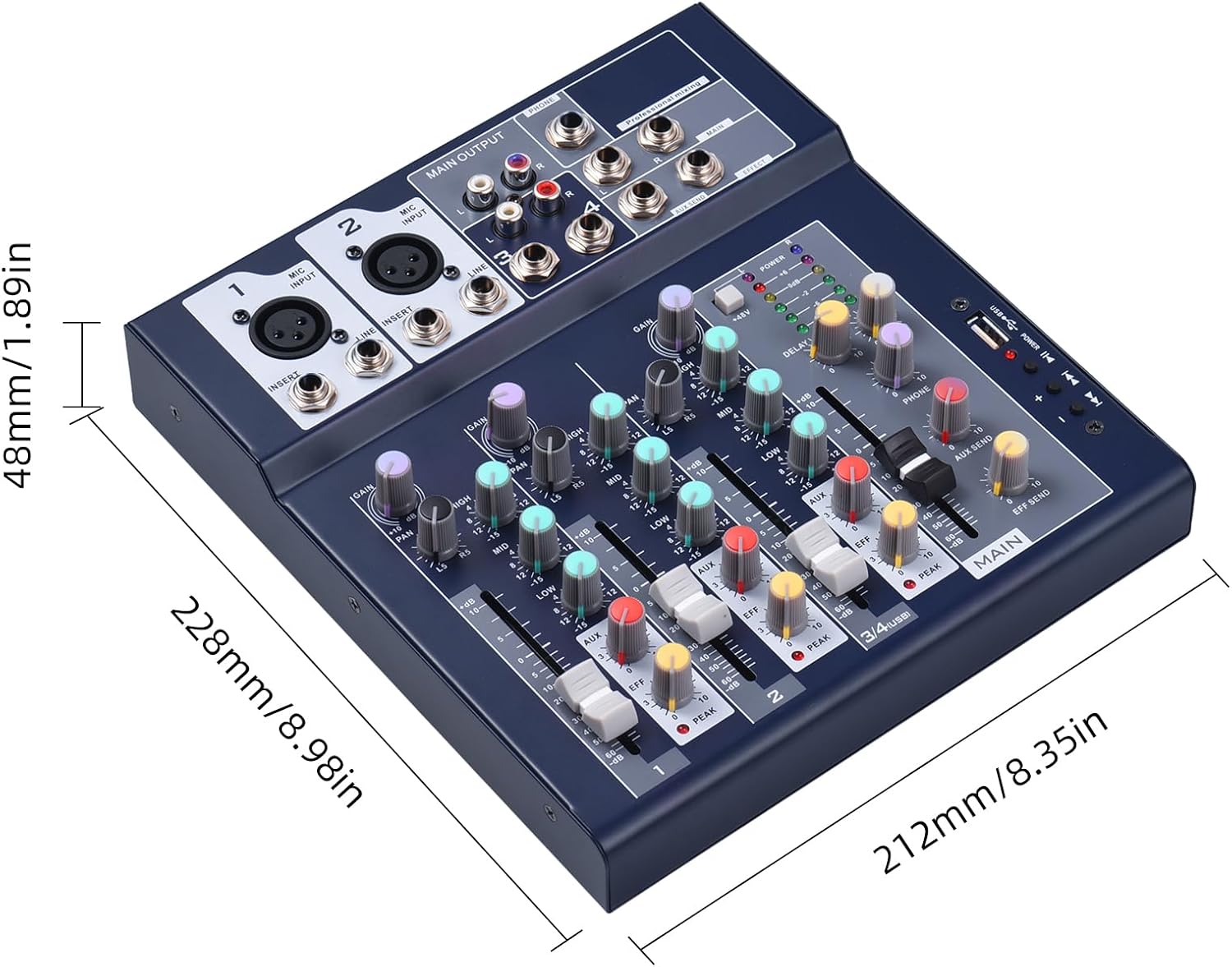
Image 5.1: Physical dimensions of the summina 4-Channel Digital Audio Mixer.
6. Manutenzione
To ensure the longevity and optimal performance of your summina 4-Channel Digital Audio Mixer, follow these maintenance guidelines:
- Pulizia: Utilizzare un panno morbido e asciutto per pulire l'esterno del mixer. Evitare l'uso di detergenti abrasivi, solventi o cere, poiché potrebbero danneggiare la finitura o i componenti interni.
- Magazzinaggio: Quando non in uso, conservare il mixer in un luogo fresco e asciutto, lontano dalla luce solare diretta, da temperature estreme e da elevata umidità.
- Ventilazione: Assicurare una ventilazione adeguata attorno al mixer per evitare il surriscaldamento. Non ostruire le aperture di ventilazione.
- Gestione dei cavi: Keep cables organized and free from kinks or excessive bending to prevent damage to the cables and connectors.
- Spegni: Always power off the mixer and disconnect it from the power source when not in use or during cleaning.
7. Risoluzione Dei Problemi
If you encounter any issues with your summina 4-Channel Digital Audio Mixer, refer to the following common troubleshooting steps:
- Nessun potere: Ensure the power adapter is securely connected to both the mixer and a working power outlet. Check if the power switch is in the 'ON' position.
- Nessuna uscita audio: Verify that all input and output cables are correctly connected. Check the GAIN and LEVEL knobs for each channel and the MAIN output level. Ensure your speakers or headphones are powered on and functioning correctly.
- Suono distorto: Reduce the GAIN and LEVEL settings if the PEAK LED indicators are frequently lighting up. Check for damaged cables or faulty microphones.
- Microfono non funzionante: Ensure the microphone is properly connected. If using a condenser microphone, verify that 48V Phantom Power is activated. Check microphone batteries if applicable.
- Problemi di riproduzione USB: Ensure the USB drive is formatted correctly (FAT32 is commonly supported) and contains compatible audio files. Try a different USB drive if issues persist.
- Problemi di connessione Bluetooth: Ensure the mixer is in Bluetooth pairing mode. Delete the mixer from your device's Bluetooth list and attempt to re-pair. Ensure no other devices are interfering with the Bluetooth signal.
Se il problema persiste dopo aver provato questi passaggi, contattare l'assistenza clienti.
8. Garanzia e supporto
Your summina 4-Channel Digital Audio Mixer is covered by a manufacturer's warranty. Please refer to the warranty card included in your product packaging for specific terms and conditions, including the warranty period and coverage details.
For technical support, service, or warranty claims, please contact summina customer service through their official website or the contact information provided in your product documentation. When contacting support, please have your product model and serial number ready.
For additional protection, extended warranty plans may be available for purchase separately. Please check with your retailer for details.