
1. Introduzione
This manual provides comprehensive instructions for the installation, operation, and maintenance of your FTes RFKits Keyless Entry Door Lock Kit. This system offers secure and convenient access control using an RFID keypad, Tuya app, cards, and passwords. Please read this manual thoroughly before installation and use to ensure proper function and safety.
2. Informazioni sulla sicurezza
- Prima di eseguire qualsiasi installazione o manutenzione, assicurarsi che tutta l'alimentazione sia scollegata.
- Se non si ha familiarità con i cablaggi elettrici, l'installazione deve essere eseguita da personale qualificato.
- Utilizzare solo l'alimentatore CC 12V specificato.
- Non esporre l'alimentatore a umidità o temperature estreme.
- Keep RFID cards and keyfobs away from strong magnetic fields to prevent data corruption.
- Regularly check all connections for security and proper function.
3. Contenuto della confezione
Verifica che tutti i componenti siano presenti nel tuo pacchetto:
- Keyless Entry RFID Keypad
- 180KG / 350LB Magnetic Lock
- DC 12V 3A Power Supply Control Unit
- Door Exit Push Button
- Campanello
- RFID Keyfobs (5 ID keyfobs + 5 IC keyfobs for management)
- Hardware di montaggio (viti, tasselli)
- Manuale dell'utente (questo documento)

Figure 3.1: Door Exit Button and Doorbell dimensions. The exit button is 86x86mm and made of hard plastic. The doorbell is 66x85x25mm, made of ABS plastic, and operates on 12V DC.
4. Caratteristiche del prodotto
- Supporto a doppia frequenza: Funziona sia sulle frequenze 125KHz che 13.56MHz.
- Elevata capacità utente: Supporta fino a 10,000 utenti.
- Modalità di accesso multiple: Tuya APP, RFID card, password, or a combination of RFID card + password.
- Gestione semplice: Management cards can be configured for simplified programming.
- Costruzione durevole: High-quality touch keypad with IP68 waterproof rating for outdoor installation.
- Visibilità migliorata: Features a backlit keypad and work indicator for convenient use in low-light conditions.
- Powerful Magnetic Lock: 180KG (350LB) electromagnetic lock with anti-residual magnetism design.
- Fail-Safe Operation: Lock is engaged when powered on and unlocks when power is off.
- Applicazione versatile: Suitable for wooden, metal, and glass doors.

Figure 4.1: The keypad supports dual frequencies (125KHz + 13.56MHz) and allows easy programming of management cards using 'ADD' and 'Delete' keyfobs.

Figure 4.2: The keypad features an IP68 waterproof rating, making it suitable for outdoor installation and operation in various weather conditions, including rain.

Figure 4.3: The keypad includes a work indicator light and backlit number keys for improved visibility and ease of use, especially in dark environments.
5. Configurazione e installazione
Follow these steps for proper installation of your keyless entry system:
5.1 Schema elettrico
Refer to the wiring diagram below for connecting all components. Ensure correct polarity and secure connections for all wires.
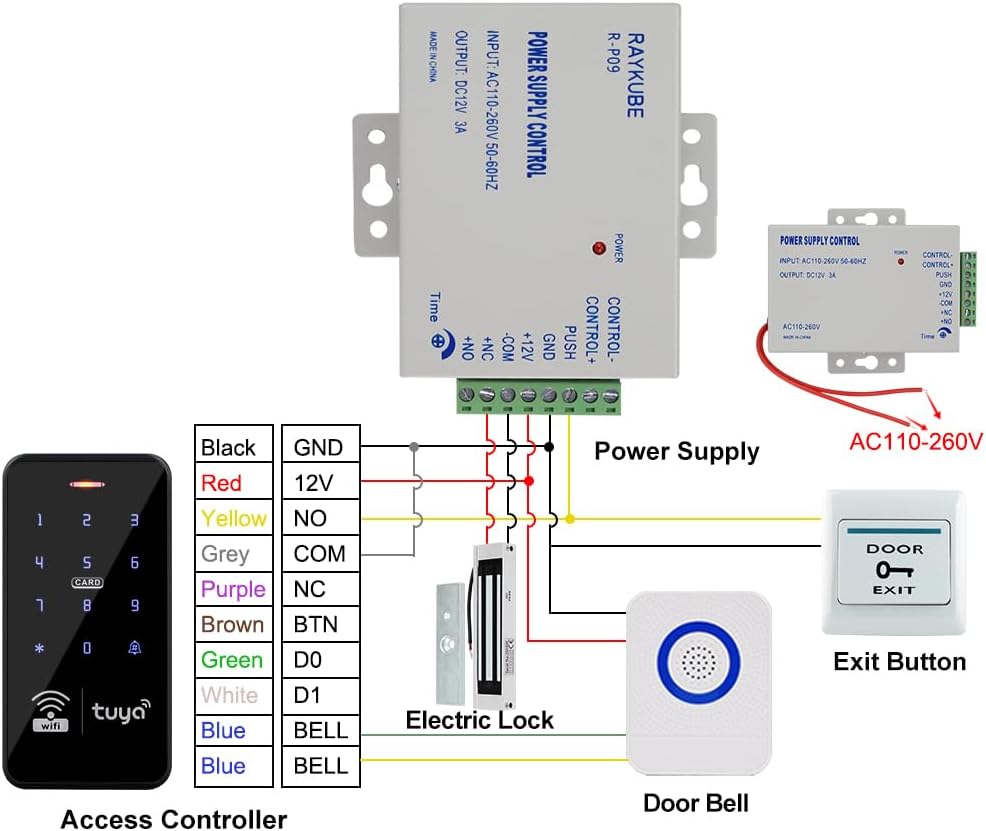
Figure 5.1: Wiring diagram illustrating connections between the access controller, power supply, electric lock, exit button, and doorbell. The power supply accepts AC110-260V input and provides DC12V 3A output.
5.2 Unità di controllo dell'alimentazione
The power supply control unit converts AC power to DC 12V for the system. It features adjustable time settings for lock release.
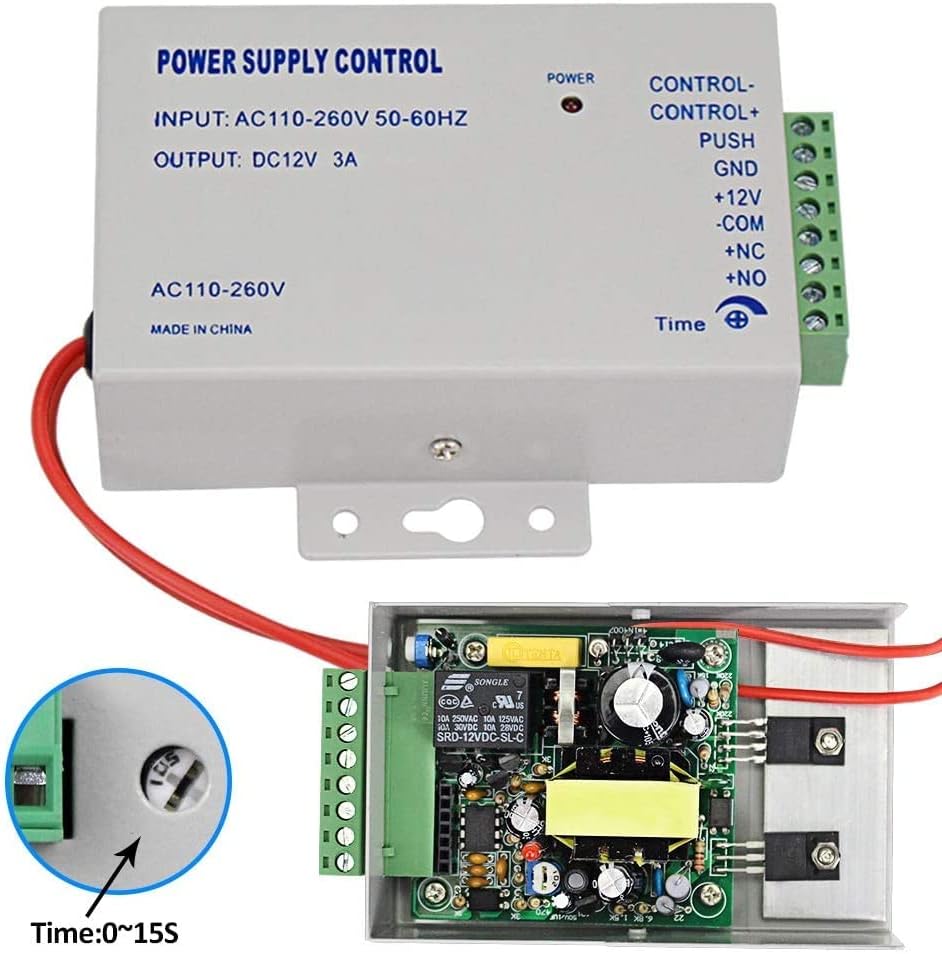
Figure 5.2: The power supply control unit (Input: AC110-260V 50-60Hz, Output: DC12V 3A) includes terminals for control, push button, ground, and lock connections. A timer adjustment knob allows setting the lock release duration from 0 to 15 seconds.
5.3 Keypad Mounting
Mount the keypad at a convenient height near the door. Ensure the mounting surface is stable. Use appropriate screws and anchors for secure installation.
6. Istruzioni per l'uso
Il sistema supporta diversi metodi per sbloccare la porta:
6.1 Access Methods Overview

Figure 6.1: The system offers various access methods including control via the Tuya APP, temporary passwords, RFID keyfobs, numerical passwords, and a combined RFID keyfob and password entry.
6.2 Controllo dell'APP Tuya
The system integrates with the Tuya Smart application for remote control and management. Download the Tuya Smart app from your smartphone's app store.
- Abbinamento: Follow the in-app instructions to pair your keypad with the Tuya app via Wi-Fi.
- Sblocco remoto: Use the app interface to remotely unlock the door.
- Gestione utenti: Add or delete users, assign RFID cards, and set passwords directly from the app.
- Password temporanee: Generate and share temporary access codes for guests or service personnel.
- Registri di accesso: View a history of door access events.

Figure 6.2: Screenshots of the Tuya APP demonstrate features such as remote unlocking, generating temporary access codes, managing members (administrators and ordinary users), and adding new RFID cards or passwords.
6.3 RFID Card Access
Present a programmed RFID card or keyfob to the card reader area on the keypad to unlock the door.
6.4 Inserimento della password
Enter your programmed numerical password on the keypad, then press the '#' key (or equivalent confirmation key) to unlock.
6.5 RFID Card + Password Entry
For enhanced security, present your RFID card first, then enter your numerical password on the keypad.
6.6 Pulsante di uscita
From the inside, press the exit button to momentarily unlock the door for egress.
6.7 Funzione campanello
Visitors can press the doorbell button on the keypad to activate the indoor doorbell chime.
7. Manutenzione
- Pulizia: Pulisci la superficie della tastiera con un panno morbido eamp panno. Evitare detergenti abrasivi o solventi.
- Ispezione: Controllare periodicamente i collegamenti elettrici per verificare la presenza di eventuali segni di usura o danni.
- Aggiornamenti software: Ensure your Tuya app is updated to the latest version for optimal performance and security features.
- Sicurezza della password: Change passwords regularly and avoid sharing them.
- Serratura magnetica: Ensure the magnetic lock and armature plate are clean and free of debris for proper engagement.
8. Risoluzione Dei Problemi
| Problema | Possibile causa | Soluzione |
|---|---|---|
| La tastiera non risponde | No power; Loose connection; Keypad malfunction | Check power supply and wiring. Ensure all connections are secure. If problem persists, contact support. |
| La porta non si sblocca | Incorrect code/card; Lock malfunction; Power issue | Verify code/card. Check power supply to the lock. Inspect lock for obstructions. |
| Tuya APP not connecting | No Wi-Fi; Incorrect pairing; App issue | Ensure Wi-Fi is active and strong. Re-pair the device in the app. Update or reinstall the Tuya app. |
| Il campanello non suona | Loose wiring; Faulty doorbell unit | Check doorbell wiring connections. Test the doorbell unit. |
9. Specifiche
- Numero modello: S20Ty-SP
- Marca: FTes RFKits
- Dimensioni del prodotto (L x P x A): Dimensioni: 22.3 x 17 x 5.8 cm
- Peso: 1.75 chilogrammi
- Tipo di alimentazione: Cavo elettrico
- Voltage: 12 Volt CC
- Uscita alimentazione: DC 12V, 3A
- Keypad Frequencies: 125 KHz e 13.56 MHz (doppia frequenza)
- Capacità utente: Fino a 10,000 utenti
- Grado di impermeabilità: IP68 (Keypad)
- Magnetic Lock Holding Force: 180KG / 350LB
- Metodo di controllo: Application (Tuya APP), RFID Card, Password
- Dispositivi compatibili: Smartphone (per il controllo delle app)
- Tecnologia di connettività: Wired and Wireless (Wi-Fi for app)
- Componenti inclusi: Keypad, Magnetic Lock, Power Supply, Exit Button, Doorbell
10. Garanzia e supporto
FTes RFKits is committed to providing reliable products and excellent customer service.
- Garanzia di qualità: This product comes with a 2-Year Quality Guarantee.
- Politica di ritorno: A 30-Day Free Return Policy is available.
- Assistenza clienti: 24/7 customer support is available for any inquiries or assistance.
- Assistenza post-vendita: For after-sale service, please contact us at Service@acyitoo.com.