1. Introduzione
This manual provides comprehensive instructions for the TERENCE TS-02 61-Key Electronic Digital Piano. It covers essential information for setup, operation, and maintenance to ensure optimal performance and longevity of your instrument. The TS-02 is designed for beginners and amateurs, featuring 61 semi-weighted keys, an LCD display, and a variety of functions including 140 voices, 128 rhythms, sustain, vibrato, programming, recording, playback, Bluetooth, and MIDI capabilities.
2. Prodotto finitoview
2.1 Caratteristiche principali
- 61 tasti semi-pesati: Full-sized keys crafted to a 1:1 piano key ratio, offering comfortable touch and velocity sensitivity.
- Schermo LCD: Provides real-time feedback on selected functions and settings, simplifying operation for beginners.
- Ampia libreria di suoni: Includes 140 voices and 128 rhythms for diverse musical expression.
- Funzioni prestazionali: Sustain, vibrato, programming, recording, and playback capabilities.
- Connettività: Supports Bluetooth and MIDI functions for pairing with mobile devices or computers.
- Doppia alimentazione: Operates via power adapter (included) or 6 AA batteries (not included) for portable use.
- Qualità del suono migliorata: Equipped with two 5W speakers for richer and more realistic tones.
- Jack per cuffie: Jack da 3.5 mm per studi privati.
2.2 Componenti inclusi
The TERENCE TS-02 package includes the following items:
- TERENCE 61-Key Electronic Digital Piano (TS-02)
- Adjustable Piano Stand
- Borsa da trasporto portatile
- Leggio per spartiti musicali
- Adattatore di alimentazione
- Cavo audio
- Key Stickers
- Manuale d'uso
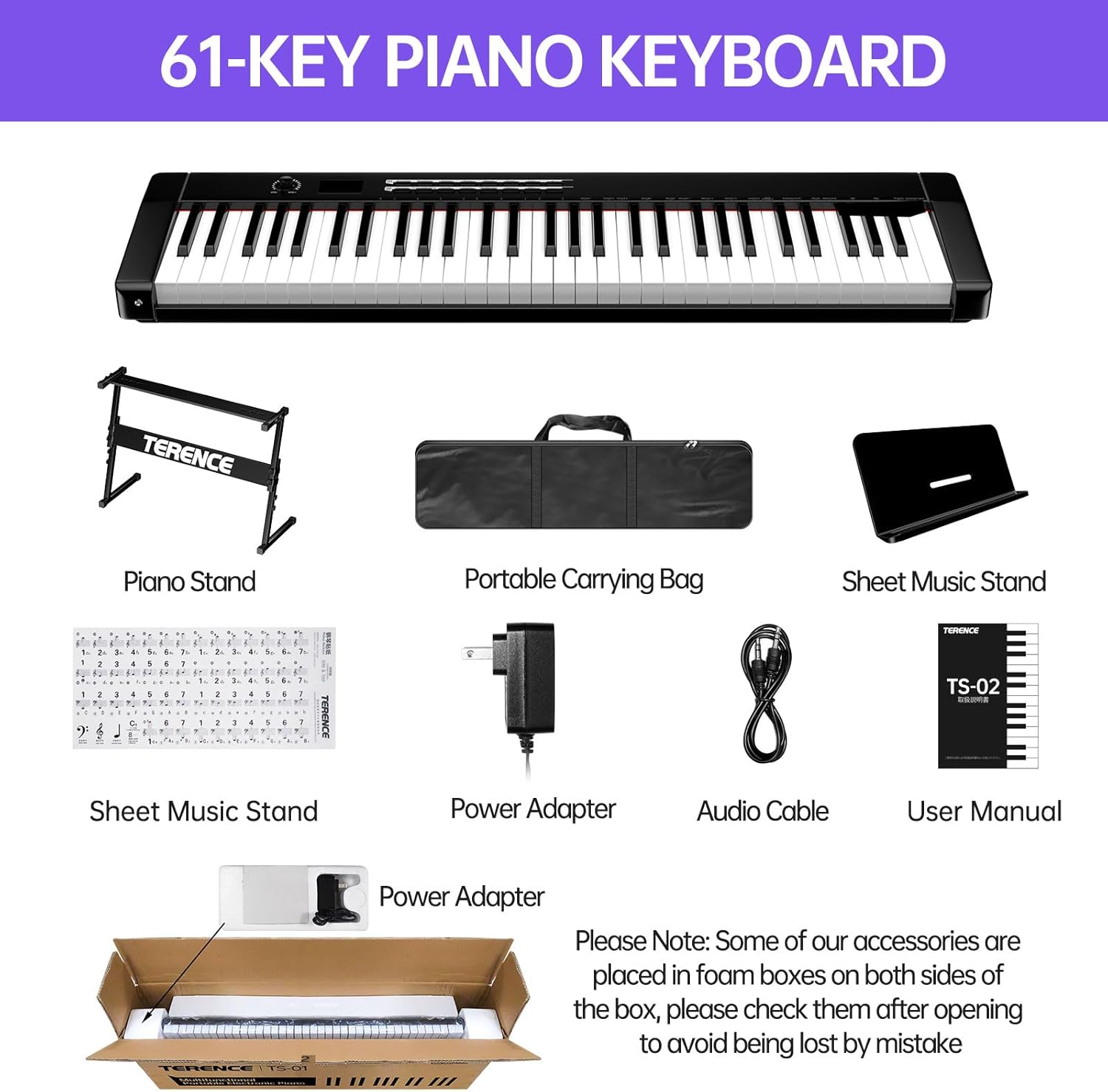
Figure 1: TERENCE TS-02 61-Key Electronic Digital Piano with all included accessories, such as the piano stand, carrying bag, music sheet stand, power adapter, audio cable, key stickers, and user manual.
2.3 Immagini del prodotto

Figure 2: The TERENCE TS-02 61-Key Electronic Digital Piano, showcasing its sleek design, keys, and an attached music stand holding a tablet.

Figure 3: An image highlighting the upgraded features of the TS-02 model, including the LCD display and panel function keys, compared to an older model.

Figura 4: Un dettaglio view of the 61 full-sized semi-weighted keys, illustrating their dimensions and the feel similar to a grand piano.
3. Impostazione
3.1 Montaggio del supporto per pianoforte
- Unfold the adjustable piano stand.
- Adjust the height of the stand to your preferred playing position using the adjustment knobs. Ensure both sides are set to the same height for stability.
- Place the TERENCE TS-02 keyboard securely on top of the stand.

Figure 5: A diagram illustrating the adjustable piano stand, showing its dimensions and how to adjust its height from 520mm to 860mm.
3.2 Fissaggio del leggio per spartiti
- Locate the two slots on the top panel of the keyboard.
- Insert the tabs of the music sheet stand into these slots until it is firmly in place.

Figure 6: An illustration demonstrating how to correctly attach the music sheet stand to the TERENCE TS-02 keyboard by aligning the tabs with the designated slots.
3.3 Accensione della tastiera
The TERENCE TS-02 can be powered in two ways:
- Adattatore di alimentazione: Connect the included power adapter to the DC 9V input jack on the back of the keyboard and plug it into a standard electrical outlet.
- Batterie: Per l'uso portatile, aprire il vano batterie sul lato inferiore della tastiera e inserire 6 batterie AA (non incluse), assicurandosi della corretta polarità.

Figure 7: A visual representation of the two power supply options for the keyboard: using 6 AA batteries (not included) or the provided power adapter.
Video 1: Una panoramica dettagliataview of the 61-key piano keyboard, demonstrating its features and components. This video is provided by the seller.
4. Istruzioni per l'uso
4.1 Funzionamento di base
- Accensione/spegnimento: Press the 'POWER' button to turn the keyboard on or off. The LCD display will illuminate.
- Controllo del volume: Use the 'VOL-' and 'VOL+' buttons or the rotary knob to adjust the master volume.
- Selezione delle voci: Use the 'TONE' button and number keys to select from 140 different instrument voices. The selected voice number will appear on the LCD.
- Selezione dei ritmi: Use the 'RHYTHM' button and number keys to select from 128 accompaniment rhythms.
- Regolazione del tempo: Use the 'TEMPO' buttons to increase or decrease the speed of rhythms and demo songs.
4.2 Funzioni avanzate
- Sustain & Vibrato: Activate these effects using their dedicated buttons to add depth and expression to your playing.
- Registrazione e riproduzione: Use the 'REC' button to start recording your performance and 'PLAY' to listen back.
- Programmazione: The programming function allows you to create custom rhythm patterns. Refer to the detailed user manual for specific steps.
- Connettività Bluetooth: Activate Bluetooth on the keyboard and your mobile device/tablet. Cercare the keyboard in your device's Bluetooth settings and pair. This enables connection to learning apps.
- Funzione MIDI: Connect the keyboard to a computer or other MIDI-compatible device using a MIDI USB cable for advanced music production or learning software.
- Utilizzo delle cuffie: Plug 3.5mm headphones into the headphone jack for silent practice, preventing disturbance to others.

Figure 8: An image demonstrating the Bluetooth connection process between the TERENCE TS-02 keyboard and a smartphone, enabling interaction with music applications.

Figure 9: This image highlights the Bluetooth and MIDI USB interface functions, showing how the keyboard can connect to various music apps like GarageBand, POP Piano, and Perfect Piano.
Video 2: A demonstration of the TERENCE Keyboard Piano in use, showcasing its playability and sound. This video is provided by the seller.
5. Manutenzione
- Pulizia: Use a soft, dry cloth to wipe the surface of the keyboard. Avoid using abrasive cleaners or solvents, which can damage the finish.
- Magazzinaggio: When not in use, store the keyboard in a cool, dry place away from direct sunlight and extreme temperatures. Use the included carrying bag for protection during transport or storage.
- Cura della batteria: Se si utilizzano le batterie, rimuoverle se non si utilizza la tastiera per un periodo prolungato per evitare perdite.
- Cura delle chiavi: The durable ABS material keys are designed to prevent skidding and fading. Regular gentle cleaning will maintain their high gloss.
6. Risoluzione Dei Problemi
- Nessun potere: Ensure the power adapter is securely connected to both the keyboard and a working power outlet. If using batteries, check that they are correctly inserted and not depleted.
- Nessun suono: Check the volume level of the keyboard and any connected headphones. Ensure headphones are fully plugged in if in use.
- I tasti non rispondono: Verify that no foreign objects are lodged between the keys. If the issue persists, power cycle the device.
- Bluetooth/MIDI Connectivity Issues: Ensure the keyboard's Bluetooth is enabled and your device is within range. For MIDI, check cable connections and ensure relevant software is correctly configured.
- Suono distorto: Reduce the volume to see if distortion decreases. Ensure the power supply is stable.
If you encounter issues not covered here, please refer to the full user manual or contact customer support.
7. Specifiche
| Caratteristica | Dettaglio |
|---|---|
| Nome del modello | TS-02 |
| Numero di chiavi | 61 |
| Tipo di chiave | Semi-Weighted, Full-Sized |
| Voci | 140 |
| ritmi | 128 |
| Display | LCD |
| Connettività | Bluetooth, MIDI USB, 3.5mm Jack (Headphones) |
| Fonte di alimentazione | Power Adapter (included) or 6 AA Batteries (not included) |
| Altoparlanti | 2 x 5W |
| Dimensioni (tastiera) | 35.4" (L) x 9.1" (W) x 2.4" (H) (without music stand) |
| Peso (tastiera) | 7.5 libbre |
| Colore | Nero lucido |
8. Garanzia e supporto
For warranty information and customer support, please refer to the documentation included with your product or visit the official TERENCE websito. Conservare la ricevuta d'acquisto come prova d'acquisto per eventuali reclami in garanzia.