
YABER L1w
Manuale utente del proiettore Android YABER L1
Model: L1w
Introduzione
About Your YABER L1 Projector
The YABER Android Projector L1 is a compact smart entertainment projector designed for easy access to your favorite movies, TV shows, and games through its built-in Android OS. This manual provides essential information for setting up, operating, and maintaining your projector.

Image: The YABER Android Projector L1, showcasingrazie al suo design compatto e alla lente frontale.

Image: The YABER L1 Projector projecting a vibrant Android TV interface, highlighting its smart capabilities.

Image: The YABER L1 Projector being easily placed into a bag alongside a laptop, illustrating its portability and compact size for travel or storage.
Prodotto finitoview
Contenuto della confezione
- YABER Android Projector L1
- Telecomando
- Adattatore di alimentazione
- Cavo HDMI
- Manuale d'uso
Componenti del proiettore
Familiarize yourself with the key components of your YABER L1 projector:

Image: A detailed breakdown of the YABER L1 Projector's key components, including the projection lens, the top control panel with buttons, and the chamfered edge design.
- Lente: The projection lens, responsible for displaying the image.
- Pannello di controllo: Buttons on the top of the projector for basic navigation and control.
- Chamfer: The distinct design element on the projector's casing.
- Porte: Various input/output ports (HDMI, USB, Audio Out) located on the rear or side.
- Griglie di ventilazione: Located on the sides and rear to ensure proper airflow and prevent overheating.
Guida all'installazione
Posizionamento
Place the projector on a stable, flat surface. Ensure there is adequate space around the projector for ventilation. The distance from the screen or wall will determine the image size.
Collegamento di potenza
- Collegare l'adattatore di alimentazione alla porta di ingresso dell'alimentazione del proiettore.
- Collegare l'adattatore di corrente a una presa a muro.
- Premere il pulsante di accensione sul proiettore o sul telecomando per accenderlo.
Configurazione iniziale e connessione di rete
Upon first power-on, the projector will guide you through the initial Android OS setup, including language selection and Wi-Fi network connection. A stable Wi-Fi connection is essential for accessing online content and apps.
Messa a fuoco e correzione trapezoidale
The YABER L1 features automatic focus. If the image appears blurry, the projector will automatically adjust. Manual adjustments can also be made via the settings menu. Keystone correction helps to square the image if the projector is not perfectly perpendicular to the screen.
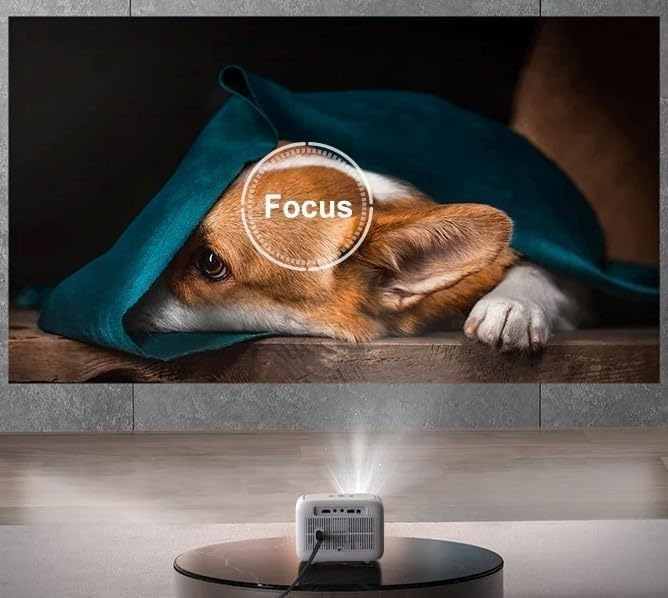
Image: The YABER L1 Projector actively performing an automatic focus adjustment, indicated by a circular 'Focus' overlay on the projected image of a dog, ensuring a clear picture.

Image: A visual guide illustrating the optimal projection distances for the YABER L1 Projector, showing how different distances (5.9ft, 9.8ft, 11.3ft) correspond to various screen sizes (60", 100", 120").
Istruzioni per l'uso
Navigating the Android OS
Use the provided remote control to navigate the Android TV interface. The remote allows you to select apps, adjust settings, and control media playback. Basic navigation buttons are also available on the projector itself.
Connecting External Devices (HDMI, USB)
- HDMI: Connect gaming consoles, Blu-ray players, or laptops using an HDMI cable. Select the corresponding HDMI input from the projector's source menu.
- USB: Inserire unità USB per riprodurre contenuti multimediali file(foto, video, musica) direttamente dall'unità. Utilizzare il file manager app within the Android OS to browse content.
Mirroring/casting dello schermo
The YABER L1 supports screen mirroring from compatible smartphones and tablets. Ensure both your device and the projector are connected to the same Wi-Fi network. Refer to your device's casting instructions or the projector's mirroring app for detailed steps.

Image: A person holding a smartphone, demonstrating the screen mirroring capability of the YABER L1 Projector as content from the phone is displayed on the large projected screen.
Connessione audio Bluetooth
Connect external Bluetooth speakers or soundbars for enhanced audio experience. Navigate to the Bluetooth settings in the Android OS, enable Bluetooth, and pair with your desired audio device.

Image: The YABER L1 Projector wirelessly connected to a soundbar via Bluetooth, illustrating its ability to output audio to external speakers for an immersive sound experience.
Manutenzione
Pulizia della lente
Pulire delicatamente la lente del proiettore con un panno morbido e privo di lanugine, specificamente progettato per superfici ottiche. Non utilizzare detergenti abrasivi o esercitare una forza eccessiva, poiché ciò potrebbe graffiare la lente.
Garantire una corretta ventilazione
Keep the projector's ventilation grilles clear of obstructions to ensure proper airflow. Blocked vents can lead to overheating and affect performance and lifespan. Do not place the projector on soft surfaces like blankets that can block vents.
Magazzinaggio
When not in use for extended periods, store the projector in a cool, dry place, away from direct sunlight and excessive dust. Consider using the original packaging or a protective case.
Risoluzione dei problemi
This section addresses common issues you might encounter with your YABER L1 Projector.
- Nessun potere:
Ensure the power adapter is securely connected to both the projector and a working power outlet. Try a different outlet. - Nessuna immagine:
Check if the projector is powered on. Verify the input source is correctly selected (e.g., HDMI1, USB). Ensure the lens cap is removed. - Immagine sfocata:
Allow the auto-focus to adjust. If still blurry, check for smudges on the lens and clean it gently. Ensure the projection surface is flat. - Nessun suono:
Check the volume level on the projector and any connected external audio devices. If using an external device (e.g., HDMI source), ensure its audio output is enabled. If using Bluetooth, ensure it's correctly paired. - Problemi di connessione Wi-Fi:
Ensure the projector is within range of your Wi-Fi router. Restart both the projector and your router. Re-enter the Wi-Fi password to ensure it's correct.
Specifiche
| Caratteristica | Dettaglio |
|---|---|
| Dimensioni del pacco | 8.82 x 7.76 x 6.34 pollici |
| Peso dell'articolo | 3.3 libbre |
| Produttore | Yaber |
| ASIN | B0CG9RY23Q |
| Numero modello articolo | L1w |
| Data prima disponibilità | 27 agosto 2023 |
Garanzia e supporto
For warranty information and technical support, please refer to the warranty card included with your product or visit the official YABER website. You may also contact YABER customer service directly for assistance with product issues or inquiries.
Documenti correlati - L1w
 |
Guida rapida all'avvio del proiettore intelligente YABER K2s Questa guida rapida fornisce istruzioni essenziali per l'installazione e il funzionamento del proiettore intelligente YABER K2s, inclusi il contenuto della confezione, il prodottoview, installazione del dongle TV, configurazione del controllo vocale Alexa, connessioni dei dispositivi, impostazioni NFC, modalità altoparlante Bluetooth e regolazione dell'immagine. |
 |
Manuale utente del proiettore per l'intrattenimento Yaber C450 Manuale utente completo per il proiettore per l'intrattenimento Yaber C450, che copre configurazione, funzionamento, connettività, risoluzione dei problemi e specifiche. Scopri come installare, collegare i dispositivi e ottimizzare il tuo viewesperienza di acquisizione. |
 |
Manuale di istruzioni YABER Y30 - La tua guida all'intrattenimento domestico 1080P Manuale di istruzioni dettagliato per il proiettore per l'intrattenimento YABER Y30 1080P. Scopri come installare, utilizzare, risolvere i problemi e molto altro per un'esperienza home theater ottimale. |
 |
Manuale utente del proiettore Yaber E1: installazione, funzionamento e risoluzione dei problemi This comprehensive user manual provides detailed instructions for the Yaber E1 projector, covering setup, image adjustment, connectivity options (HDMI, USB, Wi-Fi, Bluetooth), multimedia playback, and troubleshooting tips. Learn how to get the most out of your Yaber E1 projector. |
 |
Manuale utente e guida del proiettore Yaber Pro V9 Manuale utente completo per il proiettore Yaber Pro V9, che descrive in dettaglio installazione, configurazione, funzionalità, opzioni di connettività, impostazioni di immagine e audio, connessioni wireless e risoluzione dei problemi. Scopri come ottimizzare la tua esperienza home theater con Yaber Pro V9. |
 |
Manuale utente e specifiche del proiettore Yaber T2 Guida completa al proiettore Yaber T2, che copre caratteristiche, installazione, impostazioni, connettività, garanzia e precauzioni importanti. Scopri come configurare e utilizzare il tuo Yaber T2 per un utilizzo ottimale. viewesperienza di acquisizione. |
Ask a question about this manual
Ask about setup, troubleshooting, compatibility, parts, safety, or missing instructions. Manuals+ will review the question and use this page’s manual context to help answer it.