
Introduzione
Grazie per l'acquistoasing the OBEST EN8829-B Wireless Weather Station. This device provides accurate indoor and outdoor temperature and humidity readings, a 6-level weather forecast, time, date, and an alarm function. Please read this manual carefully to ensure proper setup and operation.
Contenuto della confezione
- OBEST EN8829-B Weather Station (Main Unit)
- Sensore esterno wireless
- Cavo di alimentazione USB
- Manuale d'uso
Prodotto finitoview
The OBEST EN8829-B features a 6-inch color LCD display and a wireless outdoor sensor for comprehensive environmental monitoring.

Image: The main display unit of the OBEST EN8829-B weather station, showing indoor and outdoor temperature and humidity, weather forecast, date, moon phase, and time.
Caratteristiche dell'unità principale:
- 6-inch HTN color LCD display
- 6 touch buttons: [SET], [MODE], [ALERTS], [UP], [SNOOZE/LIGHT], [DOWN]
- 12H/24H time selection
- Alarm with snooze function (5-60 minutes)
- Perpetual calendar with M/D or D/M display
- Week display in 5 languages (German, English, French, Italian, Spanish)
- Temperature display in °C / °F
- Barometric pressure indication (last 12 hours) in hPa/mb or inHg
- 6-level weather forecast (sunny, cloudy, overcast, rainy, heavy rain, snow)
- 8 types of moon phase indication
- Memory function for highest/lowest indoor/outdoor temperature and humidity
- Indoor temperature alarm (upper and lower limits)
- Porta di ricarica USB
- Adjustable backlight (4 levels with DC power, 10 seconds with battery)
Caratteristiche del sensore esterno:
- Grado di impermeabilità IP54
- Supporta fino a 3 sensori (uno incluso)
- RF 433.92 MHz detection frequency
- Wireless transmission distance up to 60m / 100ft
- Indicazione di bassa potenza
Impostare
1. Alimentazione dell'unità principale
The main unit can be powered by either DC power or batteries.
- DC Power (Recommended): Connect the provided USB power cable to the main unit and a suitable USB power adapter (not included). This allows the backlight to remain on continuously with adjustable brightness.
- Potenza della batteria: Insert 3 AAA batteries (not included) into the battery compartment. When powered by batteries, the backlight will illuminate for 10 seconds after a button press to conserve power.
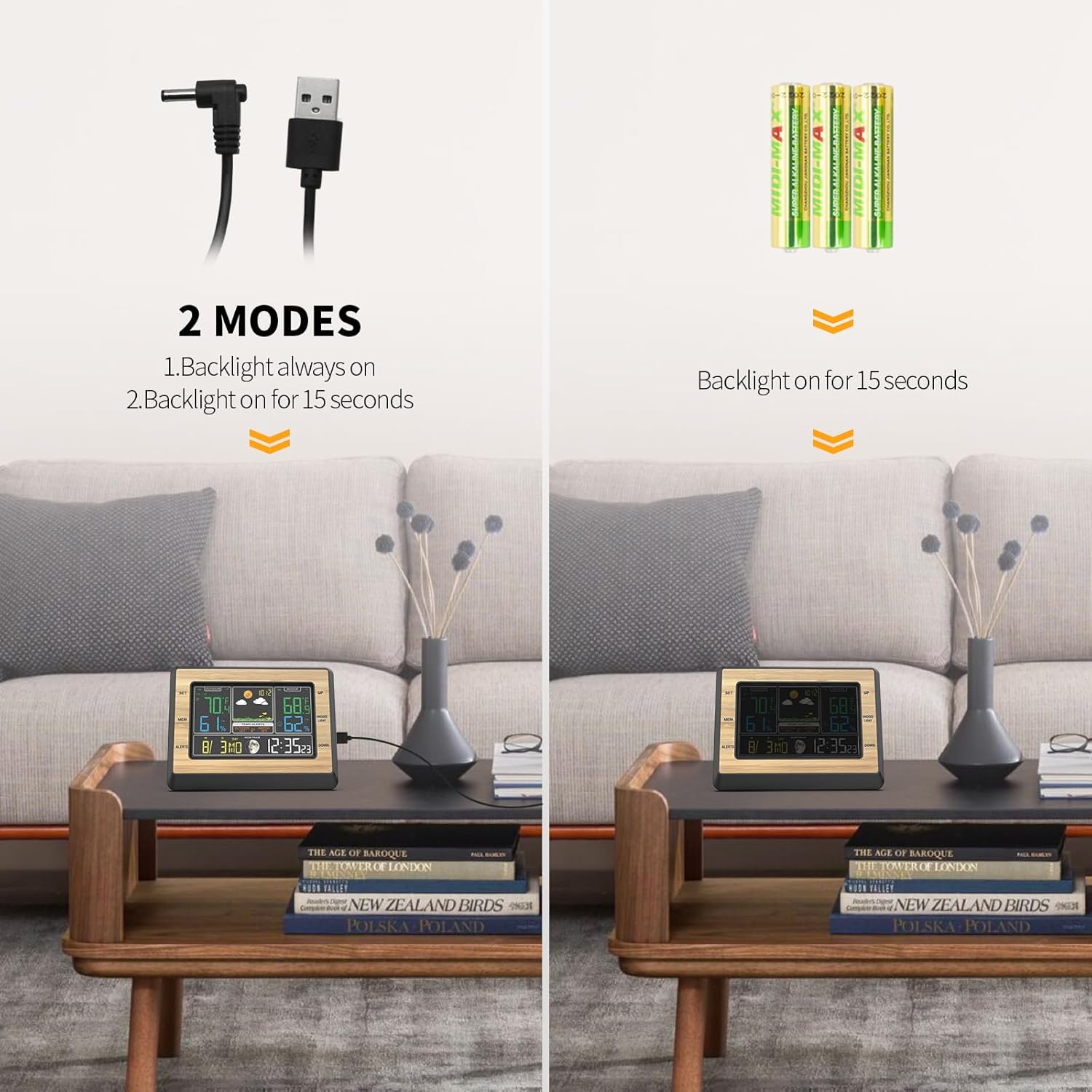
Image: Illustration of the two power modes for the weather station: DC power for continuous backlight and battery power for 15-second backlight.
2. Installing and Pairing the Outdoor Sensor
- Insert 2 AAA batteries (not included) into the outdoor sensor.
- Place the outdoor sensor in a shaded, dry location away from direct sunlight and rain, but where it can still transmit data to the main unit. The sensor is IP54 waterproof, but protection from extreme elements is recommended for longevity.
- The main unit will automatically search for and connect to the outdoor sensor. This may take a few minutes. Ensure both units are within the 60m / 100ft transmission range.
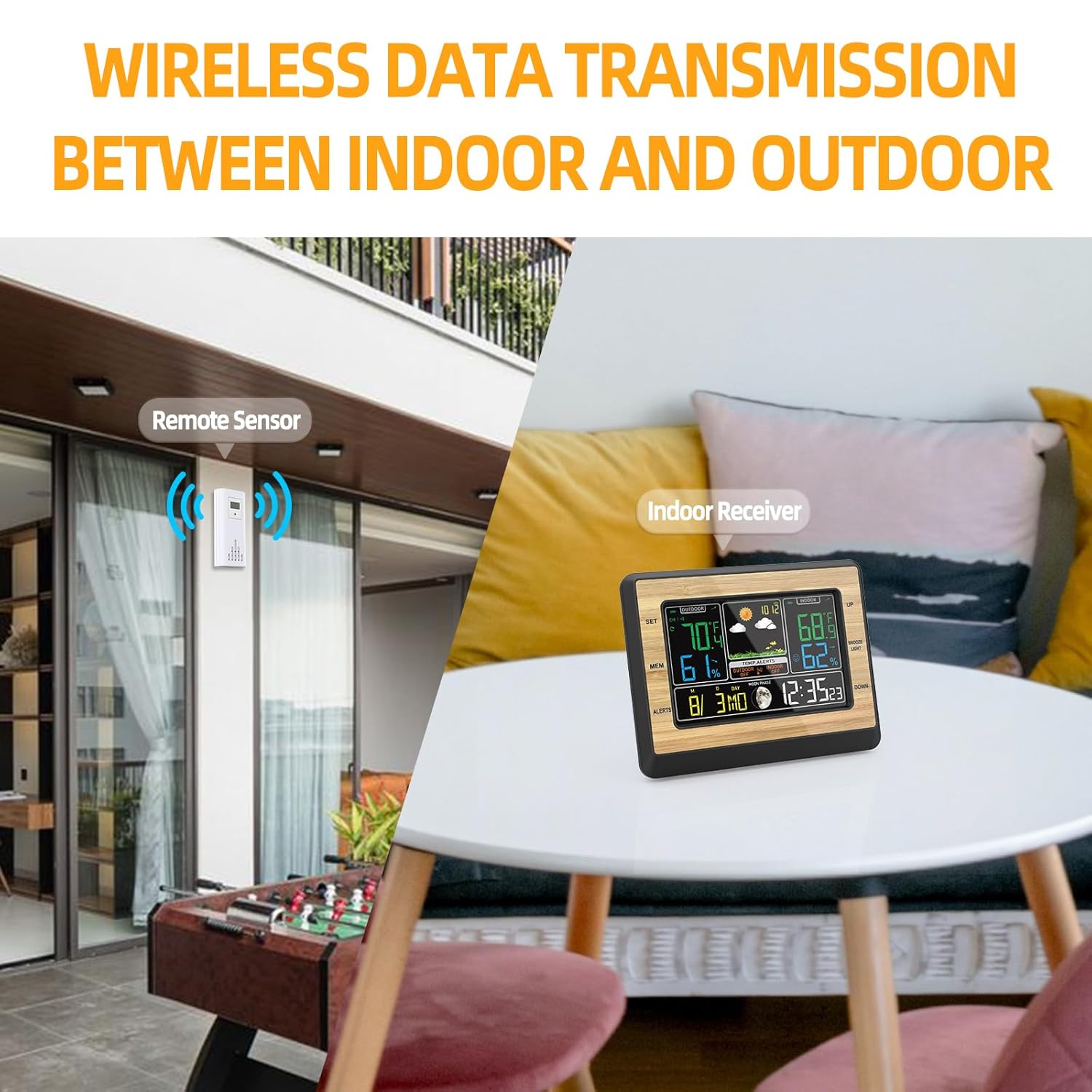
Image: Depicts the wireless data transmission between the remote outdoor sensor and the indoor receiver unit.
3. Impostazioni iniziali
After powering on, you may need to set the time, date, and other preferences.
- Premere e tenere premuto il tasto [IMPOSTATO] pulsante per accedere alla modalità di impostazione dell'ora.
- Utilizzare il [SU] E [GIÙ] pulsanti per regolare i valori.
- Premere [IMPOSTATO] again to confirm and move to the next setting (e.g., 12/24H format, hour, minute, year, month, day, date format M/D or D/M, language for day of week).
- Premere il tasto [MODALITÀ] button to exit settings at any time.
- To change temperature units (°C/°F), press the [SU] pulsante in modalità di visualizzazione normale.
Istruzioni per l'uso
1. Visualizza informazioni
Il display principale mostra varie informazioni:
- Temperatura e umidità esterne: Situato sul lato sinistro del display.
- Temperatura e umidità interna: Located on the right side of the display.
- Previsioni del tempo: Icons indicating sunny, cloudy, rainy, etc., in the upper middle section.
- Ora dell'appuntamento: At the bottom right.
- Fase lunare: Icon next to the date.
- Pressione barometrica: Displayed in the upper middle section, below the weather forecast.
2. Regolazione della retroilluminazione
When powered by DC, the backlight has 4 adjustable levels.
- Premere il tasto [SNOOZE/LUCE] button to cycle through high brightness, medium light, low light, and off.
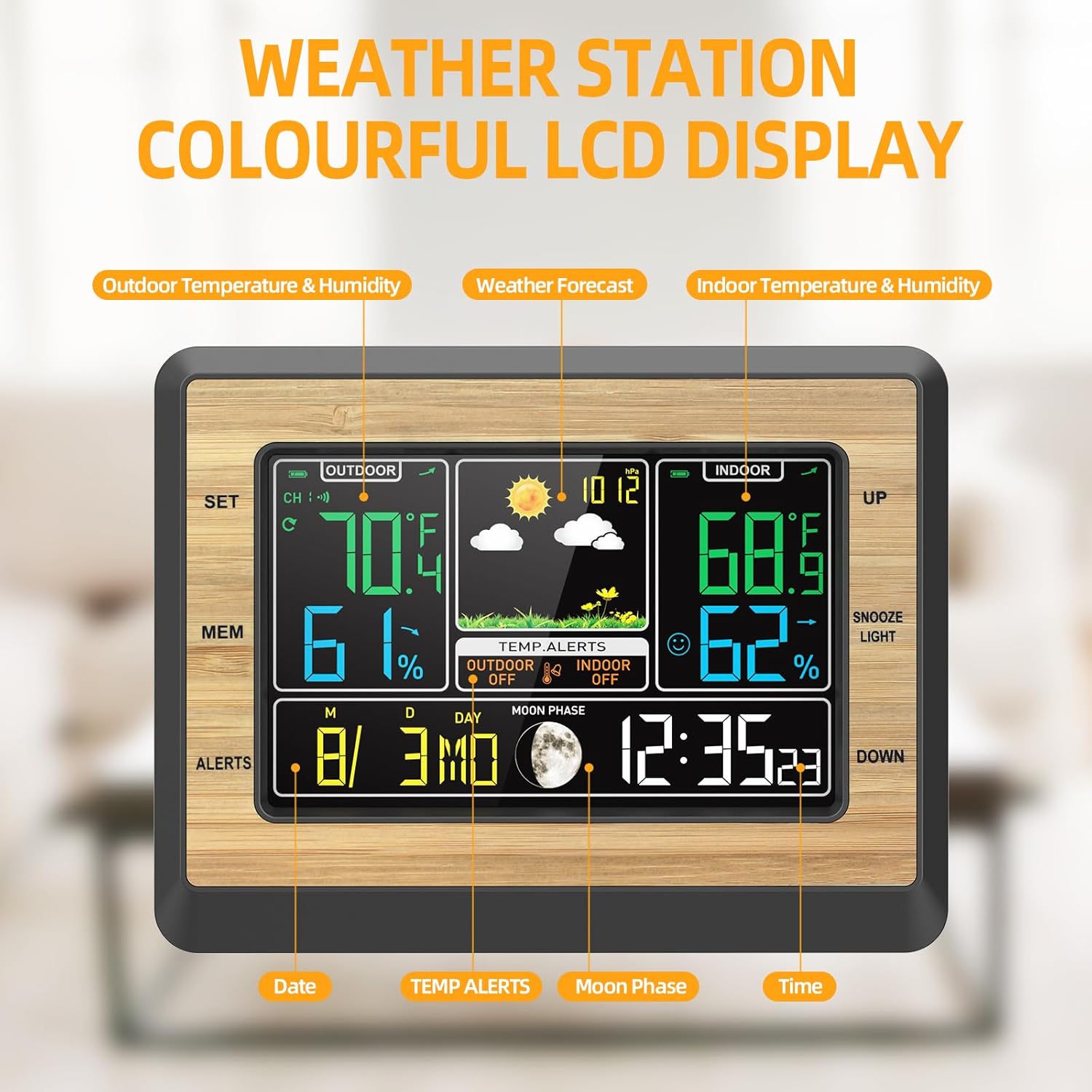
Image: Four panels illustrating the different backlight brightness levels (high, medium, low, off) of the weather station display.
3. Funzione sveglia e snooze
- Impostazione allarme: Premere il tasto [MODALITÀ] button repeatedly until the alarm time is displayed. Hold [IMPOSTATO] to adjust the alarm time using [SOTTOSOPRA]. Premere [IMPOSTATO] per confermare.
- Attivazione/disattivazione dell'allarme: In alarm display mode, press [SU] per attivare o disattivare la sveglia.
- Posticipa: Quando suona la sveglia, premere il tasto [SNOOZE/LUCE] button to activate snooze. The alarm will sound again after 5-60 minutes (adjustable in settings).
4. Avvisi di temperatura/umidità
You can set upper and lower limits for indoor temperature alerts.
- Premere il tasto [AVVISI] pulsante per view current alert settings.
- Presa [AVVISI] to enter alert setting mode. Use [SOTTOSOPRA] to adjust the desired high/low temperature limits.
- Premere [AVVISI] per confermare e passare all'impostazione successiva.
- When the temperature exceeds the set limits, an alarm will sound.
5. Max/Min Temperature and Humidity Memory
- Premere il tasto [MEM] button to display the maximum recorded indoor/outdoor temperature and humidity.
- Premere [MEM] again to display the minimum recorded values.
- Presa [MEM] to clear the recorded maximum/minimum values.
6. Previsioni del tempo
The weather station provides a 6-level weather forecast based on barometric pressure changes. This is an approximation and should not replace professional weather services.

Image: Collage of six different weather scenes (desert, clouds, rain, snow) illustrating the 6-mode weather forecast feature of the station.
Manutenzione
1. Sostituzione della batteria
- When the low battery indicator appears on the display for either the main unit or the outdoor sensor, replace the batteries promptly.
- For the main unit, use 3 AAA batteries. For the outdoor sensor, use 2 AAA batteries.
- Quando si inseriscono nuove batterie, assicurarsi della corretta polarità.
2. Pulizia
- Pulire l'unità principale e il sensore con un panno morbido e asciutto.amp stoffa.
- Do not use abrasive cleaners or solvents, as these may damage the display or casing.
3. Assistenza generale
- Evitare di esporre l'unità principale alla luce solare diretta, a temperature estreme o a elevata umidità.
- Ensure the outdoor sensor is placed in a location that minimizes direct exposure to harsh weather conditions, despite its waterproof rating.
Risoluzione dei problemi
- Nessuna lettura della temperatura/umidità esterna:
- Check if the outdoor sensor batteries are installed correctly and are not depleted.
- Ensure the sensor is within the transmission range (up to 60m / 100ft) and there are no major obstructions (thick walls, metal objects) between the sensor and the main unit.
- Try re-pairing the sensor by removing batteries from both units, then reinserting them into the sensor first, then the main unit.
- Letture imprecise di temperatura/umidità:
- Ensure the sensor is not in direct sunlight or near heat sources/vents, which can affect readings.
- Per ottenere letture accurate, lasciare che entrambe le unità si stabilizzino per almeno 30 minuti dopo l'installazione.
- Il display è scuro o vuoto:
- If using battery power, the backlight only stays on for 10 seconds after a button press.
- If using DC power, check the power cable connection. Press the [SNOOZE/LUCE] pulsante per regolare la luminosità.
- Replace batteries if the low battery indicator is on.
- L'allarme non suona:
- Assicurarsi che la funzione di allarme sia attivata (icona di allarme visibile sul display).
- Check the alarm time settings.
Specifiche
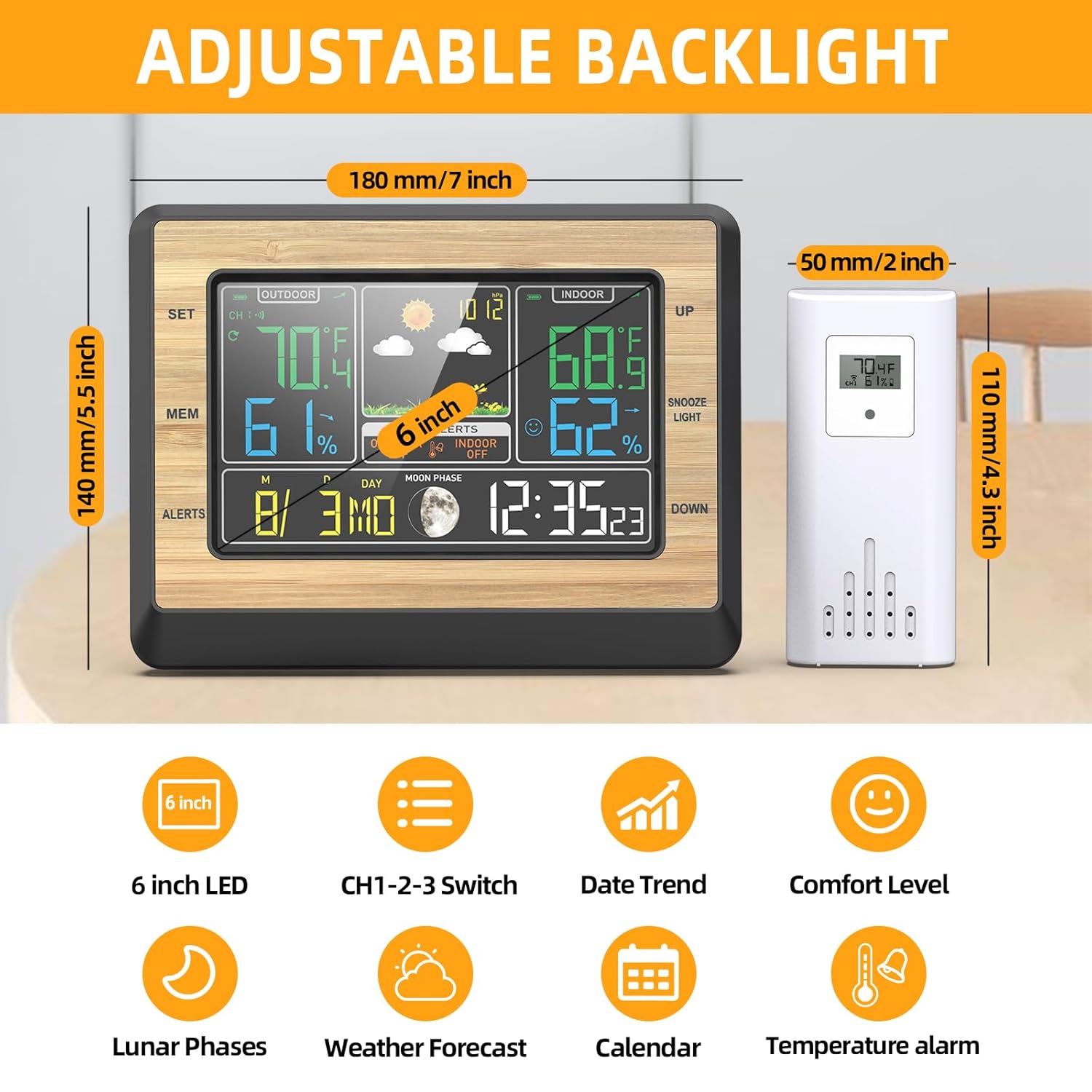
Image: Diagram showing the dimensions of the main unit (180mm/7 inch width, 140mm/5.5 inch height) and the outdoor sensor (50mm/2 inch width, 110mm/4.3 inch height), along with icons representing key features.
| Caratteristica | Dettaglio |
|---|---|
| Modello | EN8829-B |
| Tipo di visualizzazione | LCD a colori da 6 pollici |
| Intervallo di temperatura interna | -20°C ~ +70°C (-4°F ~ 158°F) |
| Intervallo di temperatura esterna | -40°C ~ +70°C (-40°F ~ 158°F) |
| Risoluzione della temperatura | 0.1°C / °F |
| Umidità ambiente | 20% di umidità relativa ~ 95% di umidità relativa |
| Intervallo di pressione barometrica | 850hPa/mb (25.1 inHg) -- 1100hPa/mb (32.48 inHg) |
| Frequenza senza fili | 433.92 MHz |
| Distanza di trasmissione wireless | Up to 60m / 100ft (open air) |
| Alimentazione dell'unità principale | USB DC 5V or 3 x AAA batteries (not included) |
| Potenza del sensore esterno | 2 batterie AAA (non incluse) |
| Dimensioni del prodotto (unità principale) | 19 x 6 x 15 cm (L x P x A) |
| Peso del prodotto | 445 grammi |
| Materiale | Acrilonitrile Butadiene Stirene (ABS) |
Garanzia e supporto
Warranty information for the OBEST EN8829-B Wireless Weather Station is not explicitly provided in the product details. For specific warranty terms or technical support, please contact the retailer or manufacturer directly.