
1. Introduzione
This manual provides detailed instructions for the installation, operation, and maintenance of your Jingelsye 10.4-inch HD Car Stereo. Please read this manual thoroughly before installation and use to ensure proper function and to maximize your product experience. This unit is designed specifically for Dodge Ram 1500, 2500, and 3500 models manufactured between 2013 and 2018, and is compatible only with vehicles equipped with manual air conditioning controls.
2. Prodotto finitoview
The Jingelsye 10.4-inch HD Car Stereo is an advanced infotainment system featuring a high-definition touchscreen display, an 8-core processor, and 64GB of internal storage. It integrates seamlessly with your vehicle, offering a range of functionalities including wireless Apple CarPlay and Android Auto, a Digital Sound Processor (DSP), 5G WiFi connectivity, GPS navigation, Bluetooth for hands-free communication, and FM/AM radio.
3. Compatibilità
This car stereo is custom-designed for:
- Dodge Ram Pickup 1500 (2013-2018)
- Dodge Ram Pickup 2500 (2013-2018)
- Dodge Ram Pickup 3500 (2013-2018)
Nota importante:
This unit is only compatible with models that have manual air conditioning (AC) controls. It is not suitable for vehicles with automatic AC versions.
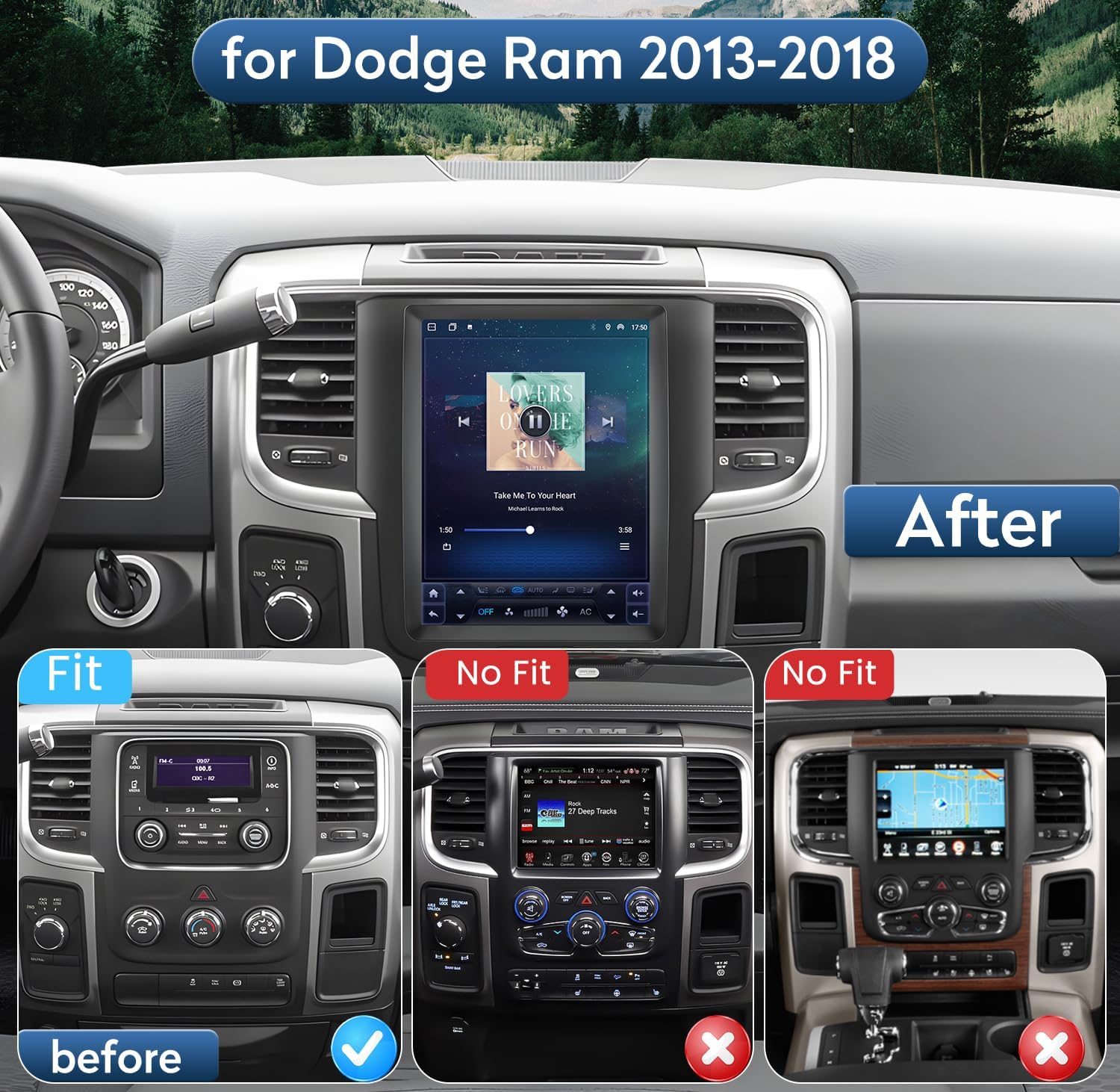
Immagine: Compatibilità suview. The top image shows the 10.4-inch stereo installed in a Dodge Ram dashboard. Below, a 'before' image shows a manual AC control panel with a checkmark, indicating compatibility. Two 'no fit' images show automatic AC control panels with cross marks, indicating incompatibility.
4. Configurazione e installazione
4.1. Elenco di controllo pre-installazione
- Ensure your vehicle is a compatible Dodge Ram model (2013-2018) with manual AC.
- Gather all included accessories and cables.
- Scollegare la batteria del veicolo prima di iniziare l'installazione.
4.2. Fasi di installazione
- Carefully remove the original car stereo and dashboard trim. Refer to your vehicle's service manual or online resources for specific removal procedures.
- Collegare il cablaggio fornito al cablaggio esistente del veicolo. Assicurarsi che tutti i collegamenti siano ben saldi.
- Connect the GPS antenna, WiFi antenna, and radio antenna cables to the corresponding ports on the new head unit.
- If installing a backup camera or DVR, connect their respective cables.
- Mount the new 10.4-inch head unit into the dashboard opening.
- Ricollegare la batteria del veicolo e testare la funzionalità dell'unità prima di rimontare completamente la finitura del cruscotto.
4.3. Included Accessories and Wiring

Image: The main stereo unit is shown with a comprehensive set of accessories and cables, including a crowbar tool, DVR cable, camera input, USB cables, AUX input, RCA audio output, power harness, GPS antenna, WiFi antenna, radio antenna cable, AC control cable, Canbus module, and an external microphone.
5. Istruzioni per l'uso
5.1 Apple CarPlay wireless
Connect your iPhone wirelessly to access Apple CarPlay features. This allows for hands-free calls, music streaming, navigation via Apple Maps, notifications, and messaging, all controlled through Siri voice commands or the touchscreen.
- Ensure Bluetooth is enabled on your iPhone and the car stereo.
- Pair your iPhone with the car stereo via Bluetooth.
- Una volta effettuato l'abbinamento, CarPlay dovrebbe avviarsi automaticamente.

Image: The car stereo screen shows the Apple CarPlay interface with various app icons. An iPhone is depicted next to it, illustrating the mirrored functionality and voice command options like 'Call Jack' or 'Play radio'.
5.2. Android Auto senza fili
Connect your Android phone wirelessly to utilize Android Auto. This provides access to Google Maps, music apps, messaging, and calls, with control via Google Assistant or the touchscreen.
- Ensure Bluetooth is enabled on your Android phone and the car stereo.
- Pair your Android phone with the car stereo via Bluetooth.
- Once paired, Android Auto should automatically launch.
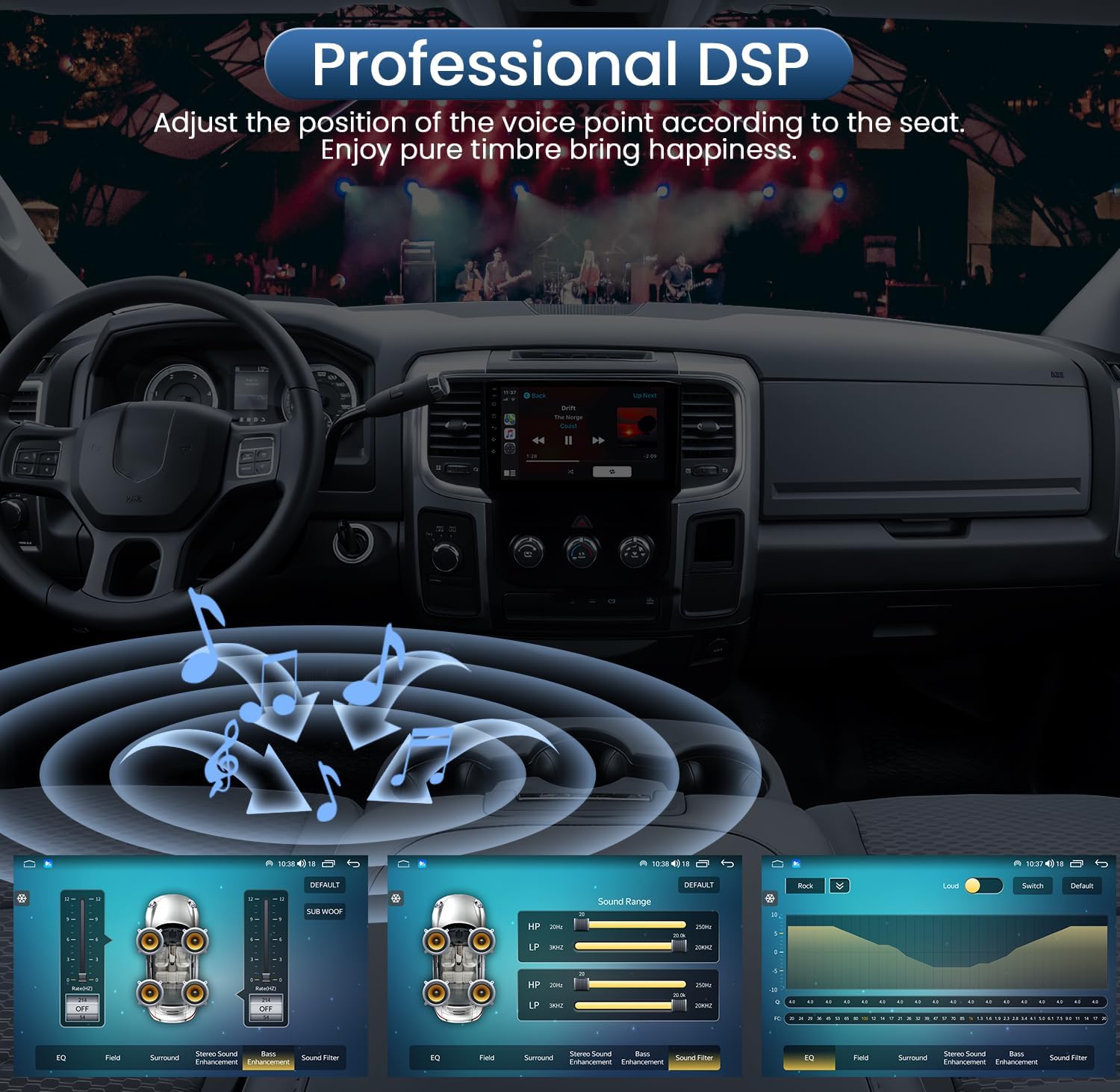
Image: The car stereo screen shows the Android Auto interface with navigation and media controls. An Android phone is shown alongside, demonstrating voice commands such as 'Open map' or 'Navigate to the airport'.
5.3. Android Operating System and HD Touch Display
The unit runs on an Android 12 operating system, powered by an 8-core processor, ensuring smooth performance. The 10.4-inch HD touchscreen (1280 x 720 resolution) provides vibrant and clear visuals. With 64GB of storage, you can download and install various applications from the app store.
5.4. Processore audio digitale (DSP)
The integrated DSP allows for precise audio customization. Use the equalizer and sound field adjustments to optimize the audio output to your preference, creating a personalized listening experience within your vehicle.
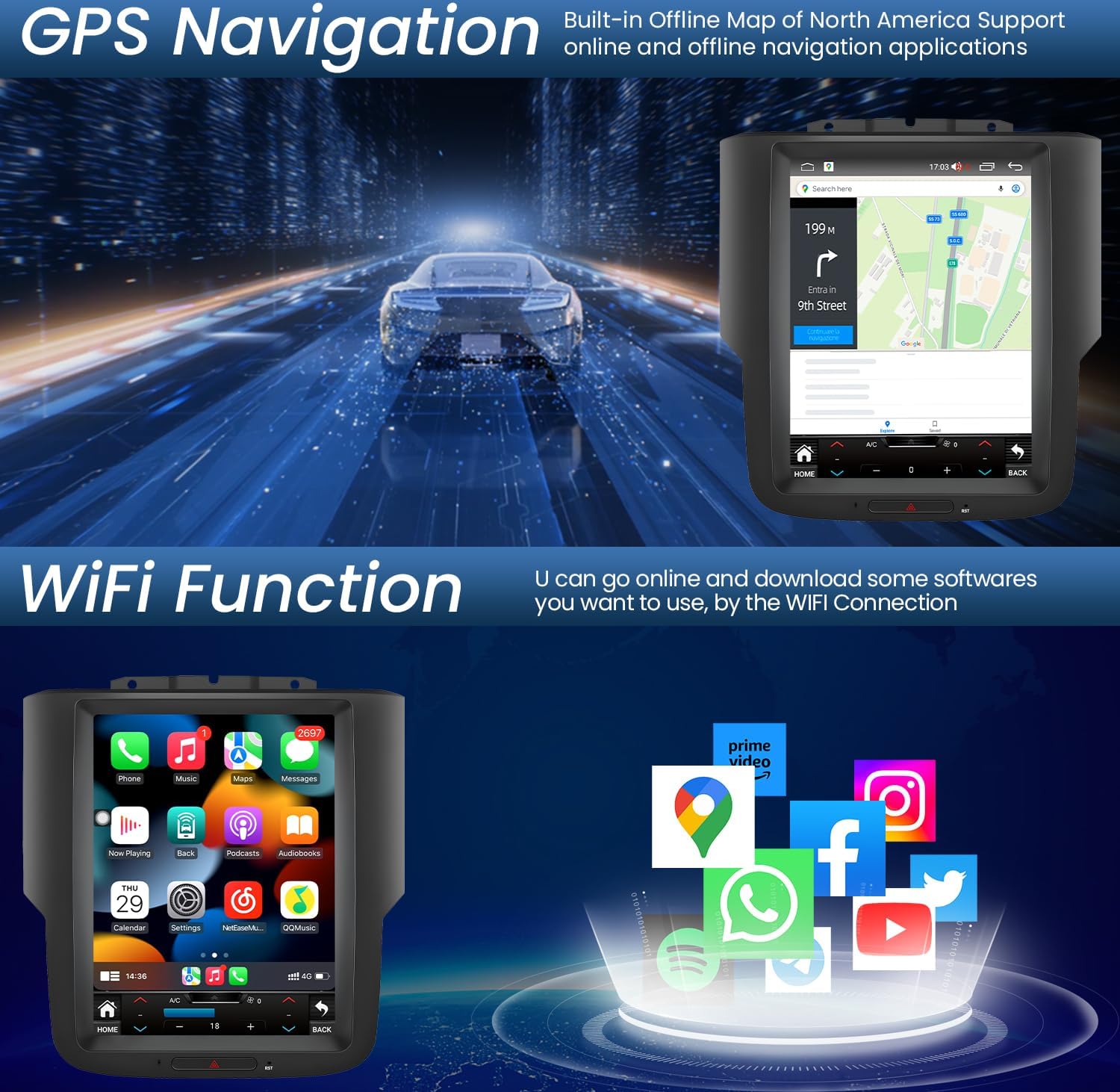
Image: The car stereo screen shows the DSP interface, allowing users to adjust equalizer settings, sound range (HP, LP filters), and the position of the voice point for optimal sound quality.
5.5. 5G WiFi and GPS Navigation
Connect the stereo to a WiFi network or your phone's hotspot to access online features. This includes downloading applications and utilizing online navigation services. The unit also supports offline navigation with pre-installed maps for North America.
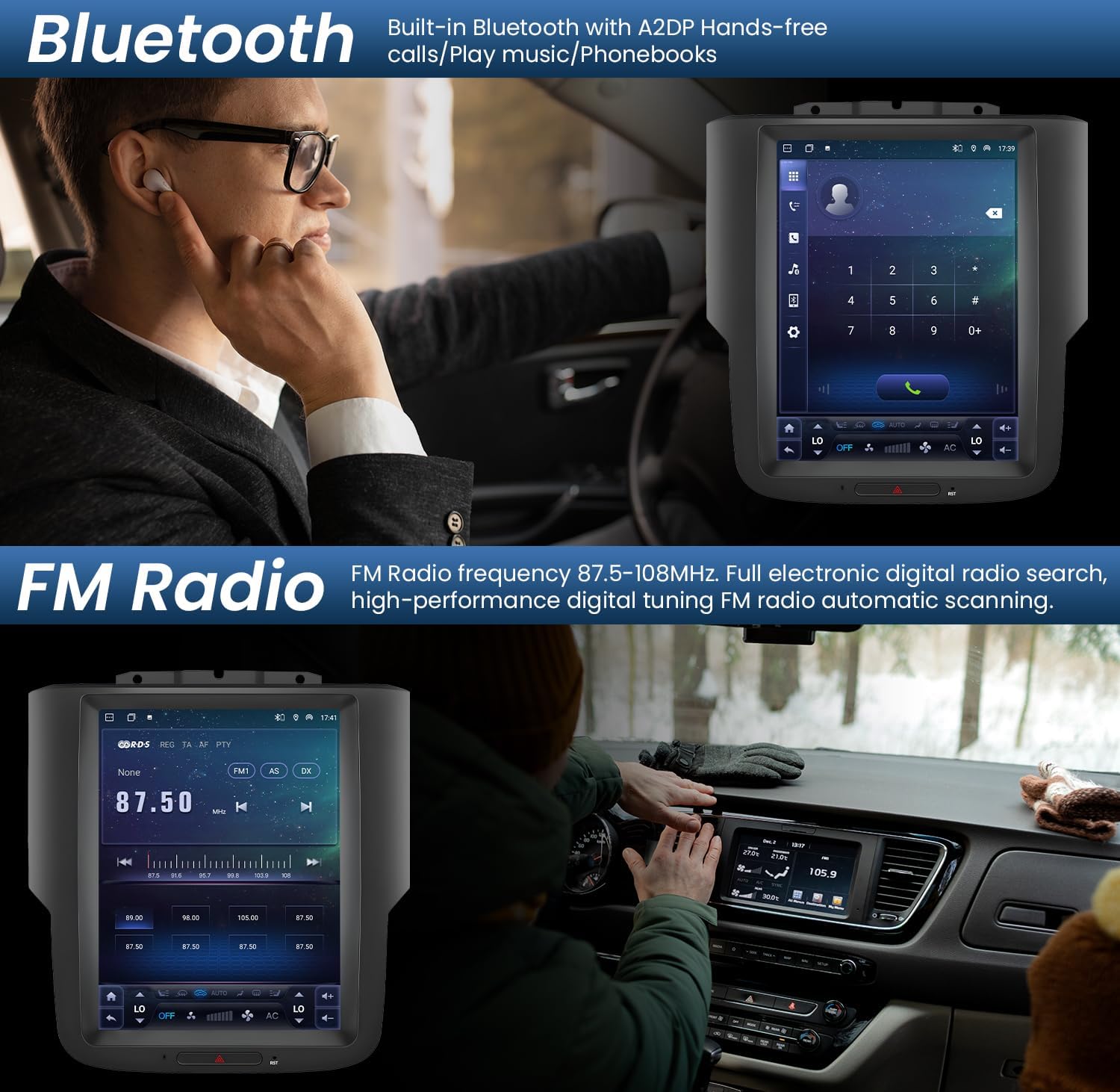
Image: The top part of the image shows the car stereo displaying a GPS navigation map. The bottom part illustrates the WiFi function, showing various app icons available for download and use.
5.6. Connettività Bluetooth
The built-in Bluetooth module supports A2DP for high-quality audio streaming and hands-free calling. Pair your smartphone to make and receive calls directly through the stereo, and stream music from your device.
5.7. Radio FM/AM
Enjoy your favorite radio stations with the integrated FM/AM tuner. The unit features full electronic digital radio search and high-performance digital tuning, with 18 preset stations available for quick access.
Image: The top section shows the Bluetooth interface for hands-free calls. The bottom section displays the FM radio interface, showing frequency tuning and preset options.
6. Manutenzione
- Pulizia dello schermo: Utilizzare un panno morbido e privo di lanugine per pulire delicatamente il touchscreen. Evitare detergenti abrasivi o prodotti chimici aggressivi.
- Aggiornamenti software: Controllare periodicamente la disponibilità di aggiornamenti software tramite le impostazioni di sistema per garantire prestazioni ottimali e l'accesso a nuove funzionalità.
- Cura generale: Keep the unit free from excessive dust and moisture. Avoid exposing it to extreme temperatures.
7. Risoluzione Dei Problemi
- L'unità non si accende: Check all power connections and ensure the vehicle's battery is properly connected. Verify the fuse.
- Nessun suono: Check speaker connections, volume levels, and audio settings (DSP). Ensure the correct audio source is selected.
- Il touchscreen non risponde: Prova a riavviare l'unità. Se il problema persiste, esegui un ripristino delle impostazioni di fabbrica (nota: questa operazione cancellerà tutti i dati utente).
- Perdita del segnale GPS: Assicurarsi che l'antenna GPS sia installata correttamente e abbia una visuale libera view del cielo.
- Bluetooth/CarPlay/Android Auto connection issues: Assicurati che il Bluetooth sia abilitato su entrambi i dispositivi e che siano nel raggio d'azione. Prova a disaccoppiare e riassociare i dispositivi.
Per problemi persistenti non trattati qui, fare riferimento alla sezione di supporto.
8. Specifiche
| Marca | Jingelsye |
| Anno del modello | 2013 (for compatibility reference) |
| Sistema operativo | Androide 12 |
| Processore | 8 core |
| Capacità di archiviazione della memoria | 64 GB (interni) |
| Dimensioni dello schermo | 10.4 pollici |
| Risoluzione dello schermo | 1280x720 |
| Tipo di visualizzazione | LCD |
| Caratteristiche speciali | Touchscreen, Wireless CarPlay, Wireless Android Auto, DSP, GPS Navigation, WiFi, Bluetooth, FM/AM Radio |
| Tecnologia di connettività | Bluetooth, USB, Wi-Fi |
| Dispositivi compatibili | Smartphone, Altoparlante |
| Modalità di uscita audio | Stereo |
| Dimensioni | Dimensioni: 45.11 x 32.21 x 15.19 cm |
| Peso | 2.96 kg |
9. Garanzia e supporto
Jingelsye is committed to providing comprehensive support for its products. All necessary accessories and a detailed instruction manual are included to facilitate installation and use. If you encounter any issues or require assistance with your car stereo, please do not hesitate to contact our customer support team. We are dedicated to resolving any problems as quickly as possible.
For support, please refer to the contact information provided with your purchase documentation or visit the official Jingelsye websito.