
1. Introduzione
Thank you for choosing the Devoko Electric Standing Desk. This manual provides detailed instructions for the safe and efficient assembly, operation, and maintenance of your new adjustable height desk. Designed for enhanced ergonomics and productivity, this desk allows you to easily switch between sitting and standing positions throughout your workday.
2. Informazioni sulla sicurezza
- Limite di peso: Do not exceed the maximum recommended weight capacity of 70 kg (154 lbs). Overloading can cause instability and damage.
- Montaggio: Seguire attentamente tutte le istruzioni di montaggio. Un montaggio non corretto può causare instabilità e potenziali lesioni.
- Sistema anticollisione: The desk is equipped with an anti-collision technology. If an obstacle is detected during height adjustment, the desk will stop and reverse slightly to prevent damage or injury.
- Protezione contro il surriscaldamento: The motor includes overheating protection. If the motor becomes too hot from continuous use, it will temporarily shut down to prevent damage. Allow it to cool before resuming operation.
- Liquidazione: Ensure there is adequate clearance around the desk during height adjustments to avoid collisions with walls, furniture, or other objects.
- Bambini e animali domestici: Per evitare incidenti, tenere bambini e animali domestici lontani dalla scrivania durante il funzionamento.
- Energia: Utilizzare solo l'adattatore di alimentazione fornito. Scollegare l'alimentazione prima di effettuare operazioni di pulizia o manutenzione.
3. Contenuto della confezione
Prima di iniziare il montaggio, verificare che tutti i componenti siano presenti:
- Desktop (4 sezioni)
- Gambe per scrivania (2)
- piedi (2)
- Control Panel with USB-C Port
- Motor and Drive Rod
- Vassoio per la gestione dei cavi
- Ganci per cuffie (2)
- Adattatore di alimentazione e cavi
- Assembly Hardware (screws, Allen keys)
- Manuale d'uso
4. Istruzioni di montaggio
Assembly is designed to be straightforward with pre-drilled holes. It typically takes about 40 minutes.
- Attach Desk Legs to Feet: Secure the desk legs to the feet using the provided screws. Ensure they are firmly attached.
- Assemblaggio del desktop: Join the four desktop sections together using the included connectors and screws. A power drill may simplify this step.
- Mount Legs to Desktop: Carefully place the assembled desktop upside down on a soft, clean surface. Attach the leg frames to the pre-drilled holes on the underside of the desktop using the provided screws.
- Install Drive Rod and Motor: Connect the drive rod between the two leg mechanisms. Install the motor unit and connect it to the drive rod and the control box.
- Attach Control Panel and Accessories: Mount the control panel to the underside of the desk in the designated area. Connect its cable to the control box. Install the cable management tray and headphone hooks as desired.
- Connetti alimentazione: Collegare l'adattatore di alimentazione alla centralina e poi collegarlo a una presa a muro.
Video: This video demonstrates the assembly process of the Devoko Electric Standing Desk, showing how to connect the frame components, attach the desktop, and install the control panel and motor. It also briefly shows the height adjustment function.

Immagine: Illustration showing the simple and quick assembly process, highlighting pre-drilled holes for easy setup.

Immagine: Avvicinamento view of desk accessories: two headphone hooks, a cable pass-through hole, a cable management tray, and adjustable feet.
5. Istruzioni per l'uso
Regolazione dell'altezza
Use the up and down arrow buttons on the control panel to adjust the desk height. The current height in centimeters will be displayed on the LED screen.
Preset di memoria
The control panel allows you to save up to 3 preferred height positions:
- Regolare la scrivania all'altezza desiderata utilizzando le frecce su/giù.
- Press the 'S' (Set) button. The display will flash.
- Press one of the numbered memory buttons (1, 2, or 3) within 3 seconds. The height is now saved to that preset.
- Per richiamare un'altezza salvata, è sufficiente premere il pulsante di memoria numerato corrispondente. La scrivania si sposterà automaticamente nella posizione salvata.
Porta di ricarica USB-C
The integrated USB-C port on the control panel allows you to conveniently charge your devices directly from your desk. Simply plug your compatible device into the port.
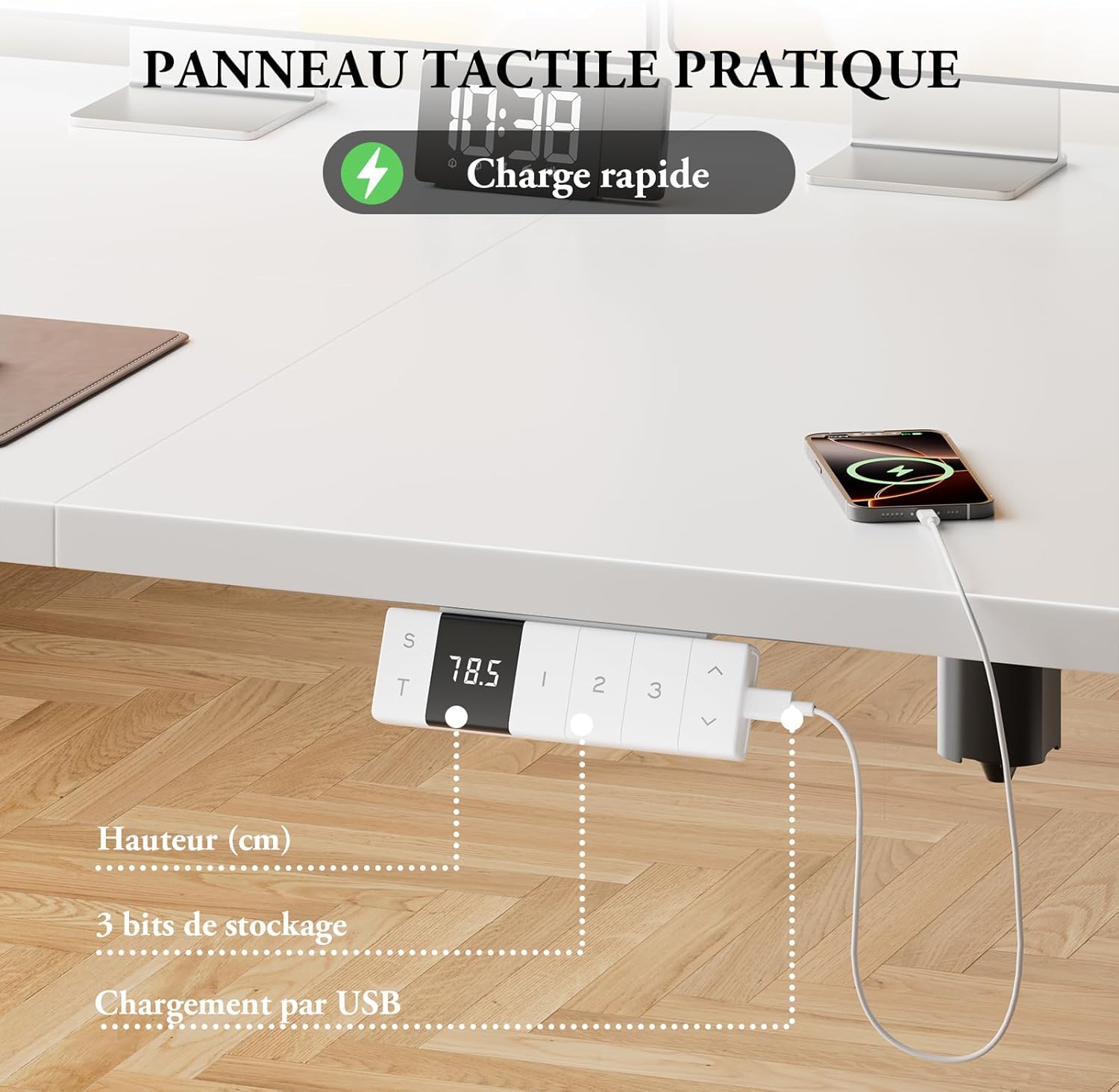
Immagine: Close-up of the control panel showing the digital height display, memory preset buttons, and the integrated USB-C charging port with a phone connected.

Immagine: Diagram illustrating the intelligent control panel with LED screen, 3 height memories, Type-C port, sitting position reminder function, and up/down movement.

Immagine: A device charging via the integrated Type-C connector on the desk's control panel, emphasizing convenient power access.

Immagine: The control panel displaying a reminder for smart sitting position memory, encouraging regular posture changes.
6. Caratteristiche principali
- Altezza regolabile: Easily adjust the desk height from 72 cm to 118 cm to suit your ergonomic needs.
- Funzionamento silenzioso: The motor operates at less than 50dB, ensuring a quiet working environment.
- Stabilità robusta: T-shaped widened desk legs provide excellent stability, supporting up to 70 kg.
- Tecnologia anticollisione: Si arresta e inverte automaticamente se viene rilevato un ostacolo durante il movimento.
- Protezione contro il surriscaldamento: Funzione di sicurezza integrata per prevenire danni al motore durante l'uso prolungato.
- Integrated USB-C Charger: Ricarica comodamente i tuoi dispositivi direttamente dalla scrivania.
- Gestione dei cavi: Includes a cable management tray and hooks to keep your workspace tidy.

Immagine: A woman standing comfortably at the Devoko Electric Standing Desk in a modern office setting, demonstrating its ergonomic benefits.

Immagine: Two Devoko desks, one at its minimum height (72cm) and another at its maximum height (118cm), illustrating the adjustable range.

Immagine: Diagram illustrating the immediate stop mechanism in case of an obstacle, ensuring safety for users, pets, and furniture.

Immagine: A visual representation of the desk's quiet motor operation, indicating noise levels below 50dB for an undisturbed work environment.

Immagine: An illustration demonstrating the desk's robust stability, capable of supporting up to 70 kg for multiple monitors and office equipment.

Immagine: A modern white desk setup showcasing the hidden cable management system, ensuring a clean and organized workspace.
7. Manutenzione
- Pulizia: Pulisci la superficie e la struttura della scrivania con un panno morbido e asciutto.amp panno. Evitare detergenti abrasivi o prodotti chimici aggressivi.
- Ispezione: Controllare periodicamente tutte le viti e i collegamenti per assicurarsi che siano ben serrati. Serrare nuovamente se necessario.
- Gestione dei cavi: Assicurarsi che i cavi siano ben organizzati e non siano schiacciati o aggrovigliati, soprattutto durante le regolazioni dell'altezza.
- Cura del motore: Avoid spilling liquids near the motor or control box. If the motor overheats, allow it to cool down completely before operating the desk again.
8. Risoluzione Dei Problemi
| Problema | Possibile causa | Soluzione |
|---|---|---|
| La scrivania non si muove | Power cable disconnected; Overload; Overheating protection activated | Check power connections; Reduce weight on desk; Allow motor to cool down for 20 minutes. |
| Regolazione dell'altezza non uniforme | Ostruzione; Carico sbilanciato | Rimuovere eventuali ostacoli; distribuire il peso uniformemente sulla scrivania. |
| Le preimpostazioni di memoria non funzionano | Programmazione errata | Riprogrammare le preimpostazioni di memoria seguendo le istruzioni per l'uso. |
| Il sistema anticollisione si attiva frequentemente | Sensitive setting; Actual obstruction | Ensure no objects are in the desk's path. Consult support if issue persists. |
9. Specifiche
- Marca: Devoko
- Numero modello: 0077
- Dimensioni (L x P x A): 140 x 80 x 72-118 cm (55.1 x 31.5 x 28.3-46.5 pollici)
- Altezza minima: 72 cm (28.3 pollici)
- Altezza massima: 118 cm (46.5 pollici)
- Colore: Bianco
- Materiale: Engineered Wood (top), Alloy Steel (legs)
- Capacità di peso: 70 kg (154 libbre)
- Tipo di motore: Elettrico
- Caratteristiche speciali: Ergonomic, Height Adjustable, Integrated USB-C Port, 3 Memory Positions, Anti-Collision, Overheating Protection, Cable Management
- Livello di rumore: ≤ 50 dB
10. Garanzia e supporto
The Devoko Electric Standing Desk comes with a limited warranty. For specific warranty details, claims, or technical support, please refer to the warranty card included with your product or contact Devoko customer service through the retailer where you purchased the product.