
Introduzione
The FOREVER Kids Look Me KW-510 Smartwatch provides a controlled and safe way for children to engage with technology and communication. Designed as an alternative to a smartphone, it features a SIM card slot for constant contact and peace of mind. This manual will guide you through the setup, operation, and maintenance of your new smartwatch.
Informazioni sulla sicurezza
- Rischio di soffocamento: Tenere le parti di piccole dimensioni lontano dalla portata dei bambini.
- Sicurezza della batteria: Do not attempt to replace the battery yourself. Use only the provided charging cable and station.
- Resistenza all'acqua: The device is IP67 water-resistant, meaning it can withstand immersion in water up to 1 meter for 30 minutes. It is not suitable for swimming or diving. Ensure the SIM card slot cover is securely closed before exposure to water.
- Temperatura di esercizio: Evitare di esporre il dispositivo a temperature estreme.
- Supervisione: Parental supervision is recommended during initial setup and use.
Contenuto della confezione
Si prega di selezionare la casella per i seguenti elementi:
- FOREVER Kids Look Me KW-510 Smartwatch
- Charging Station / Cable
- SIM Card (if included by your provider)
- Manuale dell'utente (questo documento)

Image: The retail packaging for the FOREVER Kids Look Me KW-510 Smartwatch, showing the watch and its features.
Impostare
1. Installazione della scheda SIM
The smartwatch requires a Standard size 4G SIM card for communication features. Ensure the SIM card is active and has a data plan.
- Spegnere lo smartwatch.
- Individuare lo slot per la scheda SIM sul lato dell'orologio.
- Aprire con cautela il coperchio dello slot della scheda SIM.
- Insert the Standard size SIM card into the slot with the gold contacts facing up and the notched corner aligned correctly.
- Spingere delicatamente la scheda SIM finché non scatta in posizione.
- Chiudere bene il coperchio dello slot della scheda SIM per garantire la resistenza all'acqua.
- Accendi lo smartwatch.
2. Installazione e associazione dell'app
To manage the smartwatch features, you need to install the dedicated companion application on your smartphone (compatible with iOS and Android devices).
- Download the 'Forever KidsCare' or similar companion app from your smartphone's app store.
- Register an account and follow the on-screen instructions to add your child's smartwatch. This usually involves scanning a QR code displayed on the watch screen or entering a device ID.
- Una volta effettuata l'associazione, è possibile configurare i contatti, le zone di sicurezza e altre impostazioni tramite l'app.

Image: Various screenshots of the companion mobile application, showing features like activity tracking, safety zone settings, and rewards.
3. Configurazione iniziale
After pairing, use the companion app to set up essential features:
- Contatti di emergenza: Add phone numbers for the SOS function.
- Rubrica: Add trusted contacts for your child to call.
- Zone di sicurezza: Define geographical areas (e.g., home, school) and receive notifications when your child enters or leaves them.
- Ora e data: Ensure the watch displays the correct time and date.
Istruzioni per l'uso

Image: The FOREVER Kids Look Me KW-510 Smartwatch, featuring a pink strap and a digital display with a dog face graphic.
1. Effettuare e ricevere chiamate
The smartwatch supports 4G cellular calls.
- Effettuare una chiamata: Navigate to the phonebook on the watch, select a contact, and initiate a call.
- Ricevere una chiamata: When a call comes in, the watch will ring. Tap the answer icon to accept or the decline icon to reject.
2. Funzione SOS
In an emergency, your child can activate the SOS function.
- Attivazione SOS: Press and hold the designated SOS button on the watch for a few seconds.
- The watch will automatically call the pre-set emergency contacts until one answers. It will also send a location alert to these contacts.
3. Tracciamento GPS e zone di sicurezza
The integrated GPS allows for precise location tracking.
- Monitoraggio in tempo reale: I genitori possono view the child's current location on a map via the companion app.
- Zone di sicurezza: Receive notifications when your child enters or exits predefined safe areas.
4. Camera and Remote Monitoring
The smartwatch includes a camera and remote monitoring capabilities.
- Scattare foto: Your child can take photos directly from the watch.
- Remote Camera Access: Parents can remotely activate the watch's camera via the app to view the child's surroundings.
- Remote Microphone Access: Parents can remotely activate the watch's microphone to listen to the child's surroundings.
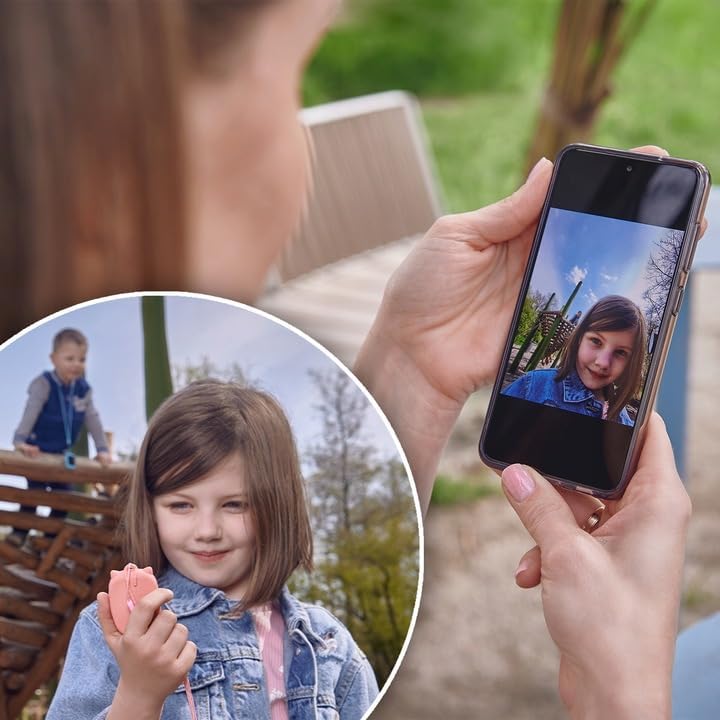
Image: A parent's hand holding a smartphone displaying a photo taken by the smartwatch, with a child playing in the background.
5. Chat Function
The watch supports a chat function for communication between the child and approved contacts.
- Invio di messaggi: Children can send voice messages or pre-set text messages to contacts.
- Ricezione messaggi: The watch will display incoming messages.
6. Allarme
Set alarms for reminders or wake-up calls through the companion app.
7. Giochi educativi
The smartwatch includes an educational math game designed to entertain and teach.
Manutenzione
1. Ricarica
Per caricare lo smartwatch:
- Collegare il cavo di ricarica alla stazione di ricarica.
- Place the smartwatch onto the charging station, ensuring the charging pins align correctly.
- Connect the charging cable to a compatible USB power adapter (not included) or a computer USB port.
- Il display dell'orologio indicherà lo stato di carica.
2. Resistenza all'acqua (IP67)
The KW-510 is rated IP67, meaning it is protected from dust and can withstand immersion in water up to 1 meter for 30 minutes. This makes it suitable for everyday splashes, rain, and brief accidental immersion. However, it is not designed for swimming, showering, or prolonged water exposure. Always ensure the SIM card slot cover is tightly sealed.
3. Pulizia
Per pulire il tuo smartwatch:
- Pulisci lo schermo e il corpo con un panno morbido eamp stoffa.
- Evitare l'uso di prodotti chimici aggressivi o materiali abrasivi.
- Ensure the watch is completely dry before charging.
Risoluzione dei problemi
| Problema | Possibile soluzione |
|---|---|
| L'orologio non si accende. | Assicurati che l'orologio sia completamente carico. Tieni premuto il pulsante di accensione per alcuni secondi. |
| Impossibile effettuare/ricevere chiamate. | Check if the SIM card is correctly inserted and active. Verify 4G network coverage. Ensure contacts are added to the watch's phonebook via the app. |
| La posizione GPS non è precisa. | Assicurati che l'orologio abbia una visione chiara view of the sky. GPS accuracy can be affected by buildings, dense foliage, or indoor environments. |
| Watch not pairing with app. | Ensure the watch is powered on and has network connectivity. Restart both the watch and your smartphone. Re-attempt the pairing process. |
| Durata breve della batteria. | Reduce screen brightness. Limit frequent GPS updates if not necessary. Close unused applications on the watch. |
Specifiche
- Numero modello: KW-510
- Marca: PER SEMPRE
- Connettività: 4G Cellular, Wi-Fi (802.11b/g)
- Posizione GPS: GPS integrato
- Dimensioni della scheda SIM: Standard
- Tipo di visualizzazione: Digitale
- Dimensioni dello schermo: 20 centimetri (diagonale)
- Composizione della batteria: Agli ioni di litio
- Resistenza all'acqua: IP67 (impermeabile fino a 1 metro per 30 minuti)
- Materiale del cinturino: Silicone
- Materiale della cassa: Alluminio
- Applicazione supportata: GPS (via companion app)
- Caratteristiche: Phone Calls, SOS Button, Camera, GPS, Notifications, Alarm, Chat Function, Remote Microphone, Remote Camera
- Dispositivi compatibili: Smartphone (iOS e Android)
Garanzia e supporto
For warranty information and technical support, please refer to the warranty card included with your product or visit the official FOREVER websito. Conservare la prova d'acquisto per eventuali reclami in garanzia.