
MODSTER MDX PRO BF 109
MODSTER MDX PRO BF 109 Warbird RTF User Manual
Modello: MDXPROBF109 | Marca: MOSTRO
1. Introduzione
The MODSTER MDX PRO BF 109 is a Ready-To-Fly (RTF) electric model aircraft, a replica of the historic BF 109 fighter. This model is designed for advanced beginners with basic aileron flight experience, offering enhanced stability and flight enjoyment. It features a 6-axis gyroscope system for stable flight and an acrobatic switch for performing basic maneuvers.
This manual provides essential information for the safe assembly, operation, and maintenance of your MODSTER MDX PRO BF 109 Warbird.
2. Avvertenze di sicurezza
Please read and understand all safety warnings before operating the aircraft. Failure to follow these instructions may result in injury or damage to the product.
- Solo per uso esterno.
- Evitare il contatto con gli occhi.
- Tenere lontano da fiamme libere e fonti di calore dirette.
- L'età consigliata per l'operazione è di 14 anni o più.
- Operare sempre in aree aperte, lontano da persone, animali e ostacoli.
- Ensure the battery is charged correctly and handled safely.
3. Contenuto della confezione
Verifica che tutti gli articoli elencati di seguito siano inclusi nel tuo pacchetto:
- MODSTER MDX PRO BF 109 450mm RTF Aircraft
- 2.4 GHz Remote Control (Mode 2)
- 1020 Coreless Drive Motor (pre-installed)
- Regulator Servo Unit with 6-Axis Gyroscope and DSMX/S-Bus Connection (pre-installed)
- LiPo Battery: 1S / 3.7V / 400mAh
- USB LiPo Charging Cable
- 1 Spare Propeller
- 1 cacciavite
- 4 AA Disposable Batteries for Transmitter
- Instruction Manual (German and English)

Image 3.1: The MODSTER MDX PRO BF 109 Warbird with its 2.4 GHz remote control, spare propeller, USB charging cable, and screwdriver.
4. Impostazione
4.1 Installazione del carrello di atterraggio
The model comes pre-assembled and painted. Only the landing gear needs to be installed. Carefully attach the landing gear components as shown in the diagram (refer to the printed manual for detailed diagrams) until they are securely in place.

Image 4.1: The MODSTER MDX PRO BF 109 Warbird with its landing gear fully installed, ready for flight.
4.2 Ricarica della batteria
- Connect the LiPo battery (1S / 3.7V / 400mAh) to the USB LiPo charging cable.
- Collegare il cavo di ricarica USB a una fonte di alimentazione USB adatta (ad esempio, una porta USB del computer, un adattatore da parete USB).
- Observe the indicator light on the charging cable. It will typically show red during charging and turn off or change color when fully charged.
- Do not leave the battery unattended during charging. Disconnect once fully charged.
4.3 Installazione della batteria del trasmettitore
Open the battery compartment on the back of the 2.4 GHz remote control. Insert the 4 AA disposable batteries, ensuring correct polarity. Close the battery compartment securely.
4.4 Electronic Board Connections
The main electronic board features a DSM2/DSMX connection port (3-pin) and an S-Bus connection port. These ports allow for the use of optional external DSM satellites or S-Bus receivers for advanced control setups. Ensure all connections are secure before flight.

Immagine 4.2: Dettagliata view of the main electronic board, highlighting the DSM and S-Bus connection ports.
5. Istruzioni per l'uso
5.1 Controllo pre-volo
- Ensure the aircraft battery is fully charged.
- Ensure the transmitter batteries are installed and have sufficient power.
- Controllare che tutte le superfici di controllo (alettoni, elevatore, timone) si muovano liberamente e rispondano correttamente agli input del trasmettitore.
- Ispezionare l'elica per verificare la presenza di eventuali danni.
- Perform a range check of the remote control system.
Modalità di volo 5.2
The integrated 6-axis gyroscope system offers three flight modes, switchable via the remote control:
- Modalità principiante: Provides maximum stabilization and limited control throws for easy and stable flight.
- Modalità avanzata: Offers moderate stabilization with increased control authority, suitable for pilots gaining confidence.
- Modalità esperto: Minimal stabilization for full control and agile maneuvers, recommended for experienced pilots.
5.3 Take-off and Flight
- Place the aircraft on a flat surface, facing into the wind.
- Slowly advance the throttle (left stick on Mode 2 transmitter) to gain speed.
- Gently apply up elevator to lift off.
- Use the right stick for aileron (roll) and elevator (pitch) control, and the left stick for rudder (yaw) and throttle.
- The Airobatic switch on the remote control allows for performing basic aerobatic maneuvers like loops and rolls with a single button press.
- Flight duration is approximately 7 to 15 minutes, depending on throttle usage.
5.4 Atterraggio
- Avvicinarsi all'area di atterraggio controvento.
- Reduce throttle gradually to decrease altitude and speed.
- Maintain control with elevator and ailerons.
- Gently flare (pull up elevator) just before touchdown to ensure a smooth landing.
- Una volta a terra, togliere completamente l'acceleratore.
6 Caratteristiche
- Durable EPP Foam: Constructed from robust EPP foam for increased resistance to impacts.
- 6-Axis Gyroscope System: Factory-installed system provides flight stabilization across three selectable modes (Beginner, Advanced, Expert).
- Acrobatic Switch: Enables one-button execution of basic aerobatic maneuvers such as loops and rolls.
- DSMX/S-Bus Connection: Main electronic board includes ports for optional external DSM satellites or S-Bus receivers.
- Prop-Saver: Reduces the risk of propeller damage during impacts or rough landings.
- Ready-To-Fly (RTF): Comes pre-assembled and painted, requiring minimal setup.
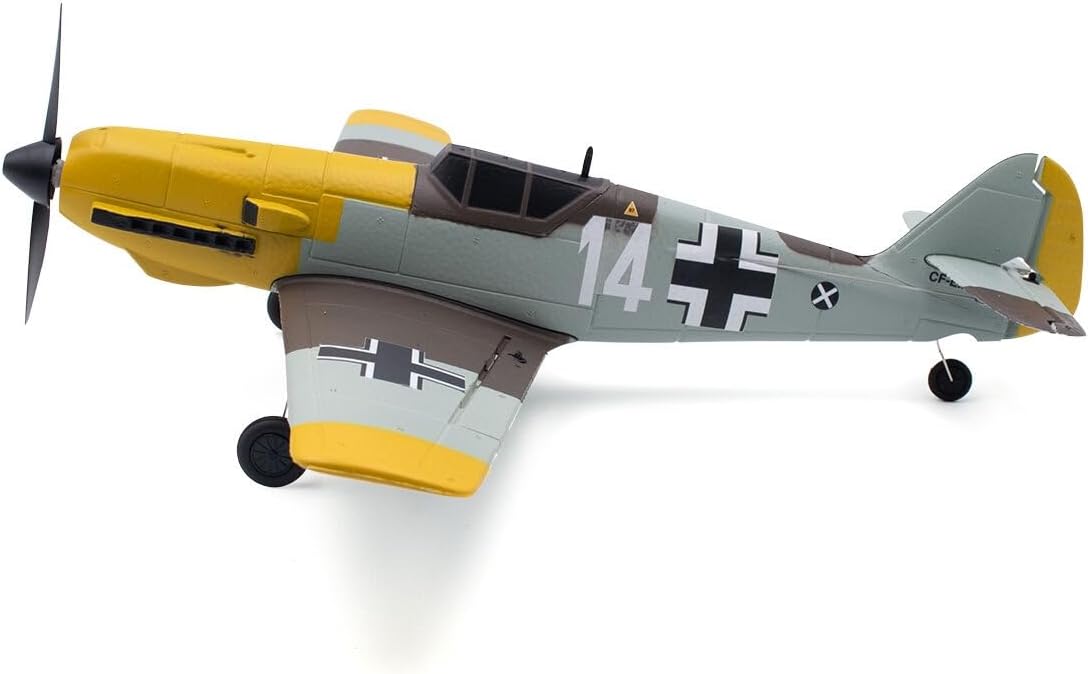
Immagine 6.1: Prospettiva lateralefile of the MODSTER MDX PRO BF 109 Warbird, showcasing its detailed paint scheme and durable EPP foam construction.
7. Manutenzione
- Ispezione dell'elica: Regularly check the propeller for cracks, bends, or other damage. Replace with the spare propeller if necessary. The Prop-Saver helps mitigate damage.
- Pulizia: Clean the aircraft body with a soft, dry cloth. Avoid using harsh chemicals or solvents.
- Cura della batteria: Store LiPo batteries in a cool, dry place, away from direct sunlight and heat. Do not overcharge or over-discharge.
- Controllo della superficie di controllo: Periodically verify that all control surfaces move freely and are securely attached.
8. Risoluzione Dei Problemi
- L'aereo non risponde ai comandi:
- Ensure both aircraft and transmitter batteries are charged and correctly installed.
- Verify that the aircraft and transmitter are properly bound.
- Check for any physical obstructions to control surfaces.
- Aircraft flies erratically:
- Ensure the gyroscope system is functioning correctly and is set to an appropriate flight mode (e.g., Beginner mode for more stability).
- Check for any damage to the airframe or control surfaces.
- Verify that the propeller is balanced and undamaged.
- Tempo di volo breve:
- Assicurati che la batteria sia completamente carica prima di ogni volo.
- Reduce continuous full throttle usage.
- Consider replacing the battery if it shows signs of degradation.
9. Specifiche
| Caratteristica | Dettaglio |
|---|---|
| Dimensioni del prodotto (L x P x A) | Dimensioni: 41 x 45 x 11.5 cm |
| Peso | 1.33 chilogrammi |
| Età consigliata dal produttore | 14 anni e oltre |
| Numero di modello | MD11827 |
| Assemblaggio richiesto | No (minimal landing gear installation) |
| Batterie richieste | Yes (for aircraft and transmitter) |
| Batterie incluse | No (4 AA for transmitter, 1S/3.7V/400mAh LiPo for aircraft are included in package contents, but listed as 'No' in specifications, clarifying here) |
| Materiale principale | EPP Foam, Plastic |
| Tipo di aeromobile | Warbird (BF 109) |
| Tema | Militare |
| Fonte di alimentazione | Alimentato a batteria |
| Caratteristica speciale | Acrobatic Switch and 6-Axis Gyroscope System |
| Componenti inclusi | Charging Cable, Remote Control, Spare Propeller, Screwdriver, AA Batteries |
10. Garanzia e supporto
Information regarding specific warranty terms and customer support contacts for the MODSTER MDX PRO BF 109 is not available in the provided product details. Please refer to the documentation included in your product packaging or visit the official MODSTER website for warranty claims and technical support.
Ask a question about this manual
Ask about setup, troubleshooting, compatibility, parts, safety, or missing instructions. Manuals+ will review the question and use this page’s manual context to help answer it.