LMT-M-F8-hei

Bluetooth Earphone Wireless Headphone Touch Control M-F8 User Manual

Model: M-F8 (LMT-M-F8-hei)

Marca: Generico

Introduzione

Grazie per l'acquistoasing the Generic M-F8 Bluetooth Earphones. These wireless headphones are designed to provide a superior audio experience with powerful bass, clear vocals, and crisp highs, thanks to advanced chip technology and high-intensity magnetic drivers. Featuring intuitive touch controls and an ergonomic design, they offer comfort and convenience for various activities. Please read this manual carefully before using the product to ensure proper operation and to maximize its lifespan.

Informazioni importanti sulla sicurezza

Si prega di leggere e seguire queste linee guida di sicurezza per evitare danni al dispositivo o lesioni personali:

Contenuto della confezione

Assicurarsi che tutti gli articoli siano presenti nel pacco:

Prodotto finitoview

The M-F8 earphones feature an ergonomic design with ear hooks for a secure and comfortable fit. Each earbud includes a touch control area and an LED indicator.

Generic M-F8 Bluetooth Earphone, black with ear hook design and blue LED indicator

This image displays the black Generic M-F8 Bluetooth Earphone, highlighting its ear hook design for secure wear and a visible blue LED indicator on the earbud body.

Impostare

1. Ricarica degli auricolari e della custodia

Prima del primo utilizzo, caricare completamente gli auricolari e la custodia di ricarica.

Diagram showing the M-F8 earphone and charging case with battery life indicators

This image illustrates the M-F8 earphone and its charging case, indicating battery life and charging times: 1.5 hours for a full charge, 20 hours of continuous use, and 200 hours of standby time.

2. Associazione con il tuo dispositivo

The M-F8 earphones feature one-step auto pairing for convenience.

  1. Assicurati che il Bluetooth del tuo dispositivo sia attivato.
  2. Apri la custodia di ricarica ed estrai entrambi gli auricolari. Si accenderanno automaticamente ed entreranno in modalità di associazione.
  3. On your device's Bluetooth settings, search for "M-F8" or a similar name and select it to connect.
  4. Once connected, you will hear a confirmation tone, and the earphone's LED indicator may change.
  5. Dopo l'associazione iniziale, gli auricolari si connetteranno automaticamente all'ultimo dispositivo associato quando verranno estratti dalla custodia.
M-F8 earphone automatically connecting to a smartphone via Bluetooth

This image shows the M-F8 earphone next to a smartphone, illustrating the automatic connection process via Bluetooth after initial pairing.

Istruzioni per l'uso

1. Indossare gli auricolari

The M-F8 earphones are designed for a secure and comfortable fit, especially during movement.

Person wearing the M-F8 earphone, demonstrating its ergonomic fit

This image shows a person wearing the M-F8 earphone, highlighting its ergonomic design that ensures a comfortable and secure fit within the ear.

Close-up of the M-F8 earphone's ergonomic design for secure wear

Questa immagine fornisce un primo piano view of the M-F8 earphone's ergonomic design, emphasizing how it is shaped to fit securely around the ear and prevent accidental drops.

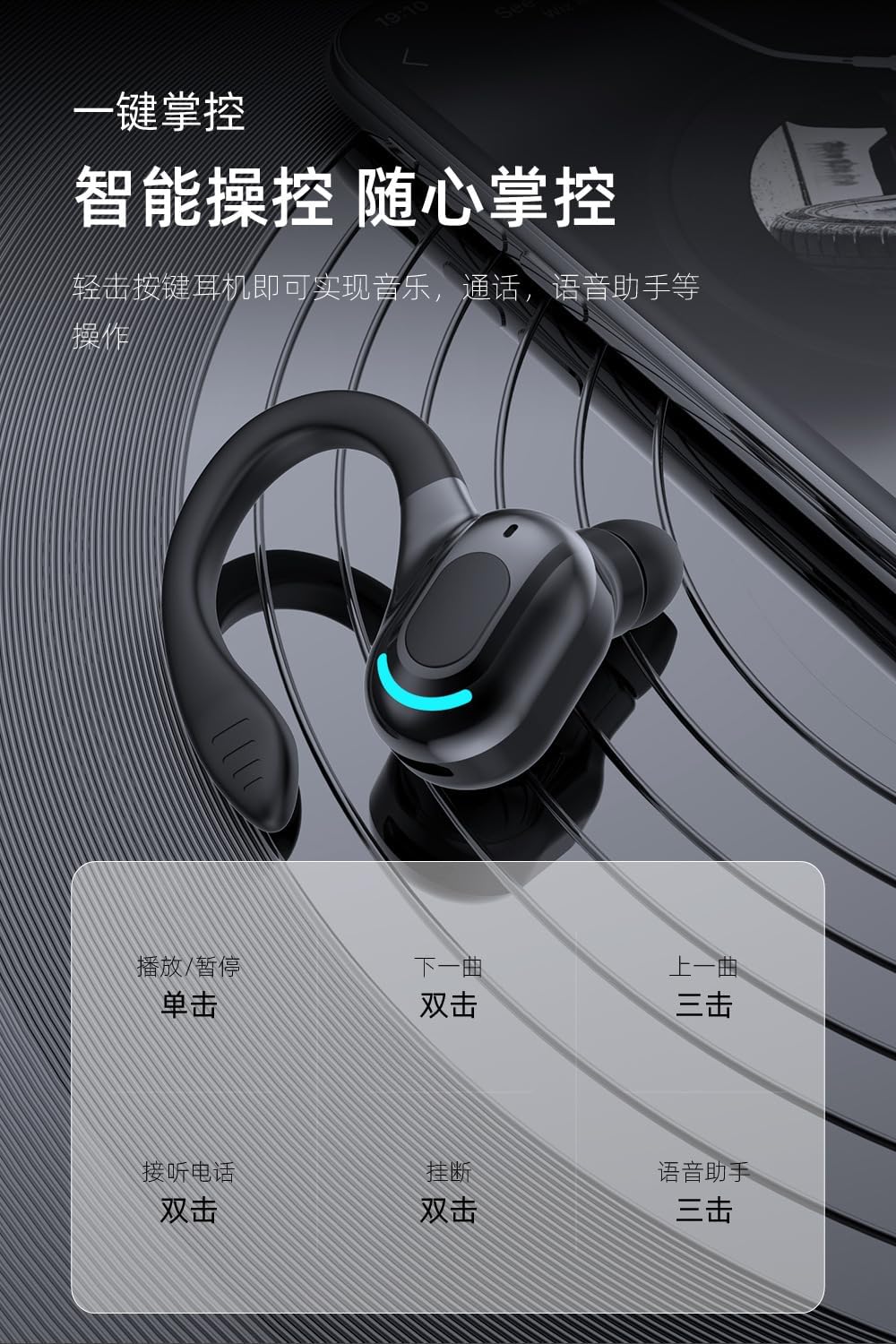
2. Toccare Controlli

Each earbud features a touch-sensitive area for easy control of music and calls.

AzioneFunzione
Singolo toccoRiproduci/Pausa musica
Doppio tocco (auricolare destro)Traccia successiva
Doppio tocco (auricolare sinistro)Rispondi/Termina chiamata
Triplo tocco (auricolare destro)Traccia precedente
Triplo tocco (auricolare sinistro)Attiva l'Assistente Vocale
Pressione lunga (2 secondi)Rifiuta chiamata
Diagram illustrating touch controls for the M-F8 earphone

This image provides a visual guide to the M-F8 earphone's touch controls, detailing actions like single tap for play/pause, double tap for next track or answering calls, and triple tap for previous track or voice assistant activation.

Manutenzione

To ensure the longevity and optimal performance of your M-F8 earphones, follow these maintenance tips:

Risoluzione dei problemi

If you encounter issues with your M-F8 earphones, refer to the following common problems and solutions:

ProblemaPossibile soluzione
Gli auricolari non si accoppianoEnsure earphones are charged. Turn off and on Bluetooth on your device. Forget "M-F8" from your device's Bluetooth list and re-pair.
Un solo auricolare funzionanteRiponi entrambi gli auricolari nella custodia di ricarica, chiudi il coperchio, attendi qualche secondo, quindi estraili nuovamente. Assicurati che entrambi gli auricolari siano carichi.
Nessun suono o volume bassoCheck the volume on both your device and the earphones. Ensure the earphones are properly connected. Clean any debris from the earbud mesh.
Problemi di ricaricaEnsure the charging cable is securely connected. Clean the charging contacts on both the earphones and the case. Try a different charging cable or power source.
Poor call quality / Noise reductionEnsure the microphone is not obstructed. Move closer to your connected device. The earphones feature intelligent noise reduction for clearer calls.
Diagram illustrating noise reduction capabilities of the M-F8 earphone

This image visually represents the noise reduction capabilities of the M-F8 earphone, showing a comparison of sound waves before and after noise cancellation, indicating improved clarity.

Specifiche

Technical specifications for the Generic M-F8 Bluetooth Earphones:

Diagram showing Bluetooth 5.2 chip and specifications for M-F8 earphone

This image highlights the Bluetooth 5.2 upgrade for the M-F8 earphone, emphasizing low latency, stable signal, and efficient power consumption, along with a transmission distance of 25 meters.

Garanzia e supporto

For warranty information or technical support, please refer to the retailer or contact the manufacturer directly. Keep your purchase receipt as proof of purchase.

For further assistance, please visit the official Generic websito o contattare il loro servizio clienti.

Documenti correlati - LMT-M-F8-hei

Preview Manuale di istruzioni per la macchina per caffè espresso Fyllo F8
Manuale di istruzioni completo per la macchina per caffè espresso Fyllo F8, che comprende precauzioni di sicurezza, funzionamento, pulizia, risoluzione dei problemi e informazioni sulla garanzia.
Preview Guida all'installazione Hilti X-SCO/N ALH37
Questo documento fornisce le istruzioni di installazione per il sistema di fissaggio Hilti X-SCO/N ALH37, descrivendo in dettaglio l'uso degli utensili Hilti DX e dei dispositivi di fissaggio appropriati per varie applicazioni.
Preview Guida rapida e istruzioni per l'uso del giunto cardanico F8
Una guida completa per configurare e utilizzare lo stabilizzatore per cellulare F8 Gimbal, che copre installazione, bilanciamento, modalità operative e conformità FCC.
Preview Sistema di fissaggio Hilti X-SCH ALH32: Istruzioni per l'uso
Guida passo passo per l'installazione del sistema di fissaggio Hilti X-SCH ALH32 utilizzando utensili della serie DX, comprese precauzioni di sicurezza e dettagli di installazione.
Preview Pompe a pistoni Annovi Reverberi serie RC: Istruzioni per l'uso e manuale dei ricambi
Istruzioni operative complete, elenchi dei componenti, guide all'installazione e suggerimenti per la risoluzione dei problemi per le pompe a pistoni Annovi Reverberi serie RC, inclusi modelli come RC11.17N, RC13.17N, serie RCA e serie RCV.
Preview Guida utente delle cuffie wireless ZFX ZP-BHP-M
Manuale d'uso per le cuffie wireless ZFX ZP-BHP-M, che copre il contenuto della confezione, il prodottoview, funzionamento, modalità Bluetooth e Disco, indicazioni LED e informazioni FCC.