
1. Introduzione
This manual provides essential instructions for the safe and efficient operation of your eKids Disney Wish Karaoke Machine, Model WH-555. Please read this manual thoroughly before using the device and retain it for future reference.

Immagine 1.1: anteriore view of the eKids Disney Wish Karaoke Machine with its wired microphone.
2. Informazioni sulla sicurezza
Per garantire un funzionamento sicuro, osservare le seguenti precauzioni:
- Non esporre l'unità a temperature estreme, alla luce solare diretta o all'umidità.
- Non immergere l'unità in acqua o altri liquidi.
- Utilizzare solo il cavo USB in dotazione per la ricarica.
- Tenere l'unità lontana da fonti di calore quali radiatori, bocchette di riscaldamento, stufe o altri apparecchi (inclusi amplificatori) che producono calore.
- Non tentare di smontare o modificare l'unità. Per qualsiasi intervento di assistenza, rivolgersi a personale qualificato.
- Questo prodotto è destinato all'uso da parte di bambini sotto la supervisione di un adulto.
3. Contenuto della confezione
Verificare che tutti gli articoli siano presenti nel pacco:
- eKids Disney Wish Karaoke Machine (Model WH-555)
- Microfono cablato
- Cavo di ricarica USB
4. Prodotto finitoview
Familiarize yourself with the various parts and controls of your karaoke machine.
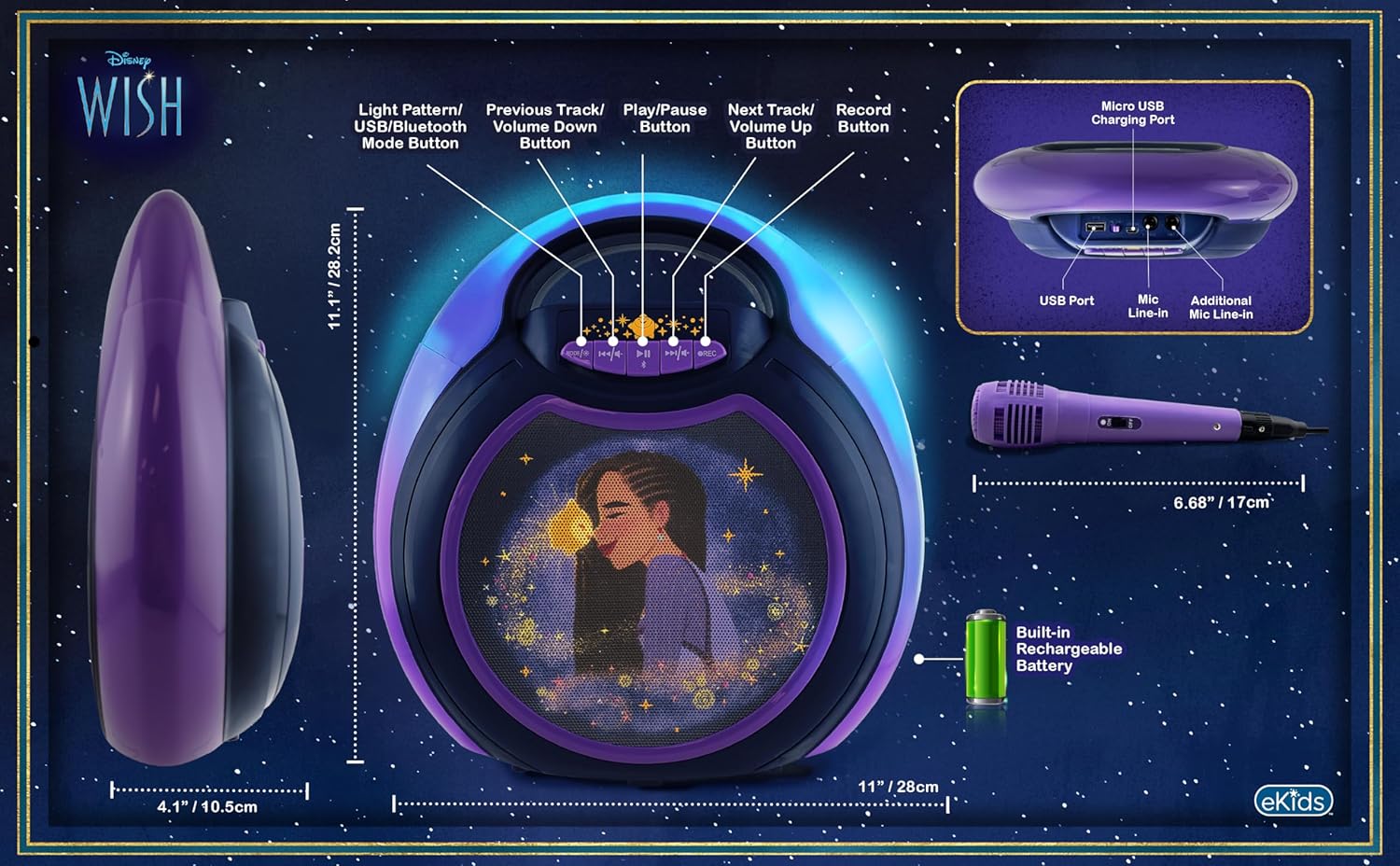
Image 4.1: Diagram of the eKids Disney Wish Karaoke Machine's controls, ports, and dimensions.
Controlli e porte:
- MODE / # Button: Switches between input modes (Bluetooth, USB) and adjusts light patterns.
- Pulsante Traccia precedente / Volume giù: Passa alla traccia precedente o diminuisce il volume.
- Pulsante Riproduci/Pausa: Riproduce o mette in pausa l'audio.
- Pulsante Traccia successiva/Volume su: Passa alla traccia successiva o aumenta il volume.
- Pulsante REC: Initiates recording (requires USB flash drive).
- Porta di ricarica micro USB: Per caricare la batteria interna.
- Porta USB: For connecting a USB flash drive for recording or playback.
- Mic Line-in: Primary port for the included wired microphone.
- Additional Mic Line-in: For connecting a second microphone (not included) for duets.
5. Impostazione
5.1 Ricarica dell'unità
Before first use, fully charge the karaoke machine. Connect the provided USB charging cable to the Micro USB Charging Port on the unit and to a standard USB power adapter (not included) or a computer's USB port. The charging indicator will illuminate during charging and turn off when fully charged.
5.2 Collegamento del microfono
Plug the wired microphone's connector into the 'Mic Line-in' port on the karaoke machine. For duet performances, an additional microphone (not included) can be connected to the 'Additional Mic Line-in' port.

Immagine 5.1: Lato view of the karaoke machine with the wired microphone connected.
6. Istruzioni per l'uso
6.1 Accensione/Spegnimento
Premere e tenere premuto il tasto MODE / # pulsante per accendere o spegnere l'unità.
6.2 Associazione Bluetooth
When the unit is powered on, it will automatically enter Bluetooth pairing mode. The indicator light will flash. On your compatible device (smartphone, tablet, etc.), enable Bluetooth and select "eKids Wish Karaoke" from the list of available devices. A confirmation tone will sound when pairing is successful.

Image 6.1: Bluetooth compatibility with various devices.
6.3 Riproduzione di musica
Once paired via Bluetooth, start playing music from your connected device. Use the Riproduci / Pausa, Traccia precedente / Volume giù, E Traccia successiva / Volume su buttons on the karaoke machine to control playback.
6.4 Utilizzo del microfono
Ensure the microphone is connected to the 'Mic Line-in' port. Adjust the microphone's volume using the dedicated switch on the microphone itself. Sing into the microphone while music plays from the speaker.
6.5 Registrazione delle performance
To record your singing, insert a USB flash drive (not included) into the USB Port. Press the RICORDA button to start recording. Press it again to stop recording. Recordings will be saved to the USB flash drive. Refer to the Product Overview (Image 4.1) for the location of the USB port.
6.6 Modalità spettacolo di luci
Premere il tasto MODE / # button repeatedly to cycle through different color-changing LED light show patterns.
6.7 Controllo del volume
Adjust the main speaker volume using the Traccia precedente / Volume giù E Traccia successiva / Volume su buttons. The microphone has its own volume control switch.
7. Manutenzione
7.1 Pulizia
Pulire l'unità con un panno morbido e asciutto. Non utilizzare detergenti liquidi o materiali abrasivi.
7.2 Conservazione
Quando non in uso, conservare l'unità in un luogo fresco e asciutto, lontano dalla luce solare diretta e da temperature estreme.
8. Risoluzione Dei Problemi
- Nessun potere: Ensure the unit is charged. Connect the USB charging cable and allow it to charge for a period.
- Nessun suono: Check that the volume on both the karaoke machine and the connected Bluetooth device is turned up. Ensure the microphone is properly connected and its switch is on.
- Bluetooth non si connette: Make sure Bluetooth is enabled on your device and the karaoke machine is in pairing mode. Try unpairing and re-pairing the device. Ensure no other devices are currently connected to the karaoke machine.
- Registrazione non funzionante: Verify that a compatible USB flash drive is inserted into the USB port and has sufficient free space.
9. Specifiche
| Numero di modello | WH-555 |
| Dimensioni | 11.07 x 4.14 x 11.11 pollici |
| Peso | 3.67 libbre |
| Fonte di alimentazione | Alimentato a batteria (ricaricabile) |
| Voltage | 3 Volt |
| Connettività | Bluetooth, USB |
| Conteggio parlanti | 1 |
| Caratteristiche speciali | Light Up Speaker, Recording Function |
10. Garanzia e supporto
Per informazioni sulla garanzia e sull'assistenza clienti, fare riferimento alla documentazione inclusa con l'acquisto o visitare il sito ufficiale eKids websito. Conservare la prova d'acquisto per eventuali reclami in garanzia.