
Ampire CPM 101
AMPManuale utente del monitor per smartphone IRE CPM 101
Model: CPM 101
1. Introduzione
This user manual provides comprehensive instructions for the installation, operation, and maintenance of your AMPIRE CPM 101 Smartphone Monitor. Please read this manual thoroughly before using the device to ensure proper functionality and safety.
2. Informazioni sulla sicurezza
Per evitare danni al dispositivo o lesioni personali, osservare sempre le seguenti precauzioni di sicurezza:
- Non tentare di smontare o modificare il dispositivo.
- Assicurarsi che tutte le connessioni siano sicure prima di accendere.
- Evitare di esporre il dispositivo a temperature estreme, alla luce solare diretta o all'umidità.
- Install the monitor in a location that does not obstruct the driver's view o interferire con i sistemi di sicurezza del veicolo.
- Utilizzare solo i cavi e gli accessori forniti.
3. Prodotto finitoview
IL AMPIRE CPM 101 is a 10-inch high-resolution touchscreen monitor designed to integrate smartphone functionalities like Apple CarPlay and Android Auto into your vehicle. It also supports the display of an optional rearview telecamera.
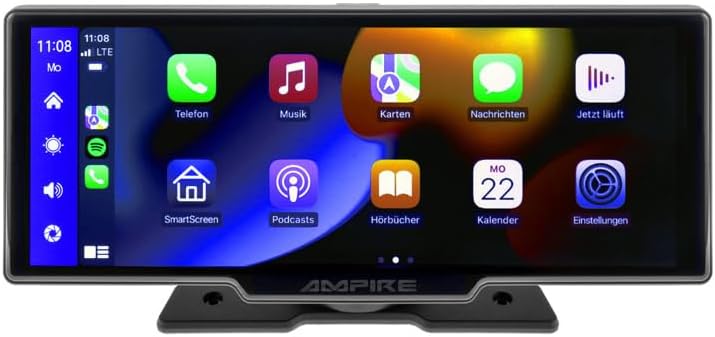
Figura 3.1: Fronte view del AMPIRE CPM 101 monitor showing the user interface with various app icons.

Figura 3.2: Il AMPIRE CPM 101 monitor with its base, highlighting key features such as Bluetooth, Apple CarPlay, Android Auto, 1080p Full HD, Wi-Fi, and 10-inch display.

Figure 3.3: Contents of the AMPIRE CPM 101 package, including the monitor, rearview camera, and various connection cables.

Figura 3.4: Il AMPIRE CPM 101 monitor displaying a split screen with navigation on one side and a rearview camera feed on the other.
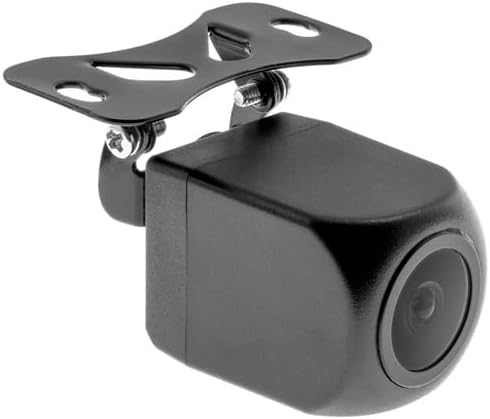
Figura 3.5: primo piano view of the compact rearview camera with its mounting bracket.
4. Configurazione e installazione
IL AMPIRE CPM 101 is designed for easy integration into most vehicles. Professional installation is recommended for optimal performance and safety.
4.1. Contenuto della confezione
Prima di iniziare l'installazione, verificare che tutti i componenti siano presenti:
- AMPIRE CPM 101 Monitor
- Set di cavi di alimentazione
- Posterioreview Fotocamera (facoltativa, se inclusa nel pacchetto)
- Cavo di collegamento della fotocamera
- Staffa di fissaggio
- Manuale d'uso
4.2. Montaggio del monitor
- Scegli una posizione adatta sul cruscotto che non ostruisca il tuo view o interferire con gli airbag.
- Pulire accuratamente la superficie di montaggio.
- Attach the mounting bracket to the monitor.
- Securely mount the monitor to the dashboard using the provided adhesive or screws, ensuring it is stable.
4.3. Collegamenti elettrici
Connect the power cable set to your vehicle's power source (ACC, B+, GND). If installing a rearview camera, connect its video cable to the monitor's camera input and its power cable to the vehicle's reverse light circuit for automatic activation.
- Filo rosso: Connect to ACC (Accessory Power).
- filo giallo: Connect to B+ (Constant Power).
- Filo nero: Connect to GND (Ground).
- Reverse Trigger Wire (if applicable): Connect to the vehicle's reverse light positive wire.
5. Istruzioni per l'uso
5.1. Accensione/Spegnimento
The monitor will power on automatically when the vehicle's ignition is turned on (ACC power). To manually turn off, press and hold the power button (if available) or turn off the vehicle's ignition.
5.2. Connessione ad Apple CarPlay / Android Auto
The CPM 101 supports wireless connection to Apple CarPlay and Android Auto. Nota: Devices with only 2.4 GHz Wi-Fi are not supported. iPhone 5 or newer is required for Apple CarPlay.
- Assicurati che il Bluetooth e il Wi-Fi del tuo smartphone siano abilitati.
- On the CPM 101 monitor, navigate to the "Phone" or "Connect" menu.
- Select "Pair New Device" or similar option.
- On your smartphone, search for and select the CPM 101 in the Bluetooth device list.
- Confermare il codice di associazione su entrambi i dispositivi.
- Once paired via Bluetooth, the monitor will automatically establish a Wi-Fi connection for CarPlay or Android Auto.
5.3. Using the Rearview Telecamera
Se un posterioreview camera is connected, the monitor will automatically switch to the camera view when the vehicle is put into reverse gear. The image will revert to the previous screen when taken out of reverse.
5.4. Impostazioni di sistema
Access the system settings menu on the monitor to adjust display brightness, audio output, language, and other preferences. Refer to the on-screen prompts for specific setting options.
6. Manutenzione
Per garantire la longevità e le prestazioni ottimali del tuo AMPIRE CPM 101 monitor, follow these maintenance guidelines:
- Pulizia dello schermo: Utilizzare un panno morbido e privo di lanugine per pulire delicatamente lo schermo. Per macchie ostinate, leggermente dampen the cloth with water or a screen-cleaning solution. Do not use abrasive cleaners or solvents.
- Pulizia generale: Keep the monitor and its surroundings free from dust and debris. Use a soft brush or compressed air to clean vents and connectors.
- Temperatura: Avoid exposing the device to extreme hot or cold temperatures for prolonged periods.
- Magazzinaggio: If storing the vehicle for an extended period, consider disconnecting the monitor's power to prevent battery drain.
7. Risoluzione Dei Problemi
Se riscontri problemi con il tuo AMPIRE CPM 101 monitor, refer to the following common problems and solutions:
| Problema | Possibile causa | Soluzione |
|---|---|---|
| Il monitor non si accende. | Nessuna alimentazione; collegamento allentato; fusibile bruciato. | Check power cable connections. Verify vehicle's fuse box. Ensure ignition is on. |
| Impossibile connettersi ad Apple CarPlay/Android Auto. | Smartphone Wi-Fi/Bluetooth off; incompatible phone; 2.4 GHz Wi-Fi only. | Ensure Bluetooth and Wi-Fi are on. Check phone compatibility (iPhone 5+). Confirm phone supports 5 GHz Wi-Fi. Re-pair device. |
| Posterioreview la fotocamera non visualizza. | Telecamera non collegata; cavo di attivazione della retromarcia non collegato; telecamera difettosa. | Check camera video and power connections. Ensure vehicle is in reverse. Test camera if possible. |
| Nessun audio. | Volume too low; incorrect audio output setting; Bluetooth not connected. | Increase volume. Check audio output settings on monitor. Ensure Bluetooth is connected to your vehicle's audio system. |
Se il problema persiste dopo aver provato queste soluzioni, contattare l'assistenza clienti.
8. Specifiche
Below are the technical specifications for the AMPIRE CPM 101 Smartphone Monitor:
| Caratteristica | Specificazione |
|---|---|
| Marca | Ampira |
| Dimensioni dello schermo | 10 pollici |
| Tipo di visualizzazione | LCD, schermo a colori |
| Tecnologia di connettività | Wifi bluetooth |
| Dispositivi compatibili | Smartphones with Apple CarPlay or Android Auto (wireless connection) |
| Caratteristiche speciali | Wireless Apple CarPlay & Android Auto, Optional Rearview Display della fotocamera |
| Modalità di uscita audio | Stereo |
| Potenza di uscita | 50 Watt |
| Dimensioni del prodotto | Dimensioni: 29 x 15 x 10 cm |
| ASIN | B0CKLSWGY7 |
| Prima data disponibile | 6 ottobre 2023 |
9. Garanzia e supporto
For warranty information and technical support, please refer to the documentation included with your purchase or visit the official Ampira websito. Conservare la prova d'acquisto per eventuali reclami in garanzia.
Supporto online: Italiano:ampire.de
Ask a question about this manual
Ask about setup, troubleshooting, compatibility, parts, safety, or missing instructions. Manuals+ will review the question and use this page’s manual context to help answer it.