
Powerwave Purple Rush
Powerwave Wireless Controller Purple Rush
Manuale d'uso
1. Introduzione
Grazie per l'acquistoasing the Powerwave Wireless Controller. This controller is designed to enhance your gaming experience on PlayStation 4 consoles, offering advanced features such as motion sensing, dual motor vibration, and a built-in speaker. Please read this manual carefully to ensure proper use and maintenance of your device.
This controller is compatible with PS4, PS4 Slim, and PS4 Pro models. Please note that PlayStation Lightbar, PSVR, turbo functionality, and PS5 compatibility are not supported.
2. Contenuto della confezione
- 1 x Powerwave Wireless Controller (Purple Rush)
- 1 cavo di ricarica USB
- 1 x Manuale utente (questo documento)

Image: The Powerwave Wireless Controller shown within its retail packaging, highlighting the product and its box.
3. Controller Features
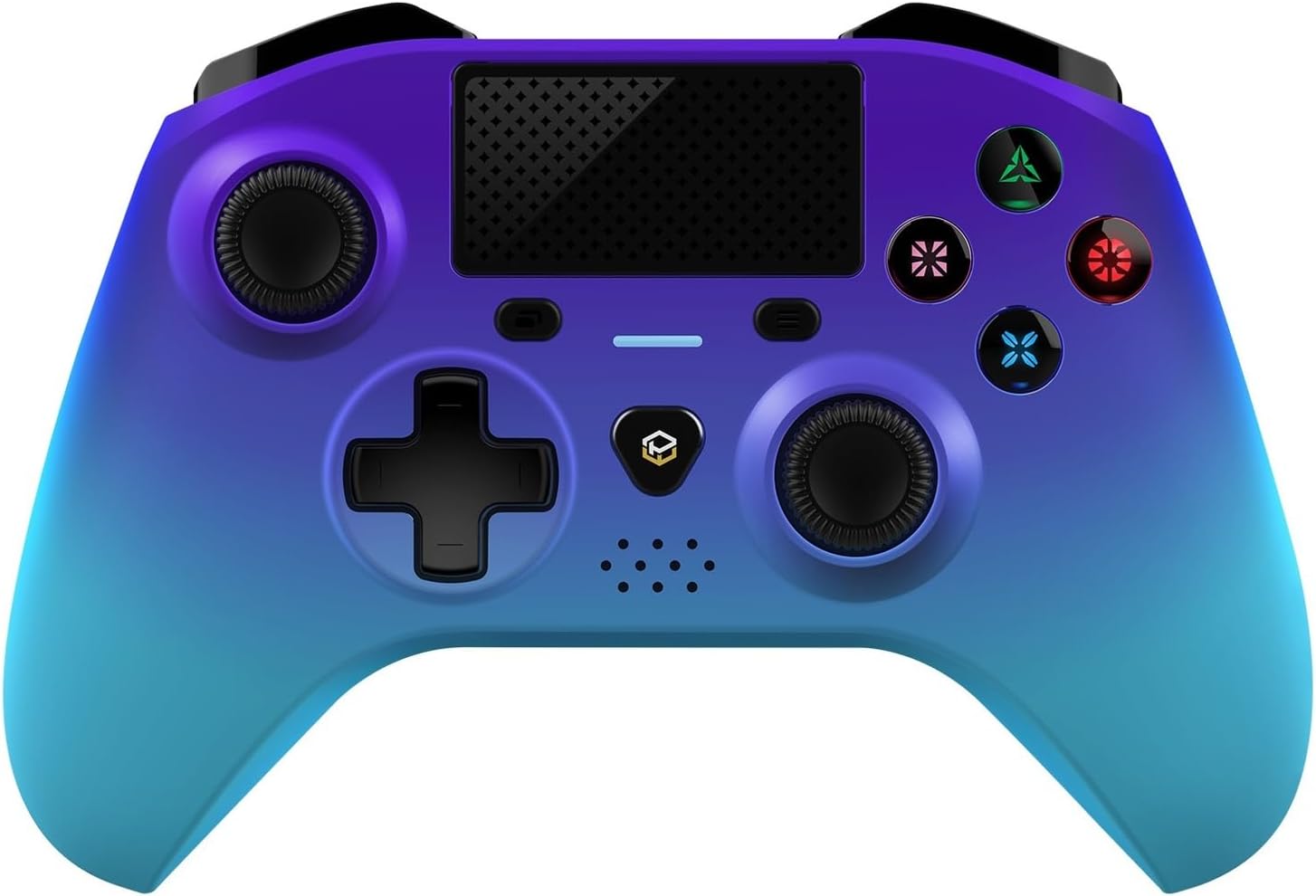
Immagine: Un fronte dettagliato view of the Powerwave Wireless Controller in Purple Rush color, showcasing its buttons, joysticks, touchpad, and LED display.
- Connettività Bluetooth senza fili: For seamless gaming without cables.
- LED Display Buttons: Illuminated buttons for enhanced visibility.
- Batteria ricaricabile: Built-in lithium polymer battery for extended playtime.
- Tecnologia di rilevamento del movimento: Integrated sensors for intuitive control in compatible games.
- Vibrazione a doppio motore: Fornisce un feedback tattile coinvolgente durante il gioco.
- Touchpad: Interactive surface for unique gameplay mechanics.
- Altoparlante incorporato: Enhances audio experience directly from the controller.
- 3.5mm Stereo Audio Jack: Per collegare cuffie o auricolari.
4. Guida all'installazione
4.1 Ricarica del controller
- Connect the small end of the supplied USB charging cable to the micro-USB port on the front of the controller.
- Connect the larger end of the USB cable to an available USB port on your PlayStation 4 console or a compatible USB wall adapter (5V/1A recommended).
- The controller's LED indicator will show charging status. It will typically turn off or change color once fully charged.
4.2 Abbinamento con PlayStation 4
- Assicurati che la tua console PlayStation 4 sia accesa.
- Collegare il controller alla console PS4 utilizzando il cavo di ricarica USB in dotazione.
- Premere il tasto Pulsante PS (the button with the PlayStation logo) in the center of the controller.
- The controller will automatically pair with the console. Once paired, you can disconnect the USB cable for wireless play.
- To pair additional controllers, repeat the steps above.
Note: If the controller does not pair, ensure it is fully charged and try connecting it to a different USB port on the console.
5. Funzionamento del controller
5.1 Controlli di base
The Powerwave Wireless Controller features standard PlayStation layout buttons, including:
- Pad direzionale (D-Pad): Per input direzionali.
- Pulsanti di azione (triangolo, cerchio, croce, quadrato): Per le azioni di gioco.
- Stick analogici sinistro e destro: Per movimenti precisi e controllo della telecamera.
- L1/R1 and L2/R2 Buttons: Pulsanti a spalla e a grilletto.
- Pulsante CONDIVIDI: Per condividere momenti di gioco.
- Pulsante OPZIONI: For accessing in-game menus.
- Pulsante PS: For accessing the PS4 home screen and power options.
- Touchpad: Functions as a clickable button and multi-touch surface.
5.2 Funzioni avanzate
- Rilevamento del movimento: Tilt and move the controller to interact with games that support motion controls.
- Risposte di vibrazione: Experience realistic vibrations during gameplay, such as impacts or explosions.
- Uscita audio: Connect a 3.5mm headset to the audio jack for in-game sound and voice chat. Adjust volume through the PS4 system settings.
6. Manutenzione e cura
- Pulizia: Utilizzare un panno morbido e asciutto per pulire il controller. Per lo sporco ostinato, leggermente dampLavare il panno con acqua. Non utilizzare prodotti chimici aggressivi o detergenti abrasivi.
- Magazzinaggio: Conservare il controller in un luogo fresco e asciutto, lontano dalla luce solare diretta e da temperature estreme.
- Cura della batteria: Per prolungare la durata della batteria, evitare di scaricare completamente il controller frequentemente. Caricarlo regolarmente, anche se non lo si utilizza per lunghi periodi.
- Evitare gocce: Proteggere il controller da urti e cadute, che potrebbero danneggiare i componenti interni.
7. Risoluzione Dei Problemi
| Problema | Possibile soluzione |
|---|---|
| Il controller non si accende. | Ensure the controller is fully charged. Connect it to the PS4 via USB cable and try pressing the PS button. |
| Controller does not pair with PS4. |
|
| Input lag or disconnection during wireless play. |
|
| Il rilevamento delle vibrazioni o del movimento non funziona. | Check in-game settings and PS4 system settings to ensure these features are enabled. Some games may not support these features. |
8. Specifiche
| Caratteristica | Dettaglio |
|---|---|
| Connettività | Bluetooth senza fili |
| Compatibilità | PlayStation 4, PS4 Slim, PS4 Pro |
| Tipo di batteria | 1 batteria ai polimeri di litio (inclusa) |
| Dimensioni (circa) | Dimensioni: 17.5 x 15.6 x 6.9 cm |
| Peso (circa) | 987 grammi |
| Porta audio | Jack audio stereo da 3.5 mm |
| Identificatore del modello (ASIN) | B0CKPF5X2N |
9. Garanzia e supporto
For warranty information and customer support, please refer to the documentation provided with your purchase or visit the official Powerwave websito. Conservare la prova d'acquisto per eventuali reclami in garanzia.
Per ulteriore assistenza, puoi anche contattare il rivenditore presso cui hai acquistato il prodotto.
Non sono stati trovati video ufficiali del venditore per questo prodotto.
Ask a question about this manual
Ask about setup, troubleshooting, compatibility, parts, safety, or missing instructions. Manuals+ will review the question and use this page’s manual context to help answer it.