
1. Prodotto finitoview
The SYLVOX 75-inch Deck Pro 2.0 Smart Outdoor TV is designed for outdoor entertainment, offering a 4K Ultra HD display with 1000 nits brightness for clear viewing in partial sun and shaded areas. It features an IP55 waterproof rating and a durable all-metal casing to withstand various outdoor conditions. Powered by Android 11.0, it provides access to a wide range of applications and supports Google Assistant and Chromecast for seamless content streaming.

Figura 1.1: Fronte view of the SYLVOX 75-inch Deck Pro 2.0 Smart Outdoor TV.
2. Informazioni sulla sicurezza
Leggere attentamente tutte le istruzioni di sicurezza prima dell'installazione e dell'uso. La mancata osservanza di queste istruzioni può causare scosse elettriche, incendi o danni al prodotto.
- Sicurezza elettrica: Ensure the power outlet meets the TV's voltage requirements. Do not overload power outlets. Disconnect power during lightning storms or when unused for long periods.
- Montaggio: Use appropriate mounting hardware and ensure the mounting surface can support the TV's weight. Professional installation is recommended for outdoor wall mounts.
- Ventilazione: Do not block ventilation openings. Ensure adequate airflow around the TV to prevent overheating.
- Temperatura: The TV is designed to operate within a specific temperature range (-22°F to 122°F). Avoid exposing it to temperatures outside this range.
- Pulizia: Scollegare l'alimentazione prima della pulizia. Utilizzare un panno morbido eamp panno. Evitare prodotti chimici aggressivi o detergenti abrasivi.
3. Cosa c'è nella scatola
Verificare che tutti i componenti siano presenti prima di procedere con l'installazione.
- 75-inch Outdoor Smart TV
- Telecomando vocale (2 batterie AAA incluse)
- Manuale dell'utente
- Scheda di garanzia
- Cavo di alimentazione
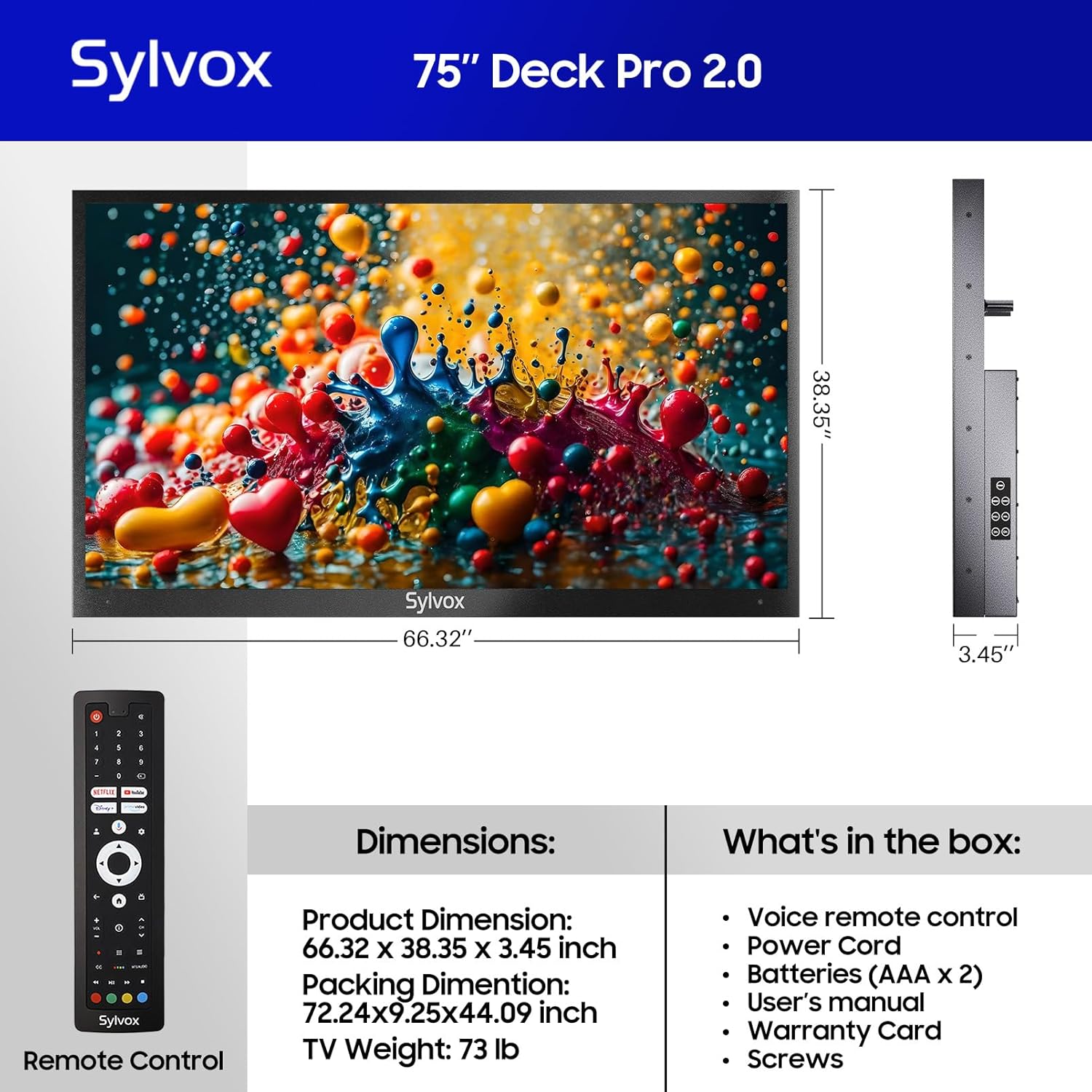
Figure 3.1: Included components and dimensions of the TV.
Video 3.1: Unboxing the Deck Pro 2.0 Series Outdoor TV, showing how components are packaged.
4. Impostazione
4.1 Installazione fisica
The SYLVOX Deck Pro 2.0 TV is designed for outdoor installation. It features a robust all-metal body for enhanced durability and weather resistance.

Figura 4.1: lato view illustrating the durable all-metal casing.
For wall mounting, ensure you use a compatible VESA mount (not included) and secure it to a sturdy structure. The TV's back panel is designed to accommodate standard VESA mounting patterns.

Figura 4.2: Indietro view of the TV with VESA mounting points.
4.2 Connessioni
The TV offers multiple connectivity options. Access the ports by removing the protective cover on the back of the unit.
- HDMI: For connecting external devices like gaming consoles or media players.
- USB: Per la riproduzione di contenuti multimediali da unità USB.
- Collegamento Ethernet: Per la connessione internet cablata.
- Senza fili: Built-in WiFi and Bluetooth for network and accessory connections.

Figure 4.3: Rear input panel with various connectivity ports.
4.3 Accensione iniziale
Connect the power cord to the TV and a suitable outdoor-rated power outlet. Press the power button on the remote control or the TV's side panel to turn on the unit. Follow the on-screen instructions to complete the initial setup, including network connection and Google account login.
5. Istruzioni per l'uso
5.1 telecomando
The included voice remote control allows for easy navigation and control of your TV. It features dedicated buttons for popular streaming services and Google Assistant.

Figure 5.1: Voice remote control for the SYLVOX Outdoor TV.
5.2 Interfaccia di Google TV
The TV runs on the Android 11.0 system with the Google TV interface, offering personalized recommendations and easy access to over 10,000 apps including YouTube, Netflix, Prime Video, Hulu, and Disney+.

Figure 5.2: Google TV interface with access to numerous applications.
Video 5.1: Demonstration of the Sylvox Smart Google Outdoor TV interface and features.
5.3 Caratteristiche principali
- Risoluzione Ultra HD 4K: Enjoy crystal-clear images with stunning detail.
- Dolby Atmos: Immerse yourself in a panoramic sound experience.
- Luminosità 1000 nit: Provides optimal visibility in outdoor environments with partial sun.
- Chromecast integrato: Trasmetti facilmente i contenuti dai tuoi dispositivi mobili alla TV.
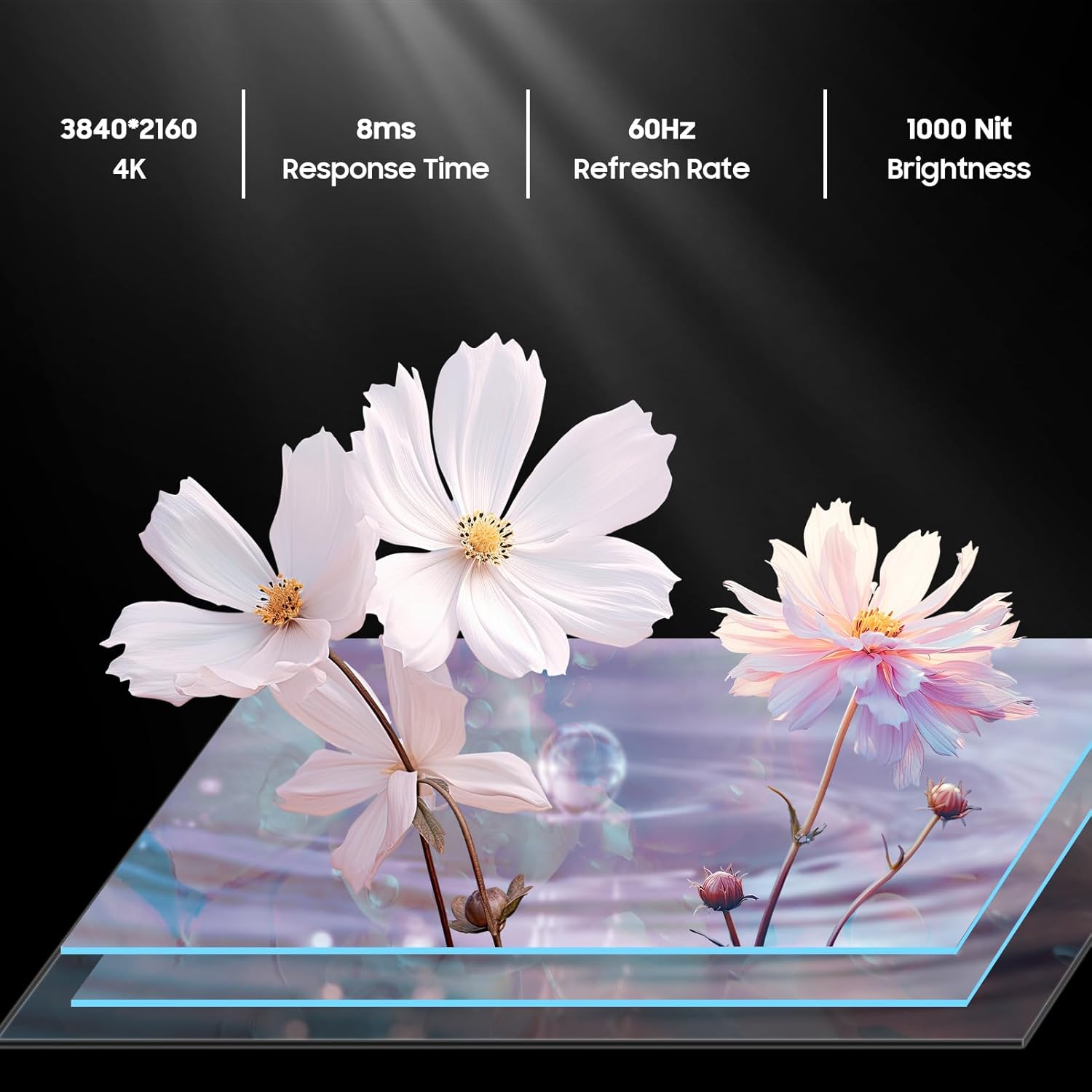
Figure 5.3: Visual representation of 4K resolution and 1000 nit brightness.
Video 5.2: Oltreview of the Deck Pro 2.0 Outdoor TV, highlighting Google TV and Dolby Atmos features.
5.4 Outdoor Use Considerations
The TV is IP55 waterproof, meaning it is protected against dust and low-pressure water jets from any direction. This makes it suitable for use in various outdoor weather conditions, including rain and snow.

Figure 5.4: The TV operating effectively during rainfall, showcasing il suo grado di impermeabilità IP55.
Video 5.3: A short clip demonstrating the TV's ability to function in various weather conditions.
6. Manutenzione
- Pulizia dello schermo: Pulire delicatamente lo schermo con un panno morbido e privo di lanugine. Per macchie ostinate, strofinare leggermenteampimmergi il panno in acqua. Non spruzzare i detergenti direttamente sullo schermo.
- Pulizia del Casing: Utilizzare un morbido, damp cloth to clean the all-metal casing. Avoid abrasive materials that could scratch the surface.
- Coperture delle porte: Ensure all port covers on the back of the TV are securely closed when not in use to maintain its waterproof rating.
- Stoccaggio stagionale: While designed for all-weather use, consider covering the TV during prolonged periods of extreme weather or when not in use for extended periods to prolong its lifespan.
7. Risoluzione Dei Problemi
- Nessun potere: Verificare che il cavo di alimentazione sia collegato saldamente sia al televisore che alla presa di corrente. Assicurarsi che la presa sia funzionante.
- Nessuna immagine/suono: Verify the correct input source is selected. Check all cable connections (HDMI, etc.).
- Il telecomando non risponde: Sostituisci le batterie AAA nel telecomando. Assicurati che non ci siano ostacoli tra il telecomando e il televisore.
- Connessione Wi-Fi scadente: Ensure the TV is within range of your Wi-Fi router. Try restarting your router.
- Image Glare in Sunlight: While the TV has 1000 nits brightness, direct, intense sunlight can still cause glare. Adjust the TV's position or consider additional shading for optimal viewing.
8. Specifiche
| Caratteristica | Descrizione |
|---|---|
| Marca | SILVOX |
| Nome del modello | Deck Pro 2.0 |
| Dimensioni dello schermo | 75 pollici |
| Risoluzione | 4K Ultra HD (3840x2160) |
| Luminosità | 1000 nidi |
| Frequenza di aggiornamento | Frequenza 60 Hz |
| Sistema operativo | Android 11.0 with Google TV |
| Grado di impermeabilità | Grado di protezione IP55 |
| Caratteristiche speciali | Dolby Atmos, Google Assistant, Chromecast Built-in |
| Connettività | Ethernet, Wireless (Wi-Fi), Bluetooth, HDMI, USB |
| Dimensioni del prodotto | 3.45"P x 66.32"L x 38.35"A |
| Peso dell'articolo | 100.8 libbre |
| Colore | Nero |
| Batterie | Sono necessarie 2 batterie AAA (incluse) |
9. Garanzia e supporto
The SYLVOX 75-inch Deck Pro 2.0 Smart Outdoor TV comes with a one-year warranty. For technical assistance, troubleshooting, or warranty claims, please contact SYLVOX customer service. Keep your purchase receipt and warranty card for reference.
Assistenza clienti: Available 24/7. Refer to the warranty card for contact details or visit the official SYLVOX websito.