
KLIM KLIM Nomade
Manuale utente del lettore CD portatile KLIM Journey
Model: KLIM Nomad | Brand: KLIM
Introduzione
The KLIM Journey Portable CD Player is a versatile audio device designed for modern listening while embracing classic CD playback. It offers multiple connectivity options including Bluetooth, FM transmission, and AUX, along with an SD card reader and FM radio. This manual provides comprehensive instructions for setting up, operating, maintaining, and troubleshooting your device to ensure an optimal listening experience.

Image: The KLIM Journey Portable CD Player, shown with its accessories including wired earphones, an AUX cable, a USB-C charging cable, and a protective carry pouch.
Contenuto della confezione
- Lettore CD portatile KLIM Journey
- KLIM Fusion Wired Earphones
- Earphone Accessories (e.g., different size ear tips)
- Cavo di ricarica USB-C
- Borsa da trasporto
- Manuale dell'utente (questo documento)
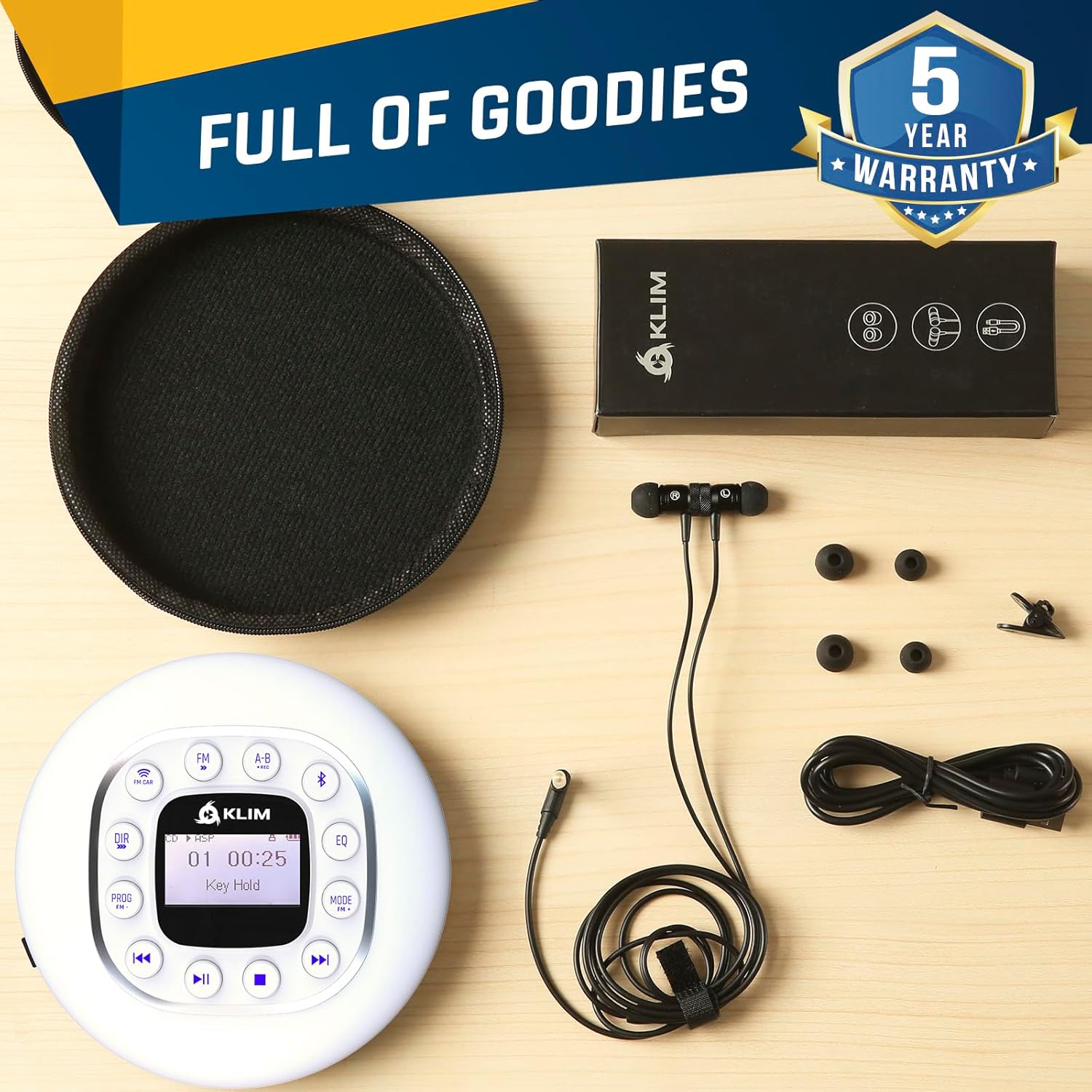
Image: A flat lay of all items included in the KLIM Journey package, neatly arranged on a wooden surface. This includes the white CD player, black wired earphones, a USB-C cable, and a black zippered carry pouch.
Impostare
1. Carica del dispositivo
Before first use, fully charge your KLIM Journey CD Player. Connect the included USB-C charging cable to the player's USB-C port and the other end to a compatible USB power adapter (not included) or a computer's USB port. The charging indicator light will show the charging status. A full charge provides over 14 hours of playback.
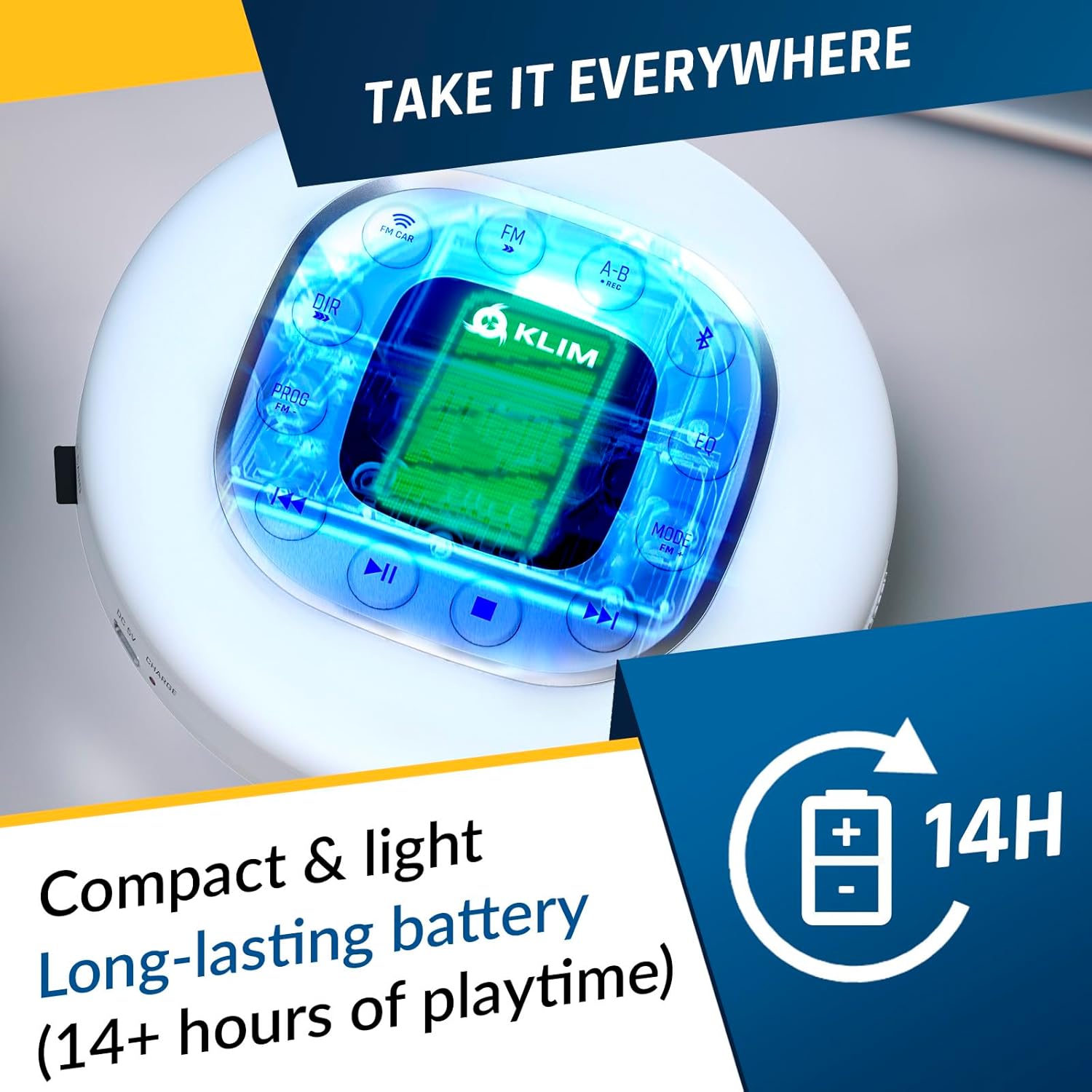
Image: The KLIM Journey CD Player with a bright, illuminated screen, emphasizing its compact design and long-lasting battery, indicated by a "14H" battery icon.
2. Collegamento delle cuffie
Insert the 3.5mm jack of the included KLIM Fusion earphones into either of the two audio output ports on the side of the player. The KLIM Journey supports two sets of earphones simultaneously for shared listening.
3. Inserimento di un CD
Gently slide the "OPEN" switch on the side of the player to open the CD compartment. Place your CD (CD, CD-R, CD-RW, HDCD, MP3 CD) onto the spindle, ensuring it clicks into place. Close the lid firmly until it latches.
Istruzioni per l'uso
Controlli del dispositivo suview
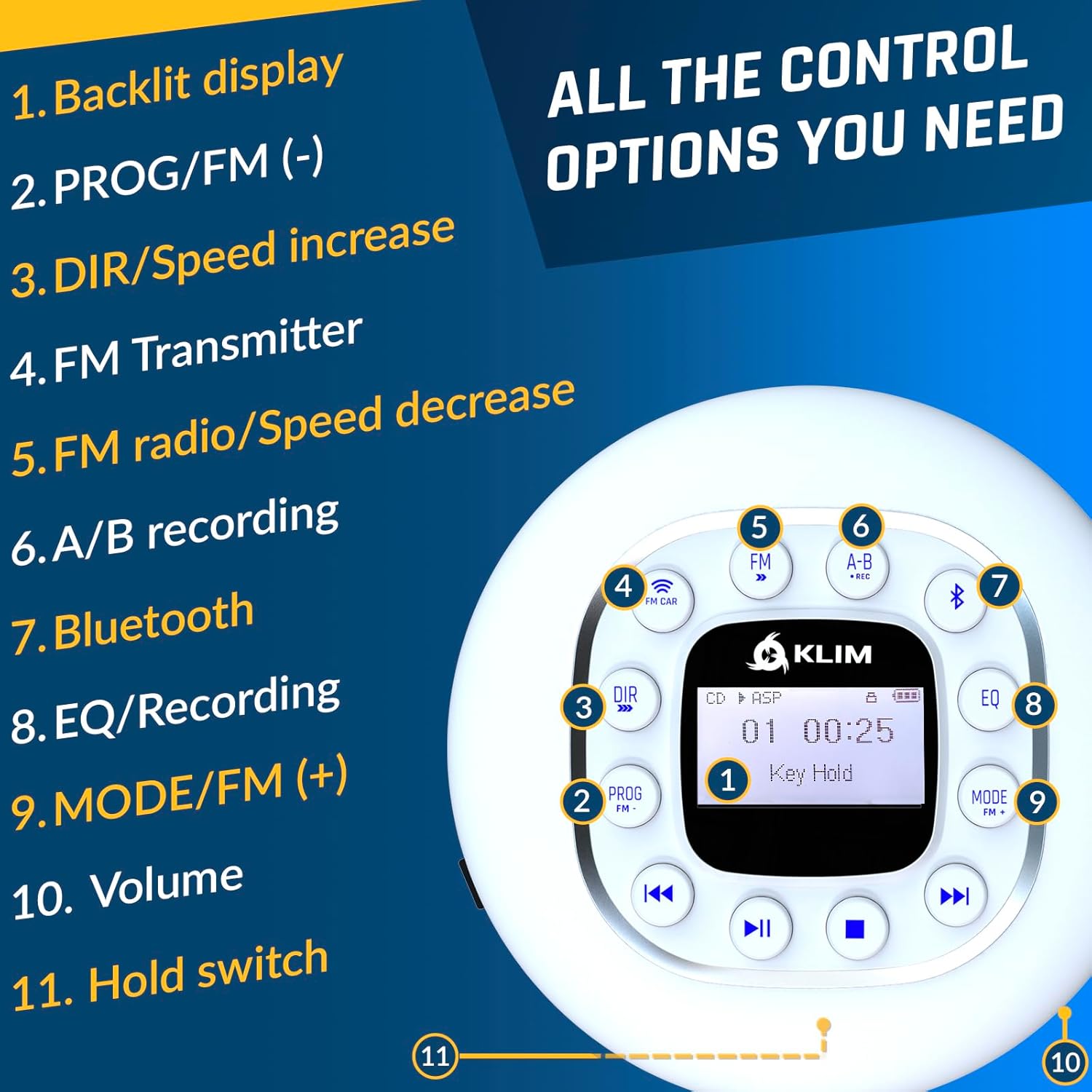
Image: A detailed diagram of the KLIM Journey CD Player's top panel, highlighting and numbering each control button and feature for easy identification and understanding.
- Display retroilluminato: Shows track information, mode, battery status, etc.
- PROG/FM (-): Program playback order; in FM mode, decreases frequency.
- DIR/Speed Increase: Directory navigation for MP3 CDs; increases playback speed.
- FM CAR: Activates FM Transmitter mode for car connection.
- Frequenza: Attiva/disattiva la modalità radio FM.
- A-B/REC: A-B repeat function; long press for recording.
- Bluetooth: Attiva la modalità di associazione Bluetooth.
- EQ/Recording: Toggles equalizer presets; short press for recording.
- MODE/FM (+): Changes playback mode (Repeat, Random, Intro); in FM mode, increases frequency.
- Volume: Regola il volume di uscita audio.
- Tenere premuto l'interruttore: Locks all buttons to prevent accidental presses.
- Traccia precedente/Riavvolgi: Skips to previous track; long press to rewind.
- Riproduci/Pausa: Avvia o mette in pausa la riproduzione.
- Stop: Interrompe la riproduzione.
- Traccia successiva/Avanti veloce: Skips to next track; long press to fast forward.
Riproduzione CD
- After inserting a CD, press the Riproduci/Pausa pulsante per iniziare la riproduzione.
- Utilizzare il Traccia precedente/Riavvolgi E Traccia successiva/Avanzamento veloce buttons to navigate tracks. Long press for fast forward/rewind.
- Premere Fermare per terminare la riproduzione.
- The device features an anti-skip/anti-shock protection chip that preloads 100 seconds of music to prevent interruptions during movement.
Connecting to Your Car
The KLIM Journey offers three primary methods for connecting to your car's audio system:

Image: A visual representation of the three connection methods for the KLIM Journey to a car: Bluetooth, FM Transmitter, and AUX Cable, with corresponding icons and example car interiors.
- Connessione AUX:
Use the included AUX cable to connect the player's audio output to your car's AUX input port. This provides a direct, high-quality audio connection. Ensure your car has an AUX port.
- Connessione Bluetooth:
Premere il tasto Bluetooth button on the player to enter pairing mode. On your car's infotainment system, search for available Bluetooth devices and select "KLIM Journey". Once paired, audio will stream wirelessly. Note: Bluetooth compatibility may vary with different car models.
- Trasmissione FM:
Premere il tasto FM CAR button. The player will display available FM frequencies. Tune your car's FM radio to the same frequency displayed on the KLIM Journey. This allows you to broadcast your music wirelessly to your car's radio. Choose a frequency that is clear of existing radio stations for best performance.
Funzionamento della radio FM
- Premere il tasto FM pulsante per passare alla modalità radio FM.
- Utilizzare il PROG/FM (-) E MODALITÀ/FM (+) pulsanti per sintonizzarsi sulle frequenze desiderate.
- The wired earphones act as an antenna for improved reception.
SD Card Playback & Recording
- Insert an SD card into the designated slot. The player will automatically detect and play compatible audio files (ad esempio, MP3).
- To record audio (e.g., from a CD or FM radio), press and hold the A-B/REC o premere brevemente il pulsante EQ/Recording button (refer to specific model instructions for exact recording initiation). Ensure an SD card is inserted for recording functionality.
Equalizer (EQ) and Speed Control
- Premere il tasto EQ button repeatedly to cycle through different equalizer presets (e.g., Pop, Jazz, Rock, Classic, Bass, Normal) to customize your audio experience.
- Utilizzare il DIR/Speed Increase button to adjust the playback speed of audio, useful for podcasts or audiobooks.
Manutenzione e cura
- Pulizia: Use a soft, dry cloth to clean the exterior of the player. For the CD lens, use a specialized CD lens cleaner. Do not use abrasive cleaners or solvents.
- Magazzinaggio: Store the player in a cool, dry place away from direct sunlight and extreme temperatures. Use the included carry pouch for protection when not in use or during transport.
- Cura della batteria: Per prolungare la durata della batteria, evitare di scaricarla completamente frequentemente. Caricare regolarmente il dispositivo, anche se non lo si utilizza costantemente.
- Gestione dei CD: Maneggiare sempre i CD tenendoli per i bordi per evitare impronte digitali e graffi. Conservare i CD nelle loro custodie quando non vengono utilizzati.
Risoluzione dei problemi
| Problema | Possibile causa | Soluzione |
|---|---|---|
| Il lettore non si accende. | Low battery; Hold switch engaged. | Charge the device; Disengage the Hold switch. |
| CD skips or playback is interrupted. | CD is dirty or scratched; Excessive vibration. | Clean the CD; Ensure the player is on a stable surface or use the anti-shock feature. |
| Nessun suono dalle cuffie. | Headphones not properly connected; Volume too low; Headphones faulty. | Ensure headphones are fully plugged in; Increase volume; Test with another pair of headphones. |
| Impossibile connettersi tramite Bluetooth. | Lettore non in modalità di associazione; Dispositivo troppo lontano; Interferenza. | Press Bluetooth button to enter pairing mode; Move devices closer; Turn off other Bluetooth devices. |
| FM transmission has static/interference. | Chosen FM frequency is occupied. | Select a different, clear FM frequency on the player and car radio. |
Specifiche
| Caratteristica | Dettaglio |
|---|---|
| Nome del modello | KLIM Nomade |
| Dimensioni | Dimensioni: 14 x 14 x 2.8 cm |
| Peso | 250 grammi |
| Tipi di supporti compatibili | CD, CD-R, CD-RW, HDCD, MP3 CD |
| Formati audio supportati | MP3 |
| Tecnologia di connettività | Bluetooth, AUX, FM Transmission |
| Fonte di alimentazione | Alimentato a batteria (litio-cobalto ricaricabile) |
| Durata della batteria | 14+ ore (circa) |
| Caratteristiche speciali | Anti-skip/Anti-shock protection, SD Card Reader, FM Radio, Recording, Speed Control, Equalizer |

Image: The rear packaging of the KLIM Journey, displaying technical specifications and product features in English, French, German, Italian, and Spanish, along with manufacturing details.
Garanzia e supporto
KLIM Technologies offers a Garanzia di 5 anno on the KLIM Journey Portable CD Player. This warranty covers manufacturing defects and ensures long-term reliability of your device.
For technical support, warranty claims, or any questions regarding your KLIM Journey, please visit the official KLIM website or contact their customer service directly. Refer to the contact information provided in your product packaging or on the KLIM Technologies Australia Amazon store page.
If you are not satisfied with the product, you may return it within 30 days for a full refund, as per Amazon's return policy.

Image: A promotional banner from KLIM highlighting their mission, commitment to quality, and a 5-year warranty, featuring images of their product engineers and specialists.
Ask a question about this manual
Ask about setup, troubleshooting, compatibility, parts, safety, or missing instructions. Manuals+ will review the question and use this page’s manual context to help answer it.