
1. Introduzione
Thank you for choosing the Philips S5885/10 5000 Series Electric Shaver. This device is designed to provide a smooth and comfortable shaving experience, whether wet or dry. It features SkinIQ technology and self-sharpening ComfortCut blades that adapt to your facial contours for efficient hair removal.
This manual provides essential information on how to set up, operate, maintain, and troubleshoot your shaver to ensure optimal performance and longevity.
2. Informazioni sulla sicurezza
Before using the appliance, read this user manual carefully and save it for future reference. Improper use may result in hazards or serious injury.
- AVVERTIMENTO: Keep the appliance and its USB charging cable dry. Do not immerse the shaver in water while it is connected to the power supply.
- AVVERTIMENTO: Questo apparecchio non è destinato all'uso da parte di persone (bambini compresi) con ridotte capacità fisiche, sensoriali o mentali, o prive di esperienza e conoscenza, a meno che non siano supervisionate o abbiano ricevuto istruzioni riguardanti l'uso dell'apparecchio da una persona responsabile della loro sicurezza.
- AVVERTIMENTO: I bambini devono essere sorvegliati per assicurarsi che non giochino con l'apparecchio.
- Always check the appliance before use. Do not use the appliance if it is damaged.
- Only use the original USB charging cable provided with the appliance.
- Do not open the appliance to replace the battery.
- For hygiene reasons, the shaver should only be used by one person.
3. Cosa c'è nella scatola
Disimballare con cura la scatola e assicurarsi che tutti gli articoli siano presenti e in buone condizioni.
- Rasoio elettrico Philips S5885/10
- Cavo di ricarica USB
- Cappuccio protettivo
- Spazzola per la pulizia
- Travel Pouch (may vary by region)

Figure 1: Philips S5885/10 Electric Shaver with included travel pouch.
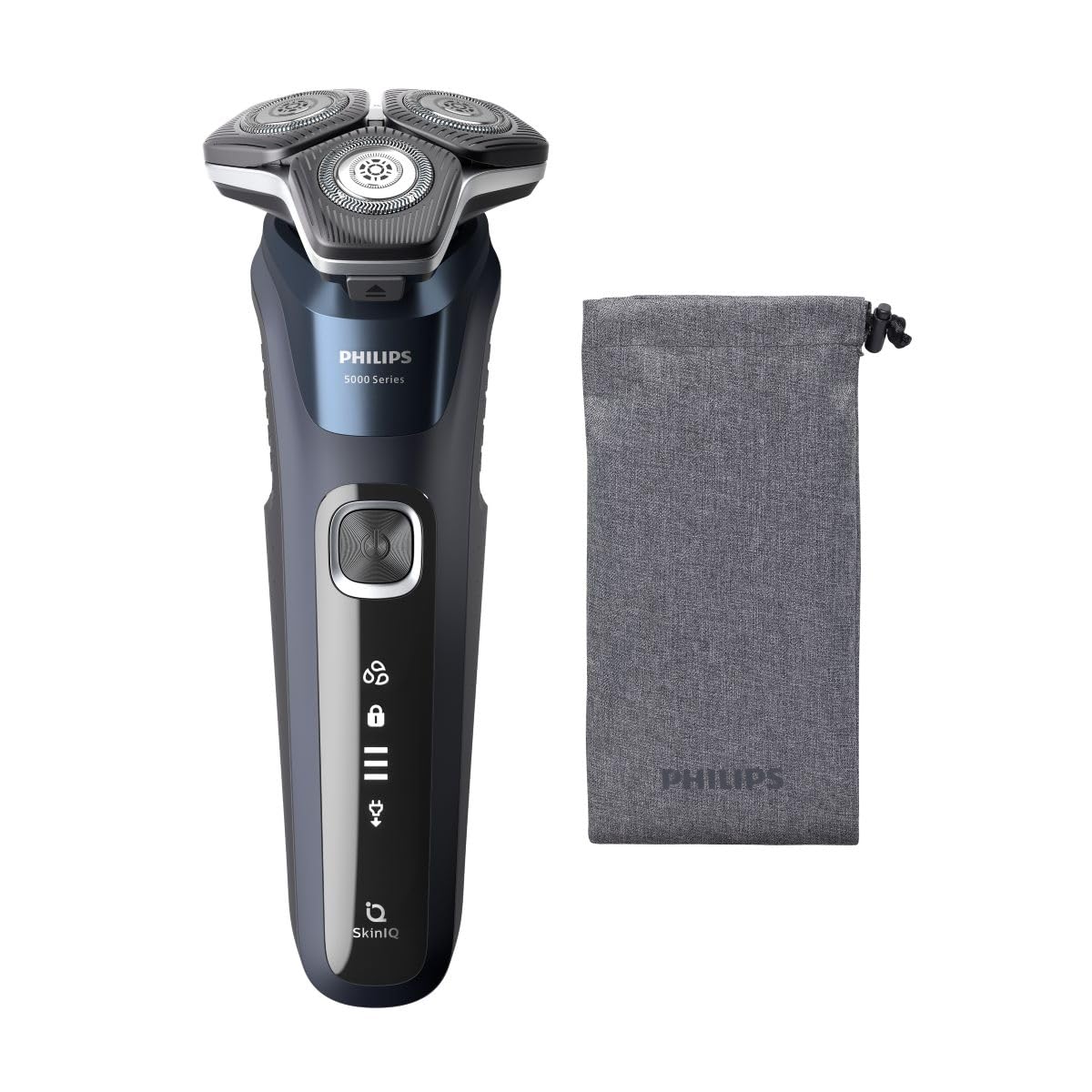
Figure 2: The Philips S5885/10 Electric Shaver as packaged in its retail box.
4. Configurazione e ricarica
Carica iniziale
Before first use, fully charge your shaver. A full charge takes approximately 1 hour and provides up to 60 minutes of cordless shaving time.
- Assicurati che il rasoio sia spento.
- Insert the small plug of the USB charging cable into the charging port at the bottom of the shaver.
- Plug the USB connector into a compatible USB power adapter (not included) or a USB port on a computer.
- The battery indicator lights on the shaver will illuminate to show the charging progress. When fully charged, all lights will be solid.
- Una volta completata la ricarica, scollegare il rasoio dalla fonte di alimentazione.
Indicatore della batteria
The shaver features a multi-level battery indicator. When the battery is low, the last segment of the indicator will flash. During charging, the segments will progressively light up until the battery is full.
5. Utilizzo del rasoio
Accensione/spegnimento
Premere una volta il pulsante di accensione per accendere il rasoio. Premerlo di nuovo per spegnerlo.
Rasatura a secco
For a dry shave, ensure your face is clean and completely dry. Move the shaver in small, circular motions over your skin, applying gentle pressure. The flexible heads will adjust to the contours of your face for optimal contact.
Rasatura a umido
For a refreshing wet shave, you can use shaving foam or gel. Apply the foam or gel to your skin and then move the shaver in small, circular motions. The shaver is 100% waterproof and can be used safely in the shower.
Tecnologia SkinIQ
The shaver is equipped with SkinIQ technology, which senses your hair density and adapts the cutting power for a personalized and comfortable shave. This ensures efficient hair removal with less irritation.
6. Pulizia e manutenzione
Una pulizia regolare garantisce prestazioni ottimali e igiene del rasoio.
Quick Cleaning (After Each Use)
- Spegni il rasoio.
- Premere il pulsante di rilascio per aprire la testina del rasoio.
- Risciacquare accuratamente la testina del rasoio sotto l'acqua corrente tiepida.
- Shake off excess water and close the shaver head unit.
Thorough Cleaning (Weekly)
- Perform the quick cleaning steps.
- Carefully remove the shaving heads from the holder.
- Rinse each shaving head and the holder under warm running water.
- Lasciare asciugare completamente tutte le parti all'aria prima di rimontarle.
- Do not wipe the shaving heads with a towel or tissue, as this may damage them.
Sostituzione delle testine di rasatura
For best shaving results, replace the shaving heads every 12 months. Replacement heads are available from Philips retailers or online.
7. Conservazione
When not in use, store your shaver in a clean, dry place, away from direct sunlight and extreme temperatures. Use the protective cap to prevent damage to the shaving heads.
8. Risoluzione Dei Problemi
| Problema | Possibile causa | Soluzione |
|---|---|---|
| Il rasoio non si accende. | La batteria è scarica. | Caricare il rasoio per almeno 1 ora. |
| Il rasoio non si carica. | USB cable or adapter is faulty; poor connection. | Ensure the USB cable is properly connected. Try a different USB port or adapter. |
| Scarse prestazioni di rasatura. | Le testine di rasatura sono sporche o usurate. | Pulire accuratamente le testine di rasatura. Sostituirle se hanno più di 12 mesi. |
| Irritazione cutanea dopo la rasatura. | Skin needs to adjust; improper technique. | Allow 2-3 weeks for skin to adjust. Ensure gentle, circular motions. Consider wet shaving with foam/gel. |
If you encounter problems not listed here, or if the suggested solutions do not resolve the issue, please contact Philips Customer Support.
9. Specifiche
- Modello: S5885/10
- Marca: Philips
- Fonte di energia: Corded Electric (via USB charging)
- Tipo di batteria: Agli ioni di litio
- Durata della batteria: Fino a 60 minuti di rasatura senza fili
- Tempo di ricarica: Approximately 1 hour for a full charge
- Materiale della lama: Stainless Steel (ComfortCut blades)
- Caratteristiche: Wet & Dry use, SkinIQ Technology, 360-D Flexing Heads, Portable
- Peso dell'articolo: 0.44 chilogrammi
- Colore: Grigio
10. Garanzia e supporto
This Philips S5885/10 Electric Shaver comes with a 24-month limited warranty from the date of purchase. Please retain your proof of purchase for warranty claims.
For detailed warranty terms, product support, or to find replacement parts, please visit the official Philips website or contact Philips Customer Service in your region. Contact information can typically be found in the warranty booklet or on the Philips websito.