
1. Introduzione
This manual provides detailed instructions for the proper use, setup, and maintenance of your Yealink W59R Ruggedized DECT Handset. Please read this manual thoroughly before operating the device to ensure optimal performance and safety. The Yealink W59R is designed for environments requiring a durable and reliable communication solution.
2. Prodotto finitoview
The Yealink W59R is a professional ruggedized DECT handset built to withstand challenging environments. It features an IP67 rating for dust, splash, and water resistance, along with integrated Bluetooth and a vibration alarm. This handset is fully compatible with the Yealink W80 Multi-Cell System, enabling seamless roaming and call handover.
Caratteristiche principali:
- Grado di protezione IP67: Shock, dust, and water resistant for reliable operation in harsh conditions.
- Maggiore durata: Tough rubberized surface protects against drops, slips, and scratches.
- Seamless Mobility: Compatible with Yealink W80 Multi-Cell System for extensive coverage.
- Connettività Bluetooth: Allows use with Bluetooth headsets for hands-free communication.
- Allarme vibrazione: Ensures calls are not missed in noisy environments.
- Optimal HD Audio: Features FNR (Flexible Noise Reduction), full duplex, and Opus codec for clear sound.
- Funzioni di allarme complete: Includes push-button, no-movement, man-down, and running alarms for occupational safety.
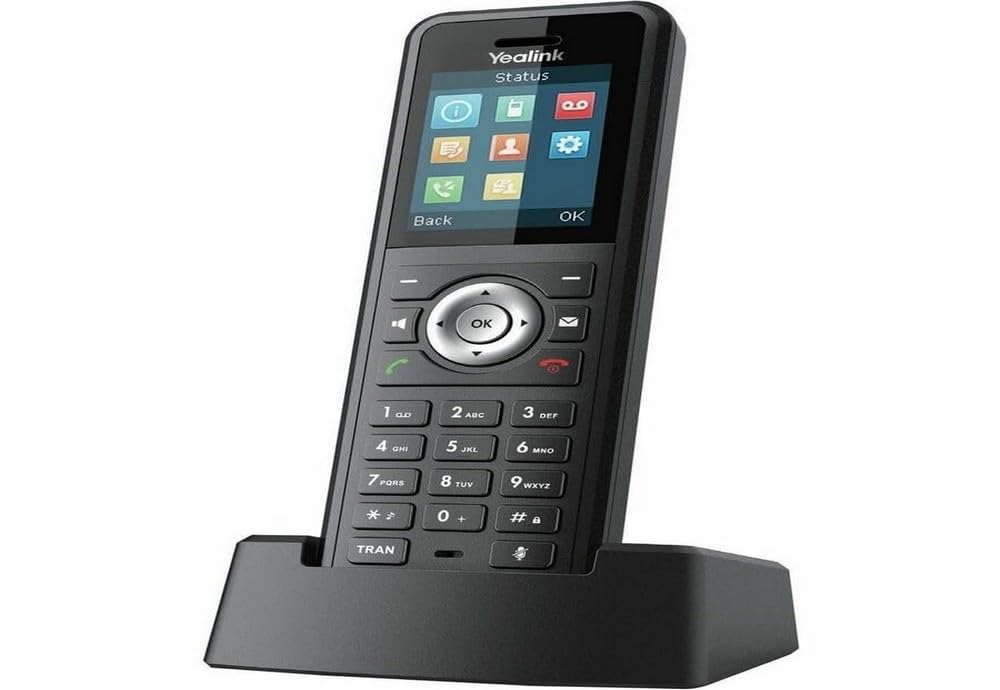
Figure 2.1: Yealink W59R Ruggedized DECT Handset. This image displays the front view of the handset, highlighting its robust design.
3. Impostazione
3.1. Contenuto della confezione
Prima di procedere, assicurati che tutti gli articoli siano presenti nella confezione:
- Ricevitore DECT robusto Yealink W59R
- Base di ricarica
- Batteria ricaricabile
- Adattatore di alimentazione
- Copertura decorativa
- Guida rapida
3.2. Installazione della batteria
- Individuare il coperchio del vano batteria sul retro del telefono.
- Rimuovere con cautela il coperchio.
- Inserire la batteria ricaricabile, assicurandosi che i contatti siano allineati correttamente.
- Replace the battery compartment cover and secure it firmly to maintain the IP67 rating.
3.3. Caricare il portatile
- Collega l'alimentatore alla base di ricarica.
- Collegare l'adattatore di corrente a una presa a muro.
- Place the handset into the charging cradle. The charging indicator on the handset will illuminate.
- Lasciare caricare il telefono per almeno 4 ore prima del primo utilizzo.
3.4. Registrazione del portatile
The W59R handset must be registered to a Yealink DECT base station (e.g., W80 Multi-Cell System) to function. Refer to your DECT base station's manual for specific registration procedures. Generally, this involves:
- Mettere la stazione base DECT in modalità di registrazione.
- On the W59R handset, navigate to the registration menu (typically Menu > Impostazioni > Registrazione > Registra telefono).
- Select the desired base and enter the system PIN (default is 0000).
- Una volta completata la registrazione, il telefono visualizzerà un messaggio di conferma.
4. Istruzioni per l'uso
4.1. Funzioni di chiamata di base
- Effettuare una chiamata: Inserisci il numero di telefono e premi il tasto Chiamata chiave.
- Risposta a una chiamata: Premere il tasto Chiamata key when the handset rings.
- Terminare una chiamata: Premere il tasto Termina chiamata chiave.
- Regolazione del volume: Use the navigation keys during a call to adjust the earpiece volume.
4.2. Utilizzo del Bluetooth
The W59R supports Bluetooth for connecting wireless headsets. To pair a Bluetooth device:
- Enable Bluetooth on your headset and set it to pairing mode.
- On the W59R, navigate to Menu > Impostazioni > Bluetooth.
- Attiva il Bluetooth On e seleziona Paired Devices > Add Device.
- Select your headset from the list of available devices and enter the PIN if prompted (usually 0000 or 1234).
4.3. Funzioni di allarme
The W59R includes several alarm features designed to enhance user safety in hazardous environments. These alarms can be configured by an administrator.
- Push-Button Alarm: Activates an emergency alert when a dedicated button is pressed.
- No-Movement Alarm: Triggers an alert if the handset detects no movement for a configurable period.
- Man-Down Alarm: Activates if the handset detects a sudden change in orientation, indicating a fall.
- Running Alarm: Can be configured to alert if the user is running or moving rapidly beyond a set threshold.

Figure 4.1: Detail of the Yealink W59R handset, showing a button that can be configured for alarm functions.
5. Manutenzione
5.1. Pulizia
To maintain the handset's IP67 rating and overall performance:
- Pulisci il ricevitore con un panno morbido eamp stoffa.
- Non utilizzare prodotti chimici aggressivi, solventi per la pulizia o detergenti aggressivi.
- Ensure all port covers are securely closed after cleaning to maintain water and dust resistance.
5.2. Cura della batteria
- Evitare di esporre la batteria a temperature estreme.
- Charge the battery regularly to prolong its lifespan.
- If the handset will not be used for an extended period, fully charge the battery before storage.
6. Risoluzione Dei Problemi
This section addresses common issues you may encounter with your W59R handset.
| Problema | Possibile causa | Soluzione |
|---|---|---|
| Il portatile non si accende. | La batteria non è installata o è scarica. | Ensure battery is correctly installed and fully charged. |
| Cannot register handset to base. | Base station not in registration mode; incorrect PIN. | Verify base station is in registration mode. Check the PIN. Ensure handset is within range. |
| Nessun segnale di linea o impossibilità di effettuare chiamate. | Handset not registered; network issue. | Confirm handset is registered. Check network connection of the base station. |
| Qualità audio scadente. | Interference; handset out of range. | Move closer to the base station. Avoid sources of interference (e.g., microwaves, Wi-Fi routers). |
If the problem persists after attempting these solutions, please contact Yealink technical support.
7. Specifiche
| Caratteristica | Dettaglio |
|---|---|
| Marca | Yealink |
| Numero di modello | W59R |
| Colore | Nero |
| Tipo di telefono | Senza fili |
| Fonte di alimentazione | Alimentato a batteria |
| Dimensioni articolo (L x P x A) | 7.6 x 4.4 x 3.7 pollici |
| Peso dell'articolo | 14.4 once |
| Dispositivi compatibili | Yealink W80 Multi-Cell System, Bluetooth devices |
| Tecnologia DECT | CAT-iq2.0 (not compatible with third-party DECT devices) |
| Grado di protezione IP | IP67 (Shock, dust, and water resistant) |
| Capacità di registrazione | 30 Minutes (Answering System Type: Digital) |
| Codice UPC | 841885104410 |
8. Garanzia e supporto
Informazioni sulla garanzia: The product specifications indicate that warranty information is not available. Please refer to your purchase documentation or contact your vendor for specific warranty details.
Supporto tecnico: For technical assistance, troubleshooting beyond this manual, or inquiries regarding your Yealink W59R, please contact Yealink customer support or visit the official Yealink websito per le risorse di supporto.