
Introduzione
This manual provides essential information for the safe and efficient use of your Tera EV Type 2 Wallbox 11kW 3-Phase Electric Vehicle Charging Station. Please read this manual thoroughly before installation and operation to ensure proper functionality and safety.
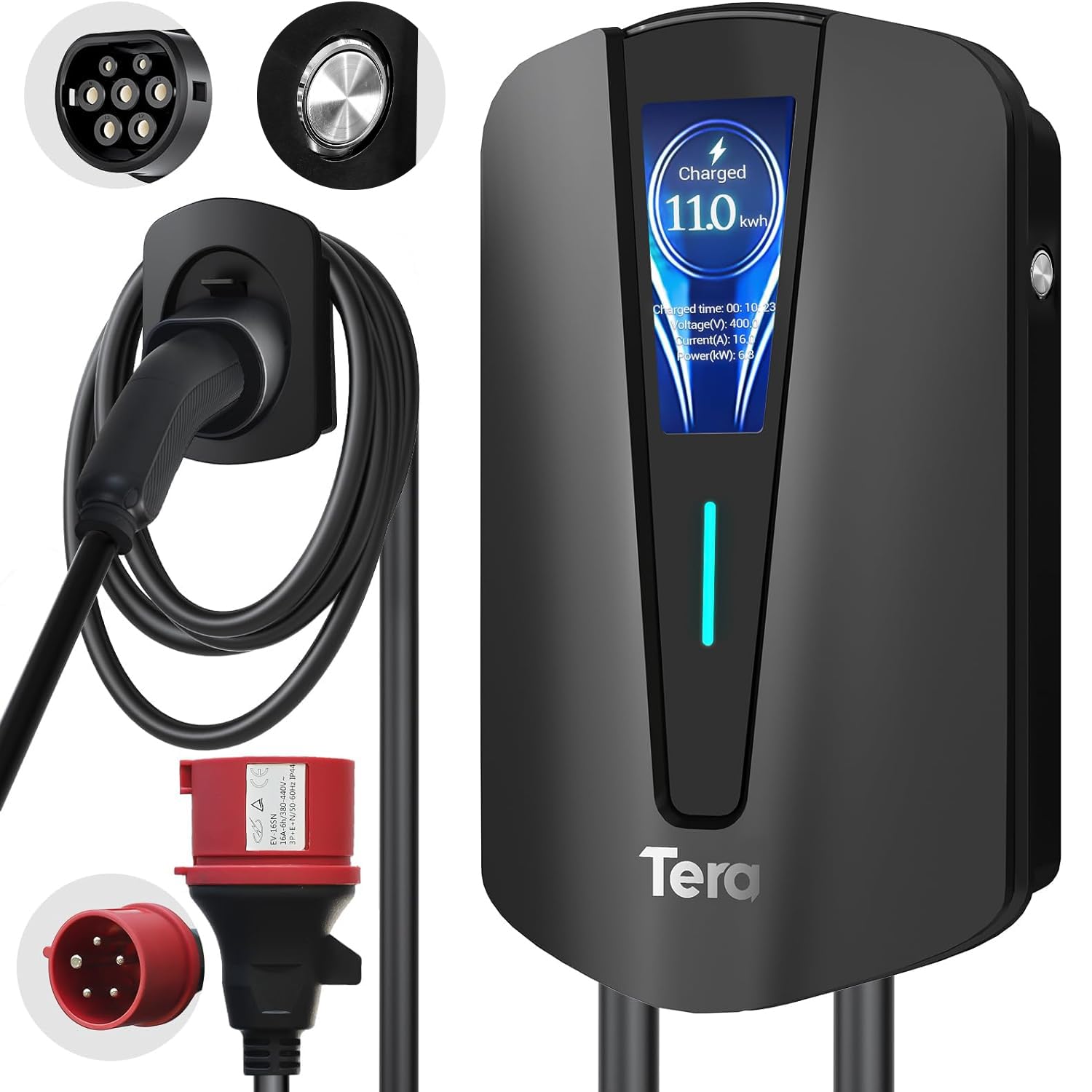
Image: The Tera EV Type 2 Wallbox charging station, featuring a sleek black design and integrated display.
The Tera EV charger is designed for electric vehicles (EVs) and plug-in hybrid electric vehicles (PHEVs), offering a maximum power output of 11 kW, 16A current, and 400V voltage. It complies with the European standard IEC 62196-2 and features advanced safety protections.

Image: The Tera EV charger in use, demonstrating its Type 2 and 3-phase CEE plug compatibility and plug-and-play operation.
Key features include a 7-meter charging cable, an integrated digital display for monitoring charging status, and an IP54 waterproof rating for outdoor use in various weather conditions. The pure copper charging cables ensure excellent conductivity and minimal heat generation.

Image: The Tera EV charger features a Type 2 connector and a CEE 3-phase plug, highlighting multiple safety protections.
Configurazione e installazione
Professional installation by a qualified electrician is recommended for this 3-phase EV charging station to ensure compliance with local electrical codes and safety standards.
Contenuto della confezione:

Image: The package includes the EV charger unit, user manual, mounting plate, screw set, and a CEE 3-phase plug.
- EV Charger Type 2 Unit
- Manuale d'uso
- Piastra di montaggio
- Screw Set
- CEE 3-Phase Plug
- Supporto per cavo
Passaggi di montaggio:
- Seleziona Località: Choose a suitable wall location for the charging station, ensuring it is within reach of your vehicle's charging port and a compatible power source. The location should be protected from direct sunlight and heavy rain if possible, despite its IP54 rating.
- Fori di perforazione: Use the mounting plate as a template to mark and drill holes on the wall.
- Piastra di montaggio sicura: Fissare la piastra di montaggio alla parete utilizzando le viti e i tasselli forniti.
- Supporto caricabatterie: Carefully place the EV charger unit onto the mounting plate.
- Caricabatterie sicuro: Fasten the anti-theft screw (if applicable) to secure the charger to the mounting plate.
- Installare il supporto per cavi: Mount the cable holder near the charging station for convenient cable management.

Image: Visual guide for mounting the EV charger: drilling holes, attaching the mounting plate, securing the charger, and final assembly.
Collegamento elettrico: Connect the CEE 3-phase plug to a compatible 400V, 16A 3-phase power outlet. Ensure the electrical circuit is properly protected with a residual current device (RCD) and circuit breaker as per local regulations.
Istruzioni per l'uso
Avvio di una carica:
- Ensure the charging station is properly connected to the power supply. The LED indicator on the unit should be lit.
- Take the Type 2 charging cable from the holder.
- Insert the Type 2 connector firmly into your electric vehicle's charging port.
- The charging process will begin automatically. The digital display will show charging progress, current power, and duration.

Image: The digital display provides real-time charging information, including energy delivered and charging speed.
Stopping a Charge:
- Once charging is complete, or if you need to stop it prematurely, unlock your vehicle's charging port (if applicable).
- Remove the Type 2 connector from your vehicle.
- Return the charging cable to its holder on the wallbox.
Indicatori di stato:
The LED indicators and digital display provide visual feedback on the charger's status:
- Verde pieno: Power on, no load (ready to charge).
- Verde lampeggiante: Plug inserted, not charging (waiting for vehicle to initiate).
- Blu fisso: Ricarica completata.
- Blu lampeggiante: Ricarica in corso.

Image: Visual representation of the charger's status lights, indicating power, charging activity, and error states.
Adaptive Power Adjustment:
The charger features adaptive power adjustment to prevent overcharging and protect the vehicle's battery. The charging power may decrease as the battery approaches full capacity, ranging from 11 kW down to 1 kW, depending on the vehicle's requirements.

Image: The charger intelligently adjusts power output to optimize battery health and prevent overcharging.
Modalità di ricarica:
The charger supports both three-phase and single-phase charging, adapting to the vehicle's capabilities.

Image: Comparison of three-phase and single-phase charging capabilities, showing how the charger adapts to different power inputs.
Manutenzione
- Pulizia regolare: Pulire l'esterno della stazione di ricarica con un panno morbido e asciutto.amp panno. Non usare detergenti abrasivi o solventi.
- Ispezione dei cavi: Periodically inspect the charging cable and connectors for any signs of wear, damage, or corrosion. If any damage is found, discontinue use and contact customer support.
- Protezione ambientale: The unit is IP54 rated for water and dust resistance. Ensure the cover is properly closed when not in use to maintain this protection.
- Nessuna parte riparabile dall'utente: The internal components of the charging station are not user-serviceable. Do not attempt to open or repair the unit yourself.

Image: The IP54 rating ensures the charger's durability and functionality in various weather conditions, requiring minimal external maintenance.
Risoluzione dei problemi
If you encounter issues, refer to the following common problems and their solutions. For persistent problems, contact customer support.
| Problema | Possibile causa | Soluzione |
|---|---|---|
| Il caricabatterie non si accende. | No power from the outlet, faulty connection. | Check the CEE 3-phase plug connection and the power supply. Ensure the circuit breaker is on. |
| La ricarica non si avvia. | Vehicle not ready, connector not fully inserted, or vehicle communication error. | Ensure the Type 2 connector is fully inserted. Check vehicle's charging settings. Re-plug the connector. |
| Velocità di ricarica lenta. | Vehicle's battery management system limiting power, or external factors (e.g., grid load). | This may be normal due to adaptive power adjustment. Check vehicle's charging status. |
| Red LED indicator flashing. | Error detected (e.g., overcurrent, ground fault, overvoltagE). | Refer to the error code on the digital display or the manual's error indicator section. Disconnect and reconnect. If persistent, contact support. |
Error Indicators (Red LED Flashing):
- 1 Flash: Ground fault protection.
- 2 flash: Protezione da sovracorrente.
- 3 flash: Earth leakage (ungrounded).
- 4 flash: Sotto/Overvoltage allarme.
- 5 flash: Relay fault.
- 6 flash: CP/CC fault.
If any red LED error occurs, disconnect the charger from the vehicle and power source, wait a few minutes, then reconnect. If the error persists, contact customer support.
Specifiche tecniche
| Caratteristica | Specificazione |
|---|---|
| Numero di modello | Q8-Schwarz |
| Marca | Terra |
| Tipo di connettore | Type 2, CEE 16A 5-pin |
| Dispositivi compatibili | Electric Vehicles (EVs) and Plug-in Hybrid Electric Vehicles (PHEVs) |
| Ingresso volumetage | 400 Volt |
| Amprabbia | 16 A |
| Potenza in uscita | 11 kW |
| Corrente di uscita | 16 A |
| Volume di uscitatage | 400 Volt |
| Gamma di frequenza | Frequenza 50 Hz |
| Fonte di alimentazione | AC |
| Caratteristica speciale | Supporto per cavo |
| Colore | Nero |
| Peso | 4.6 chilogrammi |
| Grado di protezione IP (ingresso) | Grado di protezione IP54 |
| Temperatura di esercizio | da -30 °C a 50 °C |
| Certificazioni | CE, UKCA, RoHS |
Compatibilità:
This charger is compatible with all Type 2 electric vehicles. Exampi le includono, ma non sono limitati a:
- Tesla (Model S, 3, X, Y)
- Volkswagen (e-Golf, ID4)
- Jeep (Grand Cherokee 4xe, Wrangler 4xe)
- Toyota (Prius Prime, RAV4 EV, C-HR EV)
- Honda (EV Plus, Clarity Electric)
- Fiat (500e, 500e 3+1)
- Hyundai (Ioniq Electric, Kona Electric, Santa Fe Hybrid)
- Nissan (LEAF, LEAF S, LEAF S PLUS, Altra EV)
- Chevrolet (EV1, Bolt Volt)

Image: The Type 2 connector ensures broad compatibility with a wide range of electric vehicle models.
Informazioni sulla garanzia
Tera products are manufactured to high-quality standards. For specific warranty terms and conditions, please refer to the warranty card included with your product or visit the official Tera websito. Conservare la prova d'acquisto per eventuali reclami in garanzia.
Assistenza clienti
For technical assistance, troubleshooting, or warranty inquiries, please contact Tera customer support through the following channels:
- Websito: Visita il sito ufficiale di Tera websito per risorse di supporto e moduli di contatto.
- E-mail: Fare riferimento alla confezione del prodotto o al sito ufficiale websito per gli indirizzi email del servizio clienti.
- Telefono: I numeri di contatto potrebbero essere disponibili sul sito ufficiale websito o nella documentazione del prodotto.
When contacting support, please have your product model number (Q8-Schwarz) and proof of purchase readily available.