
1. Introduzione
This manual provides detailed instructions for the installation, operation, and maintenance of your Micodus MV720 GPS Tracker. The MV720 is a compact and efficient vehicle tracking device designed for real-time location monitoring, security, and remote control functionalities. Please read this manual thoroughly before using the device to ensure proper setup and optimal performance.
2. Prodotto finitoview
The Micodus MV720 is a discreet GPS tracker often designed to resemble a standard vehicle relay, making it ideal for covert installation. It integrates advanced GPS and cellular technologies to provide accurate positioning and communication capabilities.

Figure 2.1: The Micodus MV720 GPS Tracker, designed to look like a vehicle relay, shown with a SIM card package.

Figure 2.2: The MV720 tracker positioned beside a smartphone, illustrating its integration with the mobile tracking application.

Figura 2.3: Un dettaglio view of the MV720's internal circuit board, highlighting its compact design and components.
3. Specifiche
The following table outlines the technical specifications for the Micodus MV720 GPS Tracker (typical for MV7xx series):
| Categoria | Parametro | Valore |
|---|---|---|
| Informazioni sul dispositivo | Modello | MV720 (GPS08) |
| Peso | 40g | |
| Dimensioni | 79 mm (Lunghezza) x 33 mm (Larghezza) x 16 mm (Altezza) | |
| Batteria | Batteria ai polimeri integrata da 60 mAh 3.7 V | |
| Parametri di lavoro | Volume di lavorotage | 9-95V DC |
| Corrente di lavoro | 12 V/media 35 mA | |
| Corrente di sonno | 12 V/media 10 mA | |
| Temperatura di lavoro | Temperatura ambiente -20°C ~ 75°C | |
| Specifiche cellulari | Scheda SIM | Nano SIM |
| Antenna cellulare | FPC integrato | |
| Frequenza di lavoro | GSM/2G: 850/900/1800/1900MHz | |
| 4G LTE-FDD | B1/B2/B3/B4/B5/B7/B8/B28/B66 | |
| Specifiche GNSS | GNSS | GPS+BDS |
| Frequenza GPS | L1: 1575.42 ± 1.023 MHz | |
| Frequenza BDS | B1: 1561.098 ± 2.046 MHz | |
| Sensibilità | -162 dBm | |
| Canali satellitari | 32 | |
| Avvio caldo/freddo | <1s, <32s @ Open Sky | |
| Precisione | <10m (1σ) | |
| Interfaccia esterna | Rilevamento ACC | 1 |
| Interrompere carburante/potenza | Standard | |
| SOS (facoltativo) | 1 | |
| Allarme porta aperta (opzionale) | 1 | |
| Microfono | 1 |
4. Configurazione e installazione
Proper installation is crucial for the MV720's performance. It is recommended to have the device installed by a qualified professional.
4.1 Installazione della scheda SIM
- Assicurarsi che il dispositivo sia spento.
- Locate the SIM card slot on the device. The MV720 uses a Nano SIM card.
- Insert the Nano SIM card into the slot with the correct orientation until it clicks into place.
- Ensure the SIM card has an active data plan and is capable of 2G/4G communication.
4.2 Schema elettrico
The MV720 is designed to be wired into your vehicle's electrical system. The following diagram illustrates the standard wiring connections:

Figure 4.1: Wiring diagram for the MV720 GPS Tracker, showing connections to battery, ignition, and fuel pump relay.
4.3 Punti di connessione
- Filo rosso: Connect to the positive terminal of the vehicle's battery (constant 9-95V DC power).
- Filo nero: Connect to the negative terminal of the vehicle's battery or a reliable ground point.
- Filo arancione (ACC): Connect to the vehicle's ignition (ACC) wire. This allows the tracker to detect ignition status.
- Filo giallo (controllo relè): Connect to the control wire of the fuel pump relay. This enables remote fuel cut-off functionality.
- Blue/Green Wires (Relay Output): These are the output wires from the relay integrated into the tracker, typically used to interrupt the fuel pump circuit.
Warning: Incorrect wiring can damage the device or the vehicle's electrical system. Consult a professional for installation if you are unsure.
5. Istruzioni per l'uso
The Micodus MV720 GPS Tracker is primarily operated through a dedicated mobile application or web piattaforma.
5.1 Mobile Application / Web Piattaforma
- Download the official Micodus tracking application from your smartphone's app store (iOS/Android) or access the web platform via a browser.
- Register an account and add your device using its unique ID number (usually found on the device or packaging).
- Una volta aggiunto, puoi view the real-time location of your vehicle, historical routes, and device status.
5.2 Caratteristiche principali
- Monitoraggio in tempo reale: Monitor your vehicle's live location on a map.
- Riproduzione del percorso storico: Review past travel routes and stops.
- Allarme geo-fence: Set up virtual boundaries (geo-fences) on the map. You will receive an alert if the vehicle enters or exits these predefined areas. This is useful for monitoring specific zones like home, work, or restricted areas.
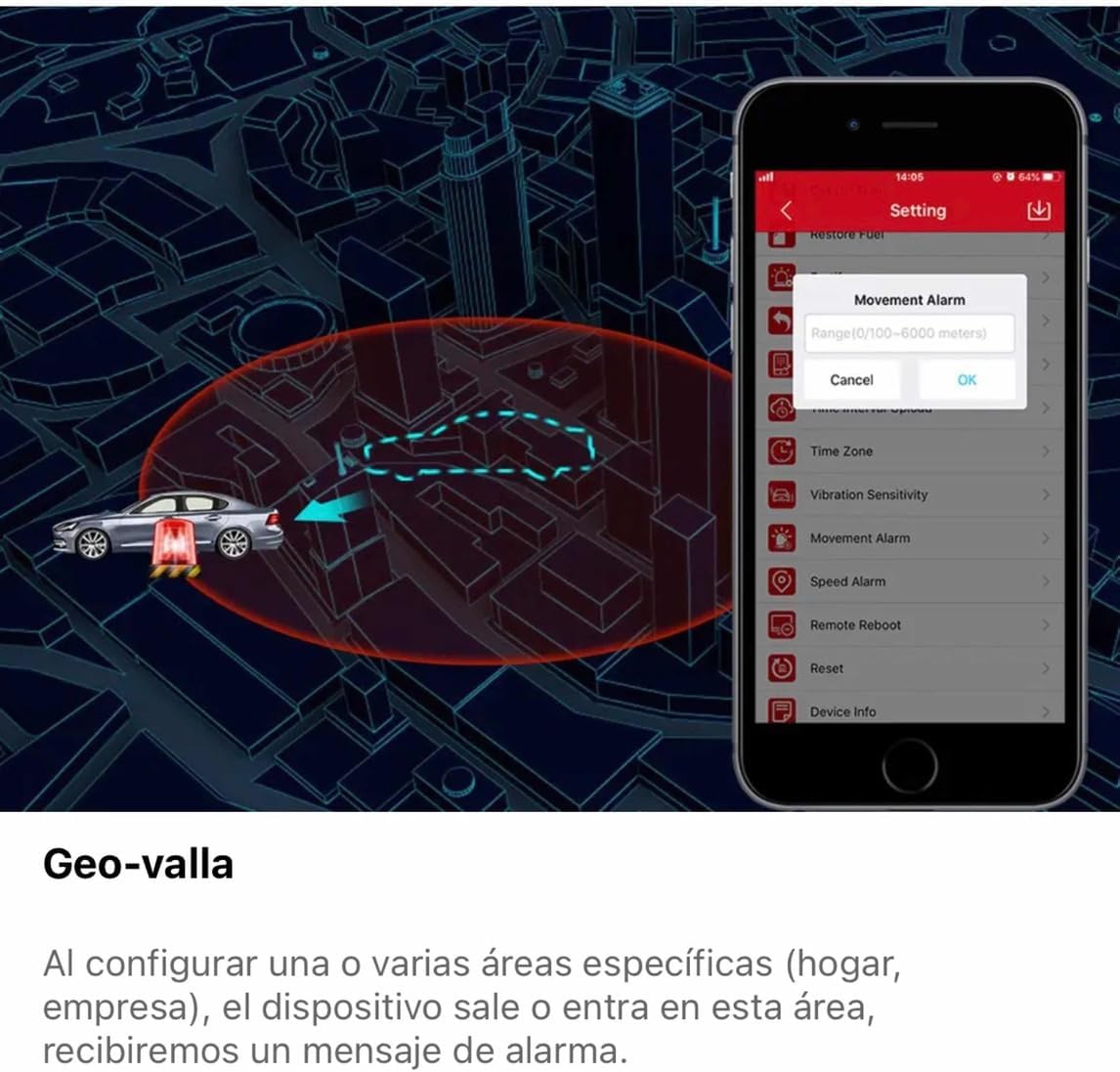
Figure 5.1: The mobile application interface demonstrating the geo-fence and movement alarm settings, allowing users to define and monitor specific areas.
- Remote Fuel/Power Cut-off: In case of theft or unauthorized use, you can remotely cut off the vehicle's fuel supply or power via the app, preventing it from being driven further. This feature should be used with caution and only when the vehicle is stationary to avoid accidents.

Figure 5.2: The mobile application displaying the remote fuel cut-off function, a security feature to disable the vehicle's engine remotely.
- Allarme vibrazione: Receive alerts if the vehicle experiences unusual vibrations, indicating potential tampering o impatto.
- Allarme velocità: Set a maximum speed limit, and receive notifications if the vehicle exceeds it.
- Rilevamento ACC: Monitor when the vehicle's ignition is turned on or off.
6. Manutenzione
The Micodus MV720 GPS Tracker is designed for low maintenance. Follow these general guidelines to ensure its longevity:
- Mantenere asciutto: Evitare di esporre il dispositivo all'acqua o a umidità eccessiva.
- Temperatura: Operate within the specified temperature range (-20°C to 75°C). Extreme temperatures can affect performance and battery life.
- Pulizia: Mantenere il dispositivo libero da polvere e detriti. Utilizzare un panno morbido e asciutto per la pulizia.
- Aggiornamenti del firmware: Periodically check the official Micodus websito o app per eventuali aggiornamenti firmware disponibili per garantire prestazioni ottimali e accesso a nuove funzionalità.
- Scheda SIM: Ensure the SIM card is always active and has sufficient data balance for continuous operation.
7. Risoluzione Dei Problemi
If you encounter issues with your Micodus MV720, refer to the following common problems and solutions:
| Problema | Possibile causa | Soluzione |
|---|---|---|
| Device not showing online | No power, SIM card issue, poor network signal | Check power connection. Ensure SIM card is correctly inserted and active. Move to an area with better cellular coverage. |
| Posizione GPS imprecisa | Poor GPS signal, device obstructed | Assicurarsi che il dispositivo abbia uno spazio libero view of the sky. Avoid installing in enclosed metal areas. |
| Cannot send commands (e.g., fuel cut-off) | No network, incorrect wiring, device offline | Verify device is online. Check wiring connections, especially the yellow wire for relay control. |
| No historical data | Device was offline, data plan expired | Ensure continuous power and active data plan. Check device status regularly. |
| L'app non si connette al dispositivo | Incorrect device ID, server issues, app version outdated | Double-check device ID. Try restarting the app or your phone. Update the app to the latest version. Contact support if issues persist. |
If the problem persists after trying these solutions, please contact Micodus customer support for further assistance.
8. Garanzia e supporto
Micodus products typically come with a standard manufacturer's warranty. Please refer to your purchase documentation or the official Micodus websito per termini e condizioni di garanzia specifici.
8.1 Assistenza clienti
For technical support, troubleshooting assistance, or warranty claims, please contact Micodus customer service through their official website or the contact information provided with your product packaging. When contacting support, please have your device's model number (MV720) and unique ID readily available.