
1. Introduzione
Thank you for choosing the Parkside PAAL 6000 C2 Rechargeable Work Light. This versatile and robust work light is designed to provide powerful illumination in various environments, featuring multiple operating modes, a USB power bank function, and durable construction. Please read this manual carefully before use to ensure proper operation and maintenance.
2. Caratteristiche del prodotto
- Cellulare lamp with USB Power Bank Function: Charge your mobile devices on the go.
- Powerful 20W COB LED: Fornisce un'illuminazione brillante ed efficiente.
- 4 modalità operative: Max. brightness, 50% power saving mode, SOS signal, and red flashing light.
- Doppia porta USB: Includes 2 USB ports for charging external devices.
- Indicatore di stato della batteria: Located under a protective cover for easy monitoring.
- Shock-Resistant Housing: Features rubber edges for enhanced durability.
- IP65 Jet Protection: Resistant to water jets, suitable for outdoor use.
- Foldable Magnetic Stand: Ensures secure placement on metallic surfaces.
- Opzione di sospensione: Can also be hung for versatile lighting angles.
3. Contenuto della confezione
Si prega di verificare che tutti gli articoli siano presenti e in buone condizioni:
- 1 x Parkside PAAL 6000 C2 Rechargeable Work Light
- 1 cavo USB
- 1 x Car Charging Adapter
- 1 x alimentatore

Image: Included accessories - USB cable, car charger, and power supply.
4. Istruzioni di sicurezza
- Non guardare direttamente la luce LED quando è accesa, poiché potrebbe causare danni agli occhi.
- Tenere il dispositivo lontano dalla portata dei bambini.
- Do not attempt to disassemble or modify the work light. This may void the warranty and pose safety risks.
- Use only the provided charging accessories or compatible alternatives.
- Ensure the protective cover for the USB ports is securely closed when not in use, especially in wet conditions.
- Evitare di esporre il dispositivo a temperature estreme o alla luce solare diretta per periodi prolungati.
5. Prodotto finitoview
Familiarize yourself with the main components of your work light:
- Davanti: COB LED panel for illumination.
- Indietro: Solar panel (for charging), USB output ports, USB-C input port, power button, and battery indicator lights.
- Lati: Rotatable stand/handle with magnetic base.

Immagine: Frontale view of the work light with its powerful LED panel illuminated.

Immagine: Indietro view of the work light, detailing the USB ports, power button, and battery indicator lights under a protective flap.
6. Funzionamento
The work light features a single power button to cycle through its lighting modes.
- Power On / Max Brightness: Press the power button once to turn on the light at maximum brightness.
- 50% Power Saving Mode: Press the power button a second time to switch to 50% brightness.
- Segnale SOS: Press the power button a third time for the white SOS flashing signal.
- Luce rossa lampeggiante: Press the power button a fourth time for the red flashing emergency light.
- Spegni: Press the power button a fifth time to turn off the light.
Using the Power Bank Function:
- Open the protective cover on the back of the unit.
- Connect your mobile device to one of the USB output ports using a compatible USB cable.
- The work light will automatically begin charging your device.
- Monitor the battery indicator lights to check the remaining power of the work light.
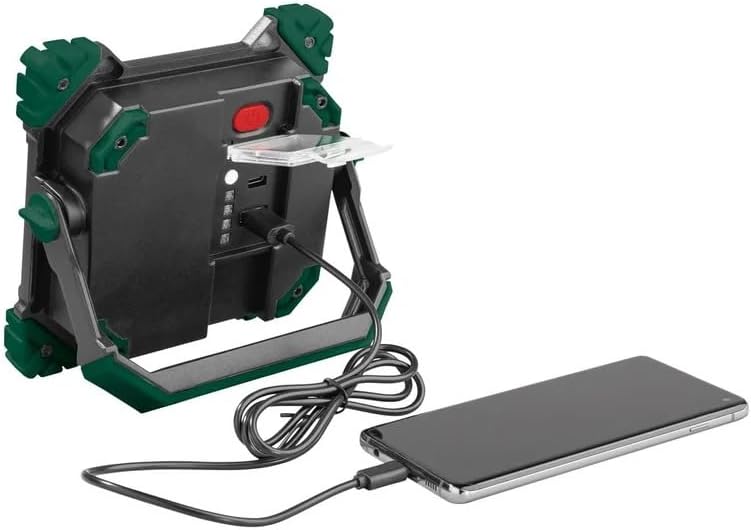
Image: The work light functioning as a power bank, charging a smartphone via its USB port.
7. Ricarica della lampada da lavoro
The Parkside PAAL 6000 C2 can be charged via USB-C or its integrated solar panel.
Ricarica USB-C:
- Open the protective cover on the back of the unit.
- Connect the provided USB cable to the USB-C input port on the work light and to a power source (e.g., wall adapter, car charger, computer USB port).
- Le spie luminose della batteria si accenderanno per mostrare l'avanzamento della ricarica. Tutte le spie saranno fisse quando la carica sarà completa.
Ricarica solare:
- Place the work light with the solar panel facing direct sunlight.
- The solar charging indicator light will show when the device is receiving power.
- Solar charging is slower than USB-C charging and is best used for maintaining charge or in emergencies.
8. Montaggio e posizionamento
The integrated foldable stand offers multiple positioning options:
- Attacco magnetico: The stand has a magnetic base, allowing the light to be securely attached to metallic surfaces for hands-free operation.
- Autoportante: Fold out the stand to position the light on any flat surface.
- Sospeso: The stand can also be used as a handle or hook to hang the light.

Image: The work light positioned on a surface, demonstrating its adjustable stand.
9. Manutenzione e cura
- Pulisci il dispositivo con un panno morbido eamp panno. Non usare detergenti abrasivi o solventi.
- Ensure the USB ports are dry before charging or using the power bank function.
- Quando non viene utilizzata, conservare la lampada da lavoro in un luogo fresco e asciutto.
- Charge the battery at least once every three months to prolong its lifespan if stored for extended periods.
10. Risoluzione Dei Problemi
- La luce non si accende: Check battery level. Recharge the device if necessary.
- Dispositivo non in carica: Ensure the charging cable is properly connected and the power source is active. Try a different cable or power source.
- Mobile device not charging from work light: Ensure the work light has sufficient battery power. Check the connection cable.
- Luminosità ridotta: Battery may be low. Recharge the device.
11. Specifiche
| Attributo | Valore |
|---|---|
| Marca | Crivit |
| Numero di modello | 390334 |
| Dimensioni del prodotto | Dimensioni: 16.5 x 15 x 4.4 cm |
| Materiale | Alluminio, Plastica |
| Tipo di sorgente luminosa | COB LED (20W) |
| Flusso luminoso | 2000 lumen |
| Voltage | 12 Volt (CC) |
| Fonte di alimentazione | DC Adapter, Solar |
| Grado di protezione IP (ingresso) | Grado di protezione IP65 |
| Caratteristiche speciali | Adjustable brightness, SOS signal, red flashing light, shockproof, water-resistant, power bank function, magnetic mount |
12. Video ufficiali dei prodotti
Watch these official videos for a visual guide on using your Parkside PAAL 6000 C2 Rechargeable Work Light:
Video: Unboxing and demonstration of the work light's features, including its handle, ports, and lighting modes.
Video: Oltreview of the work light's design, charging capabilities, and various light settings.
Video: Demonstration of the work light's different brightness levels, SOS mode, and power bank function.
Video: Features and applications of the rechargeable work light, including its use in various settings.
Video: Multifunctional rechargeable LED work light showcasinle sue caratteristiche e la sua versatilità.
Video: Detailed look at the rechargeable work light, highlighting its robust design and functionality.
Video: Another demonstration of the rechargeable work light's features and practical uses.
13. Garanzia e supporto
Per informazioni sulla garanzia e sull'assistenza clienti, consultare la documentazione fornita con l'acquisto o contattare il rivenditore. Conservare la prova d'acquisto per eventuali reclami in garanzia.