
Introduzione
This document provides instructions for the KRPTQJoo replacement infrared remote control, model Joo1322. This remote is designed as a spare or replacement for various Haier Smart LCD LED HDTV Television models, including 55E5500UB, 49U2500A, 55E5500UC, 65UF2505D, 65UF2505E, 48E2500C, 48E2500D, 49UF2500C, 49UF2500D, 75UF2500A, 55E5500UG, 65UF2505F, and KIVI models such as KT-1346A, 24HK10G, 24HK20G, 32HK10G, 32HK20G, 40FK20G. The remote control is made of high-quality ABS material.
Please note that the functions and buttons on this replacement remote may not be exactly identical to your original remote. Some keys may have no function if your television model does not support those specific features.

Image: The KRPTQJoo replacement remote control shown alongside its retail packaging.
Impostare
The KRPTQJoo replacement remote control requires no pairing or programming. To begin using the remote, follow these steps:
- Aprire il vano batteria: Locate the battery compartment cover on the back of the remote control. Slide or lift the cover to open it.
- Inserire le batterie: Inserire due (2) batterie AAA nel vano. Assicurarsi che i terminali positivo (+) e negativo (-) delle batterie siano allineati correttamente con le marcature all'interno del vano.
- Chiudere il vano batteria: Richiudere il coperchio del vano batteria, assicurandosi che scatti saldamente in posizione.
The remote control is now ready for use with your compatible television.

Image: The rear of the remote control with the battery compartment open, showing where to insert two AAA batteries.
Istruzioni per l'uso
This infrared remote control functions similarly to your original television remote. Point the remote directly at your television's infrared receiver for optimal performance.
- Pulsante di accensione: Located at the top, typically red, to turn the TV on or off.
- Tasti numerici (0-9): Used for direct channel selection.
- Controllo del volume (VOL +/-): Regola il volume dell'audio.
- Controllo canale (CH +/-): Cambia canale televisivo.
- Pulsanti di navigazione (Su, Giù, Sinistra, Destra, OK): Utilizzato per navigare nei menu e confermare le selezioni.
- Pulsante Sorgente/Ingresso: Seleziona la sorgente di ingresso (ad esempio, HDMI, AV).
- Pulsante Menu: Accede al menu principale del televisore.
- Pulsante Indietro/Esci: Ritorna alla schermata precedente o esce da un menu.
- Pulsanti dell'app: Dedicated buttons for specific applications like YouTube, if supported by your TV model.
Refer to your television's original manual for specific functions of certain buttons, as some features may vary or not be supported by all compatible models.

Image: A composite view showing the front of the remote control, a close-up of the top buttons, the open battery compartment, and the remote being held in a hand.
Manutenzione
- Sostituzione della batteria: Replace batteries when the remote's performance degrades or it stops responding. Always replace both AAA batteries simultaneously.
- Pulizia: Utilizzare un panno morbido e asciutto per pulire il telecomando. Non utilizzare detergenti liquidi o materiali abrasivi, poiché potrebbero danneggiare la superficie o i componenti interni.
- Magazzinaggio: Store the remote in a dry place, away from direct sunlight and extreme temperatures. If not used for an extended period, remove the batteries to prevent leakage.
Risoluzione dei problemi
- Il telecomando non risponde:
- Controllare che le batterie siano inserite correttamente, rispettando la polarità corretta.
- Sostituisci le vecchie batterie con nuove batterie AAA.
- Assicurarsi che non vi siano ostacoli tra il telecomando e il ricevitore a infrarossi del televisore.
- Assicurati di puntare il telecomando direttamente verso la TV.
- Certain Buttons Do Not Work:
- As a replacement remote, some advanced or specific functions may not be supported by all compatible television models. Refer to your TV's original manual to confirm feature compatibility.
- If a basic function (e.g., volume, channel) is not working, try the steps for "Remote Not Responding."
Se i problemi persistono dopo aver seguito questi passaggi per la risoluzione dei problemi, contatta il venditore per ulteriore assistenza.
Specifiche
| Caratteristica | Specificazione |
|---|---|
| Numero di modello | Joo1322 |
| Marca | KRPTQJoo |
| Dispositivi compatibili | Television (Haier, KIVI) |
| Numero massimo di dispositivi supportati | 1 |
| Colore | Nero |
| Caratteristica speciale | Design ergonomico |
| Batterie richieste | 2 x AAA (non incluso) |
| Peso dell'articolo | 1.28 once (circa 36 grammi) |
| Dimensioni del pacco | 5 x 3 x 2 pollici (circa 12.7 x 7.6 x 5.1 cm) |
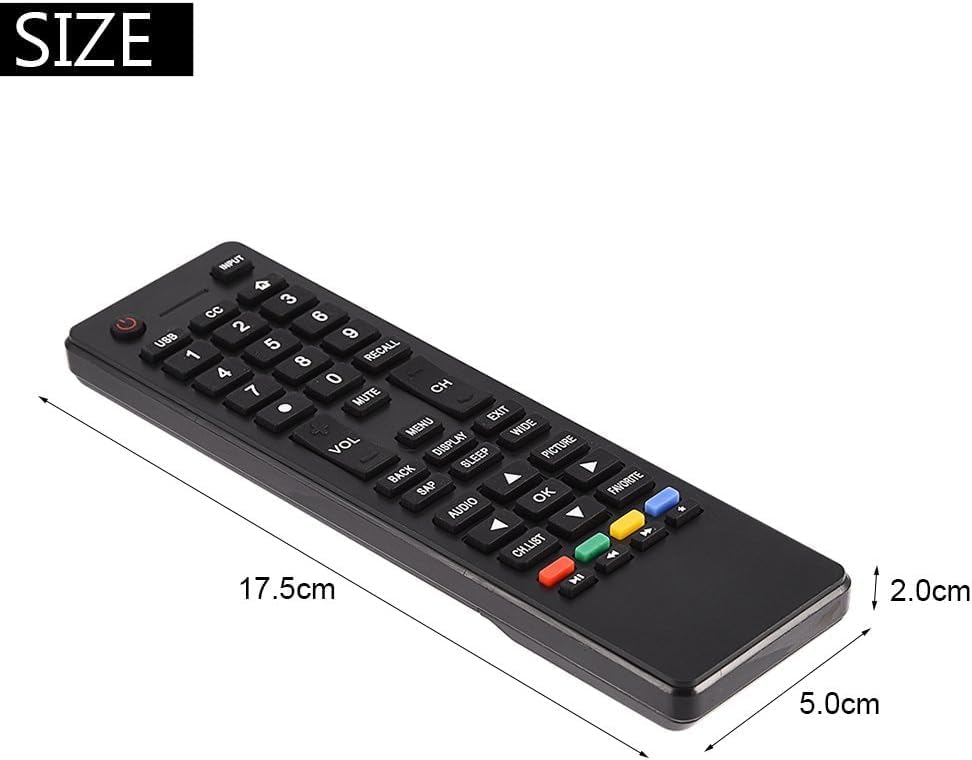
Image: The remote control with its approximate dimensions: 17.5cm length, 5.0cm width, and 2.0cm thickness.
Supporto
For any questions, concerns, or technical support regarding your KRPTQJoo replacement remote control, please contact the seller directly through your purchase platform. Provide your order details for efficient assistance.