
1. Introduzione
This manual provides detailed instructions for the installation, operation, and maintenance of your AINAVI 9-inch Android 12 Car Stereo. This unit is specifically designed for Dodge Ram 1500, 2500, and 3500 models manufactured between 2013 and 2018. Please read this manual thoroughly before use to ensure proper functionality and to maximize your experience.
2. Prodotto finitoview
2.1. Caratteristiche principali
- Sistema operativo: Android 12 OS with ARM Cortex A55 8-Core processor.
- Memoria: 4 GB di RAM + 64 GB di ROM per un funzionamento rapido e fluido.
- Display: 9-inch QLED screen with 1280x720 resolution, G+G full lamination technology, and 178° full-viewangolo di ing.
- Audio: Built-in DSP with Time Correction and 48-band EQ, 4*45W max output.
- Connettività: Wireless and wired Apple CarPlay, USB Android Auto, Built-in GPS Navigation, Dual-band 2.4Ghz & 5Ghz WiFi, Bluetooth 5.0.
- Integrazione: Plug-and-play harness with CANbus decoder, supporting original vehicle functions like steering wheel control and reverse signal.
2.2. Confronto visivo
Observe the transformation of your vehicle's dashboard with the AINAVI car stereo installation.

Image: Comparison of the Dodge Ram dashboard before and after installing the AINAVI 9-inch Android 12 Car Stereo.
3. Cosa c'è nella scatola
The following components are included with your AINAVI 9-inch Android 12 Car Stereo:
- 1x unità principale stereo per auto Android
- Cavo di alimentazione del cablaggio
- Decoder CANbus
- 1x Radio Antenna Adaptor
- 1x Altoparlante
- 1 cavo RCA
- 2x cavi USB
- 1x antenna GPS
- 1x Posteriore View Telecamera
- Microfono 1x
- Manuale dell'utente (questo documento)
A visual representation of the included accessories:
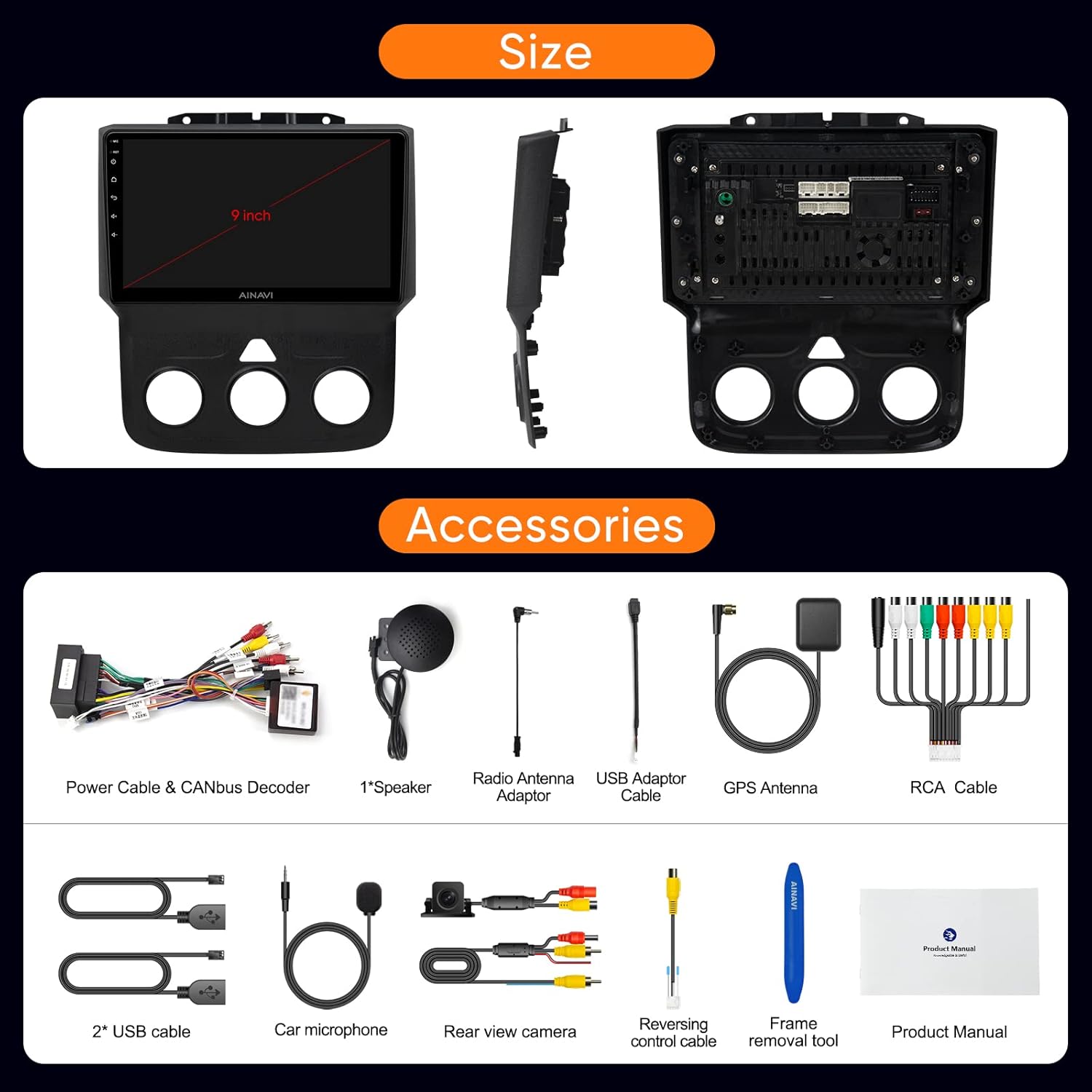
Image: All components and accessories included in the product package.

Immagine: dettagliata view of the wiring harness and other installation components.
4. Configurazione e installazione
The AINAVI car stereo is designed for a customized fit and plug-and-play installation in Dodge Ram 1500, 2500, and 3500 models from 2013-2018. It comes with a dedicated wiring harness and CANbus decoder to integrate with your vehicle's existing systems without requiring cable modifications.
4.1. Controlli pre-installazione
- Ensure your vehicle is compatible with the specified model years (2013-2018 Dodge Ram 1500/2500/3500).
- Verificare che tutti i componenti elencati nella sezione "Contenuto della confezione" siano presenti.
- Scollegare la batteria del veicolo prima di iniziare l'installazione.
4.2. Fasi di installazione (generali)
- Rimuovere con cautela l'autoradio originale e la modanatura del cruscotto.
- Connect the provided wiring harness to the vehicle's existing connectors. The CANbus decoder will ensure compatibility with original vehicle functions.
- Connect the GPS antenna, radio antenna adaptor, USB cables, rear view camera, and microphone to the corresponding ports on the new head unit.
- Montare la nuova unità principale AINAVI nell'apertura del cruscotto.
- Reinstallare la finitura del cruscotto.
- Reconnect the vehicle's battery and power on the unit for initial testing.
For detailed visual guidance on wiring, refer to the wiring harness diagram provided in the 'What's in the Box' section.
5. Istruzioni per l'uso
5.1. Navigazione di base dell'interfaccia
The unit features a responsive 9-inch QLED touchscreen. Navigate through applications and settings by tapping and swiping. The main screen provides quick access to essential functions like Radio, Video, Music, and EQ.
5.2. Apple CarPlay e Android Auto
The stereo supports both wireless and wired Apple CarPlay, and USB-connected Android Auto. This allows seamless integration of your smartphone for navigation, calls, messages, and music.
- Connessione: Pair your phone via Bluetooth for wireless CarPlay/Android Auto, or connect via USB for wired Android Auto.
- Controllo vocale: Access voice commands directly by saying “Hey Siri” or “Hey Google”.
Watch these videos for connection guides:
Video: Demonstrates how to connect Wireless Android Auto to the car stereo.
Video: Shows the process of connecting Apple CarPlay to the Dodge Ram 1500/2500/3500 stereo.
Video: Guide on connecting both Apple CarPlay and Android Auto to the Ram 2013-18 stereo.

Image: Interface displaying Wireless CarPlay and Android Auto features.

Image: Smart Voice Control functionality with Apple CarPlay and Android Auto.
5.3. DSP Settings and Audio Control
The built-in Digital Sound Processor (DSP) allows for precise audio customization, including Time Correction and a 48-band Equalizer.
- Equalizzatore: Regola le bande di frequenza per adattare il suono alle tue preferenze.
- Correzione del tempo: Digitally control the sound timing for each speaker to optimize the sound field position.
Explore DSP settings and music playback:
Video: Demonstrates how to use the Split Screen feature and adjust DSP settings.
Video: Oltreview of DSP functions for music playback and multimedia.

Image: DSP settings interface showing 48 EQ band and time correction.

Image: Explanation of the sound control system with DSP.
5.4. Funzionalità schermo diviso
The split-screen mode allows you to run two applications simultaneously, such as navigation and a media player.
See how to use split screen mode:
Video: Demonstrates how to use the Split Screen feature and adjust DSP settings.
5.5. Navigazione GPS
The unit includes built-in GPS navigation. You can access real-time traffic information when connected to a network or download offline maps for use without internet access.

Image: GPS map display and multimedia entertainment options.
5.6. Connectivity (WiFi & Bluetooth)
- Wifi: Supports dual-band 2.4Ghz and 5Ghz WiFi for high-speed internet access and app downloads.
- Bluetooth 5.0: Consente chiamate in vivavoce, streaming musicale e sincronizzazione della rubrica.
5.7. Funzionalità radio
The unit features an FM tuner with RDS support. You can scan for stations and save your favorites.
Learn how to use the RDS Radio Player:
Video: Demonstrates how to use the RDS Radio Player and save channel stations.
5.8. Impostazioni di sistema
Access various system settings to customize your stereo experience.
- Panel Light: Adjust panel light settings.
- Unità di velocità: Change speed unit from km/h to mph.
- Impostazioni di fabbrica: Access advanced settings. The factory password is 123456.
Watch these videos for system settings guidance:
Video: Guide on accessing factory settings using password 123456 for Ram 1500 2013-2018.
Video: Instructions on how to change the speed unit from kilometers to miles.
6. Manutenzione
- Pulizia: Utilizzare un panno morbido e asciutto per pulire lo schermo e l'unità. Evitare detergenti abrasivi o solventi.
- Aggiornamenti software: Controlla periodicamente la disponibilità di aggiornamenti software per garantire prestazioni ottimali e l'accesso a nuove funzionalità. Gli aggiornamenti sono in genere disponibili nelle impostazioni di sistema.
- Condizioni ambientali: Evitare di esporre l'unità a temperature estreme, alla luce solare diretta per periodi prolungati o a umidità eccessiva.
7. Risoluzione Dei Problemi
If you encounter issues with your AINAVI car stereo, refer to the following common solutions:
| Problema | Possibile soluzione |
|---|---|
| L'unità non si accende | Check power connections and vehicle's fuse box. Ensure the battery is properly reconnected. |
| Nessuna uscita audio | Verify speaker connections, check volume levels, and ensure DSP settings are not muting audio. |
| CarPlay/Android Auto non si connette | Ensure Bluetooth is on and paired (for wireless), or USB cable is securely connected. Restart phone and stereo. |
| Problemi con il segnale GPS | Assicurarsi che l'antenna GPS sia installata correttamente e abbia una visuale libera view del cielo. Controlla la connessione di rete per le mappe online. |
| I comandi al volante non funzionano | Verify CANbus decoder connection and check steering wheel control settings in the stereo's menu. |
| Lo schermo non risponde | Perform a soft reset of the unit (refer to the device's reset button location, if available). |
Se il problema persiste dopo aver provato queste soluzioni, contattare l'assistenza clienti.
8. Specifiche
| Caratteristica | Dettaglio |
|---|---|
| Marca | AINAVI |
| Modello | B0CLTQ1Q2P |
| Sistema operativo | Androide 12 |
| Processore | ARM Cortex A55 a 8 core |
| Memoria RAM | 4 GB |
| Capacità di archiviazione della memoria | 64 GB |
| Dimensioni dello schermo | 9 pollici |
| Risoluzione | 1280x720 |
| Tipo di visualizzazione | QLED, Capacitive Touchscreen |
| Modalità di uscita audio | Stereo (4*45W) |
| Tecnologia di connettività | Bluetooth 5.0, USB, Wi-Fi (2.4Ghz & 5Ghz) |
| Supported Navigation Systems | BeiDou, GPS, Galileo |
| Tipo di veicolo compatibile | Dodge Ram 1500, 2500, 3500 (2013-2018) |
| Input dell'interfaccia umana | Microfono, Touchscreen |
| Metodo di controllo | Tocco, Voce |
| Codice UPC | 760762573289 |
9. Garanzia e supporto
AINAVI fornisce un garanzia del prodotto di un anno from the date of purchase. For any technical assistance, troubleshooting, or warranty claims, please do not hesitate to contact us via Amazon email. Our professional technical support team will respond as soon as possible to assist you.
Conservare la prova d'acquisto per la convalida della garanzia.