
1. Introduzione
This manual provides essential instructions for the safe and efficient operation, setup, and maintenance of your ALLPOWERS R1500 LITE Portable Power Station and SP037 Solar Panel. Please read this manual thoroughly before using the product to ensure optimal performance and longevity.
The ALLPOWERS R1500 LITE is a versatile portable power station designed to provide reliable power for various applications, from outdoor camping and RV use to home backup during power outages. It features a 1056Wh capacity and 1600W AC output (3200W surge), capable of charging up to 9 devices simultaneously. The included SP037 400W solar panel allows for efficient solar recharging.

Figura 1: Un overview of the ALLPOWERS R1500 LITE portable power station alongside the SP037 foldable solar panel.
2. Informazioni sulla sicurezza
Per evitare lesioni o danni al prodotto, attenersi sempre alle seguenti linee guida di sicurezza:
- Non smontare, riparare o modificare l'unità.
- Keep the product away from fire, heat sources, and direct sunlight.
- Avoid exposure to water or other liquids. Do not operate in rain or wet conditions.
- Assicurare una ventilazione adeguata durante l'uso e la ricarica. Non coprire l'unità.
- Utilizzare solo cavi di ricarica e accessori originali o certificati.
- Tenere fuori dalla portata dei bambini e degli animali domestici.
- In caso di incendio, utilizzare un estintore a polvere secca. Non utilizzare acqua.
3. Contenuto della confezione
Verifica che tutti gli articoli siano presenti nel tuo pacco:
- Centrale elettrica portatile ALLPOWERS R1500 LITE
- ALLPOWERS SP037 400W Solar Panel
- Cavo di ricarica CA.
- Cavo di ricarica solare
- Manuale dell'utente (questo documento)
4. Impostazione
4.1 Ricarica iniziale della centrale elettrica
Before first use, fully charge the R1500 LITE using the AC charging cable.
- Connect the AC charging cable to the AC input port on the R1500 LITE.
- Collegare l'altra estremità del cavo di ricarica CA a una presa a muro standard.
- Il display indicherà lo stato di carica. Caricare finché l'indicatore della batteria non mostra il 100%.
4.2 Connecting the SP037 Solar Panel
To charge the R1500 LITE using solar power:
- Unfold the SP037 solar panel and place it in direct sunlight. Adjust the kickstands for optimal angle towards the sun.
- Connect the solar charging cable to the output port of the SP037 solar panel.
- Connect the other end of the solar charging cable to the DC input port on the R1500 LITE.
- The display will show solar input wattage e lo stato di carica.

Figure 2: Key features of the SP037 solar panel, including its IP67 water resistance, included cables with a storage bag, and adjustable kickstands for optimal sun exposure.
5. Funzionamento
5.1 Accensione/Spegnimento
Press and hold the main power button for a few seconds to turn the R1500 LITE on or off. The LCD screen will illuminate upon activation.
5.2 Dispositivi di ricarica
The R1500 LITE offers multiple output ports:
- Prese CA: Press the AC power button to activate the 1600W (3200W surge) AC outputs. Plug in your AC-powered devices.
- Porte USB-C: Two 100W USB-C ports are available for fast charging compatible devices.
- Porte USB-A: Two USB-A ports provide standard USB charging.
- Porta accendisigari: Per dispositivi a 12 V CC.

Figure 3: The R1500 LITE providing power for both home appliances and outdoor electronic devices.
5.3 Ricarica della centrale elettrica
The R1500 LITE can be recharged via AC wall outlet or solar panel. It supports three charging modes:
- Modalità standard: 1000W AC input.
- Modalità veloce: 1200W AC input, allowing a full charge in approximately 50 minutes.
- Modalità silenziosa: 400W AC input for quieter charging, suitable for overnight use.
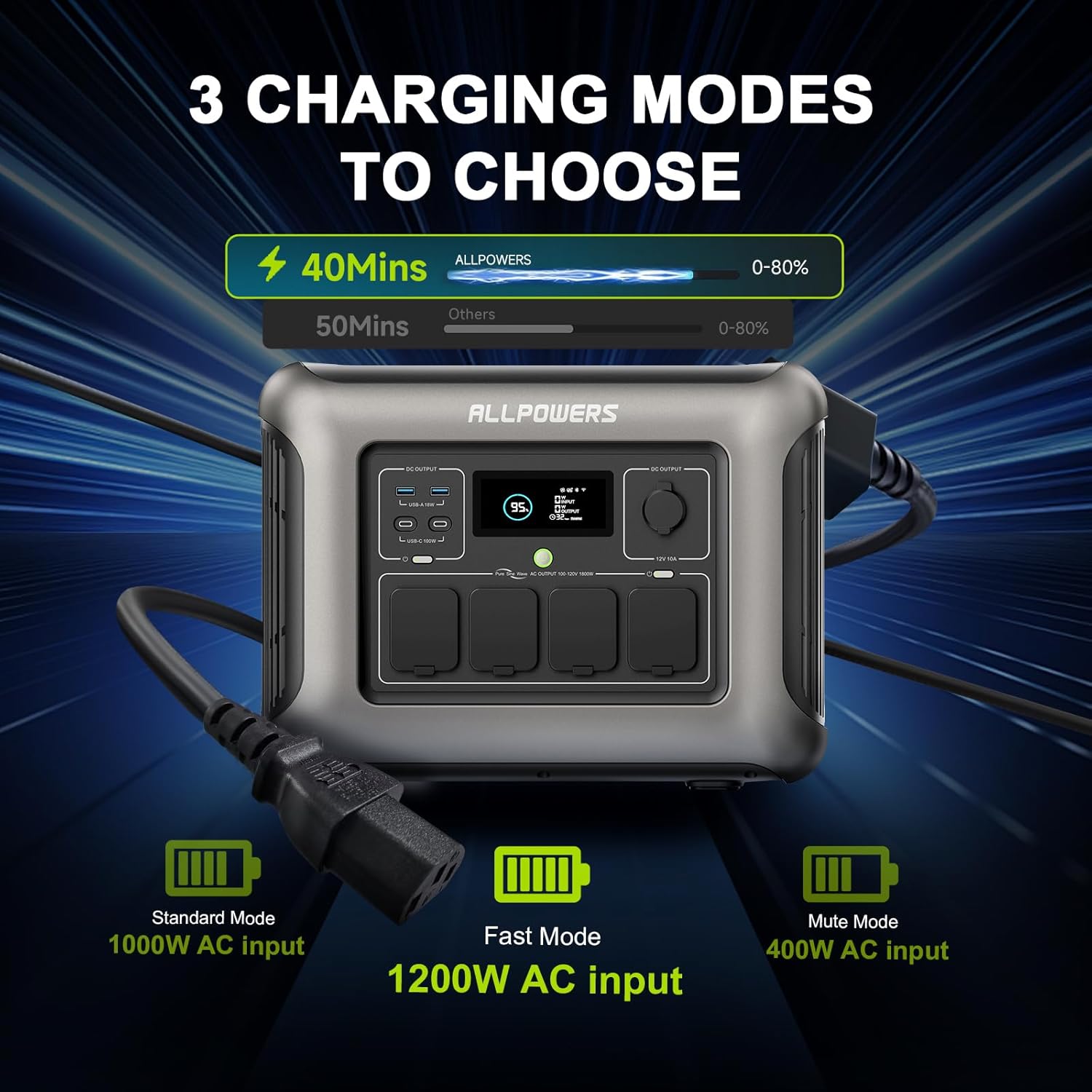
Figure 4: Visual representation of the three charging modes for the R1500 LITE: Standard, Fast, and Mute.
5.4 Funzione di alimentazione ininterrotta (UPS)
The R1500 LITE features a UPS function to protect sensitive electronics during power outages.
- Connect the R1500 LITE to a wall outlet using the AC charging cable.
- Connect your critical devices (e.g., desktop PC, server) to the AC output ports of the R1500 LITE.
- In the event of a power failure, the R1500 LITE will automatically switch to battery power within 15ms, providing continuous power to your connected devices.

Figure 5: Diagram illustrating the R1500 LITE's UPS function, showing seamless power transition during an outage.
5.5 Controllo delle app mobili
The ALLPOWERS R1500 LITE can be controlled via a mobile application for convenient remote management.
- Scarica l'app ALLPOWERS dall'app store del tuo dispositivo.
- Follow the in-app instructions to pair your R1500 LITE with your smartphone.
- Through the app, you can monitor battery status, switch Hertz, change charging modes, and activate Eco Mode.

Figure 6: The mobile application interface for controlling the R1500 LITE, showing various settings and monitoring options.
6. Manutenzione
6.1 Conservazione
When storing the R1500 LITE for extended periods, ensure the battery is charged to approximately 50-80%. Recharge every 3-6 months to maintain battery health. Store in a cool, dry place away from direct sunlight and extreme temperatures.
6.2 Cura della batteria
The R1500 LITE uses LiFePO4 batteries, known for their long lifespan of over 3500 cycles, which translates to approximately 10 years of use under normal conditions. To maximize battery life, avoid consistently draining the battery to 0% or charging to 100% if not immediately needed.

Figure 7: A cutaway diagram of the R1500 LITE highlighting its LiFePO4 battery technology and its extended lifespan.
6.3 Pulizia
Use a dry, soft cloth to clean the exterior of the power station and solar panel. Do not use abrasive cleaners or immerse the unit in water. Ensure all ports are free of dust and debris.
7. Risoluzione Dei Problemi
If you encounter issues with your ALLPOWERS R1500 LITE, refer to the following common problems and solutions:
- L'unità non si accende: Ensure the battery is not completely depleted. Try connecting to an AC outlet for a few minutes.
- Nessun output dalle porte: Verify that the specific output section (AC, DC, USB) is activated by pressing its respective button. Check if the device being charged is functioning correctly.
- Ricarica lenta: Ensure you are using the appropriate charging mode (Fast Mode for quicker AC charging). For solar charging, ensure the solar panel is in direct sunlight and properly angled, and that the cables are securely connected.
- Protezione da sovraccarico: If the unit shuts down due to overload, disconnect some devices and restart the power station. Ensure the total wattage of connected devices does not exceed the R1500 LITE's 1600W output.
- Display non funzionante: Prova a riavviare l'unità. Se il problema persiste, contatta l'assistenza clienti.
For persistent issues or error codes not listed, please contact ALLPOWERS customer support.
8. Specifiche
8.1 ALLPOWERS R1500 LITE Portable Power Station
| Caratteristica | Specificazione |
|---|---|
| Marca | TUTTI I POTERI |
| Nome del modello | PACCHETTO R1500 |
| Cosatage | 1600 Watts (Running), 3200 Watts (Surge) |
| Capacità | 1056 Wh |
| Tipo di batteria | LiFePO4 |
| Fonte di alimentazione | Alimentato a batteria, solare |
| Ingresso CA | Up to 1200W (Fast Mode) |
| Ingresso solare | MPPT 650W |
| Porte di uscita | 4x AC, 2x USB-C (100W), 2x USB-A, 1x Cigarette Lighter |
| Caratteristica speciale | UPS Function (15ms switching) |
| Peso dell'articolo | 36.8 libbre |
| Dimensioni del prodotto | 16.25 cm L x 12.28 cm P x 10.43 cm A |
8.2 Pannello solare ALLPOWERS SP037 400W
| Caratteristica | Specificazione |
|---|---|
| Potenza nominale | 400W |
| Tipo di cellula | Silicio policristallino |
| Efficienza | 22% |
| Circuito aperto Voltage | 45.3V |
| Potenza massima Voltage | 37.4V |
| Corrente di cortocircuito | 11.45A |
| Corrente di potenza massima | 10.6A |
| Dimensioni non piegate | Dimensioni: 105 x 266 x 0.5 cm |
| Dimensioni piegate | Dimensioni: 105 x 53.2 x 6.5 cm |
| Peso netto | 18.5KG |
| Resistenza all'acqua | Grado di protezione IP67 |

Figure 8: Detailed specifications for the ALLPOWERS SP037 400W solar panel.
9. Garanzia e supporto
ALLPOWERS products are designed for reliability and performance. For warranty information, please refer to the warranty card included with your product or visit the official ALLPOWERS website. Customer reviews indicate that ALLPOWERS provides responsive customer service for product issues.
If you require technical assistance, have questions about your product, or need to report a defect, please contact ALLPOWERS customer support through their official channels. You can often find support contact information on the ALLPOWERS brand store page or their official websito.
ALLPOWERS Brand Store: Visit ALLPOWERS Store on Amazon
10. Video di prodotto
Nei dati forniti non sono stati trovati video ufficiali pertinenti del prodotto del venditore da incorporare in questo manuale.