
Introduzione
The Posturite Penguin 3-in-1 Ambidextrous Vertical Mouse is designed to provide ergonomic support and versatile connectivity. This model integrates Wired, Wireless (2.4GHz), and Bluetooth technologies, offering flexibility for various computing environments. Its vertical design promotes a neutral wrist posture, aiming to reduce strain associated with repetitive strain injury (RSI) and carpal tunnel syndrome (CTS). The ambidextrous design allows for effortless switching between left and right-handed use, distributing workload and preventing static muscle strain. Additionally, the mouse is equipped with BioCote® antimicrobial technology to inhibit bacterial growth, making it suitable for shared workspaces.
Caratteristiche principali
- Connettività 3 in 1: Supports Wired, 2.4GHz Wireless (USB dongle), and Bluetooth connections.
- Design ambidestro: Easily switch between right and left-handed use to distribute workload and reduce strain.
- Ergonomic Vertical Posture: Promotes a natural handshake position, minimizing wrist pronation and pressure on the carpal tunnel.
- DPI regolabile: Optical tracking with multiple DPI settings (up to 2400 dpi) for precise cursor control.
- BioCote® Antimicrobial Technology: Inhibits bacterial and mold growth for enhanced hygiene.
- Rotellina di scorrimento di precisione: Ensures accurate document scrolling.
- Diverse dimensioni: Available in various sizes to accommodate different hand dimensions for a personalized fit.
Contenuto della confezione
- Posturite The Penguin 3-in-1 Vertical Mouse
- Cavo di ricarica da USB-C a USB-A
- 2.4GHz USB-A Wireless Dongle (stored in mouse base)
- Manuale utente/Istruzioni
Impostare
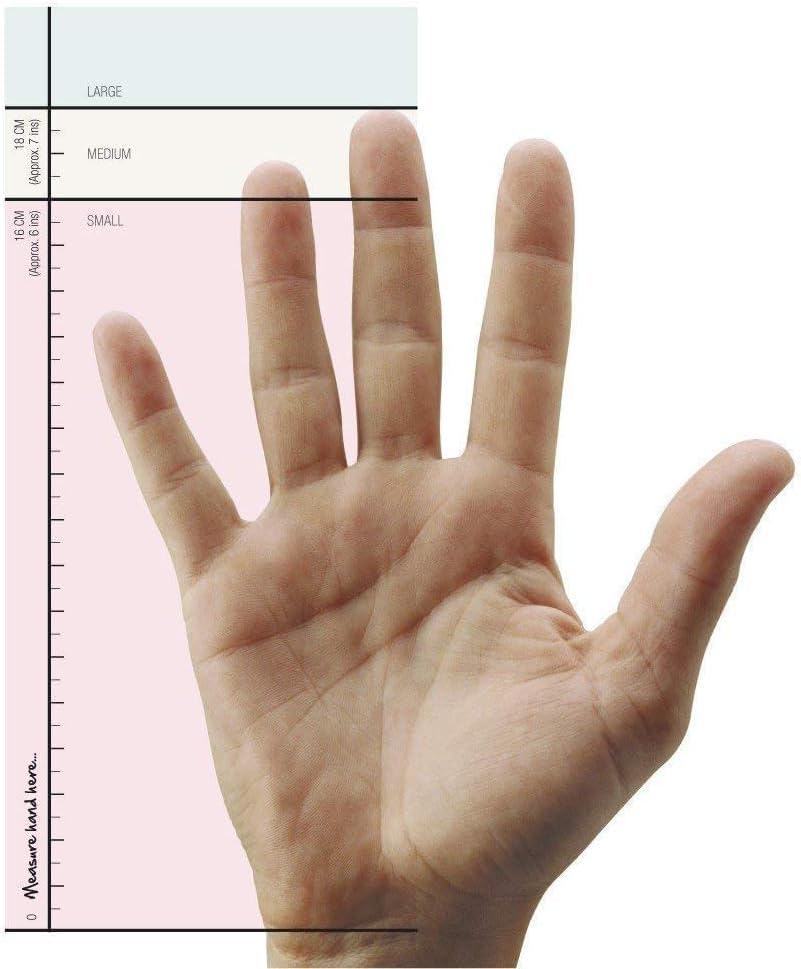
1. Guida alle taglie
To ensure optimal comfort and ergonomic benefits, select the correct mouse size. Measure your hand from the first crease of your wrist to the tip of your middle finger.
- Piccolo: 0-16 cm (0-6 pollici)
- Medio: (Size not specified in input, typically for average hands)
- Grande: (Size not specified in input, typically for larger hands)
2. Carica iniziale
Before first use, it is recommended to fully charge your Penguin Mouse. Connect the provided USB-C cable to the mouse's charging port and the USB-A end to a power source (e.g., computer USB port, USB wall adapter).
3. Collegamento del mouse
The Penguin Mouse offers three connectivity options:
3.1. Connessione wireless a 2.4 GHz (chiavetta USB)
- Locate the USB-A wireless dongle stored in the compartment at the bottom of the mouse.
- Plug the USB-A dongle into an available USB-A port on your computer.
- Accendere il mouse utilizzando l'interruttore ON/OFF situato nella parte inferiore.
- Il mouse dovrebbe connettersi automaticamente al computer.
3.2. Connessione Bluetooth
- Accendere il mouse utilizzando l'interruttore ON/OFF situato nella parte inferiore.
- Press the connectivity mode button (usually a small circular button near the ON/OFF switch) to switch to Bluetooth mode. An indicator light will flash.
- On your computer, open Bluetooth settings and search for "Penguin Mouse" or a similar device name.
- Select the mouse to pair. The indicator light on the mouse will stop flashing once connected.
3.3. Connessione cablata
- Collegare il cavo USB-C in dotazione alla porta di ricarica del mouse.
- Collegare l'estremità USB-A del cavo a una porta USB-A disponibile sul computer.
- Il mouse funzionerà come un mouse cablato e si caricherà contemporaneamente.
Istruzioni per l'uso
1. Impugnatura ergonomica
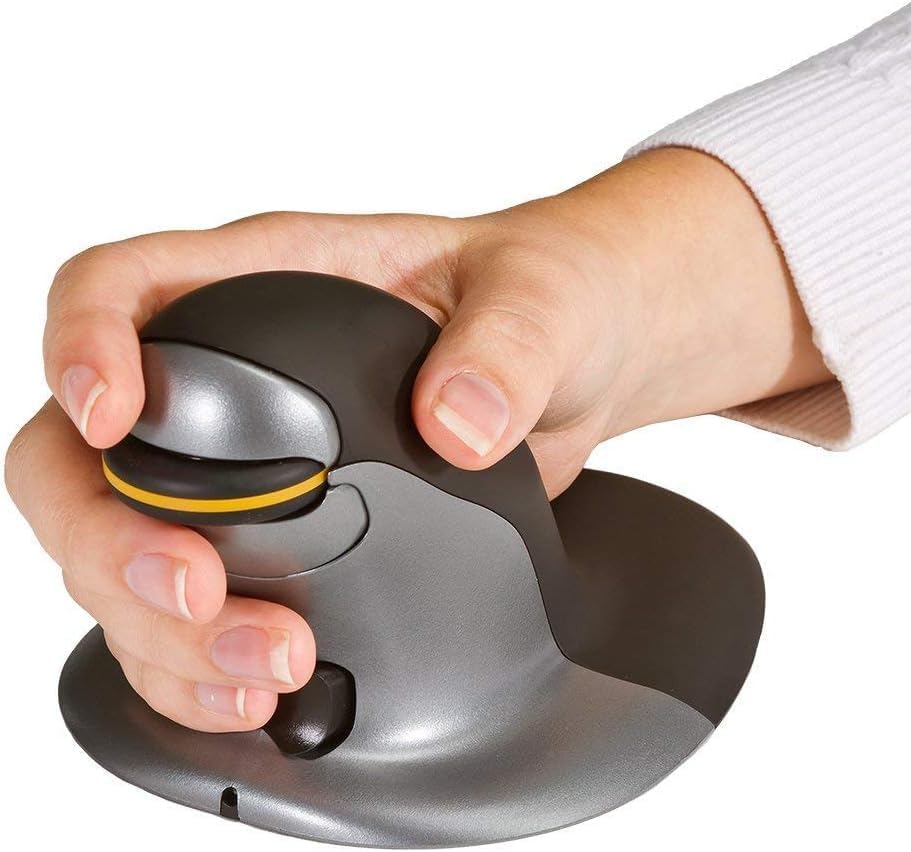
Hold the Penguin Mouse with your hand in a natural handshake position. Your thumb should rest comfortably on the side, and your fingers should drape over the buttons and scroll wheel. This vertical orientation helps maintain a neutral wrist posture.

2. Ambidextrous Use
The symmetrical design allows for easy switching between left and right-handed use. Simply rotate the mouse 180 degrees to use it with your other hand. This feature is crucial for distributing mouse-related workload and preventing static muscle strain.
3. Funzioni dei pulsanti
- Pulsante sinistro del mouse: Funzione standard di clic primario.
- Pulsante destro del mouse: Funzione di clic secondario standard.
- Rotella di scorrimento: Scorrere i documenti su/giù e web pagine. È possibile anche cliccarci sopra per attivare la funzionalità del clic centrale.
- Pulsante di regolazione DPI: Located near the scroll wheel. Press to cycle through available DPI settings (e.g., 800, 1200, 1600, 2400 DPI). The current DPI level may be indicated by an LED or screen on some models.
- Pulsanti Avanti/Indietro: Located on the side of the mouse (typically for thumb operation). These buttons allow for quick navigation in web browser o file esploratori.
Manutenzione
- Pulizia: Pulisci regolarmente la superficie del mouse con un panno morbido eamp cloth. Avoid harsh chemicals. The BioCote® antimicrobial coating helps maintain hygiene.
- Pulizia del sensore: Occasionally clean the optical sensor at the bottom of the mouse with a soft, dry cloth to ensure accurate tracking.
- Cura della batteria: For rechargeable models, avoid fully discharging the battery frequently to prolong its lifespan.
Risoluzione dei problemi
- Il mouse non risponde:
- Controllare che il mouse sia acceso.
- Assicurarsi che la batteria sia carica.
- For 2.4GHz wireless, ensure the USB dongle is securely plugged in and the mouse is in 2.4GHz mode.
- For Bluetooth, ensure the mouse is in Bluetooth mode and successfully paired in your device's Bluetooth settings. Try re-pairing if necessary.
- For wired connection, ensure the USB cable is securely connected to both the mouse and the computer.
- Cursor Lag/Jumping:
- Pulisci il sensore ottico nella parte inferiore del mouse.
- Ensure you are using the mouse on a suitable surface (non-reflective, non-glass). A mouse pad is recommended.
- Check for interference from other wireless devices if using wireless modes.
- Se il cursore è troppo sensibile, impostare un valore DPI più basso.
- Pulsanti non funzionanti:
- Assicurarsi che il mouse sia acceso e collegato.
- If using custom button assignments, check your mouse software settings.
Specifiche
| Numero di modello | 100016307 |
| Tecnologia di connettività | Cable/Wireless (2.4GHz USB), Bluetooth |
| Rilevamento del movimento | Ottico |
| Risoluzione del movimento (DPI) | Fino a 2400 (regolabile) |
| Tipo di scorrimento | Rotella di scorrimento |
| Caratteristica speciale | Ergonomic Design, Ambidextrous, BioCote® Antimicrobial |
| Dimensioni del prodotto | 1 x 7.5 x 0.1 pollici |
| Peso dell'articolo | 13.6 once |
| Batterie | Rechargeable (Note: Product specifications also list "2 AA batteries required", which may be a discrepancy or refer to an older model/variant. This manual assumes a rechargeable battery based on product description and reviewS.) |
| Produttore | Posturite |
Garanzia e supporto
The Posturite Penguin 3-in-1 Vertical Mouse comes with an extended 2-year warranty. For support, troubleshooting, or warranty claims, please refer to the contact information provided in your product packaging or visit the official Posturite websito.