
1. Introduzione
The Rakstore XY-AP50H is a compact and versatile TPA3116D2 stereo digital amplifier board featuring Bluetooth 5.0 connectivity. It delivers 50W+50W output, making it suitable for various audio applications including home theater systems. This manual provides detailed instructions for setup, operation, and maintenance to ensure optimal performance and longevity of your device.
2. Informazioni sulla sicurezza
- Garantire l'alimentazione voltage is within the specified range of DC 5-27V. Using an incorrect voltage può danneggiare il dispositivo.
- Always connect speakers and power supply before powering on the amppiù vivace.
- Avoid short-circuiting the speaker outputs or power input terminals.
- Non esporre il dispositivo a umidità, acqua o temperature estreme.
- Tenere il dispositivo lontano dalla portata dei bambini.
- Scollegare l'alimentazione prima di effettuare qualsiasi manutenzione o collegamento.
3. Caratteristiche del prodotto
- Uscita ad alta potenza: 50W + 50W stereo output.
- Connettività Bluetooth 5.0: Stable wireless audio transmission up to 15 meters (unobstructed).
- Ampio volumetage Gamma: Operates on DC 5-27V / 2A or above.
- Ingressi audio multipli: Supports Bluetooth, AUX, and USB Sound Card functions.
- Meccanismi di protezione: Includes power supply reverse connection protection, short circuit protection, and self-recovery overheating protection.
- Compatibilità degli altoparlanti: Adaptable for 10W-200W, 4Ω/8Ω speakers.
4. Prodotto finitoview e componenti
Familiarize yourself with the various components and connection points of the XY-AP50H ampbordo dell'allevatore.
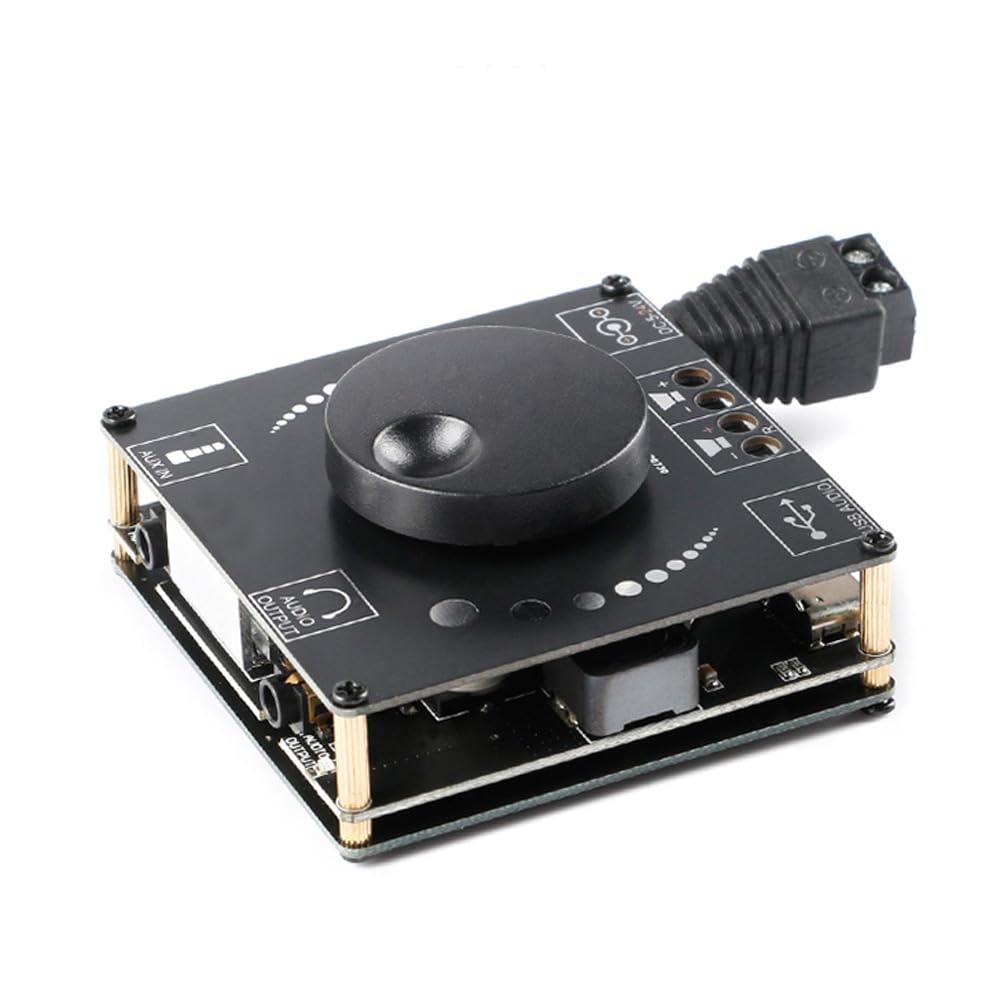
Immagine 4.1: Superiore view of the XY-AP50H amplifier board, showing the main components including the volume knob, power input, speaker terminals, AUX input, and USB port.

Immagine 4.2: Metter il fondo a view of the XY-AP50H amplifier board, indicating the USB Audio input, speaker outputs (SPKR, SPKL), and DC 5-24V power input.

Immagine 4.3: Dimensions of the XY-AP50H amplifier board, measuring approximately 60mm by 60mm.
5. Istruzioni per l'installazione
5.1 Collegamento di alimentazione
- Assicurare il amplifier is powered off and disconnected from any power source.
- Connect a DC 5-27V / 2A or above power adapter to the DC power input jack on the board. Observe polarity if using bare wires.
5.2 Collegamento degli altoparlanti
- Identify the left (SPKL) and right (SPKR) speaker output terminals on the board.
- Connect your passive speakers (10W-200W, 4Ω/8Ω) to the corresponding terminals. Ensure correct polarity (+ to + and - to -) for each speaker.
5.3 Opzioni di input audio
The XY-AP50H supports three audio input methods: Bluetooth, AUX, and USB Sound Card.
5.3.1 Connessione Bluetooth
- Accendi il ampbordo dell'allevatore.
- On your audio source device (e.g., smartphone, tablet), enable Bluetooth and search for available devices.
- Select "XY-AP50H" from the list to pair. A confirmation sound will indicate successful pairing.
5.3.2 Connessione di ingresso AUX
- Connect a 3.5mm audio cable from your audio source device's headphone jack to the AUX input port on the ampbordo dell'allevatore.
- IL amplifier will automatically switch to AUX input mode when a cable is detected.
5.3.3 Funzione della scheda audio USB

Immagine 5.1: Illustration of connecting the XY-AP50H to a computer via a data cable to utilize its USB sound card function, providing improved audio output quality.
- Collegare il amplifier board to your computer using a USB data cable (Type-C to USB-A or Type-C to Type-C, depending on your computer's ports).
- Most computers will automatically recognize the amplifier as an external sound card.
- If prompted, select the XY-AP50H as the audio output device in your computer's sound settings.
- Open your computer's audio playback software to play music. The amplifier will output the audio.
6. Istruzioni per l'uso
6.1 Accensione/spegnimento
Connect or disconnect the DC power supply to power on or off the ampbordo dell'allevatore.
6.2 Controllo del volume
Rotate the potentiometer knob on the board clockwise to increase volume and counter-clockwise to decrease volume.
6.3 Commutazione della modalità di input
IL amplifier automatically prioritizes inputs. Bluetooth is typically the default. Connecting an AUX cable will switch to AUX. Connecting via USB to a computer will activate the USB sound card mode.
7. Specifiche
| Caratteristica | Specificazione |
|---|---|
| Modello | XY-AP50H |
| Ampchip lificatore | TPA3116D2 |
| Versione Bluetooth | Versione BLE 5.0 |
| Potenza di uscita | 50W + 50W (Stereo) |
| Volume di fornituratage | DC 5-27V / 2A above |
| Distanza di trasmissione | 15 metri (senza ostacoli) |
| Numero di canali | Canali doppi sinistro e destro (stereo) |
| Altoparlanti adattati | 10W-200W, 4Ω/8Ω |
| Meccanismi di protezione | Power supply reverse connection protection, short circuit protection, self-recovery overheating protection |
8. Risoluzione Dei Problemi
- Nessun suono:
- Check power supply connection and ensure it meets DC 5-27V / 2A or above.
- Verify speaker connections are secure and correctly polarized.
- Ensure the correct audio input mode is selected (Bluetooth paired, AUX cable connected, or USB sound card active).
- Regolare la manopola del volume sul amplifier e il dispositivo sorgente audio.
- Suono distorto:
- Ridurre il volume da entrambi i amplifier e la sorgente audio.
- Check speaker impedance and power rating to ensure compatibility.
- Ensure power supply is stable and sufficient (at least 2A).
- Disconnessione Bluetooth:
- Ensure the audio source device is within 15 meters of the amplifier and there are no major obstructions.
- Prova a disaccoppiare e riassociare il dispositivo.
- Assicurarsi che nessun altro dispositivo interferisca con il segnale Bluetooth.
- Surriscaldamento:
- Assicurare una ventilazione adeguata attorno all' ampbordo dell'allevatore.
- Reduce output volume or check speaker impedance. The board has self-recovery overheating protection, which may temporarily shut down output.
9. Manutenzione
- Mantieni il ampScheda di controllo pulita e priva di polvere. Per la pulizia, utilizzare un panno morbido e asciutto.
- Avoid placing the board in environments with high humidity or extreme temperatures.
- Non tentare di smontare o modificare la scheda, poiché ciò potrebbe invalidare qualsiasi potenziale garanzia e causare danni.
10. Garanzia e supporto
For warranty information and technical support, please refer to the seller's policies or contact Rakstore customer service directly. Keep your purchase receipt as proof of purchase.