
FOYCOY D8
FOYCOY D8 Bluetooth Headphones User Manual
Modello: D8
1. Introduzione
Thank you for choosing the FOYCOY D8 Bluetooth Headphones. These wireless earbuds are designed for an active lifestyle, offering extended playtime, secure fit, and high-fidelity audio. This manual provides detailed instructions on how to set up, operate, maintain, and troubleshoot your headphones to ensure optimal performance.

Image: The FOYCOY D8 Bluetooth Headphones, showing both earbuds and the charging case with its LED display.
2. Contenuto della confezione
Assicurati che tutti gli articoli siano presenti nel pacco:
- FOYCOY D8 Wireless Earbuds (Left and Right)
- 2600mAh Wireless Charging Case
- Cavo di ricarica USB-C
- Manuale dell'utente (questo documento)
- Additional Eartips (S, M, L sizes; M size pre-installed)

Image: An illustration showing the FOYCOY D8 earbuds, charging case, USB-C cable, and different sized eartips included in the package.
3. Prodotto finitoview
The FOYCOY D8 headphones feature an ergonomic design with over-ear earhooks for a secure and comfortable fit, ideal for sports and active use. The charging case provides extended battery life and doubles as a power bank.
Componenti degli auricolari:
- Pulsante multifunzione: For controlling music, calls, and voice assistant.
- Microfono: Built-in for clear calls.
- Contatti di ricarica: Per la ricarica all'interno della custodia.
- Gancio auricolare: Garantisce una vestibilità sicura sopra l'orecchio.
- Auricolare: Soft silicone for in-ear comfort and sound isolation.
Componenti della custodia di ricarica:
- Visualizzazione dell'alimentazione a LED: Mostra la percentuale di batteria rimanentetage of the case and charging status of individual earbuds.
- Porta di ingresso USB-C: Per caricare la custodia.
- Porta di uscita USB: To use the case as a power bank for other devices.
- Area di ricarica wireless: For wireless charging of the case.

Immagine: Un'immagine sopraview of the FOYCOY D8 headphones and their charging case, illustrating features such as extended playtime, wireless charging, and power bank capability.
4. Impostazione
4.1 Initial Charge & Preparation
Before first use, ensure the earbuds and charging case are fully charged.
- Rimuovere la pellicola isolante: Locate and remove the protective insulating film from the charging contacts on both earbuds. The headphones will not turn on or charge if these films are not removed.
- Carica la custodia: Connect the charging case to a power source using the provided USB-C cable or place it on a wireless charging pad. The LED display will show the charging progress.
- Carica gli auricolari: Place both earbuds into the charging case. Ensure they are properly seated; the LED display on the case will show their charging status.
Importante: If the charging case is over-discharged (shows "0"), it may take 15-30 minutes for the LED display to update after plugging in the power supply.

Immagine: la custodia di ricarica che mostra la percentuale di batteriatage and the charging status of the earbuds.
4.2 Choosing and Wearing Eartips
Selecting the correct eartip size is crucial for comfort, secure fit, and optimal sound quality.
- Scegli i gommini auricolari: Experiment with the included S, M, and L sized eartips to find the pair that provides the best seal and comfort for your ears. The M size is pre-installed.
- Install Eartips: Fissare delicatamente i gommini auricolari scelti agli auricolari.
- Wear Earbuds: Posizionare l'auricolare nel condotto uditivo.
- Regola i ganci auricolari: Guide the adjustable earhook over your ear to secure the earbud in place. Ensure a snug and comfortable fit for stability during movement.

Image: Instructions on selecting the correct eartip size and properly wearing the earbuds with the earhooks for a secure fit.
4.3 Associazione con il dispositivo
The FOYCOY D8 headphones feature one-step auto pairing for convenience.
- Accensione: Estrarre entrambi gli auricolari dalla custodia di ricarica. Si accenderanno automaticamente ed entreranno in modalità di associazione.
- Attiva Bluetooth: Sul tuo smartphone, tablet o altro dispositivo abilitato Bluetooth, vai alle impostazioni Bluetooth.
- Collegare: Cercare "D8" in the list of available devices and select it to connect. Once connected, you will hear a confirmation tone, and the earbuds will be ready for use.
The earbuds are compatible with most Bluetooth-enabled devices, including Android smartphones, iPhone series, iPads, MacBooks, computers, and smart TVs.

Image: A visual guide to the one-step auto pairing process, showing the earbuds in their case and the Bluetooth connection screen on a smartphone.
5. Istruzioni per l'uso
5.1 Accensione/spegnimento
- Accensione: Estrai gli auricolari dalla custodia di ricarica. Si accenderanno automaticamente.
- Spegni: Place the earbuds back into the charging case. They will automatically power off and begin charging. Alternatively, long press the multi-function button for 2 seconds to manually power off.
5.2 Controllo della musica
- Riproduci/Pausa: Click the multi-function button once on either the Left (L) or Right (R) earbud.
- Traccia successiva: Quick-click the Right (R) earbud's multi-function button twice.
- Traccia precedente: Quick-click the Left (L) earbud's multi-function button twice.
- Aumenta volume: Long press the Right (R) earbud's multi-function button.
- Volume basso: Long press the Left (L) earbud's multi-function button.
5.3 Controllo delle chiamate
- Rispondi/Termina chiamata: Click the multi-function button once on either L/R earbud.
- Rifiuta chiamata: Long press the multi-function button for 2 seconds on either L/R earbud.
5.4 Attivazione dell'assistente vocale
- Attiva l'Assistente vocale (Siri, Google Assistant, ecc.): Quick-click the multi-function button three times on either L/R earbud.

Image: A comprehensive guide to the on-device button controls for music playback, call handling, and activating voice assistants.
5.5 Mono & Binaural Modes
The earbuds support both stereo and mono modes:
- Modalità binaurale: Use both earbuds simultaneously for a full stereo sound experience.
- Modalità Mono: Use either the left or right earbud independently. This allows you to keep one earbud charging while using the other, or to remain aware of your surroundings.
5.6 Charging the Earbuds & Case
- Ricarica degli auricolari: Place the earbuds into the charging case. They will automatically begin charging. The case's LED display will show the charging status of each earbud.
- Case Charging (USB-C): Connect the provided USB-C cable to the charging case's USB-C input port and to a power adapter (not included). The LED display will show the case's battery percentage.
- Ricarica della custodia (wireless): Place the charging case on a compatible wireless charging pad (not included). Ensure the case is centered on the pad for efficient charging.
A full charge provides approximately 9 hours of listening time for the earbuds, and the 2600mAh charging case can provide multiple recharges for a total playtime of up to 120 hours.
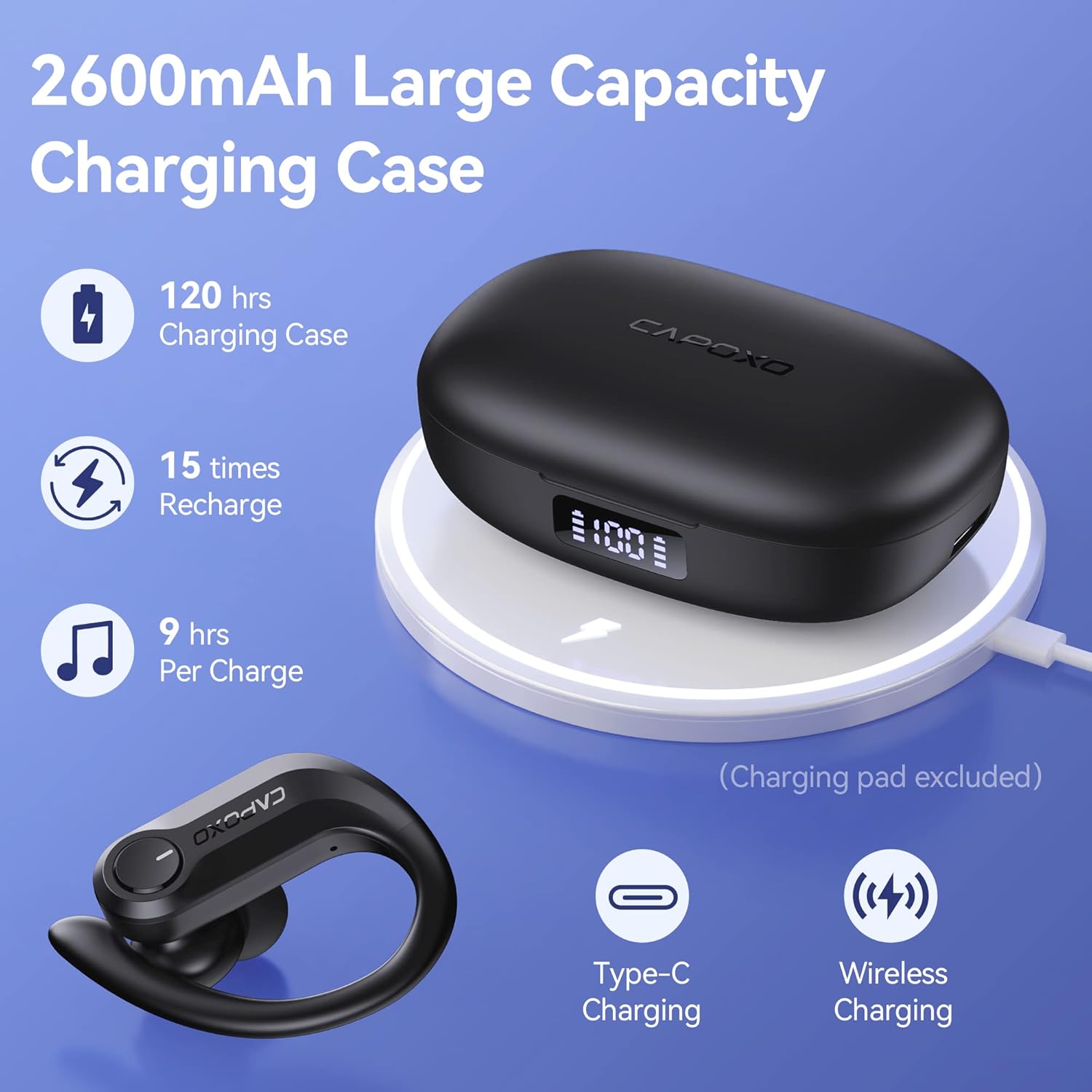
Image: The charging case highlighting its large capacity, extended playtime, and support for both Type-C and wireless charging.
5.7 Using the Charging Case as a Power Bank
The 2600mAh charging case can also function as an emergency power bank for your mobile phone or other small devices.
- Connetti dispositivo: Use a USB cable (not included) to connect your device to the USB output port on the right side of the charging case.
- Ricarica: The charging case will begin to charge your connected device. The LED display will show the remaining power of the case.

Image: The charging case being used as an emergency power bank to charge a smartphone.
6. Manutenzione
6.1 Pulizia
- Pulisci regolarmente gli auricolari, in particolare i gommini e i contatti di ricarica, con un panno morbido, asciutto e privo di lanugine.
- If the wireless earbuds cannot be charged, try wiping the pins and points with an alcohol cloth to remove any residue.
- Non utilizzare prodotti chimici aggressivi o materiali abrasivi per la pulizia.
6.2 Conservazione
- Conserva gli auricolari nella custodia di ricarica quando non vengono utilizzati per proteggerli e mantenerli carichi.
- Conservare il dispositivo in un luogo fresco e asciutto, lontano da temperature estreme e dalla luce solare diretta.
- Charge the charging case at least once every two weeks to prevent over-discharge, even if not in regular use.
6.3 Resistenza all'acqua (IPX7)
The FOYCOY D8 earbuds are IPX7 waterproof, meaning they can withstand submersion in up to 1 meter of water for 30 minutes. This makes them suitable for workouts, running, and other activities where they may be exposed to sweat or light rain.
- Non immergere intenzionalmente gli auricolari per periodi prolungati o a profondità superiori a quelle specificate.
- La custodia di ricarica non è impermeabile. Mantenerla asciutta.
- Assicurarsi che gli auricolari siano asciutti prima di riporli nella custodia di ricarica per evitare di danneggiare i contatti di ricarica.

Image: The earbuds demonstrating their IPX7 waterproof capability, suitable for active use.
7. Risoluzione Dei Problemi
Problemi comuni e soluzioni:
| Problema | Possibile causa | Soluzione |
|---|---|---|
| Earbuds do not turn on or charge when taken out of case. | Protective insulating film still on charging contacts. | Remove the insulating film from the charging points on both earbuds. Place them back in the case to activate. |
| No pairing name "D8" shown on phone, but charging case shows 100%. | Earbuds not activated or charging contacts are dirty. | Ensure insulating films are removed. Wipe the charging pins and points on the earbuds and in the case with an alcohol cloth. Place earbuds back in case, then remove to re-enter pairing mode. |
| Gli auricolari non possono essere caricati. | Dirty charging contacts or improper placement. | Wipe the charging pins on the earbuds and the charging points in the case with an alcohol cloth. Ensure earbuds are correctly seated in the case. |
| Charging case LED display shows "0" even when plugged in. | Charging case is over-discharged. | Wait 15-30 minutes after plugging in the power supply; the LED display will update. |
| Connection drops frequently (especially with iPhone). | Interference or software issue. | Try resetting the earbuds to factory settings (see below). Ensure no other devices are interfering with the Bluetooth signal. Update your phone's operating system if available. |
7.1 How to Restore Factory Default Settings
This action will delete all pairing data between the earbuds and your devices. Perform this if you experience persistent connection issues or wish to clear previous pairings.
- Fase 1: Place both earbuds into the charging case. Ensure they are in the charging status.
- Fase 2: Hold the multi-function button on Entrambi earbuds for 8 seconds. The earbuds will flash Red & Blue light alternately for 3 seconds, indicating that both earbuds have been reset completely.
- Fase 3: Pick up the earbuds to turn them on. Activate the Bluetooth setting on your device, search for "D8", and select it to connect.
If the issue persists, repeat the steps above.
8. Specifiche
| Caratteristica | Dettaglio |
|---|---|
| Nome del modello | D8 |
| Tecnologia di connettività | Wireless (Bluetooth) |
| Versione Bluetooth | 5.3 (from A+ content) |
| Componenti inclusi | Custodia di ricarica, cavo |
| Materiale | Plastica, gomma, silicone |
| Usi specifici | Sport, Music, Exercising |
| Dispositivi compatibili | Bluetooth-enabled devices (Android, iPhone, iPad, Mac Book, PC, Smart TV) |
| Tipo di controllo | Media Control (On-device Button) |
| Livello di resistenza all'acqua | IPX7 impermeabile |
| Durata della batteria (auricolari) | ca. 9 ore per carica |
| Tempo di riproduzione totale (con custodia) | Fino a 120 ore |
| Capacità della batteria della custodia di ricarica | 2600mAh |
| Caratteristiche della custodia di ricarica | USB-C Input, USB Output (Power Bank), Wireless Charging, Dual LED Power Display |
| Forma dell'auricolare | Over-Ear (with earhooks) |
| Posizionamento dell'orecchio | Nell'orecchio |
| Controllo del rumore | Passive Noise Cancellation (In-ear design) |
| Dimensioni del prodotto | 6.93 x 6.93 x 11.06 pollici |
| Peso dell'articolo | 7.4 once |
9. Garanzia e supporto
For warranty information or technical support, please refer to the contact details provided with your purchase or visit the official FOYCOY websito. Conservare la prova d'acquisto per eventuali reclami in garanzia.