
1. Introduzione
This manual provides instructions for the ALLIMITY XMRM-M3 Voice Remote Control. This remote is designed for use with specific Xiaomi Smart TV models, offering convenient control and voice command functionality. Please read this manual carefully before using the remote control.
2. Prodotto finitoview
The ALLIMITY XMRM-M3 is a replacement voice remote control for various Xiaomi Smart TV models. It features dedicated buttons for popular streaming services and a built-in microphone for voice commands.

Figura 1: Fronte view of the ALLIMITY XMRM-M3 Voice Remote Control, showing power, voice assistant, navigation, and app buttons.
Caratteristiche principali:
- Voice control capability for hands-free operation.
- Dedicated buttons for quick access to popular applications like Netflix and YouTube.
- Design ergonomico per una gestione confortevole.
- No programming required after battery installation for basic functions.
3. Impostazione
3.1 Installazione della batteria
Il telecomando richiede due batterie alcaline AAA (non incluse).
- Individuare il coperchio del vano batterie sul retro del telecomando.
- Per aprirlo, far scorrere il coperchio verso il basso oppure premere il fermo.
- Inserire due batterie alcaline AAA, assicurandosi che i terminali positivo (+) e negativo (-) corrispondano agli schemi all'interno del vano.
- Richiudere il coperchio del vano batteria, facendolo scorrere in posizione finché non scatta in posizione.
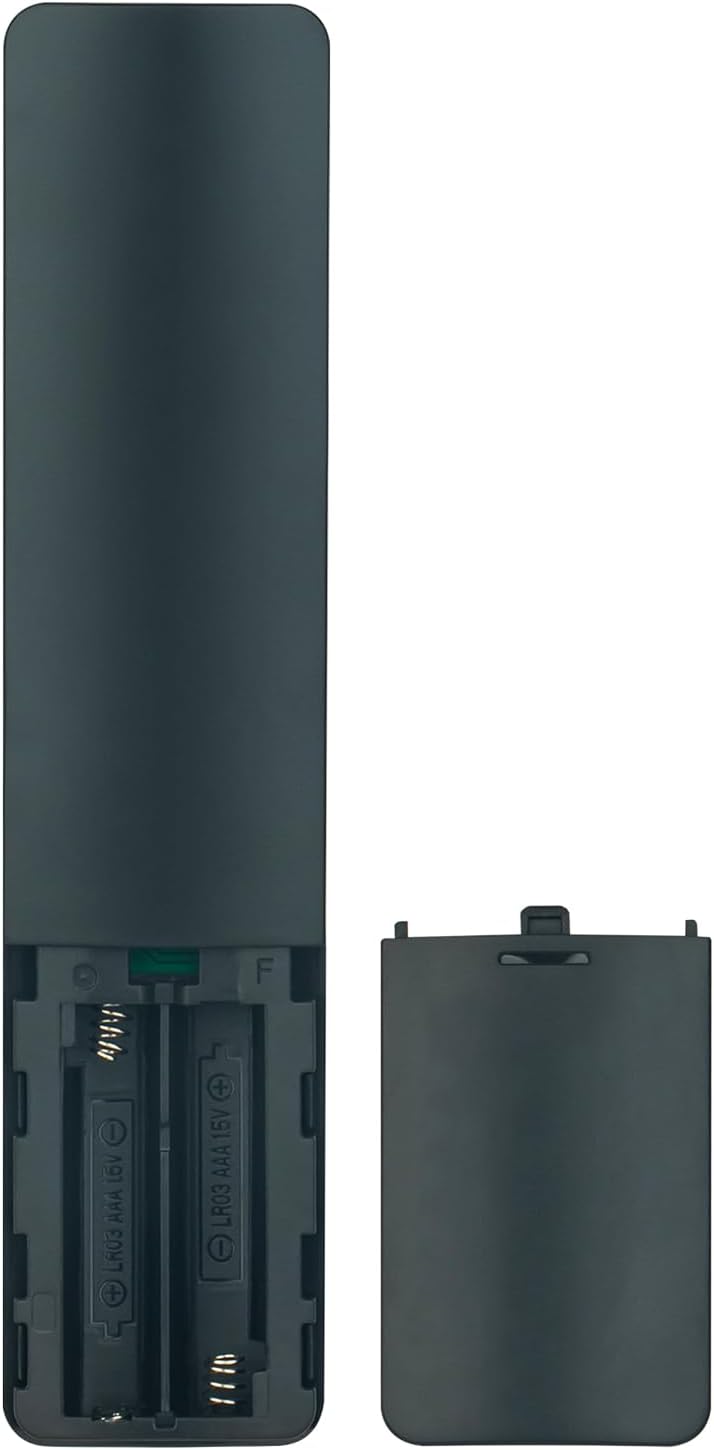
Figure 2: Battery compartment of the remote control, illustrating correct battery insertion.
3.2 Pairing for Voice Functionality
While basic functions work immediately after battery installation, the voice control feature requires pairing the remote with your Xiaomi Smart TV.
- Assicurati che la TV sia accesa.
- Navigate to the TV's settings menu.
- Look for options related to "Remotes & Accessories" or "Bluetooth Devices."
- Select "Add device" or "Pair new remote."
- Follow the on-screen instructions to put the remote into pairing mode (often by holding specific buttons, refer to your TV's manual for exact steps if needed).
- Once paired, the voice control function will be active.
4. Utilizzo del telecomando
This section describes the primary functions of the remote control buttons.

Figure 3: Remote control with an emphasis on the voice command button.
- Pulsante di accensione (⏻): Accende o spegne la TV.
- Pulsante Assistente vocale (icona Microfono): Activates the voice control feature. Press and hold to speak commands.
- Tasti di navigazione (pulsanti circolari): Use the directional arrows to move through menus and the center button to confirm selections.
- Tasto indietro (↩): Ritorna alla schermata o al menu precedente.
- Pulsante Home (🏠): Ritorna alla schermata iniziale del televisore.
- Pulsanti del volume (+/-): Regola il volume del televisore.
- Pulsante Netflix: Accesso diretto all'applicazione Netflix.
- Pulsante YouTube: Accesso diretto all'applicazione YouTube.
- Pulsante Video principale: Accesso diretto all'applicazione Prime Video.
- Pulsante App: Apre il menu delle applicazioni del televisore.
5. Manutenzione
5.1 Sostituzione della batteria
Sostituisci le batterie quando la risposta del telecomando diventa lenta o smette di funzionare. Sostituisci sempre entrambe le batterie contemporaneamente con batterie alcaline AAA nuove. Non mischiare batterie vecchie e nuove o tipi diversi di batterie.
5.2 Pulizia
Per pulire il telecomando, utilizzare un panno morbido e asciutto. Non utilizzare detergenti liquidi, spray o materiali abrasivi, poiché potrebbero danneggiare la superficie o i componenti interni del telecomando.
6. Risoluzione Dei Problemi
- Il telecomando non risponde:
- Controllare che le batterie siano inserite correttamente, rispettando la polarità corretta.
- Sostituire le batterie con nuove batterie alcaline AAA.
- Assicurarsi che non vi siano ostacoli tra il telecomando e il ricevitore a infrarossi del televisore.
- Il controllo vocale non funziona:
- Confirm that the remote control is properly paired with your TV (refer to Section 3.2).
- Ensure the TV's internet connection is stable, as voice commands often require online processing.
- Parlare in modo chiaro e diretto nel microfono del telecomando.
- Specific app buttons not working:
- Ensure the respective applications are installed and updated on your Xiaomi Smart TV.
- Check your TV's network connection.
7. Specifiche
| Caratteristica | Dettaglio |
|---|---|
| Modello | XMRM-M3 |
| Marca | ALLIMITÀ |
| Modelli TV compatibili | Xiaomi Smart TV L55M6-ESG, L55M6-ARG, MDZ-24-AA |
| Tecnologia di connettività | Infrared (IR) and Bluetooth (for voice function) |
| Tipo di batteria | 2 batterie alcaline AAA (non incluse) |
| Caratteristica speciale | Controllo vocale, design ergonomico |
| Portata massima | 33 piedi (circa 10 metri) |
8. Garanzia e supporto
Per informazioni sulla garanzia o assistenza tecnica, consultare la documentazione fornita con l'acquisto o contattare direttamente il venditore. Conservare la ricevuta d'acquisto come prova d'acquisto.


