1. Introduzione
Thank you for choosing the TYLT MagSafe Wireless Charger Ring Stand. This device combines powerful MagSafe wireless charging with the convenience of a built-in kickstand, designed to seamlessly power and prop up your iPhone 12, 13, 14, and 15 series devices. This manual provides essential information for the proper setup, operation, and maintenance of your new charger.
2. Prodotto finitoview
The TYLT MagSafe Wireless Charger Ring Stand is a compact and versatile charging solution. It features a magnetic charging pad with an integrated ring kickstand.
2.1 Componenti
- Magnetic Wireless Charging Pad with Integrated Ring Stand
- 4-foot USB-C Cable (attached)
2.2 Prodotto Views

Figura 2.2.1: in alto view of the TYLT MagSafe Wireless Charger Ring Stand. This image displays the circular charging pad with its black surface and the surrounding grey metallic ring. The TYLT logo and product information are visible on the black surface.

Figura 2.2.2: Fronte view of the TYLT MagSafe Wireless Charger Ring Stand. This image shows the smooth, unadorned black charging surface with a subtle TYLT logo, highlighting its sleek design.

Figura 2.2.3: lato view of the TYLT MagSafe Wireless Charger Ring Stand with the kickstand extended. This angle demonstrates how the integrated ring stand props up the charger, ready to support a phone for hands-free viewing.

Figura 2.2.4: Angolato view of the TYLT MagSafe Wireless Charger Ring Stand with the kickstand extended. This perspective highlights the charger's profile and the integrated USB-C cable connection point.

Figure 2.2.5: The TYLT MagSafe Wireless Charger Ring Stand magnetically attached to the back of an iPhone. This image illustrates the secure MagSafe connection and how the kickstand supports the phone in a vertical orientation.
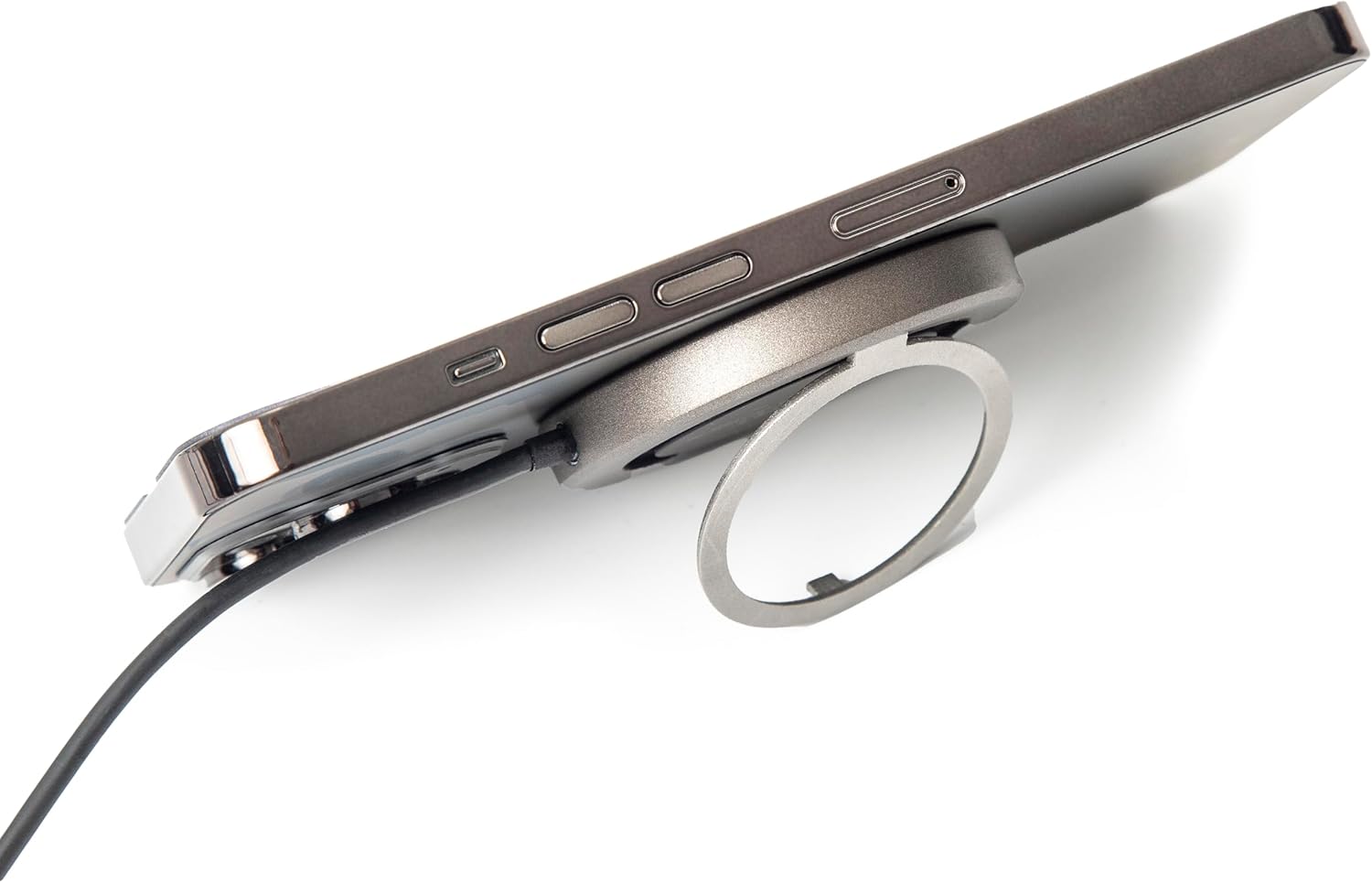
Figura 2.2.6: lato view of the TYLT MagSafe Wireless Charger Ring Stand attached to an iPhone. This image emphasizes the slim profile of the charger when connected to a device, maintaining portability.

Figure 2.2.7: The TYLT MagSafe Wireless Charger Ring Stand with an iPhone attached, positioned on a desk. This image showcases the charger's functionality as a stand for hands-free viewing in a typical usage scenario.
3. Impostazione
- Connettiti all'alimentazione: Plug the USB-C connector of the attached 4-foot cable into a compatible USB-C power adapter (not included). For optimal 15W fast charging, use a power adapter that supports Power Delivery (PD) with an output of at least 9V/1.8A or 12V/1.67A.
- Accensione: Once connected to a power source, the charger is ready for use. There is no power button.
4. Istruzioni per l'uso
4.1 Ricarica wireless
- Allinea il tuo dispositivo: Place your MagSafe-compatible iPhone (iPhone 12, 13, 14, or 15 series) onto the black charging surface of the TYLT charger. The charger will magnetically snap into place, ensuring proper alignment for efficient charging.
- Indicazione di carica: Your iPhone's screen will indicate that charging has begun. The charger is designed to work with most MagSafe-compatible phone cases, eliminating the need for case removal.
- Ricarica ottimale: Ensure no foreign objects (e.g., metal plates, credit cards) are between your phone and the charger, as this can interfere with wireless charging.
4.2 Utilizzo del cavalletto integrato
- Estendi il cavalletto: Gently pull out the integrated ring from the back of the charger.
- Regolare Viewangolo di ing: The ring can rotate and adjust to multiple viewing angles, allowing you to prop up your phone in either portrait or landscape orientation for hands-free viewing of videos, video calls, or other content.
- Ritrarre il cavalletto: When not in use, fold the ring back into its recess on the charger for a compact and portable form factor.
5. Manutenzione
- Pulizia: Disconnect the charger from the power source before cleaning. Use a soft, dry, lint-free cloth to wipe the surface of the charger. Do not use harsh chemicals, cleaning solvents, or strong detergents.
- Magazzinaggio: Conservare il caricabatterie in un luogo fresco e asciutto, lontano dalla luce solare diretta e da temperature estreme.
- Gestione: Avoid dropping the charger or subjecting it to strong impacts. Do not disassemble the device.
6. Risoluzione Dei Problemi
| Problema | Possibile causa | Soluzione |
|---|---|---|
| Il dispositivo non si carica o si carica lentamente. |
|
|
| Kickstand does not hold phone securely. |
|
|
| Il caricabatterie risulta caldo durante l'uso. |
|
|
7. Specifiche
| Caratteristica | Dettaglio |
|---|---|
| Numero di modello | 4902Q |
| Ingresso | 5V–2A, 9V–1.8A, 12V–1.67A |
| Produzione | 15 W (massimo) |
| Tecnologia di connettività | USB-C (attached cable) |
| Dispositivi compatibili | iPhone 12, 13, 14, 15 Series (MagSafe compatible) |
| Dimensioni del prodotto | 10 x 8 x 1 pollici |
| Peso dell'articolo | 3.17 once |
| Colore | Nero |
8. Informazioni sulla sicurezza
Please read all safety instructions before using this product to prevent injury or damage.
- Do not expose the device to liquids, moisture, or humidity.
- Non esporre il dispositivo a temperature estreme.
- Tenere il dispositivo lontano da forti campi magnetici.
- Non tentare di smontare, riparare o modificare il dispositivo.
- Tenere fuori dalla portata dei bambini.
- Use only with compatible power adapters.
9. Garanzia e supporto
For information regarding warranty coverage, returns, or technical support, please refer to the original purchase documentation or contact TYLT customer service directly.
Politica di ritorno: This product typically has a 30-day return/replacement policy from the date of purchase. Please check with your retailer for specific details.
Produttore: TILT
For further assistance, visit the official TYLT websito o contattare i loro canali di supporto.