

Introduzione
Thank you for choosing the FREEWOLF K8 Tri-Mode Mechanical Gaming Keyboard. This keyboard offers versatile connectivity options including Bluetooth, 2.4 GHz wireless, and USB-C wired modes, along with a hot-swappable design for personalized switch customization. With its vibrant RGB backlighting and long-lasting battery, the K8 is designed to enhance your gaming, programming, and general computing experience across both Mac and Windows systems. Please read this manual carefully to ensure proper setup and operation.
Contenuto della confezione
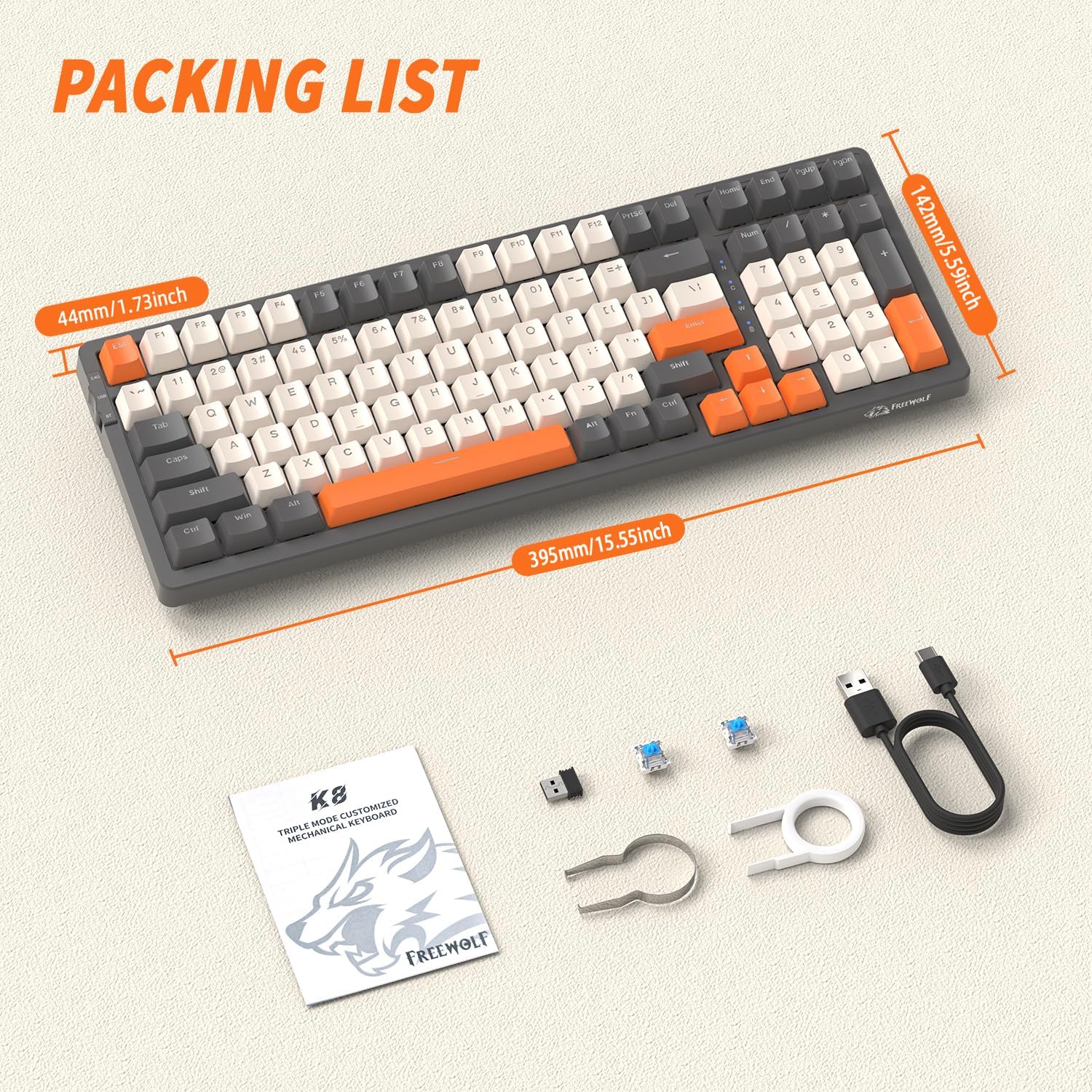
Upon opening your FREEWOLF K8 keyboard package, please verify that all the following items are included:
- FREEWOLF K8 Mechanical Gaming Keyboard
- Cavo da USB-C a USB-A
- 2.4 GHz USB Wireless Receiver
- Strumento per estrarre i copritasti
- Cambia strumento estrattore
- Two (2) Spare Mechanical Switches
- Manuale dell'utente (questo documento)
Impostazione e connessione
Carica iniziale
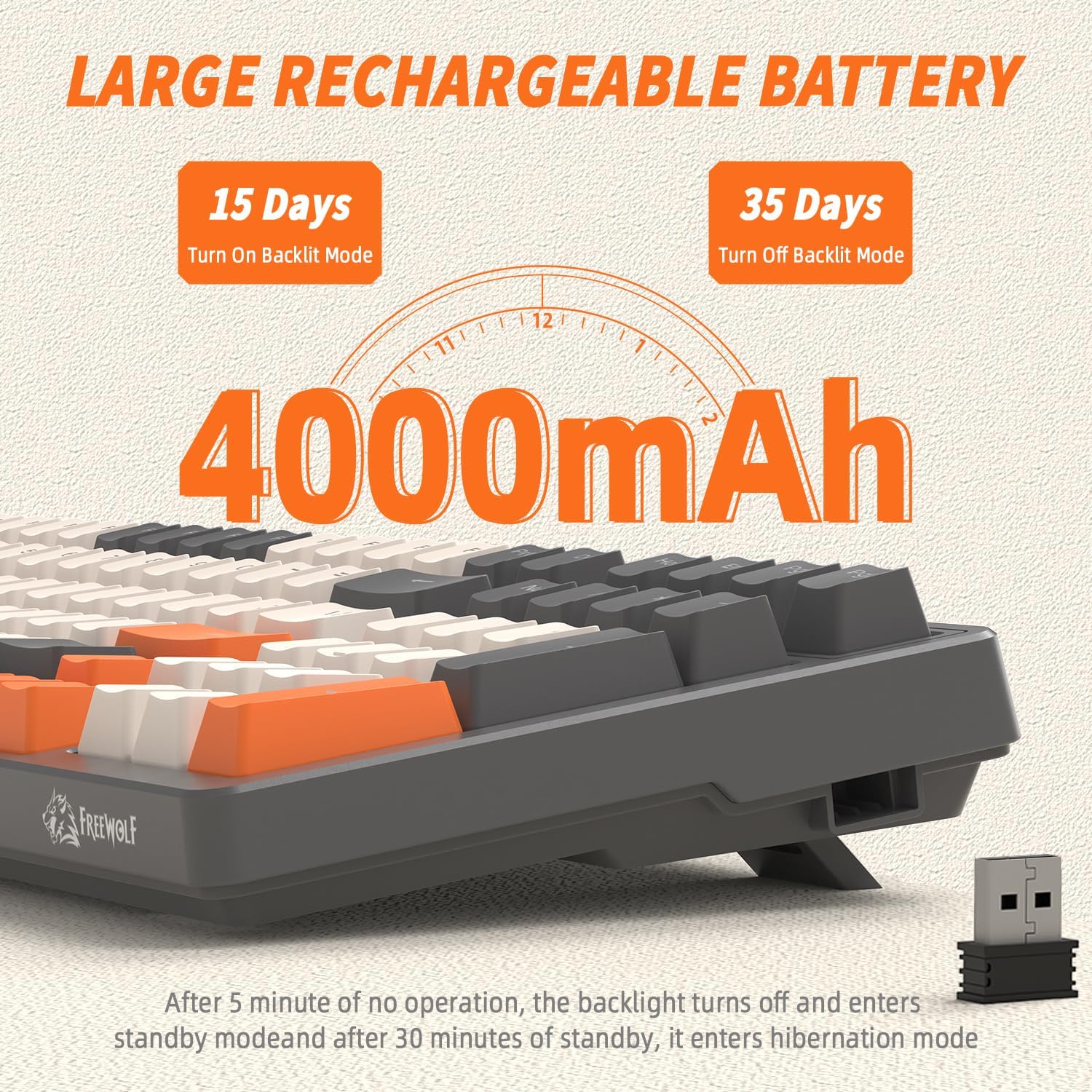
Before first use, it is recommended to fully charge the keyboard. Connect the provided USB-C cable to the keyboard's USB-C port and the other end to a USB power source (e.g., computer USB port, wall adapter). The indicator light will show charging status and turn off when fully charged. The keyboard features a 4000mAh battery for extended use.
Modalità di connettività
The K8 keyboard supports three connection modes: USB-C Wired, 2.4 GHz Wireless, and Bluetooth.

1. Modalità cablata USB-C
- Ensure the mode switch on the keyboard (usually on the back or side) is set to 'USB' or 'Wired'.
- Collega il cavo USB-C alla tastiera e l'estremità USB-A alla porta USB del computer.
- La tastiera verrà riconosciuta automaticamente e sarà pronta all'uso.
2. 2.4 GHz Wireless Mode
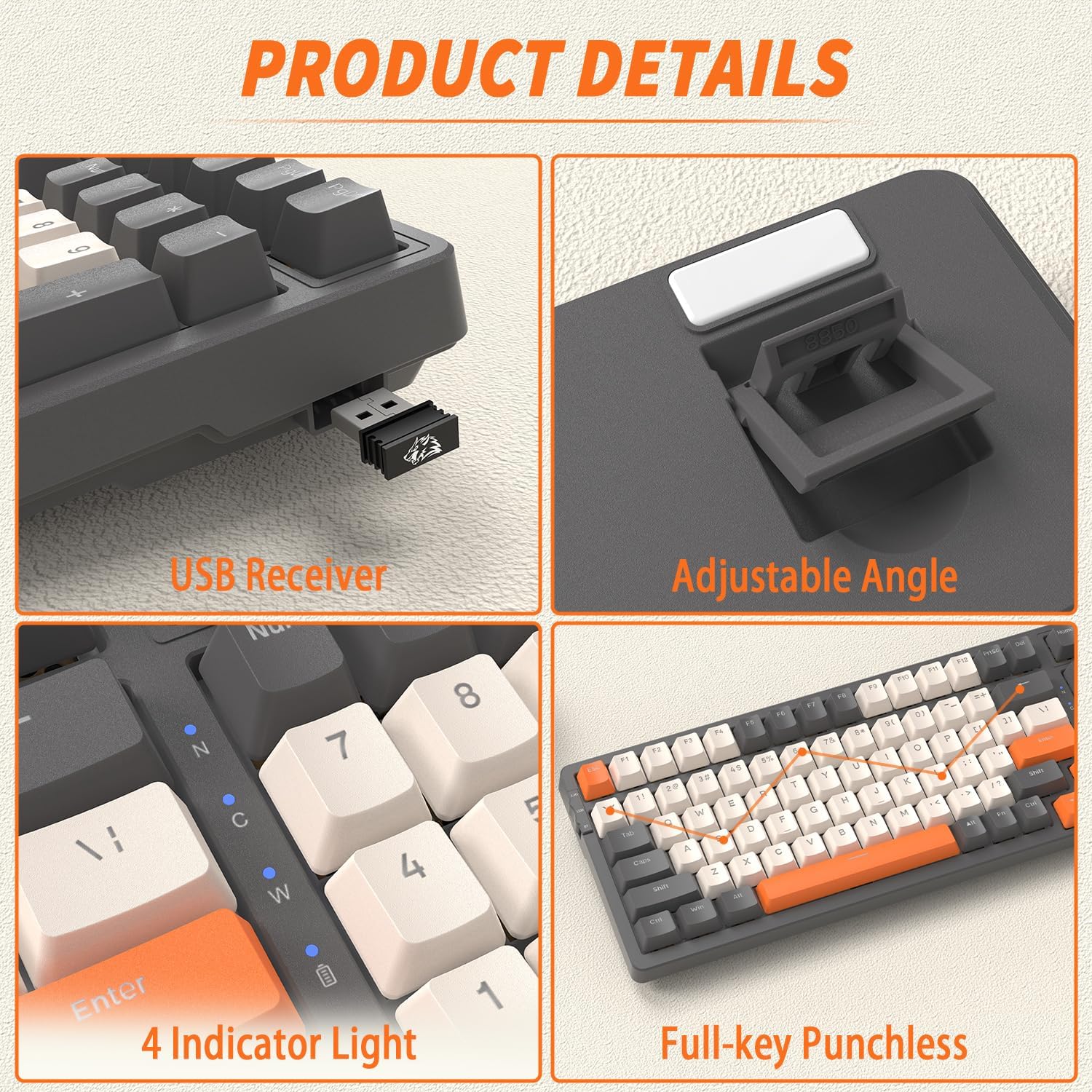
- Locate the 2.4 GHz USB receiver, typically stored in a slot on the keyboard's underside or side.
- Collega il ricevitore USB a una porta USB disponibile sul tuo computer.
- Impostare l'interruttore della modalità sulla tastiera su "2.4G".
- La tastiera dovrebbe connettersi automaticamente. In caso contrario, premere FN+R per avviare l'accoppiamento.
3. Modalità Bluetooth
The K8 keyboard supports up to three Bluetooth devices.
- Impostare l'interruttore di modalità sulla tastiera su 'BT'.
- Per entrare in modalità di associazione per un canale Bluetooth specifico, tenere premuto FN+Q (per BT1), FN+W (per BT2), oppure FA + MI (for BT3) for 3-5 seconds until the corresponding indicator light flashes rapidly.
- Sul tuo dispositivo (computer, tablet, smartphone), attiva il Bluetooth e cerca nuovi dispositivi.
- Select 'FREEWOLF K8' from the list of available devices to pair.
- Una volta accoppiato, l'indicatore luminoso smetterà di lampeggiare e rimarrà fisso.
- Per passare da un dispositivo Bluetooth associato all'altro, premere semplicemente FN+Q, FN+W, O FA + MI.
System Compatibility (Win/Mac)
The K8 keyboard is compatible with both Windows and Mac operating systems. To switch between layouts, press FN + LA for Windows mode or FN+S for Mac mode.
Istruzioni per l'uso
Regolazione dell'angolazione della tastiera
The keyboard features adjustable kickstands on the underside. Flip them out to achieve a more ergonomic typing angle, or fold them in for a flatter profile.
Controllo della retroilluminazione RGB
The K8 keyboard offers over 20 RGB backlight effects and customizable gaming backlights.

- Cambia modalità di retroilluminazione: Premere FN + | per scorrere 19 diversi effetti di illuminazione RGB.
- Customized Gaming Backlights: The keyboard has three pre-set gaming backlight modes that can be customized:
- FN + 1! (FPS Mode): Lights up W/A/S/D and arrow keys.
- FN + 2@ (LOL Mode): Lights up Q/W/E/R/D/F/G/V/B/Tab/Space/1-6/Esc keys.
- FN + 3# (Office Mode): Lights up A-Z/[/]/;/'/,/.// and arrow keys.
- Record Custom Backlight: To record your own custom backlight for FN+1!, FN+2@, or FN+3#, first select the desired mode (e.g., FN+1!), then press FN + ~. The indicator light will flash. Press the keys you wish to light up. Press FN + ~ di nuovo per salvare.
- Regola luminosità: Premere FN + per aumentare la luminosità e FN + per diminuire la luminosità.
- Regola la velocità: Premere FN + per diminuire la velocità dell'effetto e FN+→ per aumentare la velocità dell'effetto.
Funzionalità di risparmio energetico
To conserve battery life, the K8 keyboard implements the following power-saving measures:
- La retroilluminazione si spegnerà dopo 5 minuti di inattività.
- After 30 minutes of no operation, the keyboard will enter deep sleep (hibernation) mode.
- To wake the keyboard from sleep, press any key twice.
Manutenzione
Pulizia della tastiera
Una pulizia regolare aiuta a mantenere le prestazioni e l'aspetto della tastiera.
- Prima di pulire la tastiera, scollegarla da tutte le fonti di alimentazione.
- Utilizzare un panno morbido e privo di lanugine leggermente dampPulire i tasti e il telaio con acqua o una soluzione detergente delicata.
- Per rimuovere polvere e detriti tra i tasti, utilizzare aria compressa o una piccola spazzola.
- Evitare l'uso di prodotti chimici aggressivi o materiali abrasivi.
Interruttori hot-swapping
The FREEWOLF K8 is a hot-swappable keyboard, allowing you to change mechanical switches without soldering. It supports most 3-pin switches.
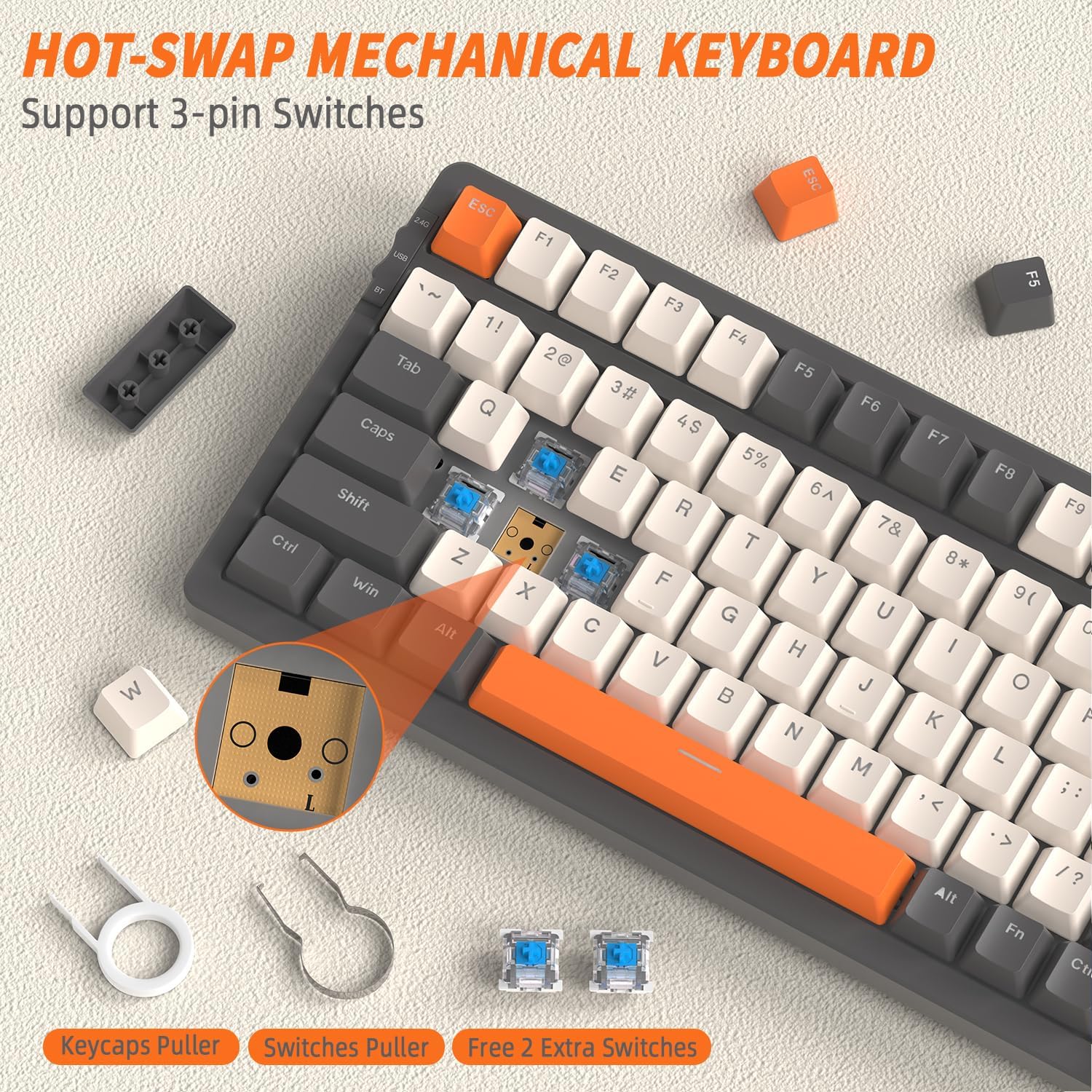
- Rimuovere il tasto: Use the included keycap puller tool to gently pull up the desired keycap.
- Rimuovi interruttore: Use the included switch puller tool to grasp the top and bottom clips of the switch. Gently pull the switch straight up to remove it from the PCB.
- Installa nuovo switch: Align the pins of the new 3-pin mechanical switch with the holes on the PCB. Gently push the switch straight down until it clicks into place. Ensure the pins are not bent.
- Reinstall Keycap: Place the keycap back onto the new switch and press down firmly.
Risoluzione dei problemi
| Problema | Possibile causa | Soluzione |
|---|---|---|
| La tastiera non risponde (cablata) | Collegamento del cavo allentato, modalità errata. | Ensure USB-C cable is securely connected. Verify mode switch is set to 'USB' or 'Wired'. Try a different USB port or cable. |
| Keyboard not responding (2.4 GHz) | Receiver not plugged in, incorrect mode, pairing issue. | Ensure 2.4 GHz receiver is plugged into a USB port. Verify mode switch is set to '2.4G'. Press FN+R to re-pair. Move keyboard closer to receiver. |
| La tastiera non risponde (Bluetooth) | Incorrect mode, not paired, out of range, device Bluetooth off. | Verify mode switch is set to 'BT'. Ensure Bluetooth is enabled on your device. Re-enter pairing mode (FN + Q/W/E) and re-pair. Move keyboard closer to device. |
| La retroilluminazione non funziona o è fioca | Backlight off, brightness too low, low battery. | Premere FN + | per scorrere le modalità. Aumenta la luminosità con FN +. Caricare la tastiera. |
| Tasti specifici non rispondono | Interruttore allentato o difettoso, detriti sotto il tasto. | Remove keycap and switch. Clean any debris. Reinstall switch firmly. If issue persists, replace the switch with a spare or new one. |
| La tastiera si disconnette frequentemente | Interference, low battery, too far from receiver/device. | Charge the keyboard. Reduce distance to receiver/device. Avoid strong electromagnetic interference. |
Specifiche
| Caratteristica | Descrizione |
|---|---|
| Modello | K8 |
| Marca | FREEWOLF |
| Connettività | USB-C Wired, 2.4 GHz Wireless, Bluetooth (BT1, BT2, BT3) |
| Disposizione della tastiera | 80% (100 tasti) |
| Tipo di interruttore | Mechanical (Hot-swappable, supports 3-pin switches) |
| Retroilluminazione | RGB (19 effects, 3 customizable gaming modes) |
| Capacità della batteria | 4000 mAh |
| Sistemi compatibili | Windows, macOS |
| keycaps | PBT Double Injection |
| Caratteristiche speciali | Hot-swappable, Adjustable Angle, Full-key Punchless (N-key rollover) |
| Colore | Grey/Orange - Blue Switch (variant specific) |
Garanzia e supporto
For warranty information, technical support, or service inquiries, please refer to the FREEWOLF official website or contact your point of purchase. This manual does not contain specific warranty details or support contact information.