
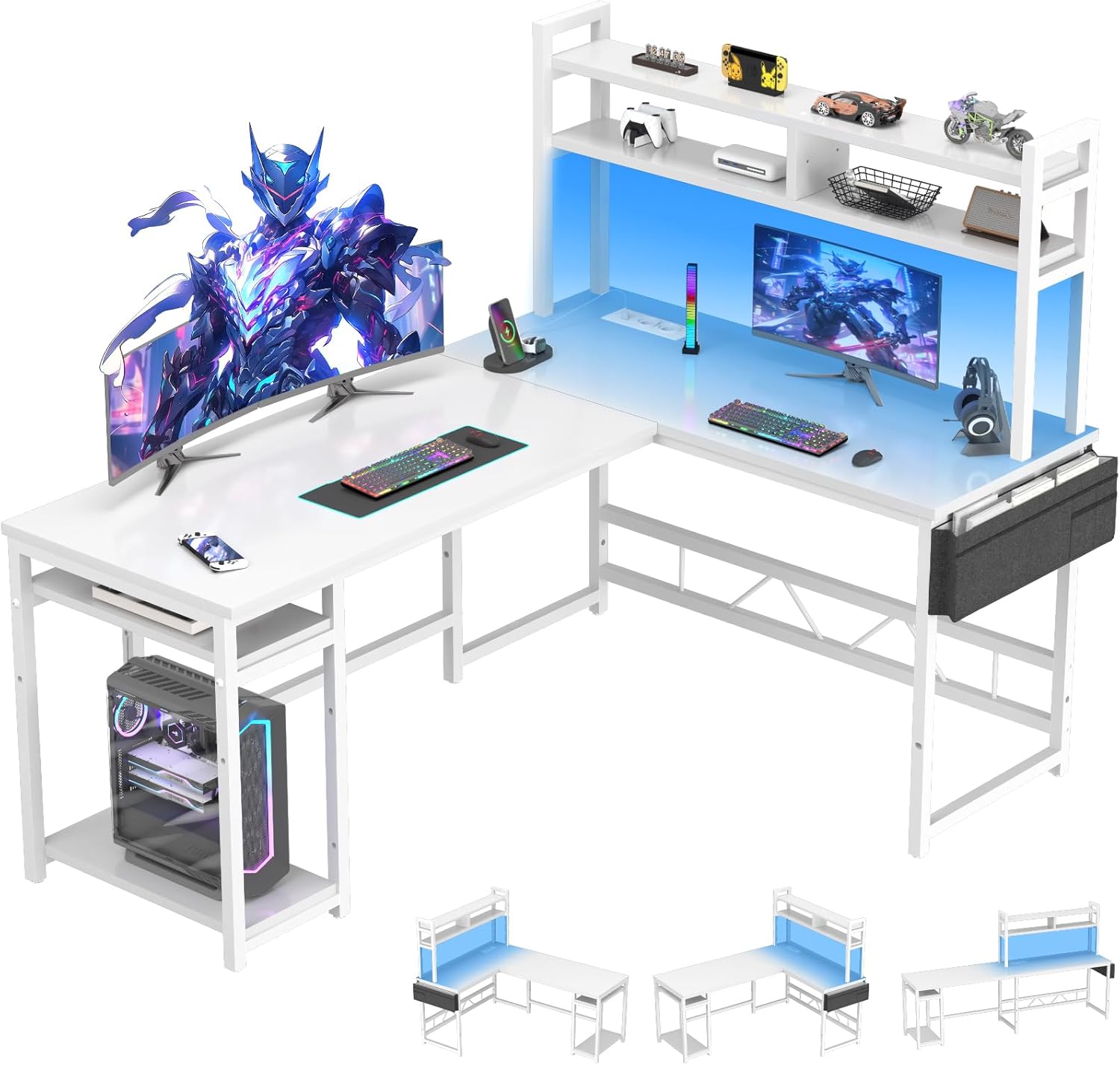
Prodotto finitoview
The Devoko L-Shaped Gaming Desk is designed to optimize your workspace with its versatile configuration, integrated power solutions, and ambient LED lighting. This manual provides detailed instructions for assembly, operation, maintenance, and troubleshooting to ensure a seamless user experience.
Caratteristiche principali:
- Design a forma di L: Maximizes corner space, offering ample room for multiple monitors and gaming peripherals.
- Integrated Power Hub: Includes 2 AC outlets and 2 USB charging ports for convenient power access.
- Illuminazione a LED: Customizable RGB LED strip with remote control for personalized ambiance.
- AmpMemorizzazione: Features stable side supports, storage pockets, and adjustable shelves for efficient organization.
- Costruzione durevole: Built with a sturdy metal frame and engineered wood for stability and longevity.
- Poggiapiedi regolabili: Protects floors from scratches and ensures stability on uneven surfaces.
Dimensioni del prodotto:

Image: Diagram illustrating the dimensions of the L-shaped desk, including the main desktop, side shelves, and overall height and width measurements.
Installazione: Istruzioni di montaggio
Informazioni importanti sulla sicurezza: This desk requires self-assembly. Please read the instructions carefully and follow them precisely to ensure safe assembly. Only proceed with assembly if you have the necessary skills and tools. Improper assembly may result in injury or damage.
For ease and safety, a two-person assembly is recommended. Ensure all parts are removed from packaging and are complete and in good condition before beginning. Pay close attention to the orientation of parts and screw holes as indicated in the steps.
Guida video all'assemblaggio:
Video: A detailed installation guide for an L-shaped desk, demonstrating each step of the assembly process. This video provides visual assistance for constructing your Devoko L-Shaped Gaming Desk.
Montaggio passo dopo passoview:
- Preparare i componenti: Unpack all parts and identify them using the provided parts list. Attach foot pads to the base frames.
- Assemble Side Shelves: Connect the vertical and horizontal mesh shelves using screws. Ensure correct orientation of parts.
- Collegare le sezioni del telaio: Join the assembled side shelf units with the main desk frame components, paying attention to screw hole alignment.
- Installare i ripiani inferiori: Secure the bottom wooden shelves to the frame using screws. Note that the support piece (U) is designed to prevent overload damage and may not touch the floor.
- Assemble Upper Shelves: Attach the upper shelf frames, ensuring proper alignment and securing with screws.
- Installare le barre trasversali: Secure the crossbars to the desk frame for added stability.
- Fissare i tutori di supporto: Install the diagonal support braces to reinforce the desk structure.
- Montare i pannelli del desktop: Carefully place the desktop panels onto the frame. Install all screws loosely first, then tighten them once both panels are perfectly aligned.
- Install CPU Stand/Side Storage: Attach the mesh panels for the CPU stand or side storage area.
- Montare il supporto del monitor: Construct the monitor stand by attaching the vertical supports to the base panel.
- Connect Monitor Stand Components: Assemble the L-shaped monitor stand base, ensuring all parts are aligned before tightening screws.
- Preparare la striscia LED: Apply the 3M adhesive to the back of the LED light strip, ensuring it is placed to avoid obstructing light emission.
- Install LED Strip and Cable Management: Attach the LED strip to the monitor stand and secure the power cable using the provided cable clips.
- Final Placement of Monitor Stand: Gently flip the assembled monitor stand and place it onto the main desktop, securing it with screws.
Istruzioni per l'uso
Sistema di illuminazione a LED:
The desk features an integrated RGB LED lighting system. Use the provided remote control to power the lights on/off, change colors, adjust brightness, and select dynamic lighting modes. Ensure the LED strip is properly connected to a power source via the integrated power hub.

Immagine: un primo piano view of the desk's LED lighting strip and the remote control used to manage its various color and mode settings.
Integrated Power & USB Ports:
The desk is equipped with a built-in power strip featuring 2 standard AC outlets (220-250V/15A) and 2 USB charging ports (5V/2.1A). Simply plug your electronic devices into these ports for convenient power access while working or gaming. Ensure the desk's main power cord is plugged into a wall outlet.

Immagine: Un dettaglio view of the integrated power hub on the desk, showing two AC power outlets and two USB charging ports.
Ripiani portaoggetti regolabili:
The desk includes adjustable shelves, allowing you to customize the storage height to fit various items such as books, plants, or your CPU tower. To adjust, loosen the screws holding the shelf, reposition it to the desired height, and then re-tighten the screws securely.

Image: Illustration demonstrating the adjustable height feature of the desk's side shelves, allowing for flexible storage configurations.
Caratteristiche aggiuntive:
Video: A product video showcasing various features of a gaming desk, including LED lighting, integrated power outlets, a foldable cup holder, a headphone hook, and adjustable foot pads. These features are also present on the Devoko L-Shaped Gaming Desk.
- Foldable Cup Holder: Conveniently located to keep beverages secure and within reach.
- Gancio per cuffie: Provides a dedicated spot to hang your headphones, keeping your desk tidy.
- Adjustable Grid Pegboard: Offers flexible organization for small accessories and decorations.
Manutenzione
Per garantire la longevità e l'aspetto della tua scrivania da gioco a L Devoko, segui queste linee guida per la manutenzione:
- Pulizia: Pulire le superfici con un panno morbido, damp panno. Evitare prodotti chimici aggressivi o detergenti abrasivi che potrebbero danneggiare la finitura.
- Fuoriuscite: Immediately clean up any spills to prevent staining or damage to the engineered wood.
- Controllo di stabilità: Controllare periodicamente tutte le viti e i collegamenti per assicurarsi che siano ben serrati. Serrarli nuovamente se necessario per mantenere la stabilità della scrivania.
- Cura dei LED: Avoid bending or sharply creasing the LED strip. If the LED strip or remote malfunctions, contact customer support.
- Distribuzione del peso: Distribute weight evenly across the desktop and shelves to prevent stress on the frame.
Risoluzione dei problemi
Se riscontri problemi con la tua scrivania da gioco a L Devoko, consulta i seguenti suggerimenti comuni per la risoluzione dei problemi:
- La scrivania ondeggia:
Soluzione: Ensure all assembly screws are securely tightened. Adjust the foot pads on the bottom of the desk legs to compensate for uneven flooring. - Luci LED non funzionanti:
Soluzione: Check if the LED strip is properly connected to the power hub and if the power hub is plugged into a functional wall outlet. Ensure the remote control batteries are not depleted. If issues persist, contact customer support. - Prese di corrente/porte USB non funzionanti:
Soluzione: Verify that the desk's main power cord is securely plugged into a live wall outlet. Check the power switch on the integrated power hub. Test with different devices to rule out device-specific issues. - Parti mancanti o danneggiate:
Soluzione: If you received the product with missing or damaged parts, do not proceed with assembly. Contact Devoko customer support immediately for assistance.
Specifiche
| Marca | Devoko |
| Numero di modello | 0232A-160WT |
| Colore | Bianco |
| Dimensioni del prodotto (L x P x A) | Dimensioni: 120 x 160 x 150 cm |
| Materiale | Legno ingegnerizzato, acciaio legato |
| Peso dell'articolo | 59.5 chilogrammi |
| Caratteristiche speciali | Integrated Power Outlets, USB Ports, LED Lighting, Gaming Design |
| Stile | Moderno |
| Usi consigliati | Gaming, Multi-purpose |
Garanzia e supporto
For any issues encountered during assembly or use, please do not hesitate to contact Devoko customer support. We are committed to providing assistance and ensuring your satisfaction with the product.
Per i dettagli specifici sulla garanzia e le informazioni di contatto, fare riferimento alla documentazione di acquisto. Conservare la prova d'acquisto per eventuali reclami in garanzia.