
FREEWOLF RK-K8
FREEWOLF RK-K8 Wireless Mechanical Gaming Keyboard User Manual
Model: RK-K8
1. Introduzione
This manual provides detailed instructions for the FREEWOLF RK-K8 Wireless Mechanical Gaming Keyboard. Please read this manual thoroughly before using the product to ensure proper operation and to maximize your user experience.
Caratteristiche principali:
- Triple-Mode Connectivity: Supports Type-C wired, 2.4GHz wireless, and Bluetooth 5.0 connections.
- Hot-Swappable Switches: Compatible with most 3-pin mechanical switches for customization.
- Gasket Mounted Structure: Enhances typing feel and reduces hollow sound.
- Customizable Rainbow Backlight: Features 18 backlight effects.
- Long-Lasting Battery: Equipped with a 4000mAh battery.
- 96% Layout: 100-key design that saves space while retaining essential keys.
- Wide Compatibility: Supports Windows and Mac operating systems.
2. Contenuto della confezione
Si prega di verificare che tutti gli articoli siano presenti nel pacco:
- 1 x FREEWOLF RK-K8 Mechanical Keyboard
- 1 x USB Receiver (2.4Ghz)
- 1 x Type-C to USB-A Braided Coiled Cable
- 1 x Estrattore per tasti
- 1 x Estrattore per interruttori
- 2 x Original Switches (spare)
- 1 x Manuale utente (questo documento)

Image 2.1: Contents of the FREEWOLF RK-K8 package, showing the keyboard, coiled USB-C cable, USB 2.4G receiver, keycap puller, switch puller, and two spare switches.
3. Configurazione e connessione
3.1 Ricarica della tastiera
Before first use, it is recommended to fully charge the keyboard. Connect the provided Type-C cable to the keyboard's Type-C port and the USB-A end to a power source (e.g., computer USB port, USB wall adapter). The keyboard features a 4000mAh battery.
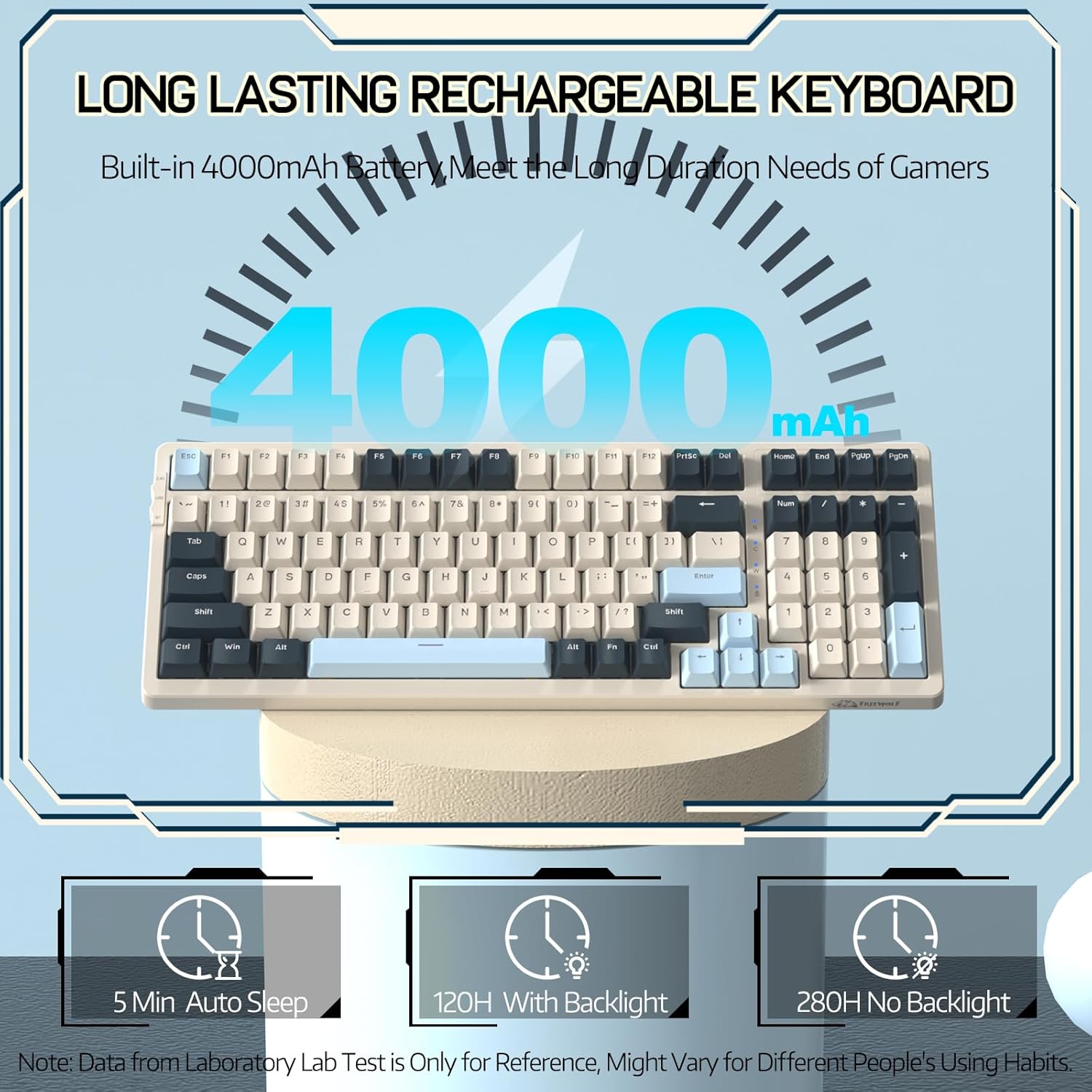
Image 3.1: The keyboard's 4000mAh battery capacity, indicating extended usage time.
3.2 Modalità di connessione
The RK-K8 keyboard supports three connection modes: Wired, 2.4GHz Wireless, and Bluetooth 5.0.

Image 3.2: Visual guide for switching between 2.4G wireless, wired, and Bluetooth connection modes.
3.2.1 Modalità cablata
- Connect the provided Type-C coiled cable to the keyboard's Type-C port.
- Collegare l'estremità USB-A del cavo alla porta USB del computer.
- Ensure the mode switch on the keyboard is set to "USB" (or wired mode indicator).
- La tastiera verrà riconosciuta automaticamente dal sistema.

Image 3.3: The Type-C to USB-A braided coiled cable, featuring a metal aviation connector for wired connection.
3.2.2 Modalità wireless a 2.4 GHz
- Individuare il ricevitore USB da 2.4 GHz, solitamente alloggiato in uno slot sulla tastiera.
- Collega il ricevitore USB a una porta USB disponibile sul tuo computer.
- Toggle the mode switch on the keyboard to "2.4G".
- La tastiera dovrebbe connettersi automaticamente.
3.2.3 Modalità Bluetooth 5.0
La tastiera supporta la connessione fino a tre dispositivi Bluetooth.
- Toggle the mode switch on the keyboard to "BT".
- Per accedere alla modalità di abbinamento, tenere premuto FN+Q, FN+W, O FA + MI for 3-5 seconds. The corresponding key's backlight will flash rapidly, indicating it's ready to pair.
- On your device (PC, Mac, tablet, phone), open Bluetooth settings and search for "RK-K8" or a similar device name.
- Select the keyboard to pair. Once connected, the backlight on the chosen key (Q, W, or E) will stop flashing and remain steadily lit.
- Per passare da un dispositivo Bluetooth associato all'altro, premere semplicemente FN+Q, FN+W, O FA + MI.
3.3 Compatibilità del sistema
The RK-K8 keyboard is compatible with both Windows and Mac operating systems. Use the appropriate FN key combinations for specific functions on each system.
Video 3.1: Un overview of the FREEWOLF K8 mechanical keyboard, showcasing its features including customizable keycaps, lighting effects, hot-swappable design, compact layout, and multi-device compatibility across Windows, Mac, and mobile devices.
4. Funzionamento
4.1 Controllo della retroilluminazione
The RK-K8 features 18 customizable rainbow backlight effects.
- FN + |: Switch between 18 backlight effects.
- Tasto funzione + ↑ / ↓: Regola la luminosità della retroilluminazione.
- Tasto F + ← / →: Regola la velocità di scorrimento degli effetti di retroilluminazione dinamica.
- FN+X: Turn on/off backlight.
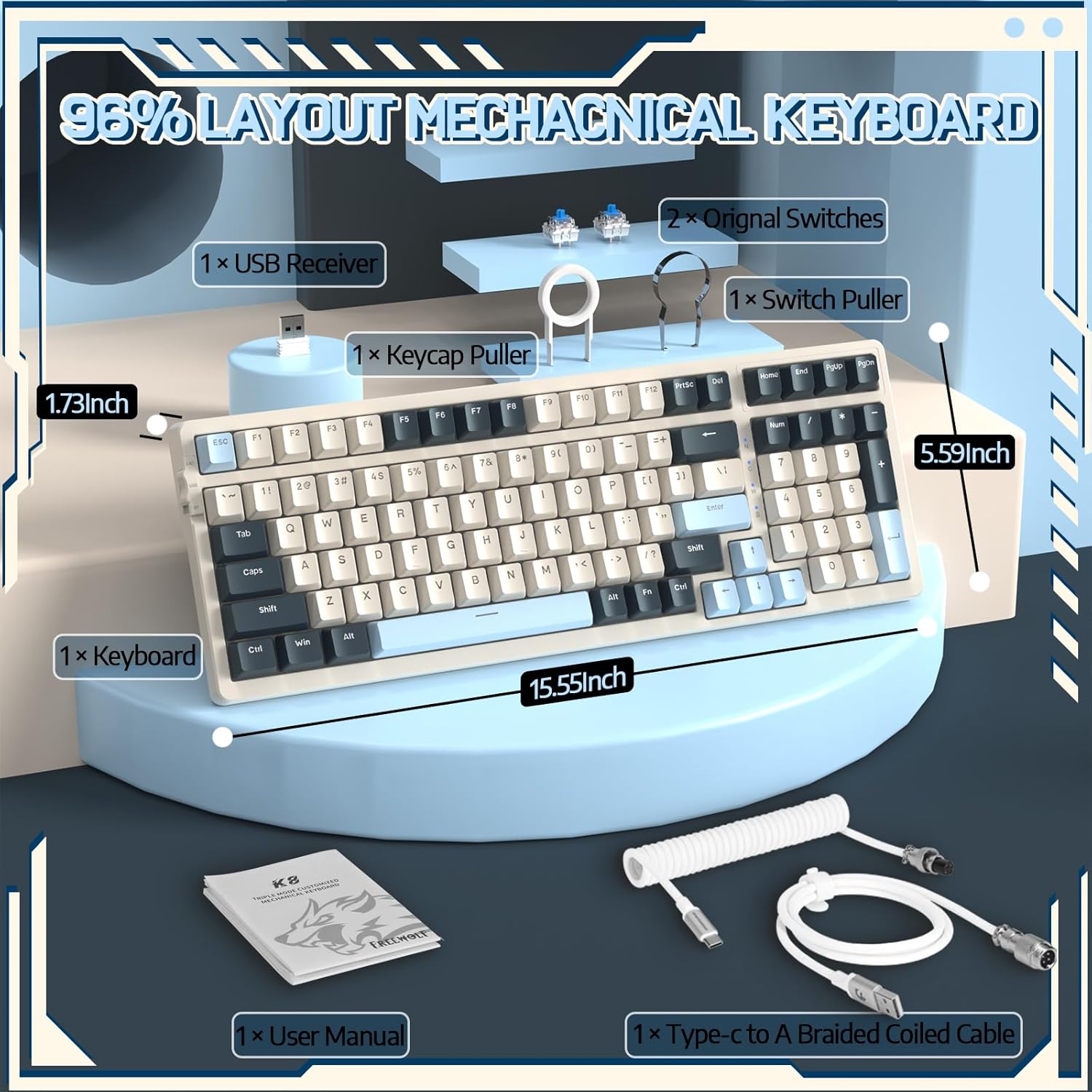
Image 4.1: The RK-K8 keyboard displaying various customizable rainbow backlight patterns.
4.2 Switch sostituibili a caldo
The keyboard is equipped with a hot-swappable PCB, allowing you to change switches without soldering. It is compatible with most 3-pin mechanical switches (e.g., Cherry MX, Gateron, Kailh Box, AKKO, Epomaker, Glorious switches).
- Use the provided switch puller to carefully remove the existing switch. Grip the switch firmly and pull straight up.
- Allineare i pin del nuovo interruttore a 3 pin con i fori sul PCB.
- Gently press the new switch into place until it clicks. Ensure the switch is seated properly and the pins are not bent.
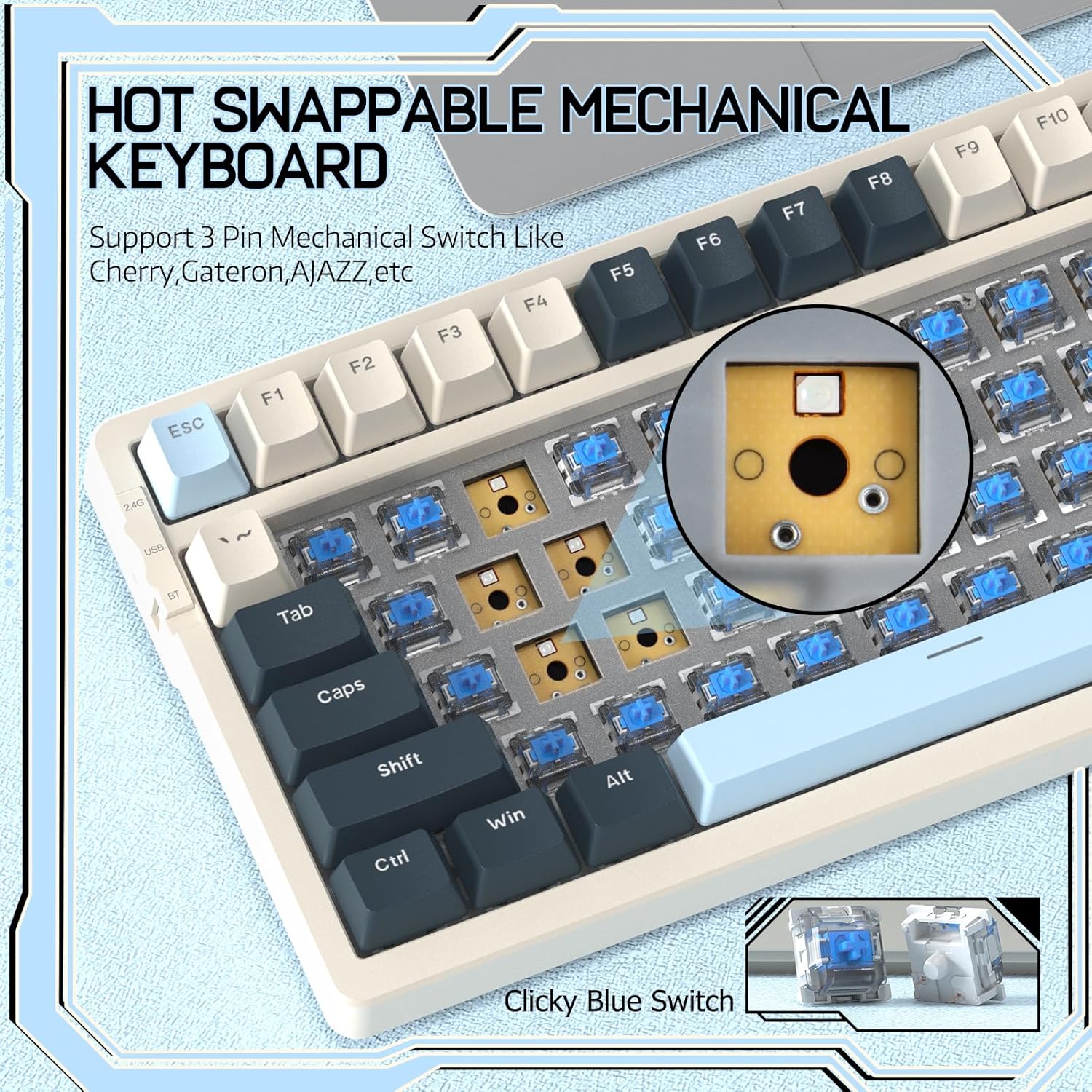
Image 4.2: Demonstrating the hot-swappable feature, showing a switch being removed from the keyboard.
4.3 Gasket Mounted Structure
The keyboard features a gasket-mounted design with sound-dampening materials between the plate and the housing. This construction reduces hollow sounds and provides a more consistent and comfortable typing experience.

Image 4.3: Diagram illustrating the internal layers of the gasket-mounted keyboard structure, designed for improved acoustics and feel.
4.4 Funzioni chiave e layout
The RK-K8 utilizes a 96% layout with 100 keys, retaining essential modifiers, arrow keys, a separate numpad, and function row while maintaining a compact form factor.
Refer to the keyboard layout for specific key placements. Many keys have secondary functions accessible via the FN chiave.
- FN + F1-F12: Multimedia and system control functions (e.g., volume, play/pause).
- FN + Vittoria: Blocca/sblocca il tasto Windows.
- FN + LA: Passa al layout Windows.
- FN+S: Passa al layout Mac.
5. Manutenzione
5.1 Pulizia
Per mantenere l'aspetto e la funzionalità della tastiera:
- Scollegare la tastiera dal computer prima di pulirla.
- Utilizzare un panno morbido e privo di lanugine leggermente dampPulire i tasti e il telaio con acqua o una soluzione detergente delicata.
- Per rimuovere polvere e detriti tra i tasti, utilizzare aria compressa o l'estrattore per tasti in dotazione per rimuovere i tasti e pulire la parte sottostante.
- Evitare l'uso di prodotti chimici aggressivi, abrasivi o solventi.
5.2 Sostituzione dei tasti e degli interruttori
The provided keycap and switch pullers facilitate easy replacement of keycaps and switches. Refer to section 4.2 for switch replacement instructions.
6. Risoluzione Dei Problemi
If you encounter issues with your FREEWOLF RK-K8 keyboard, please refer to the following common solutions:
- La tastiera non risponde:
- Assicurarsi che la tastiera sia carica.
- Verificare che l'interruttore della modalità di connessione (cablata, 2.4G, BT) corrisponda alla connessione desiderata.
- For wired mode, ensure the cable is securely connected to both the keyboard and the computer.
- For 2.4G wireless, ensure the USB receiver is plugged in and the keyboard is in 2.4G mode.
- For Bluetooth, re-pair the device if necessary (see section 3.2.3).
- Tasti ripetuti o non registrati:
- This can sometimes occur with wireless connections. Try switching to wired mode to see if the issue persists.
- Ensure the switches are properly seated. If a switch is loose, carefully remove and re-insert it.
- Pulire eventuali detriti attorno al tasto interessato.
- Retroilluminazione non funzionante o bloccata:
- Assicurarsi che la retroilluminazione non sia spenta (premere FN+X).
- Regola la luminosità utilizzando Tasto funzione + ↑ / ↓.
- Try cycling through backlight effects with FN + |.
- Problemi di connessione Bluetooth:
- Ensure the keyboard is in Bluetooth mode and sufficient battery.
- Forget the device on your computer/phone and re-pair it.
- Ensure your device's Bluetooth is enabled and working correctly.
7. Specifiche
| Caratteristica | Dettaglio |
|---|---|
| Marca | FREEWOLF |
| Modello | RK-K8 |
| Tecnologia di connettività | Bluetooth 5.0 / 2.4GHz Wireless / Wired (Type-C) |
| Descrizione della tastiera | Meccanico |
| Tipo di interruttore | Tactile Blue Switch (Hot-Swappable 3-pin) |
| Capacità della batteria | 4000mAh |
| Retroilluminazione | Rainbow Backlit (18 effects) |
| Disposizione | 96% (100 tasti) |
| Dispositivi compatibili | PC, Mac, PS4 (via USB) |
| Materiale | Acrilonitrile Butadiene Stirene (ABS) |
| Peso dell'articolo | 2.25 libbre (circa 1.02 kg) |
| Dimensioni del pacco | 16.14 x 6.69 x 2.01 pollici |
8. Garanzia e supporto
For warranty information or technical support, please refer to the contact details provided with your purchase or visit the official FREEWOLF webluogo. Conserva la ricevuta di acquisto per eventuali richieste di garanzia.
Ask a question about this manual
Ask about setup, troubleshooting, compatibility, parts, safety, or missing instructions. Manuals+ will review the question and use this page’s manual context to help answer it.