
1. Introduzione
The Snom HD350W is a robust and antibacterial Hotel SIP IP Phone designed for hospitality environments. It offers reliable communication with advanced features such as Wi-Fi connectivity, Power over Ethernet (PoE) support, and programmable keys. This manual provides detailed instructions for the setup, operation, and maintenance of your Snom HD350W phone.
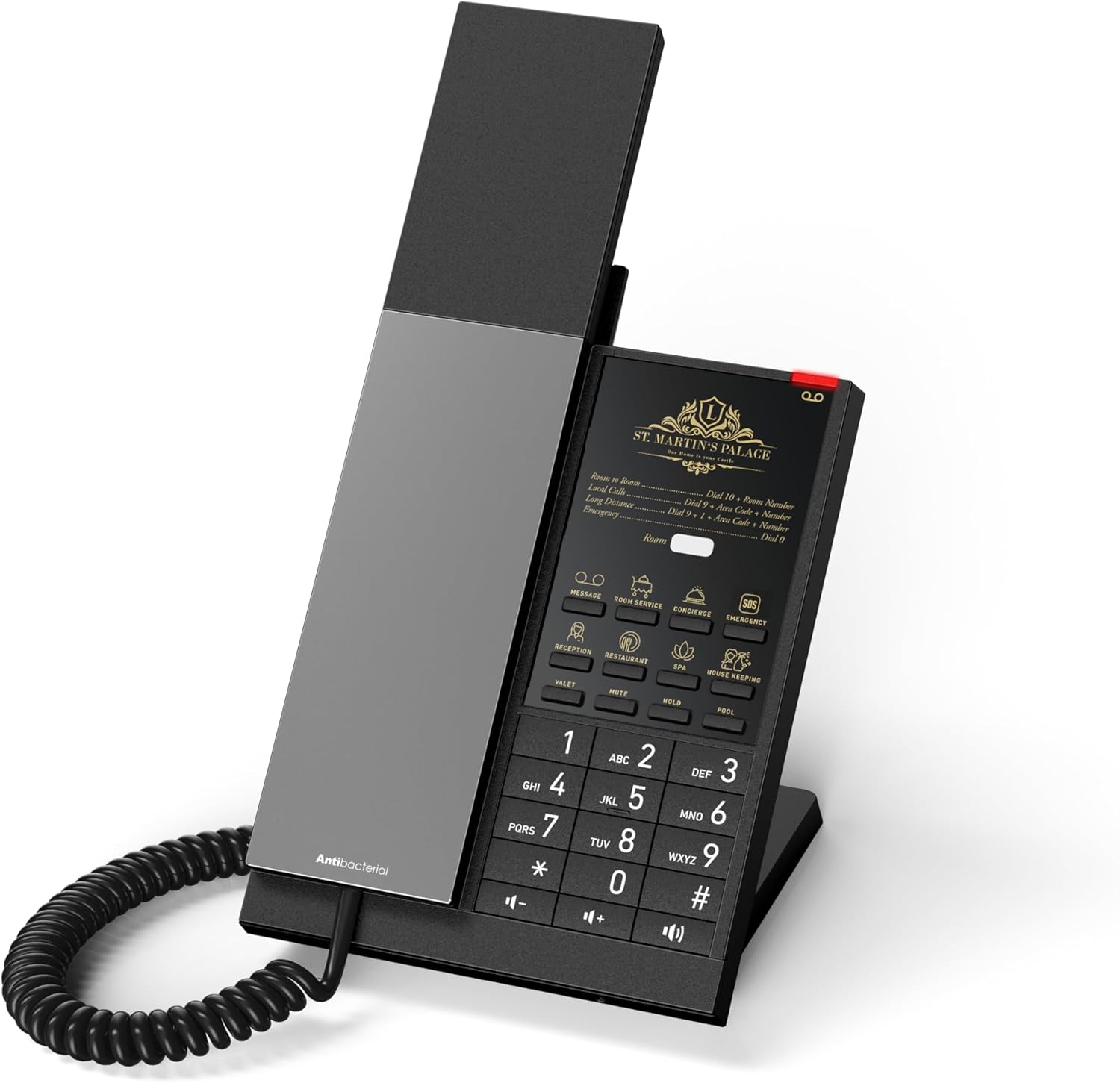
Figura 1: Fronte view of the Snom HD350W Hotel SIP IP Phone. This image shows the handset, keypad, and display area.
2. Contenuto della confezione
Si prega di verificare che il pacco contenga i seguenti articoli:
- Snom HD350W IP Phone unit
- Cornetta
- Cavo del ricevitore
- Cavo Ethernet
- Desk stand / Wall mount kit
- Guida all'installazione rapida (questo documento)
- Adattatore di alimentazione (se non si utilizza PoE)
If any items are missing or damaged, please contact your vendor or Snom support immediately.
3. Fisico oltreview
Familiarize yourself with the various components and ports of your Snom HD350W phone.
3.1 Frontale e tastiera
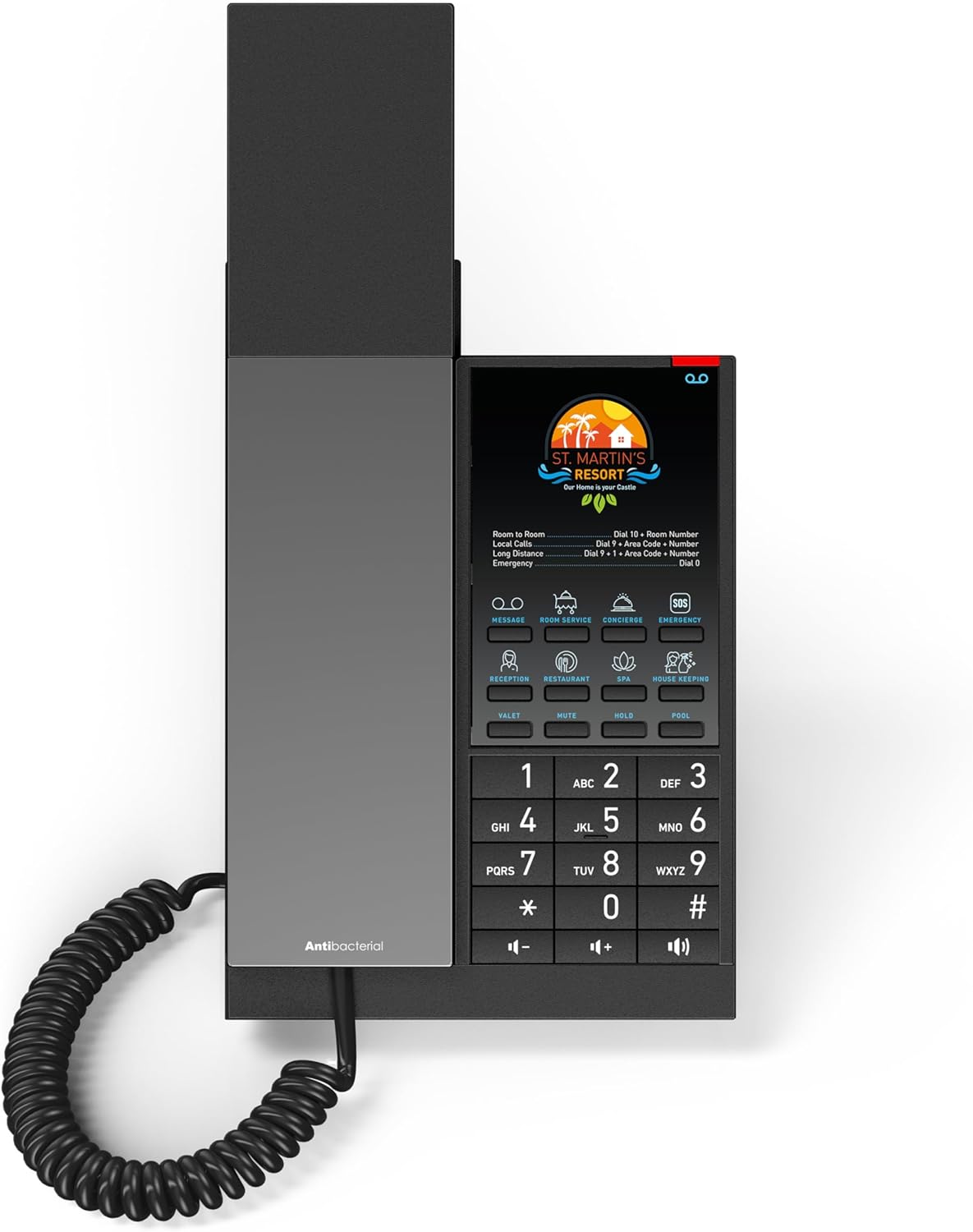
Figura 2: Dall'alto verso il basso view of the Snom HD350W keypad and display. This image highlights the numerical keypad, function keys, and the customizable display area.
- Area di visualizzazione: Customizable area for hotel branding and quick dialing instructions.
- Tasti programmabili: Up to 8 keys for quick calls or specific functions (e.g., Message, Room Service, Concierge, Emergency).
- Tastiera numerica: Tasti standard 0-9, *, # per la composizione.
- Tasti funzione: Dedicated keys for Speaker, Mute, Volume control, etc.
3.2 Porte posteriori

Figura 3: Posteriore view of the Snom HD350W, showing the connection ports. This image displays the Ethernet ports and power input.
- Porta del ricevitore: Connects the coiled handset cord.
- Ethernet Ports (2x Gigabit): Per la connessione di rete e Power over Ethernet (PoE).
- Porta dell'adattatore di alimentazione: For connecting the external power supply (if not using PoE).
4. Configurazione e installazione
4.1 Mounting the Phone
The Snom HD350W can be installed on a desk or mounted on a wall.
4.1.1 Installazione su scrivania
- Attach the supplied desk stand to the back of the phone unit. Ensure it clicks securely into place.
- Place the phone on a flat, stable surface.
4.1.2 Installazione a parete
- Use the included wall mount kit.
- Secure the wall mount bracket to the desired wall location using appropriate screws (not included).
- Attach the phone unit to the wall mount bracket, ensuring it is firmly secured.
4.2 Collegamento del portatile
Connect one end of the coiled handset cord to the handset and the other end to the handset port on the phone unit.
4.3 Alimentazione e connessione di rete
The Snom HD350W supports both Power over Ethernet (PoE) and external power adapter, as well as Wi-Fi for network connectivity.
4.3.1 Alimentazione tramite Ethernet (PoE)
- Connect an Ethernet cable from a PoE-enabled network switch or injector to one of the Gigabit Ethernet ports on the back of the phone.
- Il telefono si accenderà automaticamente.
4.3.2 External Power Adapter
- If PoE is not available, connect the supplied power adapter to the power adapter port on the phone.
- Collegare l'adattatore di corrente a una presa a muro.
- The phone will power on.
4.3.3 Connessione Wi-Fi
- The Snom HD350W is natively equipped with Wi-Fi.
- Upon initial power-up, the phone will attempt to connect to a configured Wi-Fi network or prompt for Wi-Fi setup.
- Follow the on-screen instructions or consult your network administrator for Wi-Fi configuration details.
4.3.4 Wired Ethernet Connection (without PoE)
- Connect an Ethernet cable from your network router or switch to one of the Gigabit Ethernet ports on the back of the phone.
- Ensure the phone is powered via the external power adapter as described in 4.3.2.
4.4 Configurazione iniziale
The Snom HD350W is typically provisioned by your service provider or IT administrator. Once connected to the network, it should automatically register with the SIP server. If manual configuration is required, please refer to the Snom administration guide or contact your system administrator.
5. Istruzioni per l'uso
5.1 Effettuare una chiamata
- Pick up the handset, or press the Oratore pulsante per la modalità vivavoce.
- Comporre il numero di telefono desiderato utilizzando il tastierino numerico.
- The call will connect automatically after dialing, or press the Comporre button (if available on display).
5.2 Rispondere a una chiamata
- When the phone rings, pick up the handset, or press the Oratore pulsante per rispondere in modalità vivavoce.
5.3 Using Programmable Keys
The Snom HD350W features up to 8 programmable keys, typically configured for quick access to hotel services or frequently dialed numbers. Simply press the desired key to activate its function (e.g., "Reception", "Room Service", "Emergency").

Figure 4: Multiple Snom HD350W phones demonstrating customizable display inserts for programmable keys. This image shows different branding and service options.
5.4 Regolazione del volume
- Durante una chiamata, utilizzare il Volume su (+) E Volume basso (-) buttons to adjust the handset or speaker volume.
- Quando non sono attivi, questi pulsanti consentono di regolare il volume della suoneria.
5.5 Funzione Mute
- Premere il tasto Muto button to mute your microphone during a call. The button will typically illuminate to indicate mute is active.
- Premerlo di nuovo per riattivare l'audio.
6. Manutenzione
The Snom HD350W features an antibacterial housing for enhanced hygiene.
6.1 Pulizia del telefono
- Regularly clean the phone surface with a soft, damp stoffa.
- For disinfection, use a mild, non-abrasive cleaning solution. Avoid harsh chemicals or abrasive materials that could damage the antibacterial coating or phone surface.
- Ensure the phone is disconnected from power before cleaning.
6.2 Aggiornamenti firmware
Firmware updates are typically managed by your system administrator to ensure optimal performance and security. Do not attempt to update firmware manually unless instructed by Snom support or your administrator.
7. Risoluzione Dei Problemi
If you encounter issues with your Snom HD350W, try the following basic troubleshooting steps:
- Nessun potere:
- Check if the power adapter is securely connected to the phone and the wall outlet.
- Se si utilizza PoE, assicurarsi che il cavo Ethernet sia collegato a una porta abilitata PoE e che lo switch sia acceso.
- Nessun segnale di linea / Impossibile effettuare chiamate:
- Verify the Ethernet or Wi-Fi connection is active.
- Ensure the phone is registered with the SIP server (check the display for registration status, if available).
- Contact your system administrator to confirm SIP account status.
- Scarsa qualità audio:
- Check the handset and speaker volume settings.
- Assicurarsi che il cavo del ricevitore sia collegato saldamente.
- Verificare la stabilità della rete.
- Il telefono non risponde:
- Disconnect the power adapter or Ethernet cable (if using PoE) for 10 seconds, then reconnect to restart the phone.
For persistent issues, please contact your system administrator or Snom technical support.
8. Specifiche tecniche
| Modello | HD350W |
| Numero modello articolo | 00007008 |
| Marca | Snoopy |
| Tipo di telefono | VoIP SIP IP Phone |
| Account SIP | 1 |
| Connettività | Wi-Fi, 2x Gigabit Ethernet (PoE support) |
| Fonte di alimentazione | Corded Electric (Power Adapter) or PoE |
| Materiale | Acrylonitrile Butadiene Styrene (ABS) with antibacterial coating |
| Colore | Nero |
| Peso dell'articolo | 500 grammi |
| Dimensioni del pacco | Dimensioni: 20 x 15 x 10 cm |
| Produttore | Snom Technology AG |
| Paese di origine | Germania |
9. Garanzia e supporto
9.1 Informazioni sulla garanzia
The Snom HD350W comes with an EU Spare Part Availability Duration of 2 Years. For specific warranty terms and conditions, please refer to the warranty card included with your product or visit the official Snom websito.
9.2 Supporto tecnico
For technical assistance, troubleshooting beyond this manual, or further inquiries, please contact your Snom product vendor or visit the official Snom support websito per informazioni di contatto e risorse.
Official Snom Websito: www.snom.com