
1. Prodotto finitoview
The Epronic BKPro-EU1116 is a 4-pin AHD 1080P backup camera designed for use with compatible carplay screen monitors. It provides a clear rear view to assist with parking and reversing, enhancing vehicle safety. This camera supports mirror image functionality and offers both front and rear view opzioni.
- 2.5mm to 4 PIN Connection: Specifically designed for 7/9/10.26 inch portable car stereo carplay screens with a 2.5mm video cable port. Features a 2.5mm jack on one end and a 4-pin connector at the camera end. Note: Not compatible with 3.5mm AV-IN video input ports.
- 1080P AHD posteriore View: Provides high-definition video to eliminate blind spots, making parking safer. Includes a 5.5m (18ft) video cable for easy installation and stable signal transmission.
- Waterproof & Night Vision: Features an IP68 waterproof rating for reliable performance in rainy and foggy conditions. A wide camera lens viewing angle ensures comprehensive visibility for safe parking and reversing.
- Compatibilità Nota: This camera exclusively supports AHD-1080P-PAL 25hz, provided your screen supports AHD signals. It is non compatible with motorcycle devices, original car displays, Android car radios, head units, dash cams, mirror dash cams, or CVBS (LED lights) Carplay screens only.
- Installazione semplice: A flush mount camera designed for quick installation in minutes. Can be mounted anywhere at the rear of your vehicle, such as near the license plate or on the rear bumper.

2. Compatibilità
This Epronic backup camera is designed for specific compatibility requirements. Please review the following details to ensure your device is supported.
2.1 Dispositivi supportati
- 7/9/10.26 inch portable car stereo carplay screens with a 2.5mm video cable port.
- Devices that support AHD-1080P-PAL 25hz signal format.
2.2 Dispositivi incompatibili
La macchina fotografica è non compatibile con quanto segue:
- Motorcycle devices
- Original car displays
- Android car radios
- Unità di testa
- Telecamere da cruscotto
- Mirror dash cams
- CVBS (LED lights) Carplay screens only
- Devices with 3.5mm AV-IN video input ports.


3. Contenuto della confezione
Verifica che tutti gli articoli siano presenti nel tuo pacco:
- 1 x parte posteriore dell'auto View Telecamera
- 1 x 18ft Extend Cable
- 1 x staffe metalliche
- Viti per il montaggio
- Manuale d'uso

4. Configurazione e installazione
Follow these steps for proper installation of your Epronic backup camera.
4.1 Installazione fisica
- Scegli la posizione di montaggio: Select a suitable location at the rear of your vehicle, such as above the license plate or on the rear bumper. Ensure the camera has a clear, unobstructed view.
- Montare la fotocamera: Use the provided metal brackets and screws to securely attach the camera.
- Instradare il cavo: Carefully route the 18ft extension cable from the camera to your carplay screen monitor. Ensure the cable is protected from sharp edges, heat, and moving parts.
- Connect to Carplay Screen: Connect the 2.5mm jack end of the extension cable to the corresponding 2.5mm video input port on your carplay screen monitor. Connect the 4-pin end to the camera.
- Collegamento elettrico: Connect the camera's power wire (red wire) to the vehicle's reverse light power source (12V DC) so the camera activates when the vehicle is in reverse.
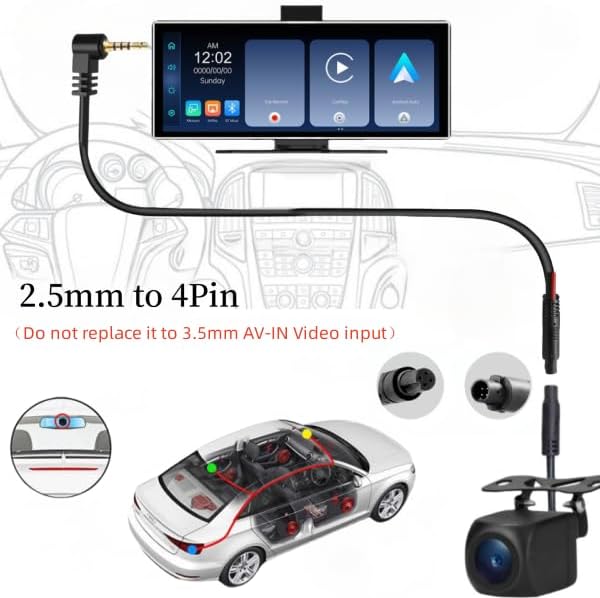
4.2 Important Notes on Connection
- The camera uses a 2.5mm jack to 4-pin connection. Do not attempt to connect it to a 3.5mm AV-IN video input port.
- Ensure your carplay screen supports AHD-1080P-PAL 25hz for optimal performance.
5. Funzionamento
Once installed, the camera will automatically activate when your vehicle is shifted into reverse, displaying the rear view on your compatible carplay screen.
5.1 Adjusting Image Settings (Mirror/Non-Mirror Image)
The camera defaults to a mirror image (rear view). To switch to a non-mirror (front view) image, locate the small green wire loop near the camera connector. Ensure the camera is powered off before making any changes.
- Default (Rear View - Mirror Image): The green wire loop is intact.
- Davanti View (Non-Mirror Image): Cut the green wire loop.

5.2 Adjusting Video Resolution (1080P/720P)
The camera defaults to HD 1080P. If your monitor defaults to 720P or displays a black and white screen, you may need to adjust the camera's resolution. Locate the small white wire loop near the camera connector. Ensure the camera is powered off before making any changes.
- Default (HD 1080P): The white wire loop is intact.
- HD 720P: Cut the white wire loop.
- Restore 1080P: Reconnect the white wire loop.

Importante: Always power off the camera and monitor before cutting or reconnecting any wires to prevent damage.
If you are unsure which format your monitor supports, try cutting/connecting the white wire to see if the image appears correctly.
5.3 Video ufficiali del prodotto
Epronic 4-Pin Backup Camera Features and Setup
This video demonstrates the features and setup process for the Epronic 4-pin backup camera, including how to switch between 1080P and 720P resolutions and mirror image settings.
Carplay Screen / Mirror Dash Cam / Monitor Testing
This video showcases the Epronic backup camera being tested with various carplay screens and monitors, demonstrating its functionality and compatibility.
6. Manutenzione
Proper maintenance ensures the longevity and optimal performance of your backup camera.
- Pulizia della lente: Pulire regolarmente l'obiettivo della fotocamera con un panno morbido eamp panno per rimuovere sporco, polvere o macchie d'acqua che potrebbero ostruire il viewEvitare detergenti abrasivi.
- Ispezione dei cavi: Periodically inspect the video cable and power connections for any signs of wear, damage, or loose connections. Secure any loose wiring.
- Sicurezza del montaggio: Ensure the camera's mounting bracket remains secure. Tighten screws if necessary to prevent vibration or displacement.
- Integrità impermeabile: While the camera is IP68 waterproof, avoid directing high-pressure water jets directly at the camera during car washes, as this could compromise the seal over time.
7. Risoluzione Dei Problemi
If you encounter issues with your Epronic backup camera, refer to the following common problems and solutions.
| Problema | Possibile causa | Soluzione |
|---|---|---|
| Nessuna immagine sullo schermo / messaggio "Nessun segnale" |
|
|
| Image is black and white or distorted |
|
|
| Image is reversed (mirror image when front view is desired) |
|
|
| Poor image quality (blurry, dark at night) |
|
|

8. Specifiche
| Caratteristica | Dettaglio |
|---|---|
| Numero di modello | BKPro-EU1116 |
| Marca | Epronico |
| Risoluzione video | AHD 1080P (Default), AHD 720P (Adjustable) |
| Formato del segnale | PAL 25hz (AHD) |
| Tipo di connettore | 2.5mm Jack to 4-Pin |
| Lunghezza del cavo | 18 piedi (5.5 metri) |
| Grado di impermeabilità | Grado di protezione IP68 |
| Viewangolo di ing | 170 gradi (angolo reale di View) |
| Tipo di immagine | Mirror (Default), Non-Mirror (Adjustable) |
| Potenza in ingresso | 12 Volt (CC) |
| Tipo di installazione | Montaggio in superficie |
| Dimensioni del prodotto | 0.91 x 0.91 x 0.91 inches (Camera body) / 4"L x 2"W x 2"H (Overall with bracket) |
| Peso dell'articolo | 6 once |
9. Garanzia e supporto
Epronic products are designed for reliability and performance. For warranty information or technical assistance, please refer to the following:
- Garanzia: Please refer to the warranty card included in your product packaging or visit the official Epronic websito per termini e condizioni di garanzia dettagliati.
- Assistenza clienti: For technical support, troubleshooting assistance, or inquiries regarding product compatibility, please contact Epronic customer service. Contact details can typically be found on the product packaging or the official Epronic websito.
- Epronic aims to respond to inquiries about device compatibility within 18 hours.