Introduzione
Thank you for choosing the Serve Wireless Headphone KST-900 Black. This manual provides essential information for the safe and efficient operation of your new wireless headphones. Please read this manual thoroughly before use and retain it for future reference.
The Serve Wireless Headphone is designed for comfortable listening to music and making phone calls, featuring excellent tone quality and a humanized design for extended wear.
Informazioni sulla sicurezza
- Non esporre le cuffie a temperature estreme, umidità o sostanze corrosive.
- Evitare di far cadere le cuffie o di sottoporle a forti urti.
- Non smontare o modificare le cuffie. Ciò potrebbe invalidare la garanzia e rappresentare un rischio per la sicurezza.
- Pulisci le cuffie con un panno morbido e asciutto. Non utilizzare detergenti liquidi.
- Ascoltare a volume moderato per prevenire danni all'udito. L'esposizione prolungata a suoni forti può causare una perdita irreversibile dell'udito.
- Tenere fuori dalla portata dei bambini.
Contenuto della confezione
Si prega di controllare il contenuto della confezione per assicurarsi che siano presenti tutti gli articoli:
- 1 x Serve Wireless Headphone KST-900 Black
- 1 cavo di ricarica (USB)
- 1 cavo audio (jack da 3.5 mm)
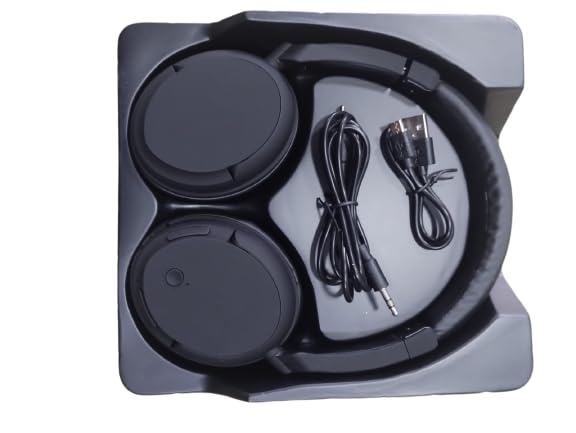
Image: The Serve Wireless Headphone KST-900 Black, along with its charging cable and 3.5mm audio cable, neatly arranged within its packaging tray.
Prodotto finitoview
The Serve Wireless Headphone KST-900 features a comfortable over-ear design with soft earcups for extended listening. It includes integrated controls for easy operation and a built-in microphone for hands-free calls.

Immagine: Lato A view of the Serve Wireless Headphone KST-900 Black, showcasing its foldable design and over-ear earcups.
Caratteristiche principali:
- Soft & comfortable earcups for prolonged use.
- Superior Sound Quality for an immersive audio experience.
- Built-in microphone for hands-free call function.
- Long battery life: Up to 6 hours for music, 8 hours for calls.
- Excellent compatibility with Wireless 4.2 technology.
- Design pieghevole per una facile trasportabilità.
Impostare
1. Carica delle cuffie
Prima del primo utilizzo, caricare completamente le cuffie. Una ricarica completa richiede circa 1.5 ore.
- Collegare l'estremità piccola del cavo di ricarica USB alla porta di ricarica delle cuffie.
- Connect the other end of the USB charging cable to a USB power adapter (not included) or a computer's USB port.
- The LED indicator light will illuminate during charging and turn off or change color once fully charged.
2. Accoppiamento Bluetooth
Pair your headphones with your device (smartphone, tablet, laptop) to enable wireless audio.
- Assicurarsi che le cuffie siano completamente cariche e spente.
- Press and hold the Power/Multi-function button on the headphones until the LED indicator light flashes rapidly (usually blue and red alternately), indicating pairing mode.
- Sul tuo dispositivo, vai alle impostazioni Bluetooth e assicurati che il Bluetooth sia abilitato.
- Cercare available devices. You should see "KST-900" or "Serve Headphone" in the list.
- Select "KST-900" to connect. Once connected, the LED indicator light will typically flash slowly or turn solid blue.
- Se viene richiesta una password, immettere "0000".
Nota: quando vengono accese, le cuffie tenteranno automaticamente di riconnettersi all'ultimo dispositivo associato.
Istruzioni per l'uso
Accensione/spegnimento
- Accensione: Tenere premuto il pulsante di accensione/multifunzione per circa 3 secondi finché l'indicatore LED non si accende.
- Spegni: Tenere premuto il pulsante di accensione/multifunzione per circa 3-5 secondi finché l'indicatore LED non si spegne.
Riproduzione musicale
- Riproduci/Pausa: Premere una volta il pulsante di accensione/multifunzione.
- Traccia successiva: Tieni premuto il pulsante Volume su (+).
- Traccia precedente: Premere e tenere premuto il pulsante Volume giù (-).
- Aumenta volume: Premere brevemente il pulsante Volume su (+).
- Volume basso: Premere brevemente il pulsante Volume giù (-).
Funzione di chiamata
- Rispondi alla chiamata: Press the Power/Multi-function button once when an incoming call rings.
- Termina chiamata: Premere una volta il pulsante di accensione/multifunzione durante una chiamata.
- Rifiuta chiamata: Press and hold the Power/Multi-function button for approximately 2 seconds when an incoming call rings.
- Ricomponi l'ultimo numero: Premere due volte il pulsante di accensione/multifunzione.
Modalità cablata (cavo audio da 3.5 mm)
You can use the headphones with the included 3.5mm audio cable when the battery is low or for devices without Bluetooth connectivity.
- Plug one end of the 3.5mm audio cable into the audio input jack on the headphone.
- Collegare l'altra estremità al jack di uscita audio da 3.5 mm del dispositivo.
- In wired mode, the headphone's built-in controls may not function, and audio control will be managed by your connected device.
Manutenzione
- Pulizia: Per pulire le cuffie, utilizzare un panno morbido, asciutto e privo di lanugine. Non utilizzare detergenti abrasivi, alcol o solventi chimici.
- Magazzinaggio: Quando non vengono utilizzate, conservare le cuffie in un luogo fresco e asciutto, lontano dalla luce solare diretta e da temperature estreme. Il design pieghevole consente di riporle in modo compatto.
- Cura della batteria: Per prolungare la durata della batteria, evitare di scaricarla completamente frequentemente. Caricare regolarmente le cuffie, anche se non vengono utilizzate frequentemente.
Risoluzione dei problemi
| Problema | Possibile causa | Soluzione |
|---|---|---|
| Le cuffie non si accendono. | La batteria è scarica o esaurita. | Caricare completamente le cuffie. |
| Impossibile associare il dispositivo. | Cuffie non in modalità di associazione; Bluetooth disattivato sul dispositivo; dispositivo troppo lontano. | Ensure headphones are in pairing mode (flashing red/blue). Turn on Bluetooth on your device. Move headphones closer to the device (within 10m). Forget previous pairings on your device and try again. |
| Nessun suono o volume basso. | Volume troppo basso sulle cuffie o sul dispositivo; cuffie non collegate; uscita audio selezionata non corretta. | Increase volume on both headphones and device. Ensure headphones are properly paired/connected. Check audio output settings on your device. Try using the 3.5mm audio cable. |
| Qualità del suono scadente. | Interferenza; dispositivo troppo lontano; batteria scarica. | Move away from sources of interference (Wi-Fi routers, other Bluetooth devices). Move headphones closer to the device. Charge the headphones. |
| Il microfono non funziona. | Incorrect microphone input selected on device; software issue. | Check microphone input settings on your device. Restart your device. |
Specifiche
| Caratteristica | Dettaglio |
|---|---|
| Nome del modello | Wireless headphone KST-900 |
| Tecnologia di connettività | Senza fili (Bluetooth 4.2) |
| Protocollo wireless | A2DP, AVRCP, HFP, HSP |
| Distanza di comunicazione | Fino a 10 metri (33 piedi) |
| Capacità della batteria | 150 mAh |
| Tempo di ricarica | Circa 1.5 ore |
| Tempo di riproduzione della musica | Fino a 6 ore |
| Chiamami | Fino a 8 ore |
| Materiale | Quality ABS Plastic |
| Formato del microfono | Incorporato |
| Fattore di forma | Over-Ear, Pieghevole |
| Presa per cuffie | Jack da 3.5 mm (per uso cablato) |
| Produttore | in one smart technology (H.K) LTD |
Garanzia e supporto
Informazioni sulla garanzia
This Serve Wireless Headphone KST-900 Black comes with a Garanzia di 1 anni dalla data di acquisto. La presente garanzia copre i difetti di fabbricazione dei materiali e di lavorazione in condizioni di normale utilizzo.
La garanzia non copre:
- Damage caused by accident, abuse, misuse, liquid contact, fire, or other external causes.
- Damage caused by operating the product outside the guidelines published in this manual.
- Damage caused by service performed by anyone who is not an authorized representative of the manufacturer.
- Danni estetici, inclusi ma non limitati a graffi, ammaccature e plastica rotta sulle porte.
Conservare la prova d'acquisto per eventuali richieste di garanzia.
Assistenza clienti
For technical support, warranty claims, or any inquiries regarding your Serve Wireless Headphone KST-900 Black, please contact your retailer or the manufacturer's customer service department. Refer to your purchase documentation for contact details.