
1. Introduzione
This manual provides essential information for the safe and efficient operation of your NETUM PDA58-02 Portable Receipt Printer. Please read it thoroughly before using the device and keep it for future reference.
The NETUM PDA58-02 is a versatile portable terminal designed for various business applications. It integrates receipt printing, 1D barcode scanning, and supports multiple connectivity options including 3G, Wi-Fi, and Bluetooth 4.0. Running on Android 6.0, it offers a stable and user-friendly experience with its 5.5-inch IPS capacitive touch screen.
2. Informazioni sulla sicurezza
- Non esporre il dispositivo a temperature estreme, alla luce solare diretta o a elevata umidità.
- Evitare di far cadere o sottoporre il dispositivo a forti impatti.
- Use only the original charger and accessories provided with the device.
- Non tentare di smontare o riparare il dispositivo da soli. Contattare personale di assistenza qualificato.
- Tenere il dispositivo lontano dall'acqua e da altri liquidi.
- Assicurare una ventilazione adeguata durante la ricarica per evitare il surriscaldamento.
3. Contenuto della confezione
Verificare che tutti gli articoli siano presenti nel pacco:
- NETUM PDA58-02 Portable Receipt Printer
- Charger Adapter (UK Plug)
- Manuale utente (inglese e cinese)
- Thermal Printer Paper Roll (58 x 35mm)

Image: NETUM PDA58-02 printer and its accessories including charger, manual, and paper roll.
4. Prodotto finitoview
The NETUM PDA58-02 features a compact design with an integrated thermal printer and a large touch screen for easy interaction. It includes a built-in barcode scanner for efficient data capture.

Immagine: Frontale view of the NETUM PDA58-02 portable printer, showing the screen displaying time and date.

Image: NETUM PDA58-02 portable printer with the paper compartment open, showing a printed receipt.
5. Impostazione
5.1 Ricarica del dispositivo
Before first use, fully charge the device. Connect the provided charger adapter to the DC charging port (12V 1.5A) on the device and plug it into a power outlet. The battery indicator will show charging status.
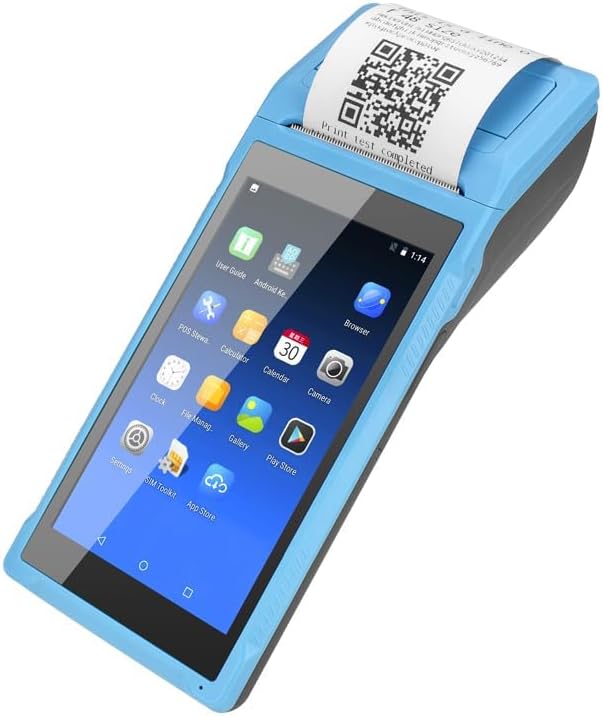
Image: Close-up of the charging port on the NETUM PDA58-02, with a charger cable connected, highlighting the 5000mAh rechargeable battery.
5.2 Caricamento della carta termica
- Open the printer cover by gently pushing the latch.
- Insert a 58 x 35mm thermal paper roll into the compartment, ensuring the printing side faces the print head.
- Estrarre una piccola quantità di carta dalla taglierina.
- Chiudere saldamente il coperchio della stampante finché non scatta in posizione.
5.3 Accensione/Spegnimento
- Per accendere: tenere premuto il pulsante di accensione finché lo schermo non si illumina.
- To power off: Press and hold the power button, then select 'Power off' from the options on the screen.
6. Istruzioni per l'uso
6.1 Navigazione di base
The device runs on Android 6.0. Navigate the interface using the 5.5-inch capacitive touch screen. Swipe, tap, and use gestures similar to a standard Android smartphone.

Image: NETUM PDA58-02 portable printer displaying various Android application icons on its screen, indicating its smart functionality.
6.2 Connettività
- Wifi: Go to Settings > Wi-Fi to connect to available wireless networks (802.11 b/g/n).
- Bluetooth: Go to Settings > Bluetooth to pair with other Bluetooth 4.0 enabled devices.
- 3G: Insert a compatible SIM card (if applicable) and configure network settings under Settings > More > Mobile networks for 3G connectivity (GSM850/900/1800/1900, WCDMA B1).
- USB: Connect the device to a computer using the Micro USB 2.0 port for data transfer or charging.
6.3 Stampa delle ricevute
The integrated thermal printer allows for fast receipt printing. Use compatible POS applications or built-in printing functions to generate receipts. Ensure paper is loaded correctly.
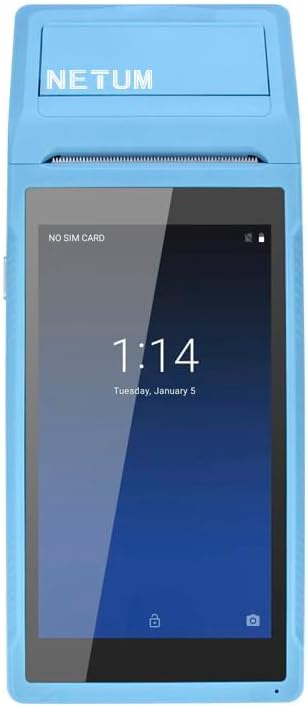
Image: NETUM PDA58-02 portable printer showing a receipt with a QR code being printed, demonstrating its receipt printing capability.
6.4 Scansione di codici a barre
The device supports 1D barcode scanning. Open the scanning application or a compatible POS application that utilizes the scanner. Point the scanner at the barcode to capture the data.
7. Manutenzione
7.1 Pulizia del dispositivo
Wipe the exterior of the device with a soft, dry cloth. For stubborn dirt, use a slightly damp cloth and then dry immediately. Do not use harsh chemicals or abrasive cleaners.
7.2 Pulizia della testina di stampa
Se la qualità di stampa peggiora, potrebbe essere necessario pulire la testina di stampa termica. Utilizzare un batuffolo di cotone leggermenteampimbevuta di alcol isopropilico per pulire delicatamente la testina di stampa. Lasciarla asciugare completamente prima dell'uso.
7.3 Cura della batteria
To prolong battery life, avoid fully discharging the battery frequently. Charge the device regularly. If storing the device for an extended period, charge it to about 50% and store in a cool, dry place.
8. Risoluzione Dei Problemi
- Il dispositivo non si accende: Assicurati che la batteria sia carica. Collega il caricabatterie e riprova. Se il problema persiste, contatta l'assistenza.
- La stampante non stampa: Check if thermal paper is loaded correctly and if the printer cover is closed. Verify that the application is sending print commands.
- Scarsa qualità di stampa: Clean the thermal print head as described in the Maintenance section. Ensure you are using suitable thermal paper.
- Problemi di connettività (Bluetooth/Wi-Fi): Ensure Bluetooth/Wi-Fi is enabled in settings. Check if the device is within range of the network/paired device. Restart the device and try reconnecting.
- Il touch screen non risponde: Riavvia il dispositivo. Se il problema persiste, contatta l'assistenza.
9. Specifiche
| Caratteristica | Dettaglio |
|---|---|
| Modello | PDA58-02 |
| Colore | Blu |
| Configurazione | 3G + Camera |
| processore | Quad-core 1.3GHz MT6580V/WA |
| Memoria RAM | 1 GB |
| Memoria flash NAND | 8 GB |
| Sistema operativo | Androide 6.0 |
| Schermata principale | 5.5 inch IPS Capacitive Touch Screen 1280*720 |
| Metodo di comunicazione | 3G (supports all network types) |
| Telecamera posteriore | 8MP |
| Batteria | 7.4 V, 5000 mAh |
| Interfaccia di ricarica | DC Charging, 12V 1.5A |
| Interfaccia per cuffie | Standard 3.5mm Headphone |
| Supporto OTG | SÌ |
| Interfaccia USB | Micro USB 2.0 x 1 |
| Sistema audio | Altoparlante incorporato, cicalino, microfono |
| Wifi | 802.11b/g/n |
| GSM | 850/900/1800/1900 |
| WCDMA | B1 |
| Bluetooth | Bluetooth 4.0 |
| Tecnologia di stampa | Stampante termica |
| Paper Roll Size | 58x35 mm (incluso) |
| Printer Dimensions (L x W x H) | 21.5 x 8.6 x 5.3 cm / 8.46 x 3.39 x 2.1 pollici |
| Peso della stampante | 462 g / 16.3 once |
| Tipo di uscita | Monocromo |
| Max Mono Print Speed | 1 (unit not specified, likely pages/minute or lines/second) |
| Tipo di controllo | Android, Touch |
| Tipo di supporto | Etichette |
| Tipo di scanner | Portatile |
| Tipo di visualizzazione | LCD |
| Dispositivi compatibili | Smartphone |
| Funzioni aggiuntive della stampante | Scansione |
| Numero di processori | 4 |
| Dimensione massima del supporto | 5.5 x 8.5 pollici |
| Stampa fronte-retro | NO |
| Interfaccia Hardware | USB, USB 2.0 |
| Porte USB totali | 1 |
10. Informazioni sulla garanzia
NETUM products are covered by a manufacturer's warranty. Please refer to the warranty card included in your package or visit the official NETUM webPer i termini e le condizioni di garanzia dettagliati, consultare il sito. Conservare la ricevuta d'acquisto come prova d'acquisto per eventuali reclami in garanzia.
11. Supporto
For technical assistance, troubleshooting, or product inquiries, please contact NETUM customer support. Contact information can typically be found on the official NETUM websito o nella documentazione di garanzia.
Risorse online: Visit the NETUM official websito per FAQ, aggiornamenti software e materiale di supporto aggiuntivo.