
ambie AM-02
ambie Sound Earcuffs - Wired Open-Ear Headphones User Manual
Model: AM-02 | Brand: ambie
Introduzione
The ambie Sound Earcuffs are innovative wired open-ear headphones designed to allow you to enjoy audio while remaining aware of your surroundings. Unlike traditional earbuds, these earcuffs do not block your ear canals, reducing strain and enabling natural conversation. They feature a built-in microphone for clear calls and online meetings, and convenient volume control.
The unique ear cuff style ensures a comfortable and secure fit for various ear sizes and ages, making them suitable for extended wear. Crafted from soft silicone material, they provide a gentle fit and are designed to be worn like an accessory.

Image: ambie Sound Earcuffs in Ash Green, shown with their product packaging.
Impostare
1. Disimballaggio e componenti inclusi
Carefully remove the ambie Sound Earcuffs from their packaging. Verify that all components are present:
- ambie Sound Earcuffs (wired)
- Silicone Travel Case
- Manuale di istruzioni (questo documento)
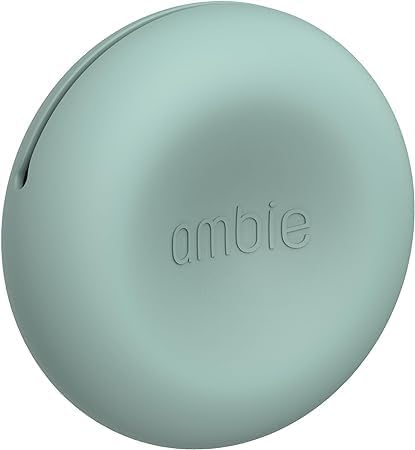
Image: The included Ash Green silicone travel case for the earcuffs.
2. Connessione al dispositivo
The ambie Sound Earcuffs connect via a standard 3.5mm audio jack. Locate the 3.5mm audio port on your smartphone, tablet, laptop, gaming console controller, or other compatible device. Insert the earcuffs' 3.5mm jack firmly into the device's audio port.
3. Wearing the Earcuffs
The earcuffs are designed to clip onto your ear. Gently position each earcuff over the top of your ear, allowing the speaker portion to rest near your ear canal without entering it. Adjust for a comfortable and secure fit. The flexible silicone material should conform to your ear shape.
Istruzioni per l'uso
1. Riproduzione audio
Once connected to your device, begin playing audio (music, podcasts, videos, games). The sound will be delivered through the open-ear design, allowing you to hear both your audio and ambient sounds.
2. Controllo del volume
The earcuffs feature an in-line remote control for easy volume adjustment. Use the '+' button to increase volume and the '-' button to decrease volume. The remote may also include a multi-function button for play/pause and call management, depending on your device's compatibility.
3. Effettuare e ricevere chiamate
The built-in microphone allows for hands-free communication. When a call comes in, press the multi-function button (if available) on the remote to answer. Press it again to end the call. During online meetings, ensure the ambie Sound Earcuffs are selected as your audio input and output device in your meeting software settings.
Manutenzione
1. Pulizia
To maintain hygiene and product longevity, regularly clean your earcuffs. Use a soft, dry, lint-free cloth to wipe down the silicone and ABS surfaces. For stubborn dirt, a slightly damp cloth with mild soap can be used, but ensure no moisture enters the speaker components or the 3.5mm jack. Allow to air dry completely before use.
Non fare use harsh chemicals, abrasive cleaners, or submerge the earcuffs in water.
2. Conservazione
When not in use, store the ambie Sound Earcuffs in the provided silicone travel case. This protects them from dust, dirt, and physical damage. Avoid storing them in extreme temperatures or direct sunlight.
3. Cura dei cavi
Handle the cable gently. Avoid sharp bends, twists, or pulling on the cable, especially near the connectors. Do not wrap the cable too tightly around the earcuffs or other objects, as this can cause internal damage.
Risoluzione dei problemi
Nessun suono o volume basso
- Verifica connessione: Assicurati che il jack da 3.5 mm sia completamente inserito nella porta audio del tuo dispositivo.
- Volume del dispositivo: Verify that your device's volume is turned up and not muted.
- Earcuff Volume: Use the in-line remote control to increase the volume of the earcuffs.
- Sorgente audio: Confirm that audio is playing from your device. Try playing different audio fileso applicazioni.
- Prova con un altro dispositivo: If possible, test the earcuffs with a different device to determine if the issue is with the earcuffs or the original device.
Il microfono non funziona
- Impostazioni del dispositivo: On your device, check the audio input settings to ensure the external microphone (earcuffs) is selected.
- Impostazioni applicazione: For online meeting applications, verify that the correct microphone input is chosen within the application's settings.
- Integrità del cavo: Ispezionare il cavo per verificare la presenza di eventuali danni visibili.
Disagio durante l'uso
- Regolazione: Re-adjust the earcuffs on your ears. Experiment with slightly different positions until you find a comfortable fit.
- Uso esteso: While designed for long wear, some users may experience discomfort after very extended periods. Take short breaks if needed.
- Ear Shape: Individual ear shapes vary. If persistent discomfort occurs, the product may not be ideally suited for your specific ear anatomy.
Sound Leakage
The ambie Sound Earcuffs feature an open-ear design, which inherently allows some sound to leak out and ambient sounds to enter. This is a design characteristic, not a defect. To minimize leakage, ensure the volume is not excessively high, especially in quiet environments.
Specifiche
| Nome del modello | AM-02AGQ |
| Tecnologia di connettività | Cablato |
| Presa per cuffie | 3.5 mm Jack |
| Materiale | Acrilonitrile Butadiene Stirene (ABS), Silicone |
| Peso dell'articolo | 0.18 oz / 5.2 g (earcuffs only) |
| Lunghezza del cavo | 47.2 pollici / 1.2 m |
| Posizionamento dell'orecchio | Orecchio aperto |
| Tipo di controllo | Controllo del volume (telecomando) |
| Caratteristiche speciali | Built-in Microphone, Lightweight, Echo Cancellation, Noise Cancellation |
| Componenti inclusi | Silicone Travel Case, Instruction Manual |
Garanzia e supporto
Specific warranty details for the ambie Sound Earcuffs (Model AM-02) are not provided within this manual. For information regarding warranty coverage, returns, or technical support, please refer to the official ambie webo contattare il rivenditore presso il quale è stato acquistato il prodotto. Conservare la prova d'acquisto per eventuali reclami in garanzia.
Per ulteriore assistenza, puoi visitare il ambie Store on Amazon or contact ambie customer service directly.
Ask a question about this manual
Ask about setup, troubleshooting, compatibility, parts, safety, or missing instructions. Manuals+ will review the question and use this page’s manual context to help answer it.