
BOMATA BS2000-001B
BOMATA Digital Scale User Manual
Model: BS2000-001B
1. Introduzione
Thank you for choosing the BOMATA 0.01g/1kg Upgraded Small Digital Scale. This high-precision digital scale is designed for accurate measurements of small items, suitable for kitchen use, baking, jewelry, and more. It features a larger display, hold function, tare function, and supports 9 different units of measurement. This manual provides detailed instructions for setup, operation, maintenance, and troubleshooting to ensure optimal performance and longevity of your scale.

Image 1.1: BOMATA 0.01g/1kg Digital Scale with included clear cover, AAA batteries, and USB charging cable.
2. Impostazione
2.1 Disimballaggio e ispezione iniziale
- Rimuovere con attenzione tutti i componenti dalla confezione.
- Verify that all accessories are present: Digital Scale, USB cable (x1), AAA batteries (x2), Trays (x2), Waterproof sticker (x1).
- Inspect the scale for any visible damage. If damaged, do not use and contact customer support.
2.2 Alimentazione
The BOMATA Digital Scale offers dual power supply options: a built-in rechargeable lithium battery or two AAA batteries.
- Ricaricabile tramite USB: Connect the provided USB cable to the scale's charging port and a compatible USB power source (e.g., computer, USB wall adapter). The display will indicate charging status.
- batterie AAA: Open the battery compartment on the underside of the scale and insert the two included AAA batteries, ensuring correct polarity (+/-).

Image 2.1: The scale can be powered by the built-in rechargeable lithium battery via USB or by two AAA batteries.
2.3 Posizionamento
Place the scale on a flat, stable, and level surface to ensure accurate readings. Avoid placing it near strong electromagnetic fields, vibrations, or extreme temperature changes.

Image 2.2: The compact size (5.5 x 4 x 0.7 inches) allows for easy placement and storage.
3. Istruzioni per l'uso
3.1 Accensione/spegnimento
- Premere il tasto Energia pulsante (
 ) to turn the scale on.
 - The display will show "0.00g" when ready for use.
- Per spegnere, tenere premuto il tasto Energia button for a few seconds, or the scale will auto-off after a period of inactivity to save power.
3.2 Conversione unità
The scale supports 9 units of measurement.
- Premere il tasto MODALITÀ pulsante (
 ) to cycle through the available units: g (grams), gn (grains), oz (ounces), ozt (troy ounces), dwt (pennyweights), ct (carats), lb (pounds), tl (taels), ml (milliliters - for water, 100ml=102.88g for normal milk).

Image 3.1: The scale offers high precision (0.01g resolution) and a variety of unit conversions for diverse weighing needs.
3.3 Funzione di tara
La funzione Tara consente di sottrarre il peso di un contenitore, in modo da misurarne solo il contenuto.
- Posizionare un contenitore vuoto sulla bilancia. Il display ne mostrerà il peso.
- Premere il tasto dalla T alla Z pulsante (
 ). Il display verrà reimpostato su "0.00 g".
 - Now, add your items to the container, and the display will show only the net weight of the items.

Image 3.2: Steps for using the Tare function to measure only the contents of a container.
3.4 Funzione HOLD
The HOLD function allows you to lock the displayed weight, which is useful when weighing large items that might obscure the display.
- Posizionare l'oggetto sulla bilancia.
- Premere il tasto PRESA pulsante (
 ). The weight reading will be locked on the display.
 - You can now remove the item, and the weight will remain displayed until you press the HOLD button again or the scale auto-offs.
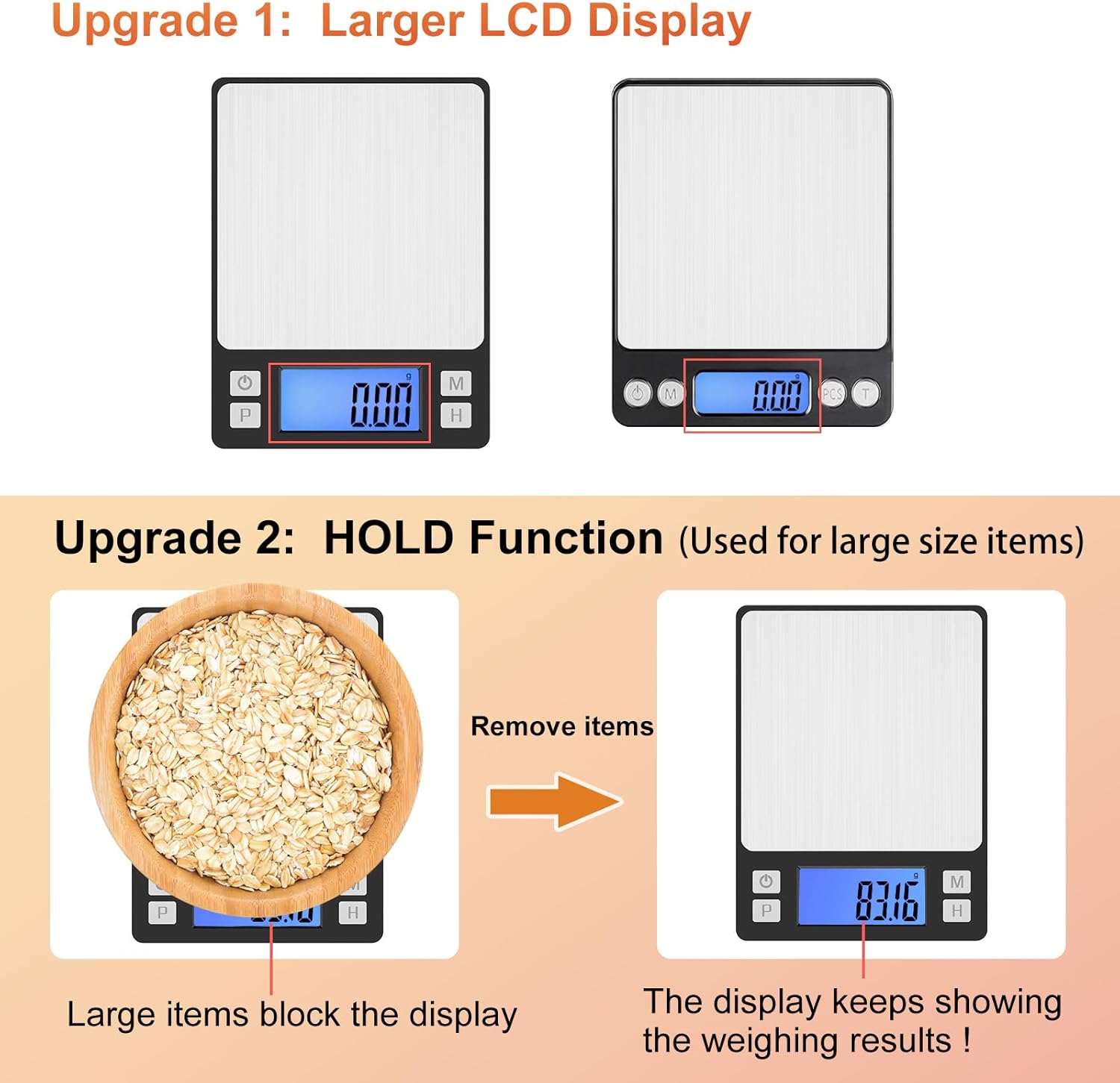
Image 3.3: The upgraded larger LCD display and HOLD function improve readability, especially for large items.
3.5 Funzione di conteggio (PCS)
Questa funzione consente di contare più piccoli oggetti di peso uniforme.
- With the scale on and empty, press the PZ pulsante (). The display will show a sample size (e.g., "25").
- Place the corresponding number of items (e.g., 25 pieces) on the scale.
- Premere il tasto PZ nuovamente il pulsante per confermare la sample. The display will now show "PCS" and the number of items.
- Ora puoi aggiungere altri elementi e la bilancia li conterà in base alla sampil peso.
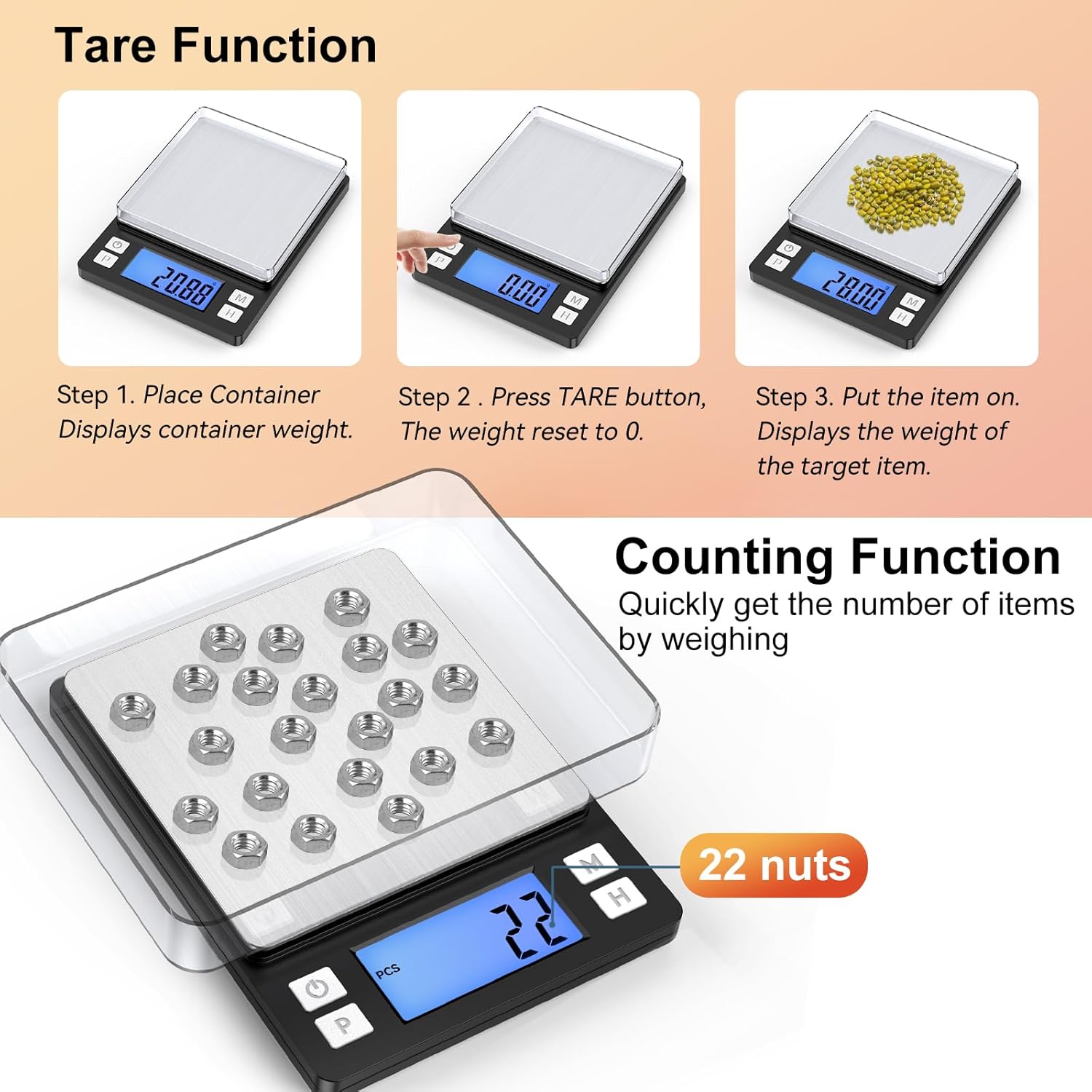
Image 3.4: The scale features both Tare and Counting functions for versatile use.
4. Manutenzione e cura
- Pulizia: The stainless steel platform is durable and easy to clean. Wipe the scale with a soft, damp panno. Non utilizzare detergenti abrasivi né immergere la bilancia in acqua.
- Waterproof Sticker: A waterproof sticker is included and can be pasted over the operation panel to enhance water resistance and protect the buttons from spills.
- Magazzinaggio: Store the scale in a cool, dry place. The included trays can be used as protective covers when not in use.
- Cura della batteria: If using AAA batteries, remove them if the scale will not be used for an extended period to prevent leakage.

Image 4.1: Key features include two trays, a stainless steel platform, an optional waterproof sticker, high-quality ABS material, and a large LCD with backlight.
5. Risoluzione Dei Problemi
Se riscontri problemi con la tua bilancia, fai riferimento ai seguenti problemi comuni e alle relative soluzioni:
| Problema | Possibile causa/soluzione |
|---|---|
| La bilancia non si accende. | Check battery installation (if using AAA) or charge the built-in lithium battery using the USB cable. |
| Letture imprecise. | Ensure the scale is on a flat, stable surface. Avoid vibrations or drafts. Recalibrate the scale if necessary (refer to calibration instructions, typically requiring a known weight). |
| Display shows "EEEE". | Overload error. Remove items immediately to prevent damage. |
| Il display mostra "LO". | Low battery. Recharge the scale or replace the AAA batteries. |
| Weight fluctuates. | Ensure no air currents (e.g., from fans, open windows) are affecting the scale. Check for stable surface. |
| Difficulty removing the protective cover. | The cover is designed to fit snugly for protection. Apply gentle, even pressure when lifting. |
5.1 Calibrazione
While the scale comes pre-calibrated, recalibration may be needed over time or if readings become inconsistent. Calibration typically requires a precise 1kg weight.
- Accendi la bilancia.
- Premere e tenere premuto il tasto MODALITÀ finché sul display non compare la scritta "CAL".
- Premere MODALITÀ again. The display will show the required calibration weight (e.g., "1000.00g").
- Place the exact calibration weight (e.g., 1kg) on the center of the platform.
- Wait for the display to show "PASS" and return to normal weighing mode. Calibration is complete.
6. Specifiche
| Caratteristica | Dettaglio |
|---|---|
| Marca | BOMATA |
| Numero di modello | BS2000-001B |
| Capacità | 1000 g (1 kg) |
| Precisione di lettura | 0.01g |
| Tipo di visualizzazione | LCD con retroilluminazione |
| Unità di misura | g, gn, oz, ozt, dwt, ct, lb, tl, ml |
| Materiale | Stainless Steel (Platform), High Quality ABS (Body) |
| Alimentazione elettrica | Built-in Rechargeable Lithium Battery, 2x AAA Batteries (included) |
| Dimensioni del prodotto | 5.5 x 4 x 0.7 pollici |
| Peso dell'articolo | 10.5 once |
| Funzioni | Tare, Hold, Counting (PCS), Auto-off |
7. Garanzia e supporto
BOMATA products are manufactured with high-quality materials and undergo strict quality control. For warranty information, please refer to the terms provided at the time of purchase or contact your retailer.
If you require technical support, have questions about your product, or need assistance with troubleshooting beyond what is covered in this manual, please contact BOMATA customer service through the retailer's platform or the official BOMATA website. Please have your model number (BS2000-001B) and purchase details ready when contacting support.
Per maggiori informazioni e altri prodotti, visita il BOMATA Store.
Ask a question about this manual
Ask about setup, troubleshooting, compatibility, parts, safety, or missing instructions. Manuals+ will review the question and use this page’s manual context to help answer it.