
FOREVER GSM169761
Manuale utente FOREVER Smartwatch SW-800
Model: SW-800 (GSM169761)
Introduzione
This manual provides essential information for the proper use and maintenance of your FOREVER Smartwatch SW-800. Please read it thoroughly before operating the device to ensure optimal performance and longevity. The SW-800 features a 1.3-inch AMOLED display, Bluetooth connectivity, and various fitness tracking capabilities.

Image: The FOREVER Smartwatch SW-800, showcasing its versatile design with both metal and silicone strap options, and various digital watch faces.
Impostare
1. Ricarica dello smartwatch
Prima del primo utilizzo, carica completamente lo smartwatch. Collega il cavo di ricarica alla porta di ricarica sul retro dell'orologio e collega l'estremità USB a un adattatore di alimentazione (non incluso) o alla porta USB di un computer. Il display dell'orologio indicherà lo stato di carica.

Immagine: La parte posteriore view of the smartwatch, highlighting the magnetic charging pins and the optical heart rate sensors.
2. Accensione/Spegnimento
- To power on: Press and hold the side button until the FOREVER logo appears.
- To power off: Press and hold the side button, then select "Power Off" on the screen.
3. Associazione con lo smartphone
- Download the companion application from the App Store (for iOS) or Google Play Store (for Android). Cercare "FOREVER Smartwatch" or refer to the QR code in the watch's settings.
- Assicurati che il Bluetooth sia abilitato sul tuo smartphone.
- Apri l'applicazione e segui le istruzioni sullo schermo per creare un account o effettuare l'accesso.
- Select "Add Device" or "Pair Device" within the app.
- Select "SW-800" from the list of available devices.
- Conferma la richiesta di associazione sia sullo smartphone che sullo smartwatch.

Image: A smartphone displaying the FOREVER companion app interface, with the smartwatch screen prompting the user to "Connect APP" via Bluetooth.
Utilizzo dello Smartwatch
1. Navigazione di base
- Schermo tattile: Scorri verso sinistra, destra, in alto o in basso per navigare tra i menu e le notifiche. Tocca per selezionare un elemento.
- Pulsante laterale: Premi per tornare alla schermata iniziale o riattivare il display. Premi a lungo per le opzioni di risparmio energetico.
2. Caratteristiche principali
- Monitoraggio della frequenza cardiaca: The smartwatch continuously monitors your heart rate. Access the heart rate widget or app on the watch to view dati in tempo reale e tendenze storiche.
- Pedometro: Tiene traccia dei passi giornalieri, della distanza e delle calorie bruciate.
- Modalità Sportive: The SW-800 supports 14 different sports modes, including running, cycling, and walking. Select a mode before starting an activity to track specific metrics.
- Monitoraggio del sonno: Monitora i tuoi schemi di sonno, inclusi sonno profondo, sonno leggero e orari di veglia.
- Monitoraggio dell'ossigeno nel sangue (SpO2): Misura i livelli di saturazione dell'ossigeno nel sangue.
- Monitoraggio della temperatura: Fornisce letture della temperatura corporea.
- Controllo della musica: Controlla la riproduzione musicale sullo smartphone connesso direttamente dall'orologio.
- Notifiche: Receive call, message, and app notifications from your smartphone.

Image: A collage of watch faces illustrating the various health and fitness tracking features, including heart rate, step count, calorie burn, sleep analysis, body temperature, and blood oxygen levels.

Image: The smartwatch displaying a graph of body temperature measurements over time, indicating current and historical readings.

Image: The smartwatch screen showing a blood oxygen saturation (SpO2) reading of 97%, along with a trend graph.

Image: The smartwatch worn by a runner, actively tracking fitness metrics during an outdoor exercise session.
Manutenzione
1. Pulizia
Regularly clean your smartwatch and strap to prevent skin irritation and maintain device functionality. Use a soft, lint-free cloth. If necessary, slightly dampLavare il panno con acqua. Evitare l'uso di prodotti chimici aggressivi o materiali abrasivi.
2. Resistenza all'acqua (IP68)
The SW-800 is rated IP68, meaning it is resistant to dust and can withstand immersion in water up to 1.5 meters for up to 30 minutes. It is suitable for daily use, such as hand washing or light rain. However, it is not recommended for swimming, diving, or high-pressure water activities.
3. Cura della batteria
- Evitare di scaricare completamente la batteria frequentemente.
- Non esporre il dispositivo a temperature estreme.
- Utilizzare solo il cavo di ricarica fornito.
Risoluzione dei problemi
1. L'orologio non si accende
- Assicurati che l'orologio sia completamente carico. Collegalo al caricabatterie per almeno 30 minuti.
- Prova a tenere premuto il pulsante laterale per 10-15 secondi per forzare il riavvio.
2. Problemi di connettività (Bluetooth)
- Assicurati che il Bluetooth sia abilitato sia sullo smartwatch che sullo smartphone.
- Assicurati che lo smartwatch si trovi nel raggio d'azione del Bluetooth del tuo telefono.
- Riavvia sia lo smartwatch che lo smartphone.
- Unpair the device from your phone's Bluetooth settings and re-pair it through the companion app.
3. Letture sanitarie imprecise
- Assicurati che l'orologio sia indossato comodamente al polso, ma non troppo stretto.
- Pulisci i sensori sul retro dell'orologio.
- Evitare movimenti eccessivi durante le misurazioni.
- Note that these devices are not medical instruments and readings are for reference only.
4. App Not Syncing Data
- Controlla la tua connessione Internet sul tuo smartphone.
- Ensure the companion app has all necessary permissions enabled in your phone's settings.
- Chiudi e riapri l'app oppure riavvia il telefono.
Specifiche
| Nome del modello | SW-800 (GSM169761) |
| Display | AMOLED da 1.3 pollici, 360 x 360 pixel |
| Connettività | Bluetooth |
| Resistenza all'acqua | Grado di protezione IP68 |
| Sensori | Heart Rate Monitor, Pedometer, SpO2, Temperature |
| Tipo di batteria | Ioni di litio |
| Dispositivi compatibili | Smartphone |
| Input dell'interfaccia umana | Pulsanti, Touchscreen |
| Dimensioni (confezione) | Dimensioni: 11.2 x 9.2 x 7.1 cm |
| Peso (confezione) | 240 grammi |
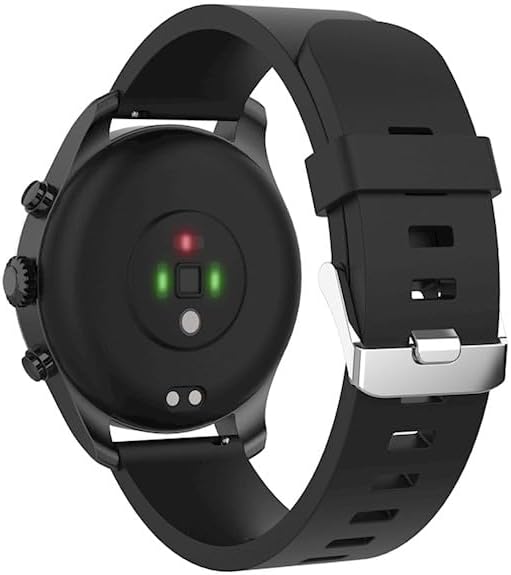
Immagine: Un dettaglio view of the smartwatch, emphasizing its 1.3-inch display with 360x360 pixel resolution, and the sleek design of the metal band.
Garanzia e supporto
Your FOREVER Smartwatch SW-800 comes with a standard manufacturer's warranty. Please refer to the warranty card included in your product packaging for specific terms and conditions, including the warranty period and coverage details.
For technical support, troubleshooting assistance, or warranty claims, please contact FOREVER customer service. Contact information can typically be found on the official FOREVER websito o sulla confezione del prodotto.
Ask a question about this manual
Ask about setup, troubleshooting, compatibility, parts, safety, or missing instructions. Manuals+ will review the question and use this page’s manual context to help answer it.