
Introduzione
Thank you for choosing the Devoko 140x60cm RGB LED Gaming Desk. This manual provides detailed instructions for the assembly, operation, and maintenance of your new gaming desk. Please read this manual thoroughly before assembly and use to ensure proper function and safety.

Image: The Devoko 140x60cm RGB LED Gaming Desk, fully assembled and set up with gaming equipment, highlighting its design and LED features.
Informazioni sulla sicurezza
AVVERTIMENTO:
- Do not exceed the recommended weight limit of 60 kg (132 lbs) on the desktop. Exceeding this limit may cause instability and damage.
- Ensure the desk is placed on a stable, level surface before use.
- Tenere tutte le parti di piccole dimensioni e i materiali di imballaggio lontano dalla portata dei bambini per evitare rischi di soffocamento.
- Non stare in piedi o seduto sulla scrivania.
- Evitare di esporre la scrivania alla luce solare diretta o a temperature estreme.
- Controllare regolarmente tutte le viti e i collegamenti per assicurarsi che siano sempre ben serrati.
Contenuto della confezione
Before beginning assembly, please verify that all components are present and undamaged. Refer to the detailed parts list provided in your physical manual. Typical components include:
- Desktop sections (carbon fiber surface)
- Z-shaped leg frames
- Crossbars and support beams
- LED light strips and controller
- Telecomando per luci LED
- Gancio per cuffie
- Portabicchieri
- Ferramenta di montaggio (viti, bulloni, chiave a brugola)
- Clip di gestione dei cavi
Installazione e assemblaggio
Follow these steps carefully for proper assembly. It is recommended to assemble the desk with two people.
- Disimballare e identificare le parti: Disporre tutti i componenti su una superficie pulita e morbida per evitare graffi. Identificare ogni parte utilizzando l'elenco dei componenti fornito.
- Montare le gambe a forma di Z: Attach the horizontal support beams to the Z-shaped leg frames using the provided hardware. Ensure all connections are secure but do not fully tighten screws until the entire frame is assembled.
- Allega sezioni desktop: Carefully place the carbon fiber desktop sections onto the assembled frame. Align the pre-drilled holes and secure the desktop to the frame using the appropriate screws. Once all desktop sections are in place, fully tighten all screws on the frame and desktop.
- Install LED Lights and Controller:
The LED light strips are pre-installed. Connect the manual controller to the desk frame using self-tapping screws. Connect the extension cable to the manual controller, then connect the other end of the extension cable to the LED strip. Secure all cables with the provided fasteners.
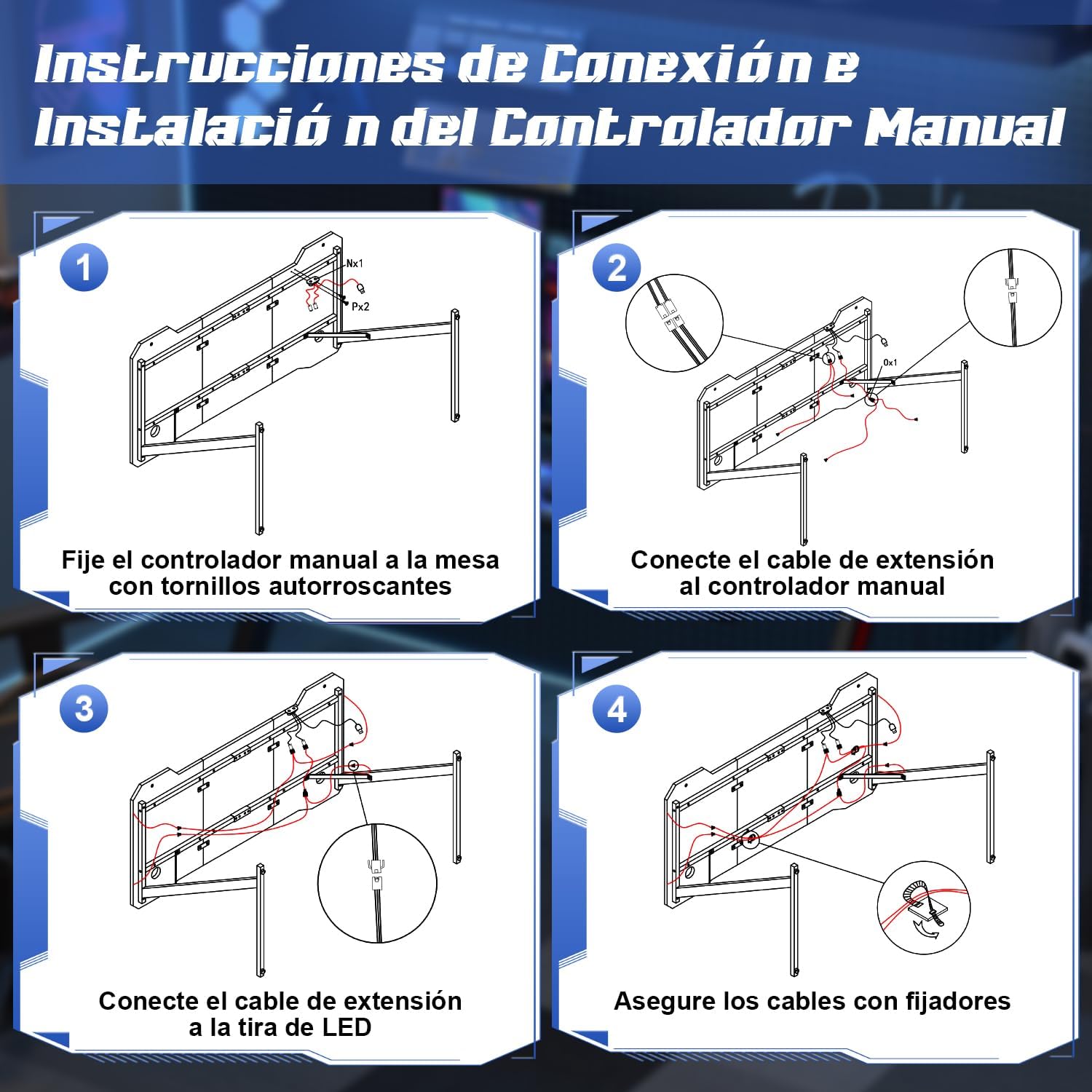
Image: Step-by-step diagram for connecting and installing the LED controller and cables.
- Collegare gli accessori: Install the cup holder and headphone hook to the designated locations on the desk. These are designed to keep your gaming area organized.
- Livella la scrivania: The desk features adjustable feet. Adjust each foot individually to ensure the desk is stable and level on your floor.
Istruzioni per l'uso
Sistema di illuminazione a LED
Your Devoko gaming desk features integrated RGB LED lighting with multiple modes, controllable via a manual touch panel and a remote control.

Immagine: dettagliata view of the manual LED control panel on the desk.
- Top Button (Touch Control): Controls the light modes. Offers 26 flash modes and 6 fixed color modes. Tap to cycle through modes.
- Bottom Button (Touch Control): Power switch and brightness regulator.
- Premere a lungo: Accende/spegne le luci LED.
- Pressione breve: Adjusts brightness. Cycles through 8 levels of brightness.
- Telecomando: Use the provided remote control to adjust colors, modes, and brightness from a distance. Refer to the remote control's specific instructions for detailed functions.

Image: The LED remote control for adjusting light settings.
Utilizzo degli accessori
- Portabicchieri: Use the integrated cup holder to securely place your beverages, preventing spills on your desk surface.
- Gancio per cuffie: Hang your gaming headphones on the hook to keep them easily accessible and off the desktop, reducing clutter.
- Gestione dei cavi: Utilize the provided cable management clips to route and organize your cables, maintaining a tidy and safe workspace.

Image: Integrated cup holder and headphone hook for organized use.
Manutenzione
Proper care will extend the life and appearance of your Devoko gaming desk.
- Pulizia del desktop: The carbon fiber surface is waterproof, heat-resistant, and scratch-resistant, making it easy to clean. Use a soft, damp panno con acqua e sapone neutro per pulire la superficie. Evitare detergenti abrasivi o prodotti chimici aggressivi che potrebbero danneggiare la finitura.
- Manutenzione del telaio: Pulisci la struttura metallica con un panno asciutto o leggermente asciuttoamp panno per rimuovere la polvere.
- Luci LED: Ensure the LED strips and controller are kept dry. Do not attempt to disassemble the LED components.
- Controlli regolari: Controllare periodicamente tutte le viti e i bulloni per assicurarsi che siano ben serrati. Serrarli nuovamente se necessario per mantenere la stabilità.

Image: Demonstrating the scratch-resistant and easy-to-clean properties of the carbon fiber desktop.
Risoluzione dei problemi
| Problema | Possibile causa | Soluzione |
|---|---|---|
| La scrivania è traballante/instabile. | Pavimento irregolare; viti allentate. | Regolare i piedini di livellamento nella parte inferiore delle gambe. Controllare e serrare tutte le viti di montaggio. |
| Le luci LED non si accendono. | Power cable disconnected; remote battery dead; controller malfunction. | Ensure the power cable for the LED lights is securely connected. Check the remote control battery and replace if necessary. Verify all connections to the LED controller. |
| LED lights not responding to remote. | Remote battery low; obstruction between remote and receiver; remote not paired. | Replace remote battery. Ensure no objects block the signal path. Refer to the LED light manual for pairing instructions if applicable. |
| Difficoltà nell'assemblaggio delle parti. | Orientamento errato della parte; hardware mancante. | Review the assembly instructions carefully, paying attention to part orientation. Verify all hardware is present. Contact customer support if parts are missing or damaged. |
Specifiche
- Marca: Devoko
- Numero modello: 0304
- Colore: Nero
- Dimensioni del prodotto (L x P x A): 140 cm x 60 cm x 75 cm (55.1 x 23.6 x 29.5 pollici)
- Peso: 15.6 kg (34.4 libbre)
- Materiale: Metal (frame), Carbon Fiber (desktop surface)
- Capacità di peso: 60 kg (132 libbre)
- Caratteristiche speciali: RGB LED lights with remote control, Z-shaped stable construction, integrated headphone hook, integrated cup holder, adjustable leveling feet.

Image: Dimensions of the Devoko 140x60cm RGB LED Gaming Desk, including an adjustable foot detail.
Garanzia e supporto
Per informazioni sulla garanzia e sull'assistenza clienti, fare riferimento alla documentazione inclusa con l'acquisto o visitare il sito ufficiale Devoko website. If you encounter any issues not covered in this manual, please contact Devoko customer service for assistance.
Informazioni sui contatti: Please refer to your purchase receipt or the manufacturer's websito per i dettagli di contatto più aggiornati.