
Introduzione
Thank you for choosing the Lovskoo 6D Colorful Wired Gaming Mouse. This manual provides essential information for setting up, operating, and maintaining your new gaming mouse. Designed for precision and comfort, this mouse features adjustable DPI, vibrant lighting, and a durable build for an enhanced computing experience.
Impostare
Collegamento del mouse
The Lovskoo 6D Colorful Wired Gaming Mouse utilizes a standard USB-A connection for plug-and-play functionality. No additional drivers are typically required for basic operation on most operating systems.
- Locate an available USB-A port on your computer (desktop, laptop, or compatible device).
- Inserire saldamente il connettore USB del cavo del mouse nella porta USB-A.
- The mouse should be automatically recognized by your operating system, and the colorful breathing lights will illuminate.
- You can begin using your mouse immediately.
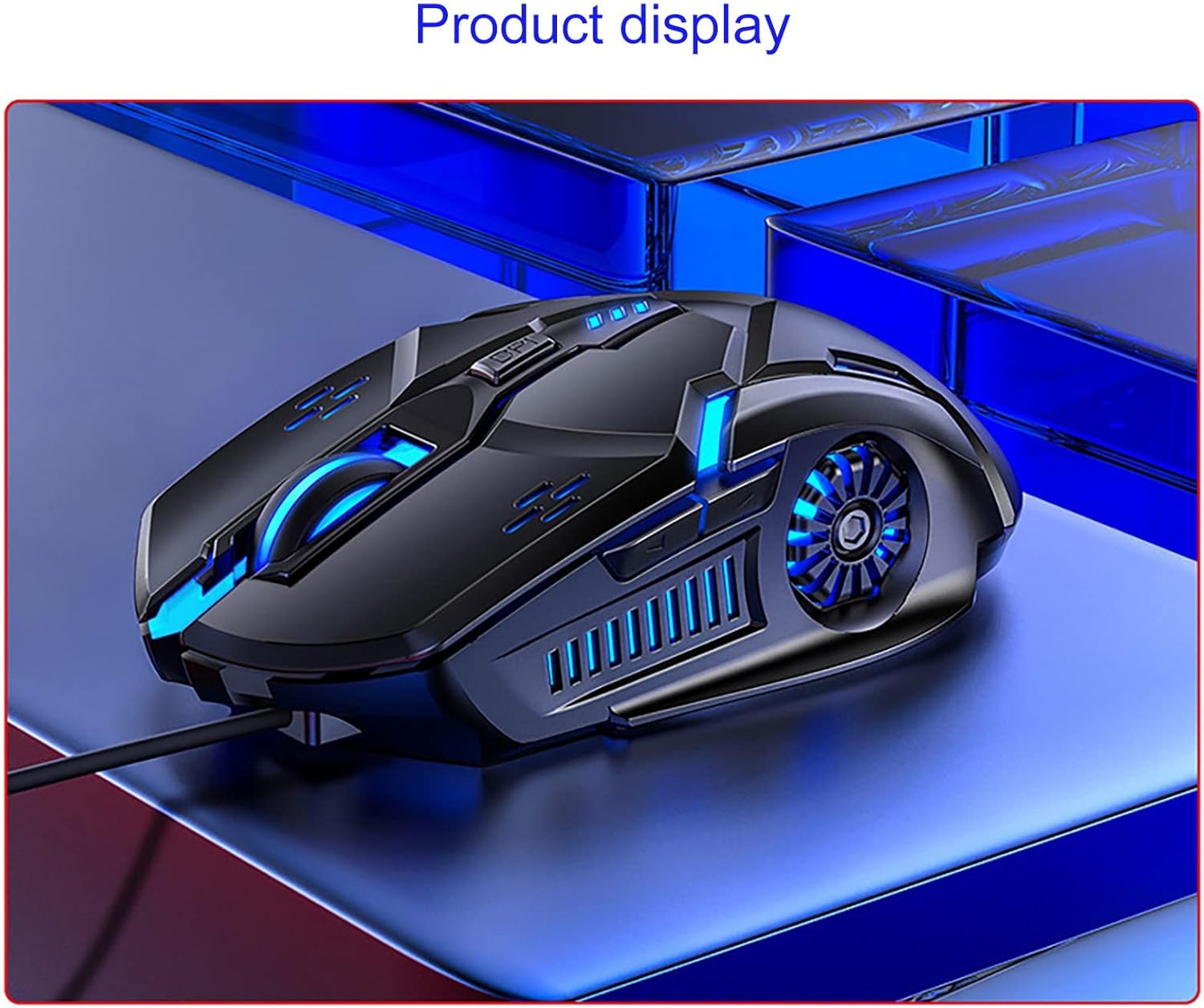
Visual Guide: Product Overview
Istruzioni per l'uso
Regolazione DPI
The mouse features a four-gear DPI (Dots Per Inch) one-button switch, allowing you to adjust sensitivity on the fly. This is particularly useful for adapting to different screen sizes or game requirements.
- 1200 DPI: Indicated by one flash. Suitable for general use and precise tasks.
- 1600 DPI: Indicated by two flashes. A balanced setting for everyday computing and light gaming.
- 2400 DPI: Indicated by three flashes. Ideal for faster cursor movement in gaming or large displays.
- 3200 DPI: Indicated by four flashes. Provides maximum speed for competitive gaming or rapid navigation across multiple monitors.

6D Key Layout and Lighting
The mouse features a 6D key layout for enhanced functionality and an upgraded seven-color breathing light system.
- Pulsanti standard: Left Click, Right Click, and Scroll Wheel.
- Pulsante DPI: Located behind the scroll wheel for quick sensitivity adjustments.
- Pulsanti laterali: Two additional buttons on the side for forward and back navigation, or customizable functions in supported software.
- Seven-Color Breathing Light: The mouse features dynamic RGB lighting. This lighting can be turned off using a combination key (refer to specific software or manual for exact key combination if available, otherwise it cycles automatically).

Caratteristiche principali
- Four-Gear DPI Adjustment: Easily switch between 1200, 1600, 2400, and 3200 DPI settings for optimal control across various applications and games.
- Seven-Color Breathing Light: Enjoy an enhanced visual experience with dynamic, upgraded seven-color lighting. The lighting can be toggled off if preferred.
- Game-Level Micro-Motion: Equipped with white dot micro-motion switches for enhanced durability, strong rebound, and consistent tactile feedback over extended use.
- High-Speed Laser Game Engine: Provides accurate positioning and reliable tracking on a variety of surfaces, minimizing skipped frames.
- 6D Key Layout: Features a newly upgraded layout with standard buttons plus a DPI switch and two convenient side buttons for faster daily operation and gaming.
Manutenzione
To ensure the longevity and optimal performance of your Lovskoo gaming mouse, follow these simple maintenance guidelines:
- Pulizia: Utilizzare un panno morbido e asciutto per pulire la superficie del mouse. Per lo sporco ostinato, un panno leggermenteamp È possibile utilizzare un panno, assicurandosi che non penetri umidità nei componenti interni. Evitare prodotti chimici aggressivi o detergenti abrasivi.
- Cura del cavo: Avoid sharp bends or excessive pulling on the USB cable. Store the cable neatly to prevent tangling and damage.
- Magazzinaggio: Quando non lo si utilizza, conservare il mouse in un ambiente pulito e asciutto, lontano da temperature estreme e dalla luce solare diretta.
Risoluzione dei problemi
If you encounter any issues with your Lovskoo gaming mouse, please refer to the following common solutions:
- Il mouse non risponde:
- Assicurati che il cavo USB sia collegato saldamente a una porta USB funzionante del tuo computer.
- Prova a collegare il mouse a una porta USB diversa.
- Riavvia il computer.
- Movimento irregolare del cursore:
- Pulire il sensore ottico nella parte inferiore del mouse con un panno morbido e asciutto.
- Assicurati di utilizzare il mouse su una superficie adatta (ad esempio un tappetino per mouse). Evita superfici altamente riflettenti o trasparenti.
- Se il cursore è troppo veloce o saltellante, regola l'impostazione DPI su una sensibilità inferiore.
- Luci non funzionanti:
- Verify the mouse is properly connected to your computer.
- Check if the lighting has been intentionally turned off via a combination key (if applicable).
Se questi passaggi non risolvono il problema, contattare l'assistenza clienti per ulteriore assistenza.
Specifiche
| Caratteristica | Dettaglio |
|---|---|
| Dimensioni del prodotto | 4.85 x 2.75 x 0.1 pollici |
| Peso dell'articolo | 4 once |
| Tecnologia di connettività | USB (cablato) |
| Impostazioni DPI | 1200 / 1600 / 2400 / 3200 (regolabile) |
| Tecnologia di rilevamento del movimento | Ottico |
| Caratteristica speciale | Portable, Colorful Breathing Light, 6D Buttons |
| Colore | Multicolore |
| Numero di modello | Lovskoo |
Garanzia e supporto
For warranty information or technical support, please refer to the product packaging or contact Lovskoo customer service directly. Keep your purchase receipt for any warranty claims.