
IPRO IPRO P1
Manuale utente del telefono cellulare IPRO P1 GSM 2G
Model: IPRO P1
Introduzione
This manual provides comprehensive instructions for the IPRO P1 GSM 2G Mobile Phone. Designed for ease of use, particularly for seniors, this phone features large buttons, a clear display, and essential functions. Please read this manual carefully before using your device to ensure proper operation and maintenance.
Cosa c'è nella scatola
Dopo aver disimballato il prodotto, verificare che siano presenti tutti i seguenti elementi:
- 1 x telefono cellulare IPRO P1
- 1 x caricabatterie micro-USB
- 1 x Batteria
- 1 x Manuale utente
Impostare
1. Inserimento della scheda SIM e della batteria
- Rimuovere con cautela la cover posteriore del telefono.
- Insert your 2G GSM SIM card(s) into the designated SIM card slot(s). This phone supports Dual SIM.
- Insert the battery into the battery compartment, ensuring the gold contacts align with the phone's terminals.
- Riposizionare il coperchio posteriore finché non scatta saldamente in posizione.
2. Carica della batteria
Prima del primo utilizzo, caricare completamente la batteria del telefono.
- Collegare il cavo di ricarica Micro-USB alla porta di ricarica del telefono.
- Collegare il caricabatterie a una presa di corrente.
- L'indicatore di carica sul telefono mostrerà lo stato di carica. Una volta completata la carica, scollegare il caricabatterie.

Figura 1: Davanti e dietro view del telefono cellulare IPRO P1, mostratoasingrazie al suo design compatto e alla cover posteriore testurizzata.
Istruzioni per l'uso
1. Accensione/spegnimento
- Per accendere: tenere premuto il pulsante di accensione/fine chiamata (solitamente rosso) finché lo schermo non si illumina.
- To power off: Press and hold the Power/End Call button until the power off options appear, then select "Power off".
2. Effettuare chiamate
- Inserire il numero di telefono utilizzando la tastiera.
- Premere il pulsante Chiama (solitamente verde) per avviare la chiamata.
- Per terminare una chiamata, premere il pulsante di accensione/fine chiamata.
3. Invio di messaggi SMS
- Dalla schermata principale, accedere al menu "Messaggi".
- Selezionare "Scrivi messaggio" o "Nuovo SMS".
- Inserisci il tuo messaggio utilizzando la tastiera.
- Inserisci il numero di telefono del destinatario o selezionalo dai contatti.
- Selezionare "Invia".
4. Using Key Features

Figura 2: The IPRO P1 phone with visual representations of its core functionalities, including communication, settings, multimedia, and utility features.
- FM Radio: Plug in headphones (not included) to use as an antenna, then navigate to the FM Radio application.
- Telecamera: Access the camera application from the menu to take photos. The phone has a basic camera.
- Bluetooth: Enable Bluetooth in the settings menu to connect to compatible devices like headsets.
- Torcia elettrica: The phone features a powerful LED flashlight. It can usually be activated by a dedicated button or a long press of a specific key (refer to quick guide or on-screen prompts).
- Sveglia: Set alarms through the "Clock" or "Alarm" application.
- Calendario e calcolatrice: Basic utility applications are available in the menu.

Figura 3: The IPRO P1 phone demonstrating its powerful LED flashlight feature, illuminating a dark path.
Manutenzione
- Pulizia: Utilizzare un panno morbido e asciutto per pulire la superficie del telefono. Evitare detergenti liquidi o materiali abrasivi.
- Cura della batteria: Non esporre la batteria a temperature estreme. Se il telefono non viene utilizzato per un periodo prolungato, caricarlo periodicamente per preservare la salute della batteria.
- Magazzinaggio: Conservare il telefono in un luogo fresco e asciutto, lontano dalla luce solare diretta e dall'umidità.
- Evitare gocce: Sebbene sia resistente, evitare di far cadere il telefono per evitare danni ai componenti interni o allo schermo.
Risoluzione dei problemi
| Problema | Possibile causa | Soluzione |
|---|---|---|
| Il telefono non si accende | La batteria è scarica o non è inserita correttamente. | Caricare la batteria. Assicurarsi che la batteria sia inserita correttamente. |
| Non è possibile effettuare o ricevere chiamate | No SIM card, SIM card not active, or out of network coverage. | Ensure SIM card is inserted and active. Check network signal strength. Contact your service provider. |
| Scarsa qualità delle chiamate | Segnale di rete debole o interferenza. | Move to an area with better signal. Avoid using near other electronic devices. |
| La batteria si scarica rapidamente | Utilizzo frequente, applicazioni in background o batteria vecchia. | Ridurre la luminosità dello schermo. Chiudere le applicazioni non utilizzate. Valutare la sostituzione della batteria se è vecchia. |
| Lo schermo non risponde | Problema software. | Remove and reinsert the battery to restart the phone. |
Specifiche
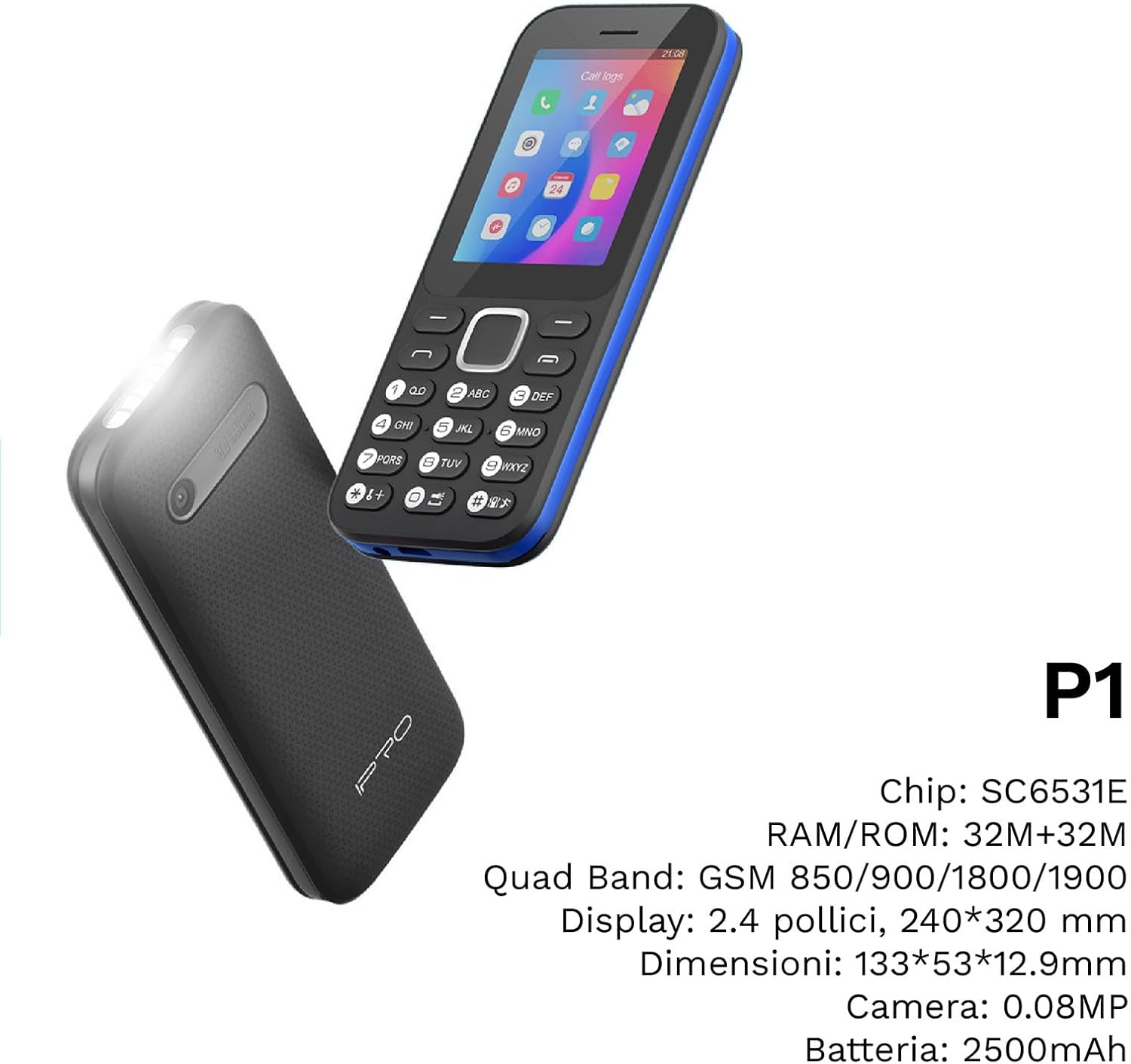
Figura 4: Un angolo view of the IPRO P1 phone, accompanied by a summary of its technical specifications.
- Rete: 2G GSM Quad Band (850/900/1800/1900 MHz)
- Chipset: SC6531E
- Display: Display a colori da 2.4 pollici (risoluzione 240 x 320)
- Memoria RAM: 4 MB
- ROM: 4 MB
- Memoria espandibile: Supporta fino a 16 GB (scheda MicroSD non inclusa)
- SIM: Supporto Dual SIM
- Connettività: Bluetooth
- Caratteristiche: Camera, FM Radio, MP3, MP4, Alarm Clock, Calendar, Calculator, Integrated Games, LED Flashlight
- Batteria: 2500 mAh agli ioni di litio
- Lingue: spagnolo, inglese, francese, italiano, portoghese
- Colore: Nero
- Dimensioni del prodotto: Dimensioni: 133 x 53 x 12.9 mm
- Peso: Circa 200 grammi

Figura 5: A close-up of the IPRO P1's screen, illustrating its 2.4-inch display size for clear viewing.
Garanzia e supporto
IPRO offers technical service and customer support for two years from the date of purchase. This warranty covers manufacturing defects but does not include artificial damage.
For support, please contact IPRO customer service through the details provided on the product packaging or the official IPRO website. When contacting support, please have your product model number (IPRO P1) and purchase details ready.

Figura 6: A visual representation of the IPRO P1 phone's target audience, showing various seniors comfortably interacting with mobile devices, highlighting its user-friendly design.

Figura 7: Display of the IPRO P1 phone in two color variants: classic black and a version with a distinctive blue trim.
Ask a question about this manual
Ask about setup, troubleshooting, compatibility, parts, safety, or missing instructions. Manuals+ will review the question and use this page’s manual context to help answer it.