
1. Introduzione
This manual provides essential information for setting up, operating, maintaining, and troubleshooting your Xiaomi Redmi 13C smartphone. Please read this guide carefully to ensure proper use and optimal performance of your device.
The Xiaomi Redmi 13C is a new product featuring 128GB storage and 6GB RAM, with Dual SIM capability, in Midnight Black. This device is supplied by a specialized distributor.
2. Cosa c'è nella scatola
Dopo aver disimballato il tuo Xiaomi Redmi 13C, verifica che siano inclusi tutti i seguenti elementi:
- Smartphone Xiaomi Redmi 13C
- Cavo USB
- Caricabatterie
- Strumento di espulsione del vassoio SIM
3. Dispositivo suview
Familiarize yourself with the key components of your Redmi 13C.

Figura 3.1: Oltreview of Xiaomi Redmi 13C key features, including its 6.74-inch 90Hz display, 50MP AI triple camera, 5000mAh battery with 18W fast charging, and powerful octa-core processor.
The Redmi 13C features a large 6.74-inch display with a 90Hz refresh rate for smooth visuals. It is equipped with a 50MP AI triple camera system and a robust 5000mAh battery supporting 18W fast charging. The device is powered by an octa-core processor, ensuring efficient performance.
4. Impostazione
4.1. Inserimento della SIM e della scheda SD
Your Redmi 13C supports Dual SIM cards and expandable storage via a microSD card (up to 128GB). Use the provided SIM tray ejector tool to open the SIM card slot.
- Individua il vassoio della SIM sul lato del telefono.
- Inserire lo strumento di espulsione della SIM nel piccolo foro accanto al vassoio e premere con decisione finché il vassoio non fuoriesce.
- Inserisci la/le scheda/e Nano-SIM e/o la scheda microSD negli appositi slot sul vassoio. Assicurati che i contatti dorati siano rivolti verso il basso.
- Reinserire con cautela il vassoio nel telefono.
4.2. Accensione iniziale e configurazione
- Tenere premuto il pulsante di accensione finché non viene visualizzato il logo Xiaomi.
- Segui le istruzioni sullo schermo per selezionare la lingua, la regione, connetterti al Wi-Fi e configurare il tuo account Google.
- You can also set up fingerprint recognition for enhanced security during this initial setup.
5. Utilizzo del dispositivo
5.1. Caratteristiche dello schermo

Figure 5.1: The Redmi 13C features an immersive 6.74-inch display, providing a fluid visual experience.
The Redmi 13C boasts a 6.74-inch display with a 90Hz refresh rate, offering a smooth and immersive viewing experience for all your content. The maximum display resolution is 720x1600 pixels with a 16:9 aspect ratio.
5.2. Utilizzo della fotocamera
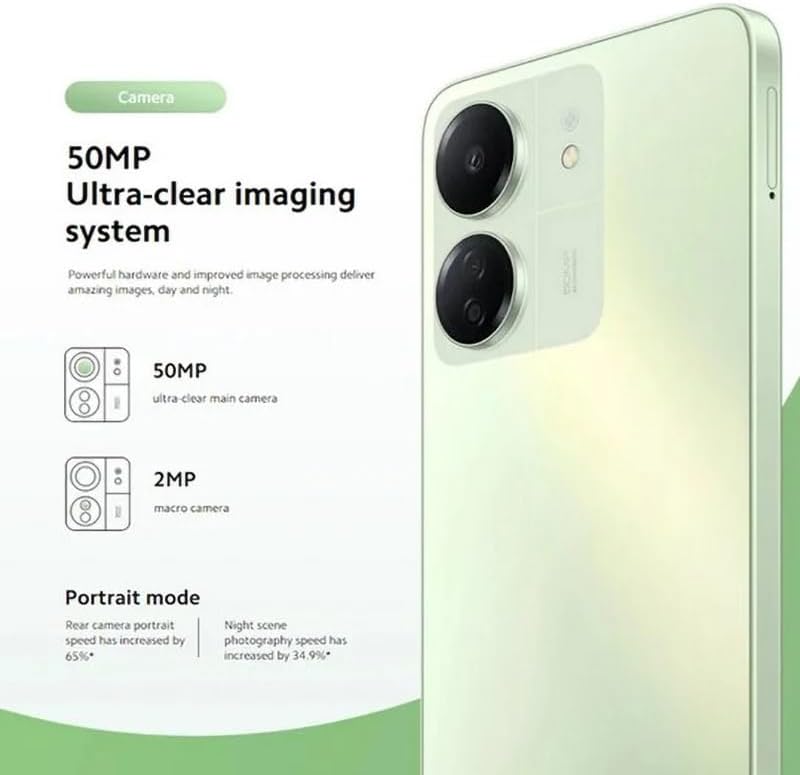
Figure 5.2: The Redmi 13C's 50MP Ultra-clear imaging system includes a 50MP main camera and a 2MP macro camera, supporting Portrait and Night modes.
The device is equipped with a 50MP Ultra-clear imaging system. The rear camera setup includes a 50MP main sensor and a 2MP macro camera. The front camera has an 8MP sensor. Utilize various shooting modes such as Portrait mode and Night mode to capture high-quality photos in different conditions.
5.3. Gestione della batteria
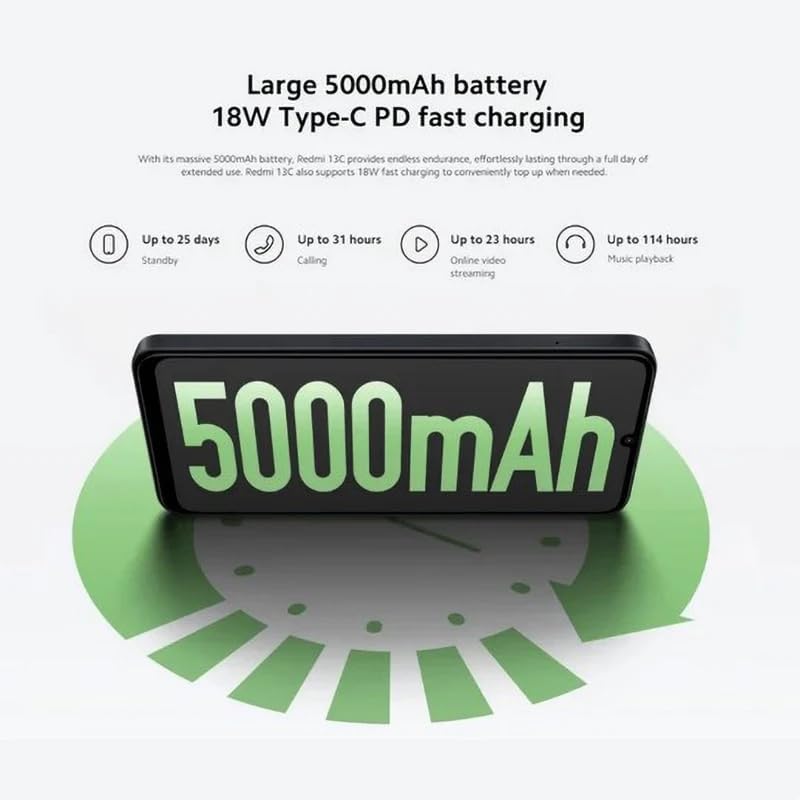
Figure 5.3: The Redmi 13C features a large 5000mAh battery with 18W Type-C PD fast charging, offering extended usage times.
Your Redmi 13C comes with a large 5000mAh Lithium-ion battery, providing extended usage. It supports 18W Type-C PD fast charging, allowing for quick power-ups. For optimal battery life, use the provided charger and avoid extreme temperatures.
- Fino a 25 giorni di standby
- Fino a 31 ore di chiamata
- Up to 23 hours online video streaming
- Fino a 114 ore di riproduzione musicale
5.4. Prestazioni

Figure 5.4: The Redmi 13C is powered by an Octa-core MediaTek Helio G85 processor, delivering smooth and stable performance.
The Redmi 13C is powered by a MediaTek Helio G85 octa-core processor, ensuring smooth and stable performance for daily tasks and applications. It comes with 6GB of RAM and 128GB of internal storage, expandable up to 1TB with a microSD card.
5.5. Connettività e sicurezza
The device supports Wi-Fi, Bluetooth, and 4G cellular technology. It is an unlocked phone, allowing use with various wireless carriers. For security, the Redmi 13C includes a fingerprint recognition feature.
6. Manutenzione
6.1. Pulizia del dispositivo
To clean your Redmi 13C, use a soft, lint-free cloth. Avoid using harsh chemicals or abrasive materials, as these can damage the screen and finish. The device is not water-resistant, so avoid exposure to liquids.
6.2. Aggiornamenti software
Regularly check for and install software updates to ensure your device has the latest features, security patches, and performance improvements. You can usually find this option in the phone's settings under "About phone" or "System updates."
6.3. Cura della batteria
To prolong battery life, avoid fully discharging the battery frequently. Charge your phone using the original charger and cable. Do not expose the device to extreme heat or cold.
7. Risoluzione Dei Problemi
Questa sezione affronta i problemi più comuni che potresti riscontrare con il tuo Redmi 13C.
- Il dispositivo non si accende: Assicurati che la batteria sia carica. Collega il telefono al caricabatterie e attendi qualche minuto prima di provare ad accenderlo di nuovo.
- Le app si bloccano o si bloccano: Close background apps. Clear the cache of the problematic app or reinstall it. If the issue persists, consider a factory reset (back up your data first).
- Scarsa durata della batteria: Ridurre la luminosità dello schermo, disattivare le funzioni non necessarie come il GPS o il Bluetooth quando non vengono utilizzate e controllare le impostazioni della batteria per individuare le app che consumano troppa energia.
- Problemi di connettività di rete: Ensure your SIM card is properly inserted. Try restarting the device. Check your network settings and contact your carrier if problems persist.
- Il sensore delle impronte digitali non funziona: Assicurati che il dito sia pulito e asciutto. Registra nuovamente le impronte digitali nelle impostazioni di sicurezza.
8. Specifiche
| Caratteristica | Specificazione |
|---|---|
| Marca | XiaomiMi |
| Nome del modello | Il mio Redmi 13C |
| Sistema operativo | Android |
| Dimensione RAM installata | 6 GB |
| Capacità di archiviazione della memoria | 128 GB (espandibile fino a 1 TB) |
| Modello CPU | MediaTek Helio G85 (Octa-core) |
| Velocità della CPU | Fino a 2.0 GHz |
| Tipo di visualizzazione | AMOLED |
| Dimensioni dello schermo | 6.74 pollici |
| Risoluzione massima dello schermo | 720x1600 |
| Frequenza di aggiornamento | Frequenza 90 Hz |
| Rear Camera Sensor Resolution | 50 Megapixels (Main), 2 Megapixels (Macro) |
| Front Camera Sensor Resolution | 8 Megapixel |
| Capacità della batteria | 5000 mAh (ioni di litio) |
| Ricarica | 18W Type-C PD Fast Charging |
| Tecnologia di connettività | Bluetooth, Wi-Fi, 4G LTE |
| Slot per schede SIM | Doppia SIM (Nano) |
| Sicurezza biometrica | Riconoscimento delle impronte digitali |
| Presa per cuffie | USB di tipo C |
| Colore | Nero mezzanotte |
| Peso dell'articolo | 410 grammi |
| Livello di resistenza all'acqua | Non resistente all'acqua |
| Anno del modello | 2023 |
9. Garanzia e supporto
9.1. Informazioni sulla garanzia
The Xiaomi Redmi 13C comes with a standard manufacturer's warranty. Please refer to the warranty card included with your product for specific terms and conditions. Spare parts availability is stated as 2 years.
9.2. Official Documents and Support
For additional information and support, you can refer to the official user guide and data transparency statement:
For further assistance, please visit the official XIAOMI support websito o contattare il loro servizio clienti.