
1. Introduzione
The Sygonix SY-5044422 Digital Timer Switch is designed for easy programming and operation, helping to manage power consumption for various appliances. This device features 20 ON/OFF programs, 3 random settings, and a countdown function, with switching intervals as short as 1 minute. Programs can be set for specific days, combinations of days, or daily. Its IP44 splash-proof rating allows for outdoor use, and an integrated battery retains settings during power outages. The timer supports a maximum switching capacity of 1800 W and includes enhanced touch protection.
2. Istruzioni di sicurezza
- Leggere attentamente tutte le istruzioni prima dell'uso.
- This device is rated IP44, making it splash-proof for outdoor use. However, do not immerse it in water or expose it to direct jets of water.
- Ensure the total load of connected appliances does not exceed 1800 W.
- Do not open the device housing. Repairs should only be performed by qualified personnel.
- Keep out of reach of children. The device features enhanced touch protection.
- Always unplug the timer from the power outlet before cleaning.
3. Contenuto della confezione
- Sygonix SY-5044422 Digital Timer Switch
- Manuale di istruzioni
- Informazioni sulla garanzia
4. Prodotto finitoview
Familiarize yourself with the components and controls of your digital timer switch.
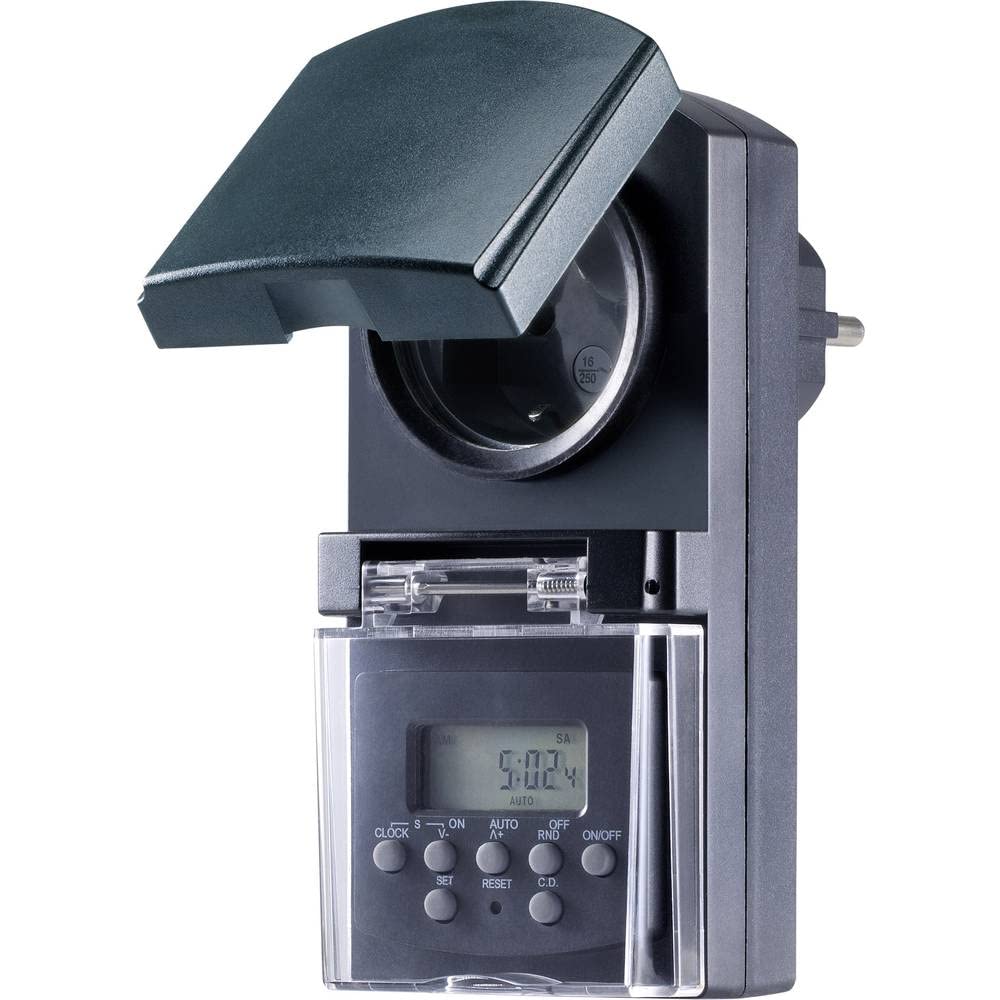
Figura 1: Davanti view of the Sygonix SY-5044422 Digital Timer Switch. This image displays the LCD screen, which shows the current time and day, along with various control buttons including CLOCK, ON/OFF, SET, RESET, AUTO/A+, OFF/RND, and C.D. (Countdown).

Figura 2: Davanti view of the timer with the protective cover opened, showing the integrated power socket. The display and control buttons are visible below the socket.
Pulsanti di controllo:
- OROLOGIO: Utilizzato per impostare l'ora e il giorno correnti.
- ACCESO/SPENTO: Manually switches the timer output ON or OFF.
- IMPOSTATO: Entra in modalità programmazione e conferma le impostazioni.
- RIPRISTINA: Clears all settings and resets the timer to factory defaults.
- AUTO/A+: Cycles through automatic mode, program settings, and adjusts values.
- OFF/RND: Activates or deactivates the Random function.
- C.D. (Countdown): Activates or deactivates the Countdown function.
5. Impostazione
5.1 Carica iniziale
Before first use, plug the timer into a power outlet for approximately 30 minutes to charge the internal battery. This ensures the display is active and settings are retained during power outages o quando è scollegato.
5.2 Impostazione dell'ora e del giorno correnti
- Premere e tenere premuto il tasto OROLOGIO pulsante.
- Mentre si tiene OROLOGIO, premere AUTO/A+ repeatedly to set the current day (MO, TU, WE, TH, FR, SA, SU).
- Mentre si tiene OROLOGIO, premere IMPOSTATO ripetutamente per impostare l'ora corrente.
- Mentre si tiene OROLOGIO, premere OFF/RND ripetutamente per impostare i minuti correnti.
- Rilasciare il OROLOGIO pulsante per salvare le impostazioni.
5.3 Regolazione dell'ora legale
The timer supports a summer time function. To activate or deactivate:
- Premere e tenere premuto il tasto OROLOGIO pulsante e il ACCESO/SPENTO button simultaneously for 3 seconds. The display will show "SUMMER" or "WINTER" to indicate the mode.
6. Istruzioni per l'uso
6.1 Programming ON/OFF Times (Weekly Program)
Il timer consente di impostare fino a 20 programmi di accensione/spegnimento. Ogni programma può essere impostato per giorni specifici o combinazioni di giorni.
- Premere il tasto IMPOSTATO button once to enter program mode. The display will show "1 ON".
- Premere AUTO/A+ to select the desired day(s) for the program (e.g., MO, TU, WE, TH, FR, SA, SU, MO-FR, SA-SU, MO-SA, etc.).
- Premere IMPOSTATO per confermare la selezione del giorno.
- Premere AUTO/A+ per impostare l'ora di accensione desiderata.
- Premere OFF/RND per impostare il minuto di accensione desiderato.
- Premere IMPOSTATO again. The display will now show "1 OFF".
- Ripetere i passaggi da 2 a 5 per impostare l'orario di spegnimento per lo stesso programma.
- Continua a premere IMPOSTATO to cycle through all 20 ON/OFF programs. To exit program mode at any time, press the OROLOGIO pulsante.
Nota: After programming, ensure the timer is in AUTO mode for the programs to execute. Press ACCESO/SPENTO repeatedly until "AUTO" is displayed.
6.2 Funzione conto alla rovescia
The countdown function allows you to switch the connected appliance ON or OFF after a set duration.
- Premere il tasto CD button once. The display will show "CD ON" or "CD OFF".
- Premere AUTO/A+ per impostare l'ora desiderata per il conto alla rovescia.
- Premere OFF/RND to set the desired countdown minute.
- Premere CD di nuovo per avviare il conto alla rovescia. Il display mostrerà il tempo rimanente.
- Per annullare il conto alla rovescia, premere CD ancora una volta.
6.3 Random Function (Presence Simulation)
The random function simulates presence by randomly switching the connected appliance ON and OFF within a set time window, deterring potential intruders.
- Assicurarsi che il timer sia in AUTO modalità.
- Premere il tasto OFF/RND button. The display will show "RND" to indicate the random function is active.
- The timer will now randomly switch the output ON and OFF for short periods within the programmed ON/OFF times.
- To deactivate the random function, press OFF/RND again. "RND" will disappear from the display.
6.4 Override manuale ON/OFF
You can manually override the programmed settings at any time.
- Premere il tasto ACCESO/SPENTO button repeatedly to cycle through "ON", "OFF", and "AUTO" modes.
- "ON" means the output is continuously ON.
- "OFF" means the output is continuously OFF.
- "AUTO" means the timer will follow the programmed settings.
7. Manutenzione
- Before cleaning, always unplug the timer from the power outlet.
- Pulire il dispositivo con un panno morbido e asciutto. Non utilizzare detergenti abrasivi o solventi.
- Ensure no liquids enter the device.
8. Risoluzione Dei Problemi
| Problema | Possibile causa | Soluzione |
|---|---|---|
| Il display è vuoto o poco luminoso. | La batteria interna è scarica. | Plug the timer into a live power outlet for at least 30 minutes to charge the battery. |
| I programmi non vengono eseguiti. | Il timer non è in modalità AUTO. | Premere il tasto ACCESO/SPENTO ripetutamente il pulsante finché non viene visualizzato "AUTO". |
| Ora o giorno visualizzati non corretti. | L'ora/il giorno non sono stati impostati correttamente o sono stati reimpostati. | Refer to Section 5.2 "Setting Current Time and Day" to re-set. |
| All settings lost after power outage. | Batteria interna non carica o difettosa. | Ensure the timer is regularly plugged in to keep the internal battery charged. If the issue persists, contact support. |
9. Specifiche
| Numero modello: | Codice articolo: SY-5044422 |
| Capacità di commutazione massima: | 1800 L |
| Classe di protezione: | IP44 (a prova di spruzzi d'acqua) |
| Tipo di visualizzazione: | Digitale |
| Programmi: | 20 programmi ON / OFF |
| Intervallo minimo di commutazione: | 1 minuto |
| Caratteristiche speciali: | Countdown function, Random function (presence simulation), Summer time, Integrated battery for settings retention, Enhanced touch protection. |
| Dimensioni del prodotto: | Dimensioni: 14 x 10 x 6 cm |
| Produttore: | Sygonix |
| Paese di origine: | Cina |
10. Garanzia e supporto
This product comes with a minimum 2-year warranty from the date of purchase. In case of any issues or defects, please contact your retailer or Sygonix customer support for assistance. Keep your proof of purchase for warranty claims.