
1. Informazioni importanti sulla sicurezza
Please read all instructions carefully before operating the SYLVOX 22-inch RV TV. Keep this manual for future reference. Failure to follow these safety guidelines may result in fire, electric shock, or other injuries.
- Non esporre il televisore alla pioggia o all'umidità.
- Non ostruire le aperture di ventilazione. Lasciare spazio sufficiente attorno al televisore per un corretto flusso d'aria.
- Use only the power supply specified for this device (12V DC or provided AC adapter).
- Proteggere il cavo di alimentazione per evitare che venga calpestato o schiacciato.
- Non tentare di riparare questo prodotto da soli. Affidare tutte le operazioni di manutenzione a personale di assistenza qualificato.
- Scollegare la spina di alimentazione dalla presa durante i temporali o quando non si utilizza l'apparecchio per lunghi periodi.
- This TV is designed for mobile environments like RVs and motorhomes. Ensure it is securely mounted to withstand vibrations during travel.
2. Prodotto finitoview
The SYLVOX 22-inch RV TV (Model RT22R3CNDA-UK) is a Full HD 1080P television designed for versatile use in motorhomes, campervans, kitchens, and homes. It features a built-in DVD player, DVB-C/T2/S2 tuner, and multiple connectivity options.
Caratteristiche principali:
- Visualizzazione Full HD: 1920x1080 resolution, 250 nits brightness, 3000:1 contrast ratio for clear and delicate picture effects. Includes noise reduction technology.
- Integrated DVD Player & Tuner: Built-in DVD player and DVB-C/T2/S2 tuner for entertainment without external devices, ideal for travel.
- Opzioni di connessione multiple: HDMI, USB, and AV IN ports for connecting game consoles, laptops, smartphones, and other devices.
- Reliable & Durable 12V Design: Sturdy casing with anti-seismic design to withstand bumps during RV motion. Can be table-mounted or wall-mounted.
- Esperienza utente migliorata: Features include sleep timer, parental controls, 4 sound modes, and "hotel mode" for personalized settings.

Figura 2.1: Fronte view of the SYLVOX 22-inch RV TV, displaying a caravan campsite scene. The TV features a Full HD 1920x1080 display and a built-in DVD player.

Figure 2.2: Dimensional drawing of the SYLVOX 22-inch RV TV, showing its width (493mm), height (310mm), and depth (125mm).
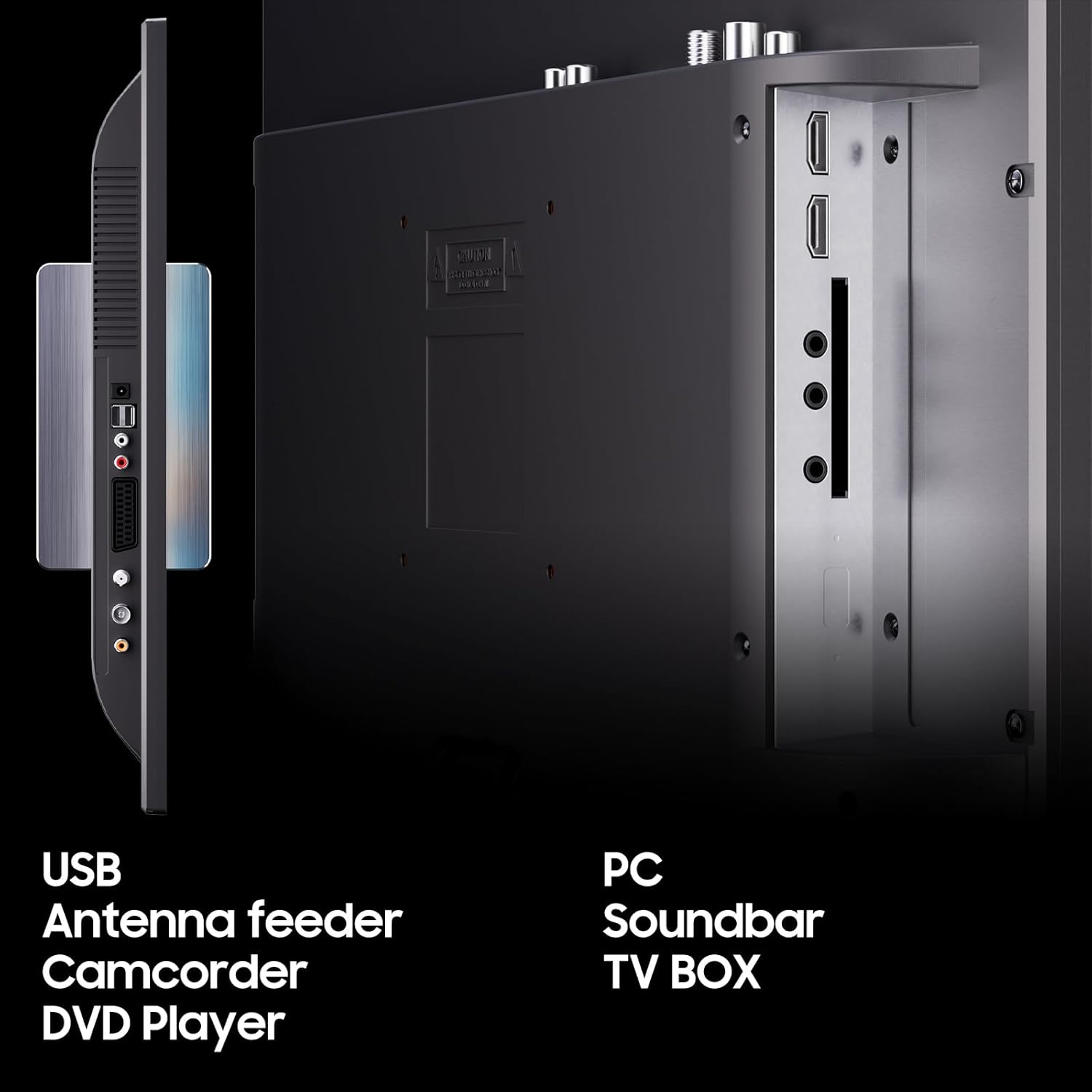
Figure 2.3: Rear panel connections of the SYLVOX RV TV, highlighting ports for USB, Antenna, SCART, HDMI, and AV IN, allowing connection to various external devices.
3. Contenuto della confezione
Si prega di selezionare la casella per i seguenti elementi:
- SYLVOX 22-inch RV TV
- Telecomando
- Manuale dell'utente (questo documento)
- Cavo di ricarica per auto
- Adattatore CA
- Power cord (Euro Schuko, AUS, or UK type)
- Base (for table mounting)
- Supporto per colonna
- Viti per il montaggio
- Scheda di garanzia (se applicabile)

Figure 3.1: Illustration of all components included in the SYLVOX 22-inch RV TV package.
4. Impostazione
4.1 Opzioni di montaggio
The SYLVOX RV TV offers flexible mounting solutions:
- Posizionamento sul tavolo: Attach the provided base to the bottom of the TV using the included screws. Ensure the base is securely fastened before placing the TV on a stable, flat surface.
- Montaggio a parete: The TV is compatible with standard VESA wall mounts (not included). Use the column bracket and screws as indicated in the wall mount instructions. Ensure the wall mount is suitable for the TV's weight and the mounting surface can support it, especially in a moving vehicle.
4.2 Collegamento di alimentazione
The TV can be powered by 12V DC or standard AC power.
- For 12V DC (RV/Caravan Use): Connect the provided car charger cable to the 12V DC input port on the TV and plug the other end into your vehicle's 12V power outlet.
- Per alimentazione CA (uso domestico): Connect the AC adapter to the TV's power input, then connect the appropriate power cord to the AC adapter and plug it into a standard wall outlet.
Note: Always ensure the correct power source is used to prevent damage to the TV.
4.3 Antenna/Satellite Connection
To receive broadcast channels, connect your antenna or satellite dish cable to the "DVB-C/T2/S2" input port on the TV.
4.4 Collegamento di dispositivi esterni
- HDMI: Connect devices like game consoles, laptops, or streaming sticks to the HDMI ports.
- USB: Inserire un'unità USB nella porta USB per riprodurre i contenuti multimediali files (foto, musica, video).
- AV IN (MINI): Use the provided adapter cable to connect older devices with AV outputs.
- Auricolare: Collega le cuffie per l'ascolto privato.
- COASSIALE: For digital audio output to an external sound system.
4.5 Accensione iniziale
After connecting power and any desired inputs, press the Power button on the TV or remote control. Follow the on-screen prompts for initial setup, including language selection and channel scanning.
5. Istruzioni per l'uso
5.1 Funzioni TV di base
- Accensione/spegnimento: Premere il tasto ENERGIA pulsante sul telecomando o sulla TV.
- Selezione canale: Utilizzo CH+/- pulsanti o tastierino numerico sul telecomando.
- Controllo del volume: Utilizzo VOL+/- pulsanti sul telecomando.
- Disattiva audio: Premere il tasto MUTE pulsante per disattivare l'audio.
- Sorgente di input: Premere il tasto FONTE or INGRESSO button to select between TV, HDMI, AV, USB, or DVD.
5.2 Navigazione nel menu
Premere il tasto MENU button on the remote to access the main menu. Use the arrow keys (SU GIÙ SINISTRA DESTRA) per navigare e OK/INVIO per confermare le selezioni. Premere EXIT or MENU di nuovo per chiudere il menu.
5.3 Tuner Operation (DVB-C/T2/S2)
After initial setup and channel scanning, you can switch between DVB-C (cable), DVB-T2 (terrestrial), and DVB-S2 (satellite) modes via the input source menu. Ensure your antenna or satellite dish is properly connected and aligned for optimal signal reception.
5.4 Funzionamento del lettore DVD
Insert a DVD disc into the slot on the side of the TV. The TV will automatically switch to DVD mode. Use the DVD control buttons on the remote (Play, Pause, Stop, Fast Forward, Rewind, Next/Previous Track) to manage playback.
5.5 Riproduzione multimediale (USB)
Inserire un'unità flash USB contenente un supporto compatibile files (photos, music, videos) into the USB port. Select "USB" as the input source. Navigate through your files using the remote and select the desired file giocare.
5.6 Funzioni speciali
- Sveglia: Set a timer for the TV to automatically turn off. Access this feature through the system settings menu.
- Controllo genitori: Set age limits for programs or block specific channels. A PIN may be required to access or change these settings.
- Funzione radio FM: Tune into FM radio stations. Refer to the on-screen menu for scanning and saving stations.
- Modalità Hotel: This mode allows for preset TV functions and personalized settings, useful for fixed installations or managing multiple units.
- Modalità audio: Choose from various preset sound modes (e.g., Standard, Music, Movie, User) to optimize audio for different content.
6. Manutenzione
6.1 Pulizia del televisore
- Schermo: Pulire delicatamente lo schermo con un panno morbido e privo di lanugine. Per macchie ostinate, dampen the cloth slightly with water or a screen cleaner specifically designed for LCD/LED displays. Do not spray liquid directly onto the screen.
- Casing: Utilizzare un panno morbido e asciutto per pulire il casing. Evitare l'uso di detergenti abrasivi, cere o solventi poiché potrebbero danneggiare la finitura.
- Ventilazione: Periodically check and clean the ventilation openings to ensure they are free from dust and debris, which can impede airflow and cause overheating.
6.2 Aggiornamenti software
From time to time, SYLVOX may release software updates to improve performance or add new features. Check the manufacturer's website or the TV's system settings for information on available updates and instructions on how to install them.
7. Risoluzione Dei Problemi
If you encounter issues with your SYLVOX RV TV, refer to the following common problems and solutions:
| Problema | Possibile causa | Soluzione |
|---|---|---|
| Nessuna alimentazione / La TV non si accende | Cavo di alimentazione non collegato; nessuna alimentazione dalla presa/sorgente da 12 V. | Check power connections. Ensure outlet/12V source is active. Try a different outlet. |
| Nessuna immagine / Schermo nero | Incorrect input source selected; loose cable connection; no signal. | Press SOURCE button to select correct input. Check HDMI/AV/Antenna cable connections. Perform channel scan. |
| Nessun suono / Suono basso | Volume too low or muted; incorrect audio settings; external audio device issue. | Increase volume. Press MUTE button. Check audio settings in menu. Disconnect/reconnect external audio devices. |
| Scarsa qualità dell'immagine (sfocata, distorta) | Weak signal; incorrect resolution; damaged cable. | Check antenna/satellite signal strength. Ensure input device resolution matches TV. Replace damaged cables. |
| Il telecomando non funziona | Batterie scariche; ostruzione; sensore remoto bloccato. | Replace batteries. Remove obstructions between remote and TV. Ensure remote is pointed at the TV's sensor. |
| Il lettore DVD non legge il disco | Il disco è sporco o graffiato; il disco è stato inserito in modo errato; il formato del disco non è compatibile. | Clean the disc. Ensure disc is inserted correctly. Try a different disc. |
| Antenna input stopped working (as per user review) | Internal component failure; loose internal connection. | This may indicate a hardware fault. If under warranty, contact customer support. Otherwise, professional repair may be required. |
| Volume control changes channel or turns off TV (as per user review) | Remote control malfunction; software glitch. | Try replacing remote batteries. Perform a factory reset (consult menu for option). If issue persists, contact customer support. |
Se il problema persiste dopo aver provato queste soluzioni, contattare l'assistenza clienti SYLVOX.
8. Specifiche
| Parametro | Valore |
|---|---|
| Marca | SILVOX |
| Numero di modello | RT22R3CNDA-UK |
| Dimensioni dello schermo (diagonale) | 22 pollici (55 cm) |
| Risoluzione | 1920 x 1080 (Full HD 1080p) |
| Proporzioni | 16:9 |
| Frequenza di aggiornamento | Frequenza 60 Hz |
| Luminosità (tipica) | 250 cd/m2 |
| Rapporto di contrasto (tipico) | 3000:1 |
| ViewAngolo di inclinazione (H/V) | Orizzontale: 178°, Verticale: 178° |
| Tempo di risposta (tipico) | 5 millisecondo |
| Sintonizzatore incorporato | DVB-C/T2/S2 |
| Sistema operativo | Android |
| Connessioni | COAXIAL, CI+, DVB-C/T/T2, DVB-S2, SCART, HDMI (2), AV IN (MINI), Earphone, USB (2), Infrared |
| Caratteristiche speciali | Built-In Speaker, DVD player built in, Parental Controls, Sleep Timer, Wide Viewing Angle, FM Radio Function |
| Dimensioni del prodotto (P x L x A) | 12.5P x 49L x 31.3A centimetri |
| Ingresso volumetage | 12V DC / 230V AC (via adapter) |
Informazioni sull'efficienza energetica:

Figure 8.1: EU Energy Label for the SYLVOX 22-inch RV TV (Model RT22R3CNDA-UK), indicating an energy efficiency class of D and an energy consumption of 11 kWh per 1000 hours.
For detailed energy information, refer to the official EPREL database: Informazioni sul prodotto EPREL
Scheda informativa del prodotto:

Figure 8.2: Official Product Information Sheet providing comprehensive technical details and compliance information for the SYLVOX 22-inch RV TV.
9. Garanzia e supporto
SYLVOX products are manufactured to high quality standards. This product comes with a minimum guaranteed product support and general guarantee offered by the supplier for 3 years from the date of placement on the market. Minimum guaranteed availability of software and firmware updates is also 3 years, and minimum guaranteed availability of spare parts is 3 years.
For technical support, warranty claims, or service inquiries, please contact your retailer or visit the official SYLVOX websito per le informazioni di contatto.
Assistenza clienti: Refer to your purchase documentation or the SYLVOX official websito per i dettagli di contatto dell'assistenza più aggiornati.